If you want to wall mount an iMac cleanly and safely, the right adapter matters as much as the mount itself. The best options match your exact model year, VESA pattern, and display size without adding wobble or fit issues.
In this roundup, we focus on adapters that make it easier to convert compatible iMacs to standard mounting systems for a more ergonomic, space-saving setup.
Best 10 IMac Wall Mounting Adapter Picks for 2026
Patented Fit
VIVO Adapter VESA Mount Kit for 21.5-inch and 27-inch iMac

- Patented adapter ring system
- Fits late 2009 to 2020 21.5-inch and 27-inch iMacs
- Supports 75x75mm and 100x100mm VESA patterns
Best For: Compatible iMac owners who want a dedicated VESA wall-mount adapter
Legacy Display Support
Amer VESA Kit for 24-inch and 27-inch iMacs

- Fits selected older iMac and Apple display models
- Uses a 100mm x 100mm VESA interface
- Works with wall mounts and articulating arms
Best For: Older Apple display owners needing a VESA adapter for mounting
Modern iMac Arm Mount
Motiexic VESA Plate for iMac M1/M3/M4

- Made for 24-inch iMac M1, M3, and M4 models
- Fits 75x75 and 100x100 VESA patterns
- Includes screws, instructions, and cable ties
Best For: Modern 24-inch iMac users who want a monitor-arm mount
Universal Conversion
LeapMars VESA Adapter Plate for Pre-2021 iMacs

- Fits pre-2021 21.5-inch, 24-inch, and 27-inch iMacs
- Converts to 75mm and 100mm VESA patterns
- Slim 3mm profile with included screws and guide
Best For: Pre-2021 iMac owners wanting a slim VESA conversion plate
24-inch iMac VESA conversion

- Fits 24-inch M1/M3/M4 iMac models
- Converts to 75x75 or 100x100 VESA
- Includes hardware, pads, and cable ties
Best For: Compatible 24-inch iMac owners wanting a tidy mount conversion
Legacy Apple display mounting
Aluminum VESA Kit for Older iMacs
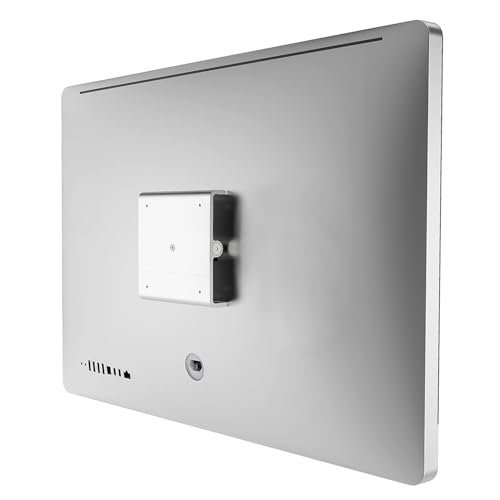
- Works with selected 2009-2011 iMacs and Apple displays
- Supports wall mounts and desk arms
- Includes installation tools
Best For: Owners of supported legacy Apple displays with a removable stand
Model-specific VESA bracket
Black Steel Mount Adapter for 24-inch iMac
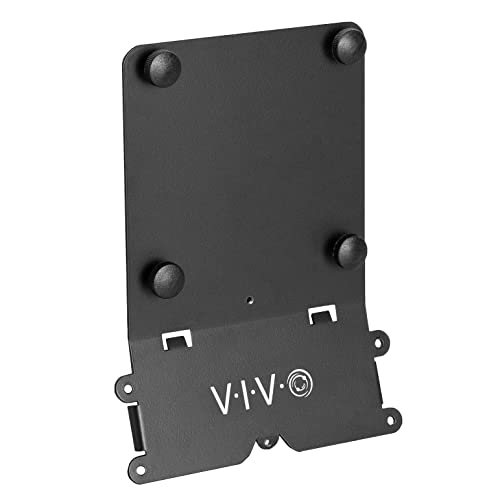
- Fits 24-inch M1, M3, and M4 iMacs only
- Supports 75x75mm and 100x100mm VESA
- All-steel build with included hardware
Best For: 24-inch iMac owners who want a black, sturdy VESA adapter
Reliable Fit
iMac 21.5–27 Inch VESA Adapter Plate

- Fits iMac 21.5-inch to 27-inch models from 2009–2020.
- Converts to 75x75mm and 100x100mm VESA patterns.
- Includes screws and cable ties for setup and cable management.
Best For: Older compatible iMac owners who want a secure, clean-looking VESA conversion.
Simple Wall-Mount Option
VESA Adapter Plate for Pre-2021 iMac

- Designed for pre-2021 iMac monitors with model check required.
- Supports 75x75mm and 100x100mm VESA mounting.
- Made from sturdy aircraft aluminum with included hardware.
Best For: Users who have confirmed compatibility and want a straightforward aluminum VESA adapter.
Heavy-Duty Pick
iMac 21.5–27 Inch VESA Mount Kit
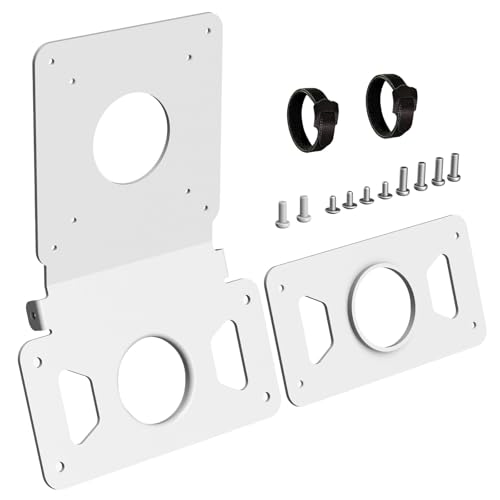
- Fits compatible iMac 21.5-inch and 27-inch models from 2009–2020.
- Converts to 75x75mm or 100x100mm VESA mounting.
- Heavy-duty alloy build includes two cable ties and a white finish.
Best For: Shoppers who want a reinforced, tidy-looking adapter for compatible older iMacs.
Patented Fit – VIVO Adapter VESA Mount Kit for 21.5-inch and 27-inch iMac
If you’re looking for an iMac wall mounting adapter for late 2009 through 2020 21.5-inch and 27-inch iMac models, this VIVO kit is built around that use case. It adapts the iMac to standard 75x75mm or 100x100mm VESA mounting patterns, making it a straightforward way to move an eligible iMac onto a wall mount or arm.
Best For: Owners of compatible 21.5-inch or 27-inch iMac models who want a simple VESA conversion for wall or arm mounting.
Pros:
- Patented adapter ring system made specifically for compatible iMac models
- Works with late 2009 to current 21.5-inch and 27-inch iMac displays, including 5K Retina models
- Supports standard 75x75mm and 100x100mm VESA mounting patterns
- Steel construction with included screws, washers, and other install hardware
Cons:
- Only compatible with 21.5-inch and 27-inch iMac displays
- Not intended for every Apple display or non-iMac setup
This is a focused mounting adapter rather than a universal bracket, so compatibility is the main thing to verify before buying. If your iMac matches the supported generation and size, it offers a clean path to wall mounting with the standard VESA ecosystem.
Legacy Display Support – Amer VESA Kit for 24-inch and 27-inch iMacs
This iMac wall mounting adapter is aimed at older Apple displays and iMac models that can use a 100mm x 100mm VESA interface. It lets compatible 24-inch or 27-inch iMacs, plus certain Apple LED Cinema and Thunderbolt displays, work with wall mounts and articulating arms.
Best For: Owners of older compatible Apple displays who need a VESA bridge for wall or arm mounting.
Pros:
- Supports selected 24-inch and 27-inch iMac, LED Cinema Display, and Thunderbolt Display models
- Connects to standard 100mm x 100mm VESA-compliant mounting solutions
- Compatible with wall mounts and zero-footprint articulating arms
- Lightweight aluminum construction
Cons:
- Does not work with iMac models from late 2012 to present
- Compatibility is limited to specific older Apple displays
The Amer kit makes sense if you are repurposing a supported older iMac or Apple display and want a standard VESA mounting path. Just be sure to check your exact model year, because the compatibility window is narrow.
Modern iMac Arm Mount – Motiexic VESA Plate for iMac M1/M3/M4
For recent iMac users, this iMac wall mounting adapter is really a VESA plate designed to connect M1, M3, and M4 series 24-inch iMacs to a monitor arm. It supports 75×75 and 100×100 VESA patterns, giving you a cleaner way to reposition the display without drilling.
Best For: Owners of 24-inch iMac M1, M3, or M4 models who want a sleek monitor-arm setup.
Pros:
- Designed specifically for 24-inch iMac M1, M3, and M4 series monitors
- Supports 75×75 and 100×100 VESA patterns for arm mounting
- Thickened metal plate is built for stability during daily adjustment
- Includes screws, instructions, and cable ties for cleaner cable management
Cons:
- Not universal, so model matching matters
- Intended for monitor-arm style setups rather than broad compatibility claims
This is a practical pick if you want to replace the stock base and free up desk space on a supported modern iMac. The white finish is a nice touch for matching the computer, but the key advantage is the direct, model-specific fit.
Universal Conversion – LeapMars VESA Adapter Plate for Pre-2021 iMacs
If you want an iMac wall mounting adapter that can convert a pre-2021 iMac to a standard VESA interface, this LeapMars plate is built for that role. It supports 21.5-inch, 24-inch, and 27-inch iMac models and is designed to work with wall mounts, monitor arms, or stands that accept 75mm or 100mm patterns.
Best For: Users with pre-2021 iMacs who want a slim, no-drill VESA conversion plate.
Pros:
- Compatible with pre-2021 21.5-inch, 24-inch, and 27-inch iMac models
- Converts to 75mm and 100mm VESA hole patterns
- 3mm thin design keeps the adapter low-profile
- Includes the needed screws and installation guide
Cons:
- Requires matching your mount’s load capacity to your iMac’s weight
- Compatibility is limited to pre-2021 models
This option is best when you want a simple conversion plate rather than a more complex mounting system. Its slim build and broad pre-2021 compatibility make it useful for floating workstation setups, provided you confirm the weight rating of your arm or wall mount.
24-inch iMac VESA conversion – White Metal Adapter Plate
If you want an iMac wall mounting adapter for a 24-inch M1, M3, or M4 iMac, this kit is built for a very specific job: converting the computer to a standard VESA pattern for use with an arm or wall solution. The fit is model-specific, the finish is matched to the iMac, and the included hardware helps keep the install straightforward.
Best For: Owners of a compatible 24-inch M1/M3/M4 iMac who want a clean VESA conversion for a monitor arm or wall mount.
Pros:
- Designed specifically for 24-inch iMac M1/M3/M4 models with 75×75 or 100×100 VESA support
- Thickened metal plate adds stability for everyday use and adjustments
- Silicone pads help protect the iMac stand contact points from scratches
- Includes cable ties to help route cords neatly behind the setup
Cons:
- Not universal, so model verification is essential before buying
- Only fits the supported 24-inch iMac series listed in the notes
This is a focused adapter for users who already know their iMac model and want a tidy upgrade to VESA mounting. If compatibility checks out, it should deliver the cleanest path to a more flexible desk or wall-mounted setup.
Legacy Apple display mounting – Aluminum VESA Kit for Older iMacs
This iMac wall mounting adapter is aimed at older Apple displays that do not have built-in VESA holes. It is tested for specific legacy models, and it lets you attach a compatible iMac or display to a standard VESA wall mount or arm for a cleaner workspace.
Best For: Owners of supported older Apple displays who want a VESA wall-mount option without replacing the screen.
Pros:
- Compatible with Apple Thunderbolt Display, LED Cinema Display, and select 24-inch and 27-inch iMac models from 2009-2011
- Supports standard VESA mount use, including wall mounting and desk arms
- Includes the tools needed for quick installation
- Aluminum construction with a silver finish suits Apple-style setups
Cons:
- Will not fit the 2021 iMac
- Only works with models that have a removable stand
- Compatibility is limited to the listed legacy devices
For the right older iMac or Apple display, this adapter is a practical way to get onto a VESA wall mount. The key is matching your exact model first, since the fit is intentionally narrow.
Model-specific VESA bracket – Black Steel Mount Adapter for 24-inch iMac
If you’re shopping for an iMac wall mounting adapter for a 24-inch M1, M3, or M4 iMac, this VIVO bracket is a straightforward option built around those exact models. It converts the screen to standard VESA mounting so you can pair it with a wall mount or compatible stand and free up desk space.
Best For: Users with a compatible 24-inch M1, M3, or M4 iMac who want a simple black VESA adapter for wall or arm mounting.
Pros:
- Designed only for the 24-inch M1, M3, and M4 iMac series
- Supports 75x75mm and 100x100mm VESA mounting patterns
- Solid all-steel construction is meant to keep the monitor secure
- Includes hardware for attaching to a VESA-compatible stand or wall mount
Cons:
- Not compatible with the Apple Studio Display
- Compatibility is limited to the listed iMac models
- Black finish may stand out more than white in an all-Apple setup
This adapter is best viewed as a model-matched mounting solution rather than a universal bracket. If your iMac is one of the supported versions, it offers a clean route to wall or arm mounting with a sturdy build.
Reliable Fit – iMac 21.5–27 Inch VESA Adapter Plate
If you need an iMac wall mounting adapter for a pre-2021 iMac, this VESA plate is built around compatibility first. It supports 21.5-inch to 27-inch models from 2009–2020 and converts the stand to a 75x75mm or 100x100mm VESA pattern for use with an arm or wall-style setup.
Best For: Owners of compatible older iMacs who want a secure VESA conversion with a clean white finish.
Pros:
- Supports iMac 21.5-inch to 27-inch models from 2009–2020.
- Works with 75x75mm and 100x100mm VESA mounts.
- Includes all screws plus two cable ties for easier setup and cleaner cabling.
- Reinforced metal construction is designed for stable, balanced support.
Cons:
- Requires a stand with a circular cable pass-through.
- Not compatible with non-circular cutouts.
- Only fits compatible iMac models in the stated size range.
For the right iMac, this is a straightforward way to move from the stock stand to a more flexible mounting setup. It emphasizes secure attachment, neat cable management, and a white finish that blends in with the computer.
Simple Wall-Mount Option – VESA Adapter Plate for Pre-2021 iMac
This iMac wall mounting adapter is aimed at users with pre-2021 iMacs who need a VESA conversion for a stand or wall bracket. It’s designed to secure the monitor to a VESA-compliant mount and supports standard 75x75mm and 100x100mm patterns.
Best For: Pre-2021 iMac owners who want a basic aluminum adapter for VESA mounting.
Pros:
- Compatible with pre-2021 iMac monitors, including the listed 24-inch M1 and M3 series guidance.
- Supports standard 75x75mm and 100x100mm VESA mounts.
- Made from sturdy aircraft aluminum.
- Includes the hardware needed to attach to a VESA-compliant stand or wall bracket.
Cons:
- You need to check your exact monitor model before ordering.
- Warranty coverage is listed as 3 months.
This option keeps the focus on function: convert a compatible iMac to VESA mounting with a simple aluminum bracket and included hardware. If your model match is confirmed, it offers a direct path to wall or arm mounting.
Heavy-Duty Pick – iMac 21.5–27 Inch VESA Mount Kit
For buyers comparing an iMac wall mounting adapter, this kit offers a heavy-duty approach for compatible 21.5-inch and 27-inch iMacs from 2009–2020. It converts the stand to a 75x75mm or 100x100mm VESA pattern and is intended for use with a monitor arm or similar mount.
Best For: Compatible older iMac users who want a reinforced, white VESA adapter with a tidy finish.
Pros:
- Compatible with iMac 21.5-inch and 27-inch models from 2009–2020.
- Supports both 75x75mm and 100x100mm VESA patterns.
- Heavy-duty alloy construction is designed for stable, balanced support.
- Includes two cable ties to help reduce cable clutter.
Cons:
- Requires a circular cable pass-through in the stand.
- Not compatible with non-circular cutouts.
- Only works with the listed older iMac model range.
This model is a solid choice if you want a sturdier-feeling adapter and a white finish that blends with the iMac. The tradeoff is the same key compatibility check: make sure your stand has the correct circular pass-through before ordering.
How We Picked the Best IMac Wall Mounting Adapter
We prioritized model compatibility first, since an IMac Wall Mounting Adapter must match the computer’s generation and mounting interface before anything else. We also looked for clear VESA support, solid materials, reliable included hardware, and installation designs that keep the adapter centered and secure.
Because buyers use these adapters in home offices, studios, and business workspaces, we favored options that balance fit, durability, and a straightforward mounting process.
Quick Comparison
Most options in this roundup fall into three groups: adapters for older 21.5-inch and 27-inch iMacs, plates for newer 24-inch M1/M3/M4 models, and broader compatibility kits that support multiple generations. If you already know your iMac year, that usually narrows the field fast.
For the simplest selection, match the adapter to your exact model family, then confirm whether you need 75×75, 100×100, or a convertible VESA pattern.
Key Buying Factors for IMac Wall Mounting Adapter
Exact Model Compatibility
This is the most important factor. A plate made for a 24-inch M-series iMac will not fit older aluminum or late-2009-to-2020 models, and vice versa. Check the year range, screen size, and whether your unit is a 21.5-inch, 24-inch, or 27-inch model.
VESA Pattern Support
Most buyers should confirm whether the adapter supports 75×75, 100×100, or both. If you plan to use a flexible arm or heavier-duty wall mount, 100×100 compatibility can open up more hardware choices.
Build Material and Stability
Metal and aluminum alloy adapters are generally preferred because they better support long-term use and reduce flex. A well-made IMac Wall Mounting Adapter should sit flush, stay aligned, and feel rigid once installed.
Finish, Clearance, and Access
White and black finishes can better match the iMac body or your workspace. Also consider how the plate affects cable access, cooling clearance, and whether it leaves room for easy repositioning on the wall mount.
Who Should Buy Which IMac Wall Mounting Adapter?
If you own a newer 24-inch M1, M3, or M4 iMac, choose a purpose-built adapter for that generation rather than a universal-looking plate. If you use a pre-2021 21.5-inch or 27-inch iMac, look for a model-specific adapter that explicitly lists your year range. Buyers with older 2009–2011 aluminum iMacs or matching Apple displays should focus on kits designed for those legacy units.
If your priority is the cleanest possible setup, go with the adapter that matches your exact machine and the VESA pattern of your wall mount. That is usually the easiest way to get a secure, low-hassle installation.