Choosing among the best audio mixers for home studio work depends on how many sources you record, whether you need USB connectivity, and how much hands-on control you prefer. This roundup covers compact interfaces, traditional analog mixers, and flexible podcast-focused bundles.
Use the comparison and buying advice below to match channel count, effects, phantom power, monitoring, and computer compatibility to your recording setup.
Best 10 Audio Mixers for Home Studio Picks for 2026
Best All-Around Interface
Focusrite Scarlett 2i2 4th Gen

- Two mic preamps and two Hi-Z inputs
- 120dB dynamic range with 24-bit/192kHz support
- Auto Gain, Clip Safe, Air modes, and bundled software
Best For: Home-studio musicians recording vocals, guitar, or two sources
Best Full-Featured Mixer

- Ten inputs with USB connectivity
- Three-band EQ, filters, compressors, and SPX effects
- Rugged powder-coated metal chassis
Best For: Home studios mixing multiple microphones, instruments, or stereo sources
Best Compact Starter Interface
Focusrite Scarlett Solo 3rd Gen

- One XLR mic preamp and one Hi-Z input
- 24-bit/192kHz recording with Air mode
- Compact design with bundled recording software
Best For: Solo artists, vocalists, guitarists, and podcasters
Best Simple Analog Mixer

- Eight channels in a compact format
- Two mic/line inputs with phantom power
- Three-band EQ on every channel and aux routing
Best For: Small home setups needing straightforward analog mixing
Best All-in-One Bundle

- Complete four-microphone recording bundle
- Noise reduction and varied vocal effects
- Battery-powered with Bluetooth and USB
Best For: Group podcasts, livestreams, and beginners
Best Feature-Rich Mixer

- 12-channel layout for growing setups
- Onyx preamps and GigFX effects
- USB, XLR, and TRS connectivity
Best For: Home recording, live sound, and content creation
Best Budget Connectivity

- Four XLR inputs with 48V phantom power
- USB, Bluetooth, and USB media playback
- Three-band EQ and 16 DSP effects
Best For: Small studios, karaoke, and basic streaming
Flexible 12-Channel Pick

- 12 channels with versatile XLR/combo connectivity
- USB recording, Bluetooth, and 16 DSP effects
- Includes +48V phantom power and output metering
Best For: Expanding home studios, podcasts, and live sound setups
Feature-Packed Studio Board
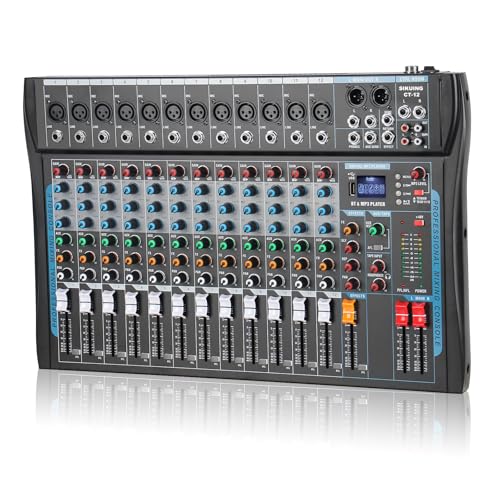
- USB and Bluetooth connectivity for recording and playback
- 16 DSP effects, three-band EQ, and channel controls
- Supports +48V phantom power and headphone monitoring
Best For: Versatile recording, streaming, karaoke, and live applications
Compact Home Studio Choice

- Four-channel format for smaller recording setups
- USB recording and Bluetooth playback included
- Offers +48V phantom power and headphone output
Best For: Beginners, podcasts, and compact home studio desks
Best All-Around Interface – Focusrite Scarlett 2i2 4th Gen
For musicians building a compact home studio, the Focusrite Scarlett 2i2 4th Gen is a flexible alternative to larger audio mixers for home studio setups. It provides two mic preamps, two Hi-Z instrument inputs, USB connectivity, and recording quality up to 24-bit/192kHz.
Best For: Home-studio musicians who record vocals, guitar, or two sources at once.
Pros:
- Two mic preamps and two Hi-Z instrument inputs support varied recording setups.
- 120dB dynamic range and up to 192kHz recording support studio-quality capture.
- Auto Gain, Clip Safe, and Air modes simplify level setting and tone shaping.
- Includes Ableton Live Lite, Pro Tools Intro+, Cubase LE, and Hitmaker Expansion.
Cons:
- It has two audio inputs, so it is less suited to larger multi-source sessions.
- It is an audio interface rather than a traditional mixer with multiple channel strips.
The 2i2 is a strong choice when direct computer recording, simple controls, and included production software matter more than a high channel count.
Best Full-Featured Mixer – Yamaha MG10XU 10-Input Mixer
The Yamaha MG10XU is a practical pick for home studios that need more hands-on channel control than compact interfaces provide. This 10-input USB mixer combines mic inputs, three-band EQ, high-pass filters, one-knob compressors, and SPX digital effects.
Best For: Home-studio users mixing several microphones, instruments, or stereo sources.
Pros:
- Ten inputs provide more connection capacity than two-channel interfaces.
- USB connectivity supports computer-based recording and mixing.
- Three-band EQ, high-pass filters, and one-knob compressors offer practical shaping tools.
- Built-in SPX digital effects add onboard processing, while the metal chassis is rugged.
Cons:
- At 7.7 pounds, it is less portable than compact interfaces.
- Its listed frequency is 48kHz, below the 192kHz support of the Focusrite interfaces.
- It requires corded power.
Choose the MG10XU when multiple inputs, physical channel controls, and onboard effects are central to your home-studio workflow.
Best Compact Starter Interface – Focusrite Scarlett Solo 3rd Gen
The Focusrite Scarlett Solo 3rd Gen is a straightforward option for home-studio beginners who need a compact recording interface rather than a multi-channel mixer. It offers one XLR mic preamp, one Hi-Z instrument input, Air mode, and recording up to 24-bit/192kHz.
Best For: Solo artists, vocalists, guitarists, and podcasters recording one mic and one instrument.
Pros:
- One mic preamp and one Hi-Z input cover common solo recording setups.
- 24-bit/192kHz converters support high-resolution recording and mixing.
- Air mode adds clarity to acoustic instruments, while Gain Halos help monitor levels.
- Includes popular recording software and a three-year warranty.
Cons:
- One XLR mic input limits simultaneous microphone recording.
- It lacks the channel count and physical mixing controls of the Yamaha and Mackie mixers.
The Solo 3rd Gen keeps a home-studio setup small and affordable while still offering useful monitoring, software, and high-resolution recording features.
Best Simple Analog Mixer – Mackie Mix8 8-Channel Mixer
The Mackie Mix8 is a compact, no-frills option for home studio users who want physical mixer controls. It combines two mic/line inputs, two stereo 1/4-inch line inputs, three-band EQ on every channel, phantom power, and an aux send with stereo returns.
Best For: Small home setups that prioritize straightforward analog mixing and multiple line connections.
Pros:
- Eight channels provide more flexibility than a single-input interface.
- Two mic/line inputs include phantom power for studio condenser microphones.
- Three-band EQ on all channels enables direct tone shaping.
- Compact design includes an aux send and stereo returns for external routing.
Cons:
- Connectivity is wired, with no USB recording connection listed.
- It has no built-in digital effects.
- It offers fewer advanced controls than the Yamaha MG10XU.
The Mix8 makes sense for users who want tactile channel mixing and basic routing, but computer recording may require additional equipment because USB connectivity is not listed.
Best All-in-One Bundle – 4-Person Podcast Mixer Kit
For creators comparing audio mixers for home studio use, this bundle stands out as a ready-to-use option for multi-person recording. It combines a mixer, four dynamic microphones, desktop stands, monitoring earphones, cables, and accessories in one package.
Best For: Beginner podcasters, group livestreams, voice-over work, and creators who need a complete four-person setup.
Pros:
- Includes four dynamic microphones, stands, earphones, cables, and accessories.
- Offers dual XLR and dual 3.5mm microphone inputs with individual volume controls and mute.
- Provides noise reduction, EQ, reverb, pitch correction, loopback, Bluetooth, and voice effects.
- Built-in 4000mAh battery and USB plug-and-play support improve portability and setup convenience.
Cons:
- Its feature-rich controls may take time for first-time users to learn.
- The supplied notes do not specify recording resolution or detailed software support beyond platform compatibility.
This is a practical choice when convenience matters more than building a system piece by piece. The included four-microphone configuration makes it especially suitable for collaborative content, while the battery and Bluetooth support add flexibility for mobile sessions.
Best Feature-Rich Mixer – Mackie ProFX12v3 USB Mixer
The Mackie ProFX12v3 is a strong contender among audio mixers for home studio recording, live sound, and content creation. Its 12-channel layout, USB connectivity, Onyx preamps, and built-in GigFX effects engine provide a more traditional mixing workflow with room to expand.
Best For: Home studios, content creators, and musicians who want a 12-channel mixer with USB recording and onboard effects.
Pros:
- 12-channel format accommodates multiple microphones and audio sources.
- Includes Onyx preamps and a built-in GigFX effects engine.
- USB, XLR, and TRS connectivity supports recording and broader studio or live-sound setups.
- Supplied with a power cord, USB cable, and quick-start guide.
Cons:
- Requires corded power, so it is less portable than a battery-powered mixer.
- The supplied product details list the model number as ProFX16v3 despite the title identifying the ProFX12v3.
Choose this model if you value channel capacity and a conventional mixer interface over an all-in-one podcast bundle. USB integration and onboard effects make it versatile for recording, live sound, and creator workflows.
Best Budget Connectivity – 6-Channel DSP Mixer
For shoppers seeking audio mixers for home studio applications, this six-channel console offers a useful mix of inputs and built-in playback features. It combines four XLR channels, 48V phantom power, USB, Bluetooth, three-band EQ, and 16 DSP effects in a compact analog design.
Best For: Small home studios, karaoke, basic streaming, and setups combining microphones, instruments, Bluetooth playback, or USB media.
Pros:
- Four XLR inputs support dynamic or condenser microphones with switchable 48V phantom power.
- USB and Bluetooth enable playback or mixing from compatible devices and media sources.
- Provides three-band EQ, independent faders, and 16 built-in DSP effects.
- Supports 1/4-inch inputs for instruments and additional stereo connections.
Cons:
- As a traditional analog mixer, it may require more hands-on setup and troubleshooting.
- The listed warranty is limited to 90 days.
- The supplied notes indicate that operation errors can result in no sound, so careful setup is important.
This mixer is best suited to buyers who want broad connection options and onboard effects at a compact-console scale. It is less focused on plug-and-play computer production than the bundled podcast system, but it offers flexible microphone, instrument, Bluetooth, and USB input choices.
Flexible 12-Channel Pick – Pyle PMXU128BT
For home studio setups that need plenty of inputs, the Pyle PMXU128BT combines 12-channel connectivity with USB recording, Bluetooth streaming, built-in DSP effects, and +48V phantom power. Its multiple I/O options make it a flexible choice for microphones, instruments, playback devices, and computer-based recording.
Best For: Home studios, podcasts, live sound, and users who need broad connectivity with wireless playback.
Pros:
- 12 channels with XLR/combo inputs and multiple line connections
- USB soundcard and audio interface for Mac or PC recording
- Bluetooth streaming, 16 DSP effects, and +48V phantom power
- 12-segment stereo output meter and independent channel controls
Cons:
- Larger and heavier than the compact four-channel option
- Its many controls and connections may be more than beginners need
The PMXU128BT is a practical choice among audio mixers for home studio users who expect their setup to grow. Its channel count and connection options provide room for multiple microphones and external sources, while USB, Bluetooth, and DSP effects add recording and streaming flexibility.
Feature-Packed Studio Board – CT-12 12-Channel Mixer
The CT-12 is a 12-channel audio mixer designed for recording, streaming, karaoke, and live use. It offers Bluetooth and USB connections, independent channel controls, a three-band EQ, 16 DSP effects, headphone monitoring, and +48V phantom power for compatible condenser microphones.
Best For: Users seeking an all-purpose mixer for home recording, streaming, interviews, karaoke, or small performances.
Pros:
- 12-channel layout with balanced XLR and line inputs
- USB and Bluetooth support for computers, phones, and external playback
- Built-in 16 DSP effects and three-band EQ adjustment
- +48V phantom power and a dedicated headphone output
Cons:
- The supplied notes do not specify recording software compatibility
- Its broad feature set may require some setup time for first-time users
With its combination of wireless connectivity, USB integration, effects, and microphone support, the CT-12 covers a wide range of home studio tasks. It is especially useful when one mixer needs to handle both production work and casual live or streaming applications.
Compact Home Studio Choice – Pyle PMXU46BT
The Pyle PMXU46BT is a compact four-channel mixer for smaller home studio rigs. It provides USB computer recording, Bluetooth playback, XLR/combo microphone inputs, +48V phantom power, headphone connectivity, and basic high, mid, and low frequency adjustment.
Best For: Beginners, compact desks, podcasts, small recording setups, and users mixing a limited number of sources.
Pros:
- Compact four-channel design with two XLR/quarter-inch combo inputs
- USB soundcard and audio interface for Mac or PC recording
- Bluetooth streaming from phones, tablets, and MP3 players
- +48V phantom power, headphone output, and LED level metering
Cons:
- Four channels provide less expansion room than 12-channel mixers
- The supplied notes do not list built-in DSP effects
For smaller audio mixers for home studio systems, the PMXU46BT keeps the essential connections in a more compact format. It is a sensible starting point when you need computer recording and wireless playback without the footprint of a larger console.
How We Picked These Audio Mixers for Home Studio Use
We selected products across the main categories home creators consider: compact two-channel USB interfaces, analog mixers with multiple inputs, and all-in-one options for podcasting, streaming, karaoke, and basic music production. We looked for practical features including microphone preamps, +48V phantom power, USB recording, headphone monitoring, onboard effects, Bluetooth, and straightforward controls.
Because no single mixer suits every studio, the selection includes both established models from Focusrite, Yamaha, and Mackie and budget-oriented consoles with broader feature lists. Specifications and intended use matter more than channel count alone, particularly when comparing an audio interface with a conventional mixer.
Quick Comparison
| Best For | Recommended Type | What to Prioritize |
|---|---|---|
| Solo vocals or instruments | Two-channel USB interface | Clean preamps, low-latency monitoring, simple drivers |
| Podcasts and interviews | Multi-input mixer or bundle | Mic inputs, headphone outputs, routing, mute controls |
| Small bands and live recording | Eight- to 12-channel mixer | Input count, aux sends, effects, durable construction |
| Streaming and casual content | USB/Bluetooth mixer | Easy computer connection, playback control, compact layout |
Key Buying Factors for Audio Mixers for Home Studio Recording
Channel Count and Input Types
Count the microphones, instruments, and playback devices you will use at the same time, then leave room for expansion. XLR inputs suit microphones, while combo inputs can accept XLR or quarter-inch sources. Stereo line channels are useful for keyboards, phones, and other playback equipment.
USB Recording and Computer Compatibility
A USB audio interface is usually the simplest choice for recording directly into a computer. Traditional mixers may offer USB stereo output, while more advanced models can provide multichannel recording. Confirm operating-system support, included software, and whether the mixer supports the routing workflow your DAW requires.
Preamps, Phantom Power, and Monitoring
Condenser microphones need +48V phantom power, and multiple microphones may require independent gain control. Look for a direct-monitoring option to reduce latency, plus a dedicated headphone output with enough volume for your headphones.
Effects, Routing, and Build Quality
Built-in reverb and other effects can help with live vocals, podcasts, and streaming, but they are not essential for every recording setup. For a permanent studio, prioritize quiet preamps, reliable controls, and useful outputs over novelty features. Bluetooth is convenient for playback, but it is not a substitute for a proper recording input.
Who Should Buy Which Audio Mixers for Home Studio?
Choose a compact Focusrite-style interface if you mainly record one or two microphones, guitars, or other instruments and want a clean, uncomplicated DAW connection. Choose a Yamaha or Mackie multi-channel mixer if you need several sources connected at once, hands-on faders, and live-style routing or effects.
Choose a podcast bundle when you need multiple microphones and accessories in one purchase. Choose a budget Bluetooth console for casual streaming, karaoke, rehearsals, or playback-heavy setups, but verify driver support, noise performance, and recording-channel limitations before relying on it for serious multitrack production.