If you edit photos on the road, a laptop screen extender can make color checks, tool panels, and side-by-side comparisons much easier.
This roundup focuses on portable multi-screen options that help speed up editing without turning your travel setup into a desk full of gear.
Best 10 Laptop Screen Extenders for Photo Editing Picks for 2026
Extra Vertical Space for Editing

- 1920x1200 16:10 panels add vertical room
- 350-nit IPS displays for clear visuals
- 2-cable setup on supported USB-C laptops
Best For: Editors who want more vertical space for tools and images
Flexible Angle Control
15.6" Rotating Triple Screen Extender
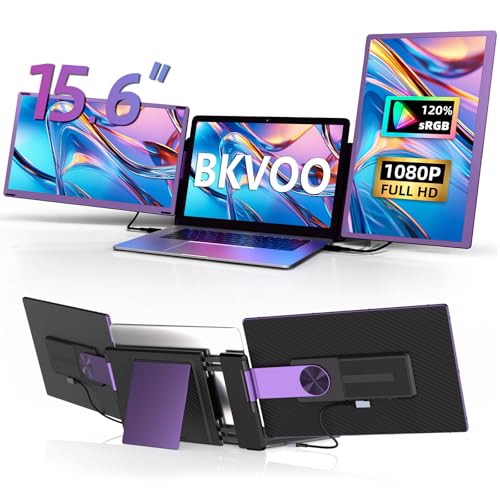
- Two detachable 15.6-inch 1080p screens
- 235° rotation with many display combinations
- Wide device compatibility with plug-and-play use
Best For: Users who want customizable screen angles and layouts
Clean Cable Setup

- Two 15.6-inch 1080p IPS displays
- Two-cable setup on supported laptops
- Lightweight aluminum build with case
Best For: Photo editors who want a tidy portable workspace
Ultra-Portable Dual Screen Pick

- 1.87 lb ultra-light dual-screen design
- 14.2" FHD IPS panel with 300 nits brightness
- USB-C/HDMI setup with adjustable viewing angle
Best For: Mobile editors who want the lightest dual-screen option
Ultra-Portable Triple-Screen Pick
Synnov 15.6“ Laptop Screen Extender

- 15.6-inch FHD IPS display
- Triple-screen extend, mirror, and portrait modes
- Lightweight 4 lb aluminum design with carry bag
Best For: Editors who want a lightweight triple-screen setup for travel or remote work.
Clean-Desk Travel Option

- Two 15.6-inch 1080P FHD screens
- Simplified USB-C setup with fewer cables
- 4 lb aluminum shell and carry bag
Best For: Mobile editors who want an easy triple-screen setup with minimal cable clutter.
Portable Triple-Screen Simplicity – KYY 15.6" FHD IPS Extender
If you want laptop screen extenders for photo editing that add room for palettes, timelines, and reference images without a complicated setup, this KYY model is built around convenience. It uses a one-cable USB-C to USB-C connection on supported laptops, includes the needed cables and power adapter, and offers two 15.6-inch 1080p IPS panels with a matte finish for a practical multi-screen workspace.
Best For: Creators who want a portable triple-screen setup with straightforward USB-C connectivity and wide OS support.
Pros:
- Two 15.6-inch FHD IPS screens with 178° viewing angles for a larger editing workspace
- One-cable USB-C connection on compatible laptops helps reduce cable clutter
- Matte screen finish, blue light filter, and flicker-free tech suit long work sessions
- Built-in adjustable stand and 0° to 360° screen rotation add flexibility
Cons:
- Drivers must be downloaded first
- Not compatible with PS5, Xbox Series X, and other gaming consoles
- Photo editors who want higher-than-1080p resolution may want more vertical detail
Overall, this is a solid pick if you value a cleaner desk and a fast portable setup more than advanced display specs. It is especially appealing for users who want extra screen space for tools, previews, and comparisons while keeping the workflow simple.
Extra Vertical Space for Editing – 16" 1200P Slim Triple Monitor
For laptop screen extenders for photo editing, this 16-inch model stands out for its 1920×1200 resolution and 16:10 aspect ratio, which gives you more vertical room for tool panels and image adjustments. The dual IPS displays are rated at 350 nits, and the all-aluminum, ultra-slim build is designed for users who move between home, office, and travel setups.
Best For: Photo editors and creators who want more vertical workspace and a brighter 16:10 display.
Pros:
- 16:10 aspect ratio and 1920×1200 resolution provide extra vertical space
- 350-nit brightness helps text and visuals stay clear
- Only 2 USB-C cables needed on laptops with two full-featured USB-C ports
- Ultra-slim aluminum build is easy to carry
Cons:
- Requires two full-featured USB-C ports for the simplest setup
- Glossy screen finish may not suit everyone
- Not the highest resolution option if you need very fine image detail
This is a strong choice if your editing workflow benefits from seeing more rows of tools, layers, or browser tabs at once. The combination of extra vertical space and bright panels makes it especially practical for organized, productivity-focused photo work.
Flexible Angle Control – 15.6" Rotating Triple Screen Extender
This model is a flexible option among laptop screen extenders for photo editing because it combines two detachable 15.6-inch 1080p screens with 235° rotation and multiple viewing configurations. The matte display, 300-nit brightness, and customizable settings give you room to arrange reference shots, editing tools, and previews in a way that matches your workflow.
Best For: Photo editors who want adjustable viewing angles and detachable screens for custom setups.
Pros:
- Two detachable 15.6-inch FHD screens support many display combinations
- 235° rotation and horizontal/vertical use add layout flexibility
- Matte finish and 300 nits create a practical editing view
- Plug-and-play setup with wide compatibility across many devices
Cons:
- M1/M2/M3 Mac devices may not support both extra screens without extra hardware
- Some setups require H5-T or H4 support and driver installation
- 1080p resolution is good for workflow space, but not ideal if you need higher-resolution editing panels
If your priority is arranging the screens exactly how you want them, this extender offers more flexibility than most. It is a useful choice for users who split time between editing, sharing work, and moving between different desk or travel setups.
Clean Cable Setup – 15.6" Triple Portable Monitor
If you are comparing laptop screen extenders for photo editing and want a cleaner desk, this 15.6-inch triple monitor focuses on reduced cable clutter and fast setup. It uses two 1080p IPS displays with 300 nits of brightness and a clip-free design, so it can work well as a portable workspace for editing, reviewing, and multitasking.
Best For: Photo editors who want a simple, lightweight triple-screen setup with minimal clutter.
Pros:
- Two 15.6-inch FHD IPS displays with 300 nits and 178° viewing angles
- Only two USB-C to USB-C cables needed on supported laptops
- Lightweight aluminum build with carrying case included
- Extended, mirror, and portrait modes add workflow flexibility
Cons:
- MacBook models with M1, M2, or M3 chips may need extra cabling and driver steps
- Some laptops require an H5-T cable and external power
- 1080p resolution may be limiting for users who want more detailed image workspace
As a photo-editing companion, this model makes the most sense if you want portability and convenience first. It keeps the setup tidy while still giving you enough screen space to manage tools, source images, and output previews more comfortably.
Ultra-Light Triple Screen Pick – 15.6" Slim 3-Screen Extender
If you want laptop screen extenders for photo editing that add serious workspace without turning your bag into a brick, this 15.6-inch triple monitor extender is built for mobility. Its dual 1080p IPS side screens, 100% sRGB coverage, and anti-glare design make it a practical choice for reviewing images, comparing edits, and keeping tool palettes visible while you work.
Best For: Travel-friendly photo editors, remote workers, and multitaskers who want a lightweight triple-screen setup.
Pros:
- Two 15.6″ FHD IPS displays with 100% sRGB for vivid, true-to-life visuals
- Ultra-slim 0.16″ screens and 3.9 lb total weight for easy portability
- Plug-and-play setup with USB-C/HDMI and broad compatibility across major systems
- Anti-glare and blue-light-filter features help reduce eye strain during long sessions
Cons:
- Triple-screen design may be more than some users need for simple edits
- Best fit is for 13″ to 17″ laptops, so very small or oversized laptops may not work well
- MacBooks without a full-featured USB-C port require a separate H5-T cable
This model stands out if portability and extra screen space matter most. For photo editing on the go, it offers a strong balance of color accuracy, screen area, and easy setup.
Clip-Free Travel Choice – 15.6" Portable Triple Monitor
For laptop screen extenders for photo editing, this clip-free 15.6-inch triple monitor is a flexible option if you want more workspace without attaching anything to the laptop display. The matte 1080p IPS panels, 300 cd/m² brightness, and 178° viewing angles are useful for comparing images, keeping reference material open, and working in bright offices or travel settings.
Best For: Editors and travelers who want a safer clip-free setup with a larger three-screen workspace.
Pros:
- Clip-free design avoids pressure on the laptop screen
- Three 15.6″ FHD IPS panels with matte finish help reduce glare
- USB-C or HDMI plug-and-play connection with no driver setup
- Includes a power adapter and a full accessory bundle for setup
Cons:
- 63% sRGB coverage is lower than color-focused options
- At 4 lb, it is portable but not the lightest in the group
- Triple-display format may be more than needed for basic editing tasks
This is a practical pick if you want a roomy, travel-ready extender and prefer a clip-free mounting style. It is especially appealing when convenience and screen protection matter more than color-critical work.
Ultra-Portable Dual Screen Pick – 14.2" Lightweight Extender
If you need laptop screen extenders for photo editing that are easy to carry every day, this 14.2-inch dual monitor extender is the lightest option here. Its 1080p IPS display, 300-nit brightness, and 0-226° adjustable angle make it a compact way to keep your editing timeline, tools, or reference images open beside your main screen.
Best For: Frequent travelers, students, and remote workers who want a very light dual-screen setup for editing and multitasking.
Pros:
- Only 1.87 lb and 0.27″ thin for excellent portability
- 14.2″ FHD IPS panel with 300 nits for clear, vivid viewing
- Extends, mirrors, and portrait modes support flexible workflows
- USB-C or HDMI plus USB-A connection with all cables included
Cons:
- Dual-screen layout offers less total workspace than triple-screen models
- 14.2″ panels are smaller than the 15.6″ options in this roundup
- Designed for 14″ to 17.3″ laptops, so compatibility still needs checking
This is the best pick if portability is your top priority. For editors who move between locations often, it delivers a practical second-screen boost without much added bulk.
Ultra-Portable Triple-Screen Pick – Synnov 15.6“ Laptop Screen Extender
If you’re shopping for laptop screen extenders for photo editing, the Synnov 15.6-inch model is built for a fast, roomy triple-screen workspace. Its FHD IPS panels, 178° viewing angle, and adjustable brightness make it a practical fit when you want more space for image browsing, reference shots, and editing tools without constantly switching tabs.
Best For: Editors who want a lightweight triple-screen setup for travel or remote work.
Pros:
- 15.6-inch FHD 1080P IPS display with wide viewing angles
- Triple-screen mode supports extend, mirror, and portrait layouts
- Lightweight 4 lb build with aluminum alloy body and carry bag
- Plug-and-play connection with simplified USB-C or USB-C/HDMI setup
Cons:
- Requires a full-featured USB-C port for compatibility
- M1/M2/M3 MacBook support is limited by chip compatibility notes
- Large triple-monitor setup may be more than casual users need
Overall, this is a strong option if you want a portable, easy-to-carry extender that gives photo editors more screen real estate and a clearer view of their workflow. It focuses on convenience, display size, and simple setup rather than advanced creator-specific features.
Clean-Desk Travel Option – 15.6" Laptop Screen Extender
For buyers comparing laptop screen extenders for photo editing, this 15.6-inch triple portable monitor stands out for its simplified cabling and large twin-display expansion. The 1080P FHD panels and wide viewing angles give you extra room for editing palettes, file browsing, and side-by-side image comparison while keeping the setup relatively tidy.
Best For: Mobile editors who want an easy triple-screen setup with minimal cable clutter.
Pros:
- Two 15.6-inch 1080P FHD displays for more working space
- Designed to reduce cable clutter with simplified USB-C connections
- Lightweight 4 lb aluminum shell with included leather carry bag
- Supports extend, mirror, and portrait modes for flexible workflows
Cons:
- M1/M2/M3 MacBooks may need the additional H5-T cable
- Non-full-featured USB-C laptops require extra connection steps
- Focuses on portability over color-accuracy extras
This is a practical pick if you want a cleaner, travel-friendly way to expand your workspace. For photo editing, the value here is in the extra screen area and straightforward setup, especially when you need a portable multi-monitor system on the go.
Balanced 14-Inch Workstation Choice – 14'' FHD 1080P Triple Portable Monitor
If you need laptop screen extenders for photo editing that prioritize portability and a compact footprint, this 14-inch Macsecor model is worth a look. It offers dual 14-inch FHD IPS screens with anti-glare and blue light filtering, which can help make long editing sessions more comfortable while still giving you more room for tool panels and photo previews.
Best For: Editors who want a lighter, more compact triple-screen setup for everyday multitasking.
Pros:
- Two 14-inch FHD 1080P IPS screens in an ultra-slim form factor
- Anti-glare and blue light filter help reduce eye strain
- Built-in aluminum stand and 180° rotation for flexible positioning
- No-driver setup with wide compatibility across major systems
Cons:
- Smaller 14-inch screens may feel tighter for detailed edits
- M1/M2/M3 MacBook users may need the extra H5-T cable
- Compatibility checks are still important before buying
As a photo-editing companion, this model is best when portability matters as much as screen expansion. Its smaller size and lightweight build make it easy to carry, while the dual displays still provide useful workspace for editing and comparison.
How We Picked the Best Laptop Screen Extenders for Photo Editing
We looked for Laptop Screen Extenders for Photo Editing that balance image clarity, workspace, portability, and ease of setup. Priority went to models with Full HD or better resolution, IPS-style panels, slim builds, and broad laptop compatibility.
For editors, the goal is not just more screen space. It is a setup that keeps palettes, timelines, and reference images visible while preserving a usable, sharp viewing experience.
Quick Comparison
In this category, the main differences are screen size, number of panels, resolution, and weight. Triple-screen extenders maximize workspace for editing, but dual-screen models may be easier to carry and better for smaller bags or lighter laptops.
If you mainly need room for Lightroom controls and a reference image, a compact dual option can be enough. If you frequently run multiple editing apps, cull large batches, or compare versions side by side, a triple-screen setup is usually the better fit.
Key Buying Factors for Laptop Screen Extenders for Photo Editing
Resolution and Panel Quality
Look for at least 1080p FHD. Higher resolution helps keep image previews, text, and interface elements crisp. IPS panels are preferable because they usually offer better viewing angles and more consistent color than cheaper alternatives.
Color Consistency
For photo work, consistency matters more than marketing claims. Choose a display that can be calibrated, and prefer models that reviewers describe as stable in brightness and color across the panel. A portable extender will not replace a dedicated color-managed monitor, but it can still be useful for sorting and editing on the go.
Size, Weight, and Travel Use
Heavier extenders can feel awkward on smaller laptops or in frequent travel workflows. If portability is a top priority, a lighter 14-inch or slim dual-screen model may be easier to live with than a larger triple-screen unit.
Connectivity and Power
Check whether the extender supports USB-C, HDMI, or both, and make sure your laptop can supply the required video and power signals. Plug-and-play setups are ideal when you need a fast workflow at a client site or while traveling.
Who Should Buy Which Laptop Screen Extenders for Photo Editing?
Choose a triple-screen extender if you want the most workspace for detailed editing, batch culling, and reference management. Pick a dual-screen model if you value mobility and only need an efficient two-pane workflow.
If you edit mostly in one place, prioritize image quality and screen size. If you edit on trains, in hotels, or between shoots, prioritize lighter weight, simpler cabling, and sturdy portability. The best Laptop Screen Extenders for Photo Editing are the ones that match your workflow, not just the biggest spec sheet.