Choosing the right laser engraver can make a big difference in how easily you turn sketches, textures, and custom designs into finished pieces.
This roundup focuses on laser engravers for artists that balance detail, speed, safety, and material compatibility for studio and craft work.
Best 10 Laser Engravers for Artists Picks for 2026
Best All-in-One Starter
xTool M2 10W Laser Engraver for DIY Craft

- Dual cameras help preview placement accurately.
- Works with 300+ materials and optional add-ons.
- Class 1 enclosed design suits home studios.
Best For: Artists and DIY makers who want a safe, versatile enclosed machine.
Speed-Focused Large Bed
Longer RAY5 Laser Engraver Cutter
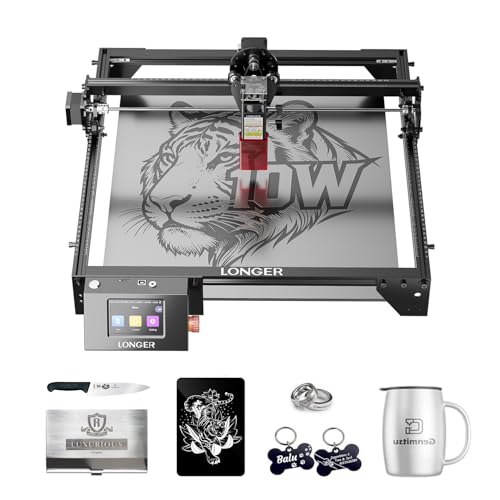
- 400 x 400mm work area supports larger pieces.
- Up to 24,000 mm/min engraving speed.
- Wi-Fi, USB, app, and TF card connectivity.
Best For: Artists and hobbyists who want a roomy engraving bed and fast everyday performance.
Fine-Detail Maker Pick
Twotrees TTS-55 Pro Laser Engraver

- Fine 0.08 x 0.46mm spot for detailed work.
- Up to 30,000mm/min engraving speed.
- Works with LaserGRBL and LightBurn.
Best For: Hobbyists and small-batch creators who want fine engraving detail in a compact machine.
High-Power Large Format
Longer Laser B1 40W Engraver Cutter

- Up to 48W output handles thicker materials.
- Large 450 x 440mm work area for bigger designs.
- Eight safety features support confident use.
Best For: Makers who need strong cutting power, a large workspace, and advanced safety features.
Materials Sampler Kit
185-Piece Laser Engraving Blank Supplies
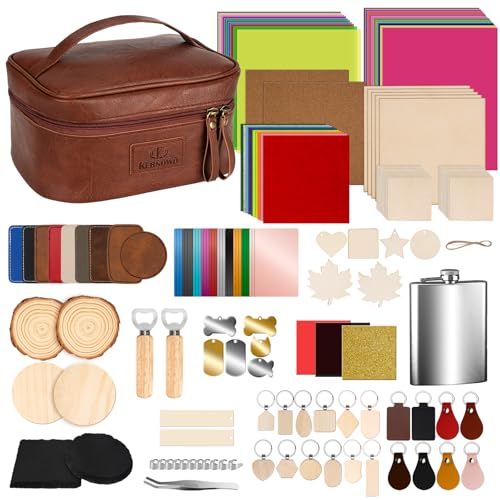
- 185-piece mix of wood, acrylic, leather, metal, and more
- Compatible with both engraving pens and laser engravers
- Useful for testing settings and making custom gifts
Best For: Artists and hobbyists who want a broad practice-and-project materials set
High-Speed Desktop Cutter
Genmitsu L8 20W Laser Engraver with Enclosure
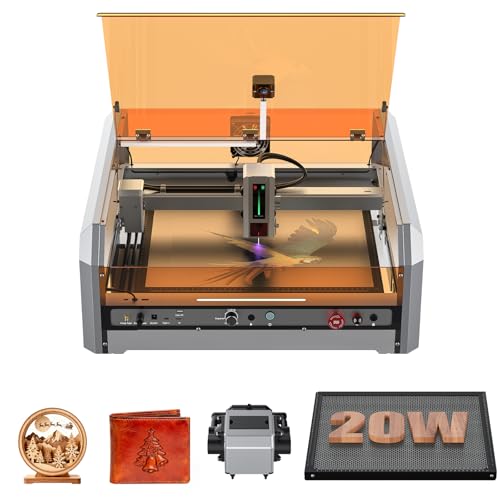
- Up to 40,000 mm/min engraving speed
- 20W optical output with air assist and honeycomb base
- Class 1 enclosure with camera and multiple safety systems
Best For: Artists and makers who want a fast enclosed desktop engraver
Precision Starter Pick

- 0.01mm ultra-fine engraving accuracy
- Works on 300+ materials, including wood and glass
- Includes enclosure, honeycomb bed, and starter accessories
Best For: Beginners and artists doing detailed desktop engraving
Power Artist Pick
LONGER RAY5 20W Laser Engraver

- 20W output for stronger cutting and engraving
- 256-color palette adds colorful artistic effects
- 3.5-inch touchscreen with USB, WiFi, and app control
Best For: Artists wanting color engraving and stronger cutting power
Enclosed Studio Pick

- Up to 30,000 mm/min engraving speed
- Class 1 enclosure helps reduce light, smoke, and noise
- Works with LightBurn, LaserGRBL, and CutLabX
Best For: Studio-minded artists who want a fast enclosed engraver
Best All-in-One Starter – xTool M2 10W Laser Engraver for DIY Craft
If you’re shopping for laser engravers for artists, the xTool M2 is aimed at creators who want one machine for engraving, cutting, and even optional color printing. Its enclosed Class 1 design, dual cameras, and beginner-friendly software make it a practical pick for home studios that value accuracy and convenience.
Best For: Artists and DIY makers who want a safe, versatile enclosed machine with guided workflow.
Pros:
- Dual-camera workspace preview helps with accurate placement and reduces wasted material.
- Supports 300+ materials and a seamless print-to-cut workflow with optional add-ons.
- xTool Studio includes ready-made templates and an AI image generator for faster setup.
- Fully enclosed Class 1 safety design suits home use and monitored operation.
Cons:
- CMYK Inkjet module and rotary accessory are sold separately.
- Standard package includes a 10W diode laser only.
- Some advanced functions require optional modules to unlock.
For artists who want a safer, more guided creative workflow, the M2 stands out as an adaptable machine that can grow with your projects. It is especially appealing if you want precision now and expansion options later.
Speed-Focused Large Bed – Longer RAY5 Laser Engraver Cutter
Among laser engravers for artists, the Longer RAY5 is built for users who want a larger work area and strong cutting performance. With a 400 x 400mm workspace, fast engraving speeds, and multiple transfer options, it suits makers who handle bigger pieces or batch work.
Best For: Artists and hobbyists who want a roomy engraving bed and fast everyday performance.
Pros:
- 400 x 400mm work area offers plenty of room for larger projects.
- Maximum engraving speed of 24,000 mm/min supports quick production.
- Transfers via Wi-Fi, USB, app, or TF card for flexible use.
- Built-in safety features and included glasses add a layer of protection.
Cons:
- Extension kit is sold separately if you need the expanded 850mm x 400mm area.
- Some users may prefer a more enclosed setup for home use.
- Assembly is required, even though installation is described as straightforward.
The RAY5 makes sense if your artwork often outgrows smaller machines and you want speed without giving up workspace. It is a strong fit for creators who value volume and flexibility.
Fine-Detail Maker Pick – Twotrees TTS-55 Pro Laser Engraver
If you want laser engravers for artists that emphasize detail and control, the Twotrees TTS-55 Pro is a compact option with a fine spot size and upgraded air-assist readiness. It is designed for creators working on wood, leather, acrylic, paper, and even stainless steel.
Best For: Hobbyists and small-batch creators who want fine engraving detail in a compact machine.
Pros:
- 0.08 x 0.46mm fine spot supports detailed engraving.
- Air-assisted nozzle and red laser shield improve cutting and safety setup.
- Up to 30,000mm/min engraving speed helps with faster jobs.
- Compatible with LaserGRBL and LightBurn on multiple operating systems.
Cons:
- 5.5W output is better for lighter work than heavy-duty cutting.
- Working area is 300 x 300mm, which is smaller than some rivals.
- Air assist system is supported, but not fully built in as a complete package.
The TTS-55 Pro is a practical pick if your priority is crisp detail and software flexibility rather than maximum power. It fits neatly into a hobby workspace and leaves room for growth.
High-Power Large Format – Longer Laser B1 40W Engraver Cutter
For artists comparing laser engravers for artists, the Longer Laser B1 is the heavy-hitting option here, with high output power, a large work area, and very fast cutting performance. It is built for larger woodworking and craft projects, especially when you want more headroom for thicker materials.
Best For: Makers who need strong cutting power, a large workspace, and advanced safety features.
Pros:
- Up to 48W output can cut through thick basswood and acrylic.
- Large 450 x 440mm work area gives more room for bigger designs.
- Up to 36,000 mm/min cutting speed boosts productivity.
- Supports colorful engraving on mirrored stainless steel and includes air-assist pump.
Cons:
- Larger, more powerful machine may be more than casual crafters need.
- Air assist control relies on LightBurn software.
- Size and capability may take up more workspace than compact models.
The Laser B1 is the most production-oriented pick in this group, especially if your work leans toward larger pieces and stronger material handling. It balances speed, power, and safety features well for ambitious creative work.
Materials Sampler Kit – 185-Piece Laser Engraving Blank Supplies
If you’re comparing laser engravers for artists, a materials kit like this is a practical way to test ideas before committing to final pieces. This 185-piece set gives you a broad mix of engraving surfaces—wood, acrylic, leather, metal, cork, felt, paper, stone, and more—so you can experiment with different looks, textures, and machine settings.
Best For: Artists and DIY makers who want a wide variety of blank materials for testing, prototyping, and personalized projects.
Pros:
- Includes 185 pieces with a large mix of surfaces for creative experimentation.
- Works with both engraving pens and laser engravers.
- Variety of hardness levels helps you test power, speed, and depth.
- Supports projects like coasters, keychains, tags, cards, and ornaments.
Cons:
- It’s a materials kit, not a laser engraver machine.
- Best suited to makers who already have or plan to buy an engraver.
This is a strong starter set if your goal is to explore different engraving effects and build a library of practice blanks. For artists, the biggest advantage is flexibility: it lets you try many project types without buying individual supplies one by one.
High-Speed Desktop Cutter – Genmitsu L8 20W Laser Engraver with Enclosure
For artists looking at laser engravers for artists, the Genmitsu L8 stands out as a high-speed desktop machine built for fast, clean production. It offers up to 20W optical output, a maximum engraving speed of 40,000 mm/min, and support features like air assist, a honeycomb bed, and a Lightburn-compatible camera for easier positioning.
Best For: Makers who want a fast, enclosed desktop laser engraver with strong cutting capability and built-in safety features.
Pros:
- Very fast engraving speed, rated up to 40,000 mm/min.
- 20W optical output can cut 12mm pinewood, 8mm black acrylic, and thin stainless steel in one pass.
- Includes air assist pump, honeycomb base, and camera for better workflow.
- Class 1 certified enclosure with door sensor, flame monitor, limit switches, and child safety lock.
Cons:
- It’s a larger, corded desktop machine, not a portable option.
- Its power and feature set may be more than casual beginners need.
The L8 is aimed at users who want speed, safety, and a more polished workspace setup. If your projects involve frequent engraving or cutting and you value an enclosed system with guided positioning, it’s a compelling pick.
Portable Starter Engraver – LaserPecker LP1 Plus Mini Laser Engraver
If portability matters in your search for laser engravers for artists, the LaserPecker LP1 Plus is built for quick creative sessions anywhere. It’s pocket-sized, can start in under 2 minutes, runs from a power bank, and supports wood, leather, acrylic, and other non-metal materials for simple personalized projects.
Best For: Beginners and mobile creators who want a compact, easy-to-use engraver for non-metal DIY projects.
Pros:
- Pocket-sized and easy to carry in a backpack.
- Can go from box to first engraving in under 2 minutes.
- Works with a power bank for outdoor or on-the-go use.
- Adjustable stand and magnetic base help with 360° engraving and small items.
Cons:
- Metal engraving is not supported.
- Requires a 200 mm lens-to-surface distance using the included ruler.
This model fits artists who want a lightweight, low-friction way to personalize everyday objects without setting up a full workshop. Its biggest appeal is simplicity: it’s easy to move, easy to start, and focused on non-metal creative work.
Precision Starter Pick – BlazeX M3 10W Laser Engraver
If you’re comparing laser engravers for artists who want fine detail without a steep learning curve, the BlazeX M3 is built around precision and ease of use. Its 0.01mm accuracy, broad material compatibility, and included starter accessories make it a practical option for small creative projects, personalized pieces, and desktop DIY work.
Best For: Beginners, hobbyists, and artists making detailed small-format work on wood, leather, glass, and coated metal.
Pros:
- 0.01mm ultra-fine engraving accuracy for detailed designs
- Supports 300+ materials, including wood, leather, glass, and coated metal
- Includes enclosure, honeycomb bed, 13 materials, goggles, and tool kit
- Class 1 safety features with tilt/lid stop sensors and smoke exhaust
Cons:
- 10W output is better suited to fine work than heavy-duty cutting
- Portable desktop format may not suit larger production needs
The BlazeX M3 stands out as a beginner-friendly creative machine with a strong focus on controlled detail and a safer enclosed setup. For artists who want to start engraving quickly and experiment across mixed materials, it offers a balanced mix of simplicity and versatility.
Power Artist Pick – LONGER RAY5 20W Laser Engraver
For artists who want stronger cutting performance in laser engravers for artists, the LONGER RAY5 brings a high-output 20W module plus creative color engraving features. It combines a 400 x 400mm work area, 0.01mm engraving precision, and touchscreen control, making it a flexible choice for more ambitious DIY and artistic production.
Best For: Creators who want a powerful, feature-rich engraver for colorful art, cutting, and longer sessions.
Pros:
- 20W output can single-pass cut pine wood, acrylic, and thin stainless steel
- Built-in 256-color palette supports colorful engraving effects
- 0.01mm engraving precision with fine laser points for intricate artwork
- 3.5-inch touchscreen plus USB, WiFi, app, and offline support
Cons:
- Larger 20W setup may be more than casual users need
- Best cutting results depend on the right material and multiple passes for thicker stock
The RAY5 is a strong fit if your projects need both precision and more serious cutting power. Its color engraving tools and broad control options give artists more room to experiment, especially on mixed-media and production-style work.
Enclosed Studio Pick – VEVOR 20W Laser Engraver
If you want laser engravers for artists that feel more studio-ready, the VEVOR 20W stands out for speed, enclosure safety, and a compact work surface. With a 15.7 x 15.7 inch area, up to 30,000 mm/min engraving speed, and camera-equipped enclosure, it suits creators who value efficiency and a cleaner working setup.
Best For: Artists and makers who want a fast enclosed machine for wood, leather, paper, glass, and select coated materials.
Pros:
- Up to 30,000 mm/min speed for fast engraving workflows
- Class 1 enclosed design helps filter laser light, smoke, and noise
- Auto positioning, camera support, and 32-bit control board improve accuracy
- Compatible with LaserGRBL, LightBurn, and CutLabX
Cons:
- Cannot cut metals and has limits on transparent or reflective materials
- Not intended for gold, silver, copper, or bare aluminum engraving
The VEVOR 20W is a sensible choice for artists who want a faster enclosed machine with straightforward software options. Its strength is practical production on approved materials, especially when safety and workspace control matter as much as output.
How We Picked These Laser Engravers for Artists
We focused on models that make sense for creative work: reliable detail, usable software or controls, solid build quality, and enough power for common materials like wood, leather, paper, acrylic, felt, and coated metals. We also looked for features that matter in a real studio, such as enclosure options, camera assistance, air assist, and workable bed sizes.
Quick Comparison: What Matters Most
If you want portability, compact units are easier to move and store. If you want production flexibility, larger enclosed machines usually offer better consistency and safety. For artists who make small objects, jewelry, or detailed branding, precision and camera alignment can be more useful than raw power. For larger signs, panels, and batch jobs, working area and speed matter more.
Key Buying Factors for Laser Engravers for Artists
Precision and Repeatability
Artists often care more about clean edges, consistent line work, and accurate placement than maximum cutting force. Look for a tight spot size, stable motion, and features that improve alignment.
Working Area
A larger bed is helpful for wall art, layered compositions, and multiple pieces at once. Smaller machines can still be ideal for detail work, prototypes, and portable studio setups.
Material Compatibility
Make sure the machine supports the materials you use most. Many Laser Engravers for Artists handle wood and leather well, while cutting thicker acrylic or marking metal may require more power or the right wavelength and settings.
Safety and Control
Enclosures, camera systems, and class-rated safety features can be valuable, especially in home studios or shared workspaces. Good airflow and air assist also help with cleaner results and less scorching.
Ease of Use
Software workflow matters. If you want to spend more time designing and less time troubleshooting, prioritize intuitive setup, accessible controls, and dependable import/export support.
Who Should Buy Which Laser Engravers for Artists?
Beginners and hobbyists should lean toward compact, enclosed, or easier-to-set-up models. Printmakers, jewelry makers, and detail-focused artists may prefer precision and camera-guided alignment. Makers who sell at scale or produce larger custom pieces should consider faster machines with a bigger work area and stronger cutting performance.
If you also need materials, a starter kit can be a smart add-on for testing settings and exploring new finishes without buying supplies one by one.