The new Mac mini is compact, fast, and famously tucked-away when it comes to the power button. That’s why the right accessory can make everyday use a lot more convenient.
Below, you’ll find options that improve access, add cooling, and help keep your desk setup cleaner and more practical.
Best 10 Mac Mini External Power Button Picks for 2026
Front-Access Stand
Mac mini M4/M4 Pro Power Button Dock

- Front-facing power access for easier wake and shutdown
- Open base improves airflow and cooling
- Includes dust filter and replaceable button caps
Best For: Mac mini M4/M4 Pro users who want easier front access and desk organization
Top-Mount Retrofit
Mac mini M4 External Power Switch

- Relocates button access to the top for easier pressing
- Simple DIY installation with no complex tools
- Made specifically for the Mac mini M4
Best For: buyers who want a basic button-access fix without a stand
Walnut Power Dock
Mac mini M4 Front-Access Wooden Stand

- Wood stand with built-in front-access power lever
- Stainless mesh filter helps block dust and debris
- Elevated base supports airflow and cooling
Best For: users who want a premium wooden dock with easier power access
Gray Top-Mount Retrofit
Mac mini M4 External Power Button

- Moves the power button to the top for easier use
- Simple DIY install with no special tools
- Gray finish keeps the look low-profile
Best For: Mac mini M4 owners wanting a minimal access-only upgrade
Minimalist Power Access Stand
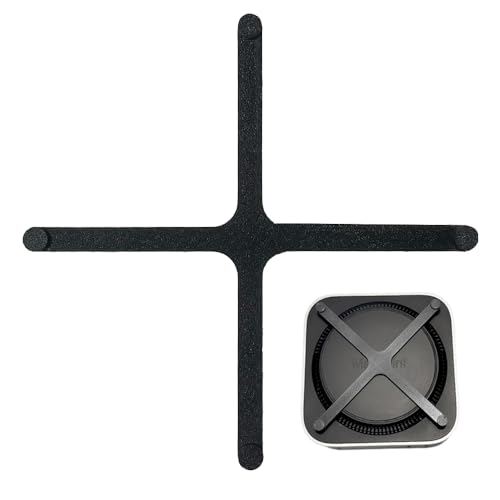
- Stand-style access for easier on/off pressing
- Raised design supports airflow and dust reduction
- Eco-friendly, slim, and minimalist build
Best For: Owners who want a discreet stand with easier power access
Top-Mounted Button Mod
Modified Top Power Button for Mac mini m4

- Moves power access to the top for easier reach
- Designed specifically for the mini M4
- Simple DIY installation with no tools
Best For: DIY users who want a top-mounted button modification
Aluminum Dock With Button Access
AKKYAJAURE Mac mini M4 Dock Stand

- Precision-fit dock with power-button cutout
- Aluminum finish matches the Mac mini aesthetic
- Elevated design improves airflow and desk organization
Best For: People who want a premium matching dock with accessible power control
Top Mount Ease
Mac mini M4 Top Power Switch Extender

- Top-mounted access for easier power presses
- Durable metal and plastic build
- Minimalist design suits the Mac mini M4
Best For: Users who want a simple top-access power button extender for Mac mini M4
Simple Gray Pick
Mac mini M4 External Power Button

- Basic external power switch for Mac mini M4
- Push-button touch operation
- Compact, simple gray design
Best For: Shoppers who want a basic external switch with minimal extras
Color Option Value
Mac mini M4 External Power Button

- Top-mounted design for easier access
- Blue finish with other color options available
- Lightweight plastic build with IP69 rating listed
Best For: People who want a colorful, easy-access power switch for Mac mini M4
Front-Access Stand – Mac mini M4/M4 Pro Power Button Dock
Lonelyfox Mac mini M4 Stand, Front Power Button Access, Cooling Base | Compatible with M4 Pro
Check Price On AmazonIf you want a Mac mini external power button solution that feels natural in daily use, this front-access stand is built to let you press the button from the front instead of reaching behind the machine. It also adds a raised base for airflow and a dust filter, making it a practical desk upgrade for Mac mini M4 and M4 Pro owners.
Best For: users who want front-facing power access plus a cooling stand for a clean desktop setup.
Pros:
- Front power button access makes waking the Mac mini easier without lifting it.
- Open-base design helps improve heat dissipation during everyday use.
- Includes a dustproof sponge filter to help keep the Mac mini cleaner.
- Replaceable button caps add a playful, customizable touch.
Cons:
- Designed specifically for Mac mini M4 and M4 Pro, so it is not a universal stand.
- The shape and extras are more desktop-oriented than minimal.
This is a good fit if you want a convenient Mac mini external power button setup that also doubles as a cooling and dust-protection base. The added front access is the main draw, while the included cosmetic caps and gift-ready presentation make it stand out as an accessory.
Top-Mount Retrofit – Mac mini M4 External Power Switch
For buyers specifically looking for a Mac mini external power button modification, this top-mounted retrofit relocates access to the top of the mini for easier pressing. It is a straightforward DIY-style accessory designed for the Mac mini M4, with a focus on simpler daily use and a cleaner desktop feel.
Best For: Mac mini M4 owners who want a simple top-access power button upgrade.
Pros:
- Tailor-made for the Mac mini M4 for a dedicated fit.
- Moves the power button to the top for easier access.
- Simple installation with no complex tools required.
- Can add a sleeker, more personalized desktop appearance.
Cons:
- Includes only the power button piece, so it is not a full stand or dock.
- Made for the M4 specifically, so compatibility is limited.
This is the most direct option if your priority is simply easier button access rather than storage, cooling, or desk styling extras. It keeps the upgrade focused on functionality while staying lightweight and uncomplicated.
Walnut Power Dock – Mac mini M4 Front-Access Wooden Stand
If you want a Mac mini external power button solution with a premium look, this solid wood dock pairs front-access control with a walnut stand base. It is designed for the Mac mini M4 and M4 Pro, with a built-in lever that lets you reach the bottom-facing power button from the front while adding dust filtering and airflow support.
Best For: Mac mini M4 and M4 Pro owners who want a premium wooden stand with front power access.
Pros:
- Built-in mechanical lever provides front-access power control.
- Integrated stainless steel mesh helps block dust, lint, and pet hair.
- Elevated design supports natural heat dissipation.
- Silicone pads help keep the stand stable on the desk.
Cons:
- Compatible only with Mac mini M4 and M4 Pro 2024 models.
- Natural wood grain means each piece will look a little different.
This dock is a strong pick if you value materials and desk presentation as much as button access. It combines a practical front-control mechanism with the kind of build quality that can make a Mac mini setup feel more finished.
Gray Top-Mount Retrofit – Mac mini M4 External Power Button
This gray retrofit is another Mac mini external power button option aimed at making the M4 easier to use day to day. It moves the button to the top for more convenient access, and the simple DIY-friendly design keeps the upgrade focused on utility rather than extra accessories.
Best For: Mac mini M4 users who prefer a gray, minimal button relocation accessory.
Pros:
- Specifically designed for the Mac mini M4.
- Top-mounted design improves access to the power button.
- Simple installation with no professional tools required.
- Gray finish offers a subtle, understated look.
Cons:
- Includes only the power button, so it is not a full stand or dock.
- Limited to the Mac mini M4.
If you want a basic functional upgrade in a muted finish, this version keeps the concept straightforward. It is best suited to people who mainly want faster access to the power button and do not need cooling or desk-organization features.
Minimalist Power Access Stand – TerraAura Mac mini M4 Stand
TerraAura 2024 Mac mini M4 Stand – Power Button Base for Easy On/Off Access – Must-Have Accessory
Check Price On AmazonIf you want a Mac Mini external power button solution that keeps the setup clean, this TerraAura stand is built for easier on/off access without changing the Mac mini’s minimalist look. It also lifts the device slightly to support airflow and help reduce dust intake, making it a practical desk accessory as much as a convenience upgrade.
Best For: Mac mini M4 owners who want a discreet stand that improves power-button access and desk organization.
Pros:
- Lets you power the Mac Mini on or off by pressing the stand-body design instead of reaching for the bottom button.
- Raised profile can improve airflow and help reduce dust buildup around the device.
- Made from eco-friendly, biodegradable materials with a slim, modern look.
- Designed to blend seamlessly under the Mac Mini without adding visual clutter.
Cons:
- Only compatible with the 2024 Mac mini M4 and M4 Pro.
- It’s a stand-based solution, not a true relocated switch or button extension.
- May appeal more to users who like minimalist accessories than to those wanting a hardware-style power mod.
Overall, this is a clean and understated choice if your main goal is better access to the Mac Mini external power button while keeping the desktop setup tidy. It balances convenience, cooling support, and a low-profile design well.
Top-Mounted Button Mod – Modified Top Power Button for Mac mini m4
This Mac Mini external power button accessory is made for users who want the button moved to a more accessible top-mounted position. It’s a straightforward DIY-style modification for the mini M4, aimed at making startup and reset more convenient while changing the look of the desktop device.
Best For: Mac mini M4 owners who want a simple top-mounted power button modification.
Pros:
- Tailor-made for the mini M4 for a more specific fit.
- Relocates power-button access to the top for easier reach.
- Simple installation with no professional tools required.
- Adds a more personalized desktop appearance.
Cons:
- Includes only the power button accessory, so it’s a very minimal package.
- Appears focused on DIY modification rather than a polished dock or stand.
- Best suited to users comfortable with changing the stock setup.
If you specifically want a more direct external-style power control option, this is the most modification-focused pick in the group. It prioritizes accessibility over accessories and is best for users who don’t mind a DIY approach.
Aluminum Dock With Button Access – AKKYAJAURE Mac mini M4 Dock Stand
For buyers searching for a Mac Mini external power button-friendly dock, this aluminum stand focuses on both access and desk organization. It uses a precision fit, includes a cutout for the bottom power button, and raises the Mac mini to support better cooling while keeping the overall look polished.
Best For: Users who want a premium aluminum dock with easy power-button access and a matching finish.
Pros:
- Custom-molded fit is designed specifically for the Mac Mini M4.
- Small cutout provides access to the bottom power button.
- Aluminum alloy construction matches the Mac Mini’s look and feel.
- Elevated design helps airflow and can improve cooling.
Cons:
- Compatible only with Mac mini M4 models.
- Button access depends on the stand cutout rather than a relocated switch.
- Not a full-featured hub or multiport dock based on the supplied notes.
This is a strong pick if you want a refined desk accessory that keeps power access convenient while preserving the Mac mini’s premium aesthetic. It offers a balanced mix of cooling, organization, and button access.
Top Mount Ease – Mac mini M4 Top Power Switch Extender
If you want a Mac Mini external power button that makes startup easier, this top-mounted switch extender is built around that exact problem. It places the power control on top of the Mac mini M4 so you can press it without reaching underneath, while keeping a simple, minimal look that fits the desktop.
Best For: Mac mini M4 users who want a more accessible top-mounted power button for everyday use.
Pros:
- Top-positioned design makes powering on and off more convenient.
- Durable metal and plastic construction is meant for long-term use.
- Minimalist style blends in with the Mac mini M4.
- Helps reduce awkward bending when reaching the original button.
Cons:
- Designed specifically for Mac mini M4, so compatibility is limited.
- Only includes one auxiliary switch.
- Blue color may not match every setup.
Overall, this is a practical accessory if your main goal is easier access to the Mac mini M4 power button. It focuses on convenience and a clean desktop presentation rather than extra features.
Simple Gray Pick – Mac mini M4 External Power Button
This Mac Mini external power button is a straightforward accessory for the Mac mini M4 2024, aimed at making startup and reset easier to reach. If you want a basic power switch add-on without extra styling details, this gray version keeps the design simple and practical.
Best For: Buyers who want a no-frills external power switch for the Mac mini M4.
Pros:
- External power switch accessory for Mac mini M4 2024.
- Push-button, touch-controlled operation keeps it simple.
- Includes on/off switching and reset support in the product description.
- Compact dimensions make it easy to place with the desktop setup.
Cons:
- Listing provides fewer construction details than some alternatives.
- Only one color option is shown for this version.
- Not described with added comfort or top-mounted ergonomics.
In practice, this model is best viewed as a basic utility pick: it is made to provide easier access to the Mac mini M4 power control, with a focus on simple operation rather than extra design features.
Color Option Value – Mac mini M4 External Power Button
If you’re shopping for a Mac Mini external power button with a bit more style, this blue accessory adds a simple top-access power control for the Mac mini M4 2024. It follows the same convenience-first idea, letting you press the power button more easily without reaching down under the machine.
Best For: Mac mini M4 users who want an easy-access power button with a more colorful finish.
Pros:
- Top-positioned switch improves accessibility on the desktop.
- Available in multiple colors, including this blue version.
- Plastic construction keeps the design lightweight and simple.
- IP69 rating is listed in the product details.
Cons:
- Designed only for the Mac mini M4 2024.
- Uses a plastic contact material, not metal contacts.
- Feature set is mostly focused on convenience rather than advanced controls.
For buyers who care about convenience and a more personalized look, this is a solid Mac mini M4 accessory. It emphasizes easy access, a clean layout, and color choice over complexity.
How We Picked the Best Mac Mini External Power Button
We focused on accessories that improve access to the Mac Mini External Power Button without making the desktop setup bulky or awkward. Priority went to stable stands, easy button reach, better airflow, and designs that fit the Mac mini M4 and M4 Pro cleanly.
We also looked for practical details such as dust filtering, non-slip bases, aluminum or wood construction, and simple installation. Since these accessories are often used daily, durability and usability mattered as much as the core function.
Quick Comparison
In this category, most products fall into three groups: stand-based button extenders, desktop power switch accessories, and premium dock-style bases. Stand models usually offer the best mix of convenience and cooling. Button extender designs are more compact and direct. Dock-style options tend to be the best choice if you also want a tidier desk and a more finished look.
Key Buying Factors for a Mac Mini External Power Button
Compatibility
Make sure the accessory is made for the Mac mini M4 or M4 Pro if that is your model. Small differences in chassis layout can affect alignment and button reach.
Button Access and Feel
The main job is simple: let you power on and off easily. Look for a design that presses cleanly and doesn’t require awkward positioning or extra force.
Cooling and Dust Management
Many of the best accessories do more than extend the button. Ventilation, raised stands, and dust mesh can help support airflow and long-term reliability.
Material and Stability
Wood, aluminum, and reinforced 3D-printed designs each have their place. Choose a sturdy base with non-slip feet if you want a stable setup for frequent use.
Desk Space and Aesthetics
If your workspace is minimal, a compact extender may be enough. If you want the Mac mini to look integrated into your setup, a dock or stand with a premium finish may be the better fit.
Who Should Buy Which Mac Mini External Power Button?
If you want the simplest daily convenience, choose a straightforward Mac Mini External Power Button extender. If heat and cable organization matter more, a stand with cooling features is usually the smarter pick. For users who care about appearance and desk polish, premium wood or aluminum dock-style accessories offer the best balance of function and style.
For most buyers, the right choice comes down to whether you value speed, cooling, or presentation most. Pick the model that solves your setup’s biggest pain point first.