A great Mac Mini stand with USB hub does more than lift your computer off the desk. It adds the ports, storage, and cable management many setups need in one compact dock.
Below, we focus on practical buying factors so you can choose a stand that matches your Mac mini model, display setup, and workflow.
Best 10 Mac Mini Stand with USB Hub Picks for 2026
Premium All-in-One Storage Dock
Mac mini M4 Dock with SSD Enclosure

- 10-in-1 hub with M.2 SSD enclosure
- 4K@60Hz HDMI plus 10Gbps USB ports
- Aluminum stand made for M4 and M4 Pro
Best For: Users who want storage expansion and a full-feature dock in one
Simple Desktop Organizer
ORICO Expansion Stand with Ports
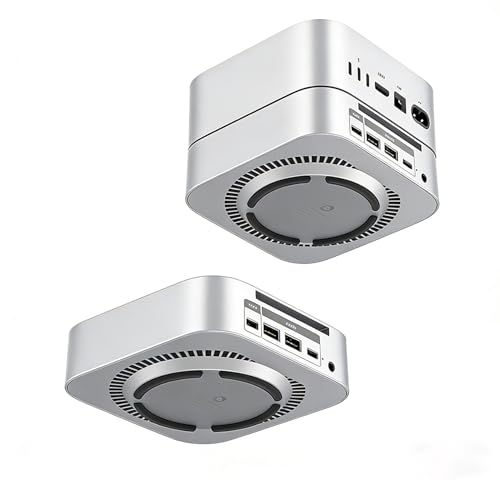
- Type-C, USB 2.0, and audio in one stand
- Built-in power switch for easier access
- Cooling-focused elevated design
Best For: Buyers who want basic ports and simple desktop organization
Storage-Heavy Workstation Dock
UGREEN Mac mini M4 Dock & Stand

- Up to 8TB NVMe SSD expansion
- 11-in-1 hub with 10Gbps ports
- Includes SD/TF reader and power lever
Best For: Creative users needing fast storage and broad connectivity
Budget-Friendly Port Expander
Mac mini M4 Docking Station KM28-Pro

- Four rear USB-A ports for peripherals
- Power button groove for easier access
- Cooling stand with anti-slip pads
Best For: Simple setups that need extra USB-A ports and better access
Compact Storage Hub
BENFEI Mac mini M4 Dock with 10-in-1 Expansion

- Adds NVMe storage plus DisplayPort and USB ports.
- Supports up to 8TB M.2 NVMe drives.
- Includes SD/TF readers with 170MB/s speeds.
Best For: Mac mini M4 users who want a dock with fast storage expansion and card readers
All-in-One Desk Base
Macally Mac mini M4 Dock with SSD Enclosure

- Single-cable dock with SSD enclosure and stand.
- Adds HDMI 4K 60Hz, USB-A, SD/TF, and audio.
- Includes installation accessories in the box.
Best For: Mac mini M4 owners who want a tidy single-cable dock with SSD expansion
High-Refresh Expansion Dock
UGREEN Mac mini M4 DP Hub with SSD Slot

- 4K DisplayPort supports 144Hz on M4 and 240Hz on M4 Pro.
- Adds 10Gbps USB-A/C, SD/TF, audio, and SSD expansion.
- Includes a power button lever for easier access.
Best For: Mac mini M4 and M4 Pro users who want higher-refresh DisplayPort support
Compact Expansion Dock
Satechi Mac mini M4 Hub & Stand

- NVMe enclosure supports up to 4TB storage
- Two 10Gbps USB-A ports plus SD card reader
- Cooling-focused aluminum stand for Mac mini M4
Best For: Users who want a compact Mac mini M4 stand with storage expansion
Best Dual-Display Dock
IVANKY 13-in-1 Mac mini M4 Dock

- 4K@144Hz HDMI and broad 13-in-1 connectivity
- 10Gbps USB-A and USB-C ports with card readers
- Includes 20W PD adapter for added power stability
Best For: Users who want dual-display support and fast USB expansion
Premium All-in-One Storage Dock – Mac mini M4 Dock with SSD Enclosure
If you want a Mac mini stand with USB hub that does more than just lift the computer off your desk, this RayCue dock is built to be a full expansion base. It combines a brushed aluminum stand with a 10-in-1 hub, including an M.2 SSD enclosure, 4K@60Hz HDMI, fast USB ports, SD/TF, and audio, making it a strong fit for users who want storage and connectivity in one unit.
Best For: Mac mini users who want an integrated stand, hub, and internal SSD expansion for a cleaner desktop.
Pros:
- Built-in M.2 NVMe/SATA enclosure supports up to 8TB and common M.2 sizes.
- Includes 4K@60Hz HDMI for a single external display.
- Offers 10Gbps USB-A and USB-C data ports plus 5Gbps USB-A ports for peripherals.
- Aluminum stand is designed to match Mac mini M4 and M4 Pro.
Cons:
- Only one HDMI port is included, so it supports one external monitor.
- SSD use may require the extra USB-C charging port for adequate power.
Overall, this is the most feature-packed option here if storage expansion is a priority. It suits buyers who want a Mac mini dock that combines desk organization, high-speed connections, and extra drive space in a single aluminum package.
Simple Desktop Organizer – ORICO Expansion Stand with Ports
This ORICO Mac mini stand with USB hub is a straightforward way to add a few essential ports while keeping your setup tidy. It focuses on practical desktop use with a Type-C port, two USB 2.0 ports, a 3.5mm audio jack, built-in power switch, and a cooling-friendly elevated design.
Best For: People who want a compact, no-fuss expansion stand with basic ports and easy power access.
Pros:
- Includes 1 Type-C port, 2 USB 2.0 ports, and a 3.5mm audio jack.
- Built-in power switch makes turning the Mac mini on and off easier.
- 360° cooling design helps with airflow and desktop organization.
- Plug-and-play setup requires no drivers or software.
Cons:
- USB 2.0 ports are better for accessories than for fast storage transfers.
- Does not include SSD expansion or video output.
This is the most basic option in the group, but that can be a strength if you only need a few extra ports and cleaner cable management. It’s a practical pick for everyday use rather than heavy storage or multimedia expansion.
Storage-Heavy Workstation Dock – UGREEN Mac mini M4 Dock & Stand
For shoppers looking for a Mac mini stand with USB hub and serious storage potential, this UGREEN dock stands out with its NVMe enclosure and high-speed port mix. It supports up to 8TB of M.2 NVMe storage and adds multiple USB-A and USB-C data ports plus an SD/TF card reader, making it well suited to file-heavy workflows.
Best For: Creative users and power multitaskers who want expandable storage and lots of fast data ports.
Pros:
- Supports M.2 NVMe SSDs up to 8TB in common sizes.
- Includes 11 total ports with multiple 10Gbps USB-A and USB-C options.
- UHS-I SD/TF reader adds convenient memory card access.
- Compact design includes a short cable, anti-slip pads, and a power button lever.
Cons:
- SSD is not included.
- Full multi-device use may benefit from an external power adapter.
This dock is aimed at users who need speed, storage, and a lot of everyday connectivity in one footprint. If your Mac mini setup handles large files, backups, or frequent peripheral swaps, it offers a very capable balance of expansion and desk cleanliness.
Budget-Friendly Port Expander – Mac mini M4 Docking Station KM28-Pro
If you mainly want a Mac mini stand with USB hub ports added at the back, this VOOPII docking station keeps things simple. It is built specifically for the Mac mini M4 and M4 Pro, with four rear USB-A ports, a cooling-focused aluminum stand, and easy access to the power button without lifting the computer.
Best For: Users who want a clean stand and extra USB-A ports for daily peripherals.
Pros:
- Four rear USB-A ports are useful for keyboards, mice, flash drives, and SSDs.
- Integrated groove allows power button access without moving the Mac mini.
- Anti-slip silicone pads help keep the device secure.
- Designed to match the Mac mini M4 and M4 Pro footprint.
Cons:
- Does not include SSD storage expansion.
- Lacks video outputs and card-reader features.
This is a focused option for buyers who want an understated dock that improves access and adds practical USB connectivity. It makes the most sense for simple desk setups where the goal is convenience, stability, and a neater workspace.
Compact Storage Hub – BENFEI Mac mini M4 Dock with 10-in-1 Expansion
If you want a Mac Mini stand with USB hub that adds both storage and everyday ports, this BENFEI dock is built for a very functional desk setup. It combines an NVMe enclosure, DisplayPort output, SD/TF card readers, and multiple USB-A/USB-C connections in one compact base for the Mac mini M4 and M4 Pro.
Best For: Mac mini M4 users who want a dock with fast storage expansion, card readers, and a DisplayPort connection.
Pros:
- 10-in-1 design adds NVMe storage, DisplayPort, USB-C, USB-A, and SD/TF support.
- Supports up to 8TB M.2 NVMe storage for large files and backups.
- Includes 10Gbps USB-C/A 3.2 ports plus 170MB/s SD/microSD card readers.
- Compact stand format keeps the Mac mini footprint tidy on the desk.
Cons:
- DisplayPort output is limited to 4K@30Hz rather than higher refresh rates.
- SSD is not included with the enclosure.
This is a practical pick if you want a single accessory to handle storage expansion and everyday connectivity without adding clutter. The feature set is broad, but the video output spec is best suited to standard productivity use rather than high-refresh displays.
All-in-One Desk Base – Macally Mac mini M4 Dock with SSD Enclosure
This Mac Mini stand with USB hub is designed for people who want a simple, organized base with room for storage and everyday peripherals. The Macally dock adds an M.2 enclosure, HDMI output, USB-A ports, SD/TF slots, and a 3.5mm audio jack, all connected through a single USB-C cable.
Best For: Mac mini M4 owners who want a tidy single-cable dock with SSD expansion and easy access to common ports.
Pros:
- Built-in M.2 enclosure supports up to 8TB for backups and project files.
- Includes HDMI 4K 60Hz, SD/TF slots, USB-A ports, and a 3.5mm audio jack.
- Stand design provides access to the Mac mini power button.
- Installation kit includes USB-C cable, screwdriver, screws, thermal strip, and SSD mounting nut.
Cons:
- USB-A ports are listed as USB 2.0, so they are not the fastest option for large transfers.
- Only compatible with Mac Mini M4.
The Macally model is best for users who value convenience and a clean desk more than raw port speed. It covers the essentials well, especially if you want storage expansion, a display connection, and easy day-to-day accessory access in one compact stand.
High-Refresh Expansion Dock – UGREEN Mac mini M4 DP Hub with SSD Slot
For buyers comparing a Mac Mini stand with USB hub, this UGREEN dock stands out for its display support and strong overall expansion. It combines an M.2 NVMe enclosure, 10Gbps USB ports, SD/TF slots, audio, and a precision fit for the Mac mini M4 and M4 Pro.
Best For: Mac mini M4 and M4 Pro users who want higher-refresh DisplayPort support with storage expansion and extra ports.
Pros:
- Supports up to 8TB M.2 NVMe storage for internal expansion.
- DisplayPort output reaches 4K@144Hz on M4 and 4K@240Hz on M4 Pro.
- Includes 10Gbps USB-A/C data ports plus SD/TF and audio.
- Power button lever lets you turn on the Mac without lifting it.
Cons:
- SSD is not included.
- Multi-screen use depends on combining the dock’s DP port with the Mac’s Thunderbolt port.
This is the strongest choice here if display performance matters as much as storage and connectivity. It feels especially well suited to creators or power users who want a dock that can keep up with a faster monitor while still offering useful everyday expansion.
Compact Expansion Dock – Satechi Mac mini M4 Hub & Stand
If you want a Mac Mini stand with USB hub that keeps the setup simple, this Satechi model adds front-facing ports plus an NVMe enclosure in a very compact aluminum design. It is built specifically for the Mac mini M4, with cooling-friendly vents and a recessed top that preserves airflow while adding practical desktop connectivity.
Best For: Mac mini M4 users who want a clean stand with USB-A, SD card access, and optional NVMe storage expansion.
Pros:
- Supports an internal M.2 NVMe SSD up to 4TB for extra local storage
- Includes two 10Gbps USB-A ports, a USB-A 2.0 port, and UHS-II SD card reader
- Self-cooling aluminum build with bottom vents and a recessed top for airflow
- Includes screw, screwdriver, thermal pad, and a 2-year limited warranty
Cons:
- SSD is not included
- Heatsink SSDs and double-sided drives are incompatible
- USB-A ports do not support Apple SuperDrive, CD readers, or iPad charging
This is a good pick if you want a tightly integrated hub-and-stand solution rather than a feature-packed desktop dock. It favors a cleaner footprint and useful everyday ports over broad display or audio expansion.
Most Feature-Packed Workstation Dock – TobenONE 13-in-1 Mac mini M4 Dock
This Mac Mini stand with USB hub is aimed at users who want a lot of I/O in one place, including display outputs, file-transfer ports, audio, and built-in SSD expansion. The TobenONE dock also adds a one-touch power button and a stable stand design, making it a practical hub for a busy Mac mini M4 workspace.
Best For: Power users who need a dock with dual monitor support, many ports, and built-in NVMe storage.
Pros:
- 13-in-1 layout with HDMI, DisplayPort, USB, SD/microSD, audio, and SSD enclosure
- Supports up to 8TB NVMe storage at 10Gbps
- Includes 4K@144Hz DisplayPort and 4K@60Hz HDMI for multi-display setups
- Built-in power button and anti-slip stability for easier daily use
Cons:
- SSD is not included
- SATA SSDs are not supported
- Designed only for Mac mini M4/M4 Pro, not older Mac mini models
For buyers who want the most all-in-one functionality, this is the most expandable option here. It trades simplicity for breadth, so it makes the most sense when your desk needs display, storage, and peripheral connections in one dock.
Best Dual-Display Dock – IVANKY 13-in-1 Mac mini M4 Dock
For buyers comparing a Mac Mini stand with USB hub for both connectivity and monitor support, this iVANKY dock stands out with a strong port mix and built-in SSD enclosure. It is designed for the Mac mini M4 and M4 Pro, and the included 20W PD adapter helps support more demanding connected devices.
Best For: Mac mini M4 users who want dual-display flexibility, fast USB connections, and external power support.
Pros:
- 13-in-1 design with HDMI, USB-A, USB-C, SD/TF, audio, and SSD enclosure
- Supports 4K@144Hz HDMI output for sharp, high-refresh visuals
- Includes both 10Gbps and 5Gbps USB ports for faster and everyday devices
- Comes with a 20W PD adapter for improved power stability
Cons:
- SSD is not included
- Dual-display setup depends on connecting the dock and the Mac’s native port
- High-refresh-rate monitors may require Game Mode or Signal Enhancement Mode
This dock is a strong fit if display performance and broad connectivity matter more than keeping the setup minimal. The combination of fast USB ports, card readers, and external power makes it a capable everyday hub for a modern desk.
How We Picked the Best Mac Mini Stand with USB Hub
We prioritized stands designed for recent Mac mini models, with a focus on useful everyday features: high-speed USB ports, reliable video output, and optional NVMe SSD expansion. We also favored designs with aluminum construction, good heat management, and layouts that keep ports easy to reach.
For a Mac Mini Stand with USB Hub, the best choice is usually the one that matches your exact needs rather than the one with the most features. A clean desktop, faster external storage, or extra display support may matter more than raw port count.
Quick Comparison
Most options in this roundup fall into three groups: simple USB hubs with basic expansion, all-in-one docks with SSD enclosures, and feature-rich stands built for higher-bandwidth display and accessory setups. If you only need a few extra peripherals, a simpler dock may be enough. If you edit media, work with large files, or want fewer external drives, look for SSD support and higher-speed data ports.
Key Buying Factors for Mac Mini Stand with USB Hub
Compatibility
Check that the dock is made for your specific Mac mini generation, especially M4 or M4 Pro models. Even when the fit looks similar, port alignment and cooling cutouts can vary.
USB Speed and Port Mix
Look for at least one high-speed USB-C port and several USB-A ports if you use flash drives, keyboards, audio interfaces, or dongles. Faster 10Gbps ports are better for external SSDs and frequent file transfers.
Storage Expansion
An NVMe enclosure can turn the dock into a practical desktop storage upgrade. If you work with photos, video, or large project libraries, this feature can reduce clutter and improve workflow.
Video Output
Choose HDMI or DisplayPort based on your monitor. If refresh rate matters, verify whether the dock supports 4K60Hz or higher. DisplayPort options may be a better fit for high-refresh displays.
Cooling and Build
Aluminum stands often offer a sturdier feel and better heat dissipation. If your Mac mini runs long tasks, ventilation and an elevated design can help maintain airflow.
Power and Everyday Convenience
Small details like a power switch, SD card slot, or audio jack can make a setup much more convenient. These extras matter most when they match your daily routine.
Who Should Buy Which Mac Mini Stand with USB Hub?
Choose a simpler Mac Mini Stand with USB Hub if you mainly need more ports and a cleaner desk. Go with an SSD-equipped dock if storage expansion is a priority. Pick a higher-end model with stronger display support if you use dual monitors, high-refresh screens, or a more demanding creative workflow.
In short, the best option is the one that balances connectivity, cooling, and expansion without adding features you will not use.