A Mac Studio setup looks best when the cables disappear. The right tray keeps power bricks, strips, and charging cords out of sight while improving airflow and desk access.
Below, we focus on options that are easy to mount, sturdy enough for daily use, and practical for compact creative workspaces.
Best 10 Mac Studio Cable Management Tray Picks for 2026
No-Drill Clamp Tray
Clamp-On Cable Organizer for Mixed Desk Materials

- Clamp installs without drilling
- Powder-coated metal tray with clips and ties
- Supports desks 0.4" to 2.4" thick
Best For: No-drill desk setups that need flexible placement
Adhesive 2-Pack Tray
Self-Stick Cable Tray for Clean Desk Setups

- Tool-free adhesive installation
- Holds cables, power strips, and transformers
- Works on smooth wood, glass, and similar surfaces
Best For: Quick cleanup on smooth desk surfaces
Mesh Clamp Tray
Steel Under-Desk Organizer with Side Holes

- No-drill clamp mount installs quickly
- Carbon steel tray holds about 15 lbs
- Side holes and mesh design support neat routing
Best For: Cable-heavy desks needing fast clamp-on installation
Low-Profile Screw Tray
Slim Steel Holder for Hidden Power Strips

- Slim 16.5" tray keeps cords concealed
- Screw-in mounting for a permanent fit
- Steel build supports up to 11 lbs
Best For: Permanent setups that prioritize a hidden, minimal look
Large-Capacity Fabric Tray
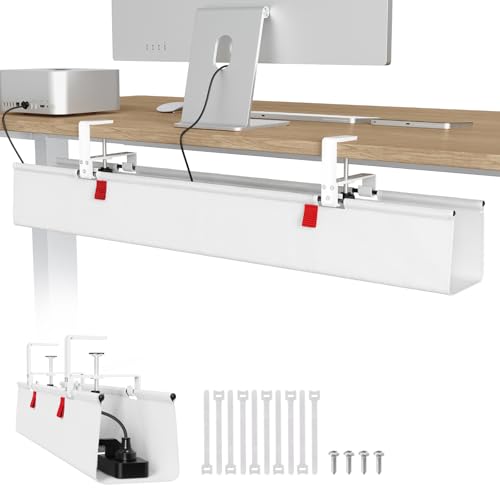
- 36" x 5.5" x 5.5" size for bulky adapters and power strips
- Clamp-on or screw-in installation for flexible setup
- Built-in ties and foldable design help organize contents
Best For: Big under-desk cable loads and users who want a no-drill option
Sturdy Dual-Pack Metal Tray
Delamu 2-Pack 34" Cable Tray Set

- Metal build with 10 lb load capacity
- Two trays provide 34 inches of total storage
- Pre-drilled screw mount setup with wide access opening
Best For: Users who want a sturdy screw-mounted tray set for desks or walls
Compact Clamp-Mount Pair
KEEGH 2-Pack 16" Cable Tray Set

- Two 16" trays expand to 32" total length
- Clamp or screw mounting for flexible installation
- Alloy build with cable guide holes for neat routing
Best For: Compact desks that need flexible cable storage without a large single tray
Budget 2-Pack Pick
White under-desk metal cable tray, 2-pack
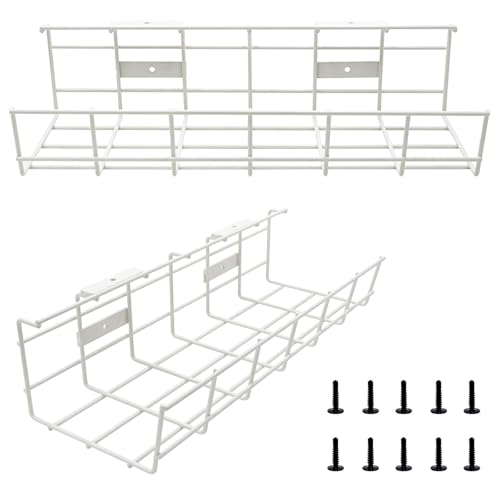
- Screw-in metal tray for secure under-desk mounting
- Two trays for separating cables and accessories
- Supports up to 15 lbs when installed properly
Best For: People who want a sturdy drilled-in tray for a tidy desk setup
Best No-Drill Option
Clamp-on cable tray with side openings
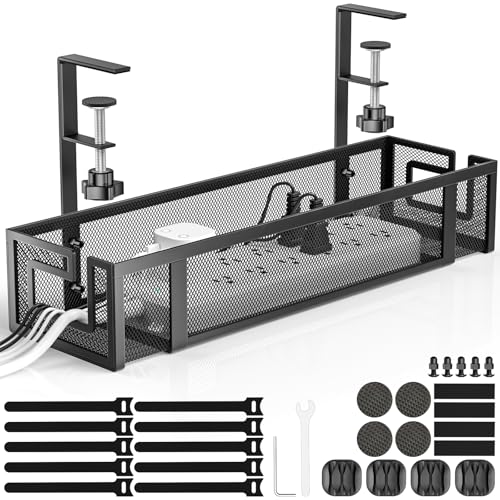
- Installs in under 3 minutes with no drilling
- Carbon steel tray supports up to 20 lbs
- Rubber pads help protect the desk surface
Best For: Anyone wanting fast tool-free cable management on a compatible desk
Extra-Long Desk Coverage
25.3-inch clamp cable tray for bigger setups

- Long 25.3-inch tray gives more storage space
- Tool-free clamp mount fits desks up to 2 inches thick
- Mesh design improves airflow and access
Best For: Larger desks that need a long, easy-access cable organizer
No-Drill Clamp Tray – Clamp-On Cable Organizer for Mixed Desk Materials
If you want a Mac Studio cable management tray that avoids drilling, this clamp-on option is a practical fit for keeping cords off the floor. It mounts directly to desk frames and can be repositioned easily, while the metal tray and included clips/ties help tame power cords, data cables, and outlet strips.
Best For: Desks where you want no-drill installation and flexible repositioning.
Pros:
- No-drill clamp installation helps avoid damage to the desk.
- Anti-scratch mats help protect the desktop during mounting.
- Sturdy welded, powder-coated metal construction.
- Includes cable clips and cable ties for extra organization.
Cons:
- Fits desk thicknesses from 0.4″ to 2.4″, so compatibility matters.
- Clamp style may not suit every desk frame shape.
Overall, this is a straightforward choice if you want a tidy under-desk setup without committing to screws. It should work especially well when you need a movable organizer that can handle everyday desk cable clutter.
Adhesive 2-Pack Tray – Self-Stick Cable Tray for Clean Desk Setups
For a Mac Studio cable management tray with simple setup, this self-adhesive pair is built for fast installation and a cleaner-looking desk. The trays are designed to hold multiple cables, power strips, and even transformers, making them a useful option when you want to reduce visible clutter without tools.
Best For: Quick cable cleanup on smooth desk surfaces.
Pros:
- Strong adhesive backing makes installation easy and tool-free.
- Spacious design can hold cables, power strips, and transformers.
- Reported to stay sturdy and secure over time.
- Works on several smooth surfaces, including glass and wood.
Cons:
- Adhesive mounting is best suited to smooth finishes.
- Less flexible to reposition than clamp-on trays.
This is a good pick if your priority is a fast, clean installation and you do not want to drill into your desk. The two-tray set also gives you more coverage for spreading cables across a larger setup.
Mesh Clamp Tray – Steel Under-Desk Organizer with Side Holes
If you need a Mac Studio cable management tray that combines sturdy construction with easy routing, this mesh clamp model is worth a look. It installs without drilling, uses side clips for quick mounting, and the side holes make it easier to pass cables through while keeping the underside of your desk organized.
Best For: Cable-heavy desks that need simple no-drill mounting and flexible routing.
Pros:
- No-drill clamp installation can be done in about 3 minutes.
- Rubber pads help protect the desk from scratches.
- Carbon steel build holds about 15 lbs.
- Mesh design helps reduce dust buildup and keeps cables organized.
Cons:
- Fits flat-edge desks from 0.4″ to 2″ thick.
- Clamp style may be less universal than adhesive mounting.
As a practical under-desk organizer, this tray stands out for its mix of strength and cable-routing convenience. The mesh basket and side holes make it especially helpful when you have multiple cords, hubs, and power bricks to manage.
Low-Profile Screw Tray – Slim Steel Holder for Hidden Power Strips
When you want a Mac Studio cable management tray that stays low-profile and out of sight, this screw-mounted VIVO option is built for a clean, concealed look. Its partially closed steel design helps hide cords and devices while still leaving a front opening for easier cable access.
Best For: Permanent under-desk installs where concealment matters most.
Pros:
- Low-profile 16.5″ tray helps keep cords tucked away.
- Partially closed design improves concealment.
- Front opening makes adding or removing cables easier.
- Durable metal construction supports up to 11 lbs.
Cons:
- Requires screw-in installation under wood or particle board.
- Less flexible if you need to reposition it later.
This tray makes sense if your goal is a more permanent cable solution and a cleaner visual finish. It is especially useful for hiding power strips, AV cables, and ethernet wires in a minimalist setup.
Large-Capacity Fabric Tray – Univivi 36" Fabric Cable Tray
If you need a Mac Studio cable management tray that can swallow bulky adapters, power strips, and excess cords, this Univivi option is built for capacity. The 36-inch fabric design is made to hide a lot under the desk, while the clamp or screw-in installation gives you flexibility across different desktop materials.
Best For: Users who want a large, soft-sided under-desk organizer with no-drill clamp mounting or permanent screw mounting.
Pros:
- Extra-large 36″ x 5.5″ x 5.5″ tray fits adapters, sockets, and other bulky gear.
- Two installation methods: no-drill clamp on or screw fixing.
- Unfoldable design makes adding or removing items easier.
- Built-in ties help keep items secured in place.
Cons:
- Fabric construction may not suit buyers who prefer a rigid metal tray.
- At 36 inches, it may be more tray than some small setups need.
Overall, this is a strong pick when capacity matters more than a minimalist footprint. It is especially practical if you want a cable management tray that can handle a full mix of power accessories without forcing a tight layout.
Sturdy Dual-Pack Metal Tray – Delamu 2-Pack 34" Cable Tray Set
For a Mac Studio cable management tray setup that favors sturdiness, this Delamu metal pair offers a practical way to lift clutter off the floor and keep power strips out of sight. The 2-pack design gives you 34 inches of total organizing space, and the wide opening makes it easier to place or remove equipment when your desk layout changes.
Best For: Buyers who want a sturdy metal cable tray set with a simple screw-mounted installation and separate tray pieces.
Pros:
- Metal construction is designed for stronger, longer-lasting support than plastic.
- 2-pack provides a total of 34 inches of cable management space.
- Wide opening improves access for surge protectors and power supplies.
- Pre-drilled holes and included screws make installation straightforward.
Cons:
- Screw installation is less convenient than clamp-on designs.
- Each tray is relatively narrow at 3.5 inches wide.
This set is a solid fit if you want a dependable, no-nonsense under-desk solution and do not mind mounting hardware. It works well for keeping cables, hubs, and power strips organized with a clean, understated look.
Compact Clamp-Mount Pair – KEEGH 2-Pack 16" Cable Tray Set
If you want a Mac Studio cable management tray that is compact but still adaptable, this KEEGH 2-pack gives you two 16-inch trays that can expand to 32 inches total. It is designed for cord management under desk with room for power strips, adapters, extension cords, and USB hubs, while offering both clamp and screw mounting options.
Best For: People who want a versatile under-desk tray set with no-drill clamp mounting and enough room for a compact workstation.
Pros:
- Two 16″ trays expand to 32″ total length for flexible coverage.
- No-drill C-clamp and screw-mount options add installation versatility.
- Metal alloy construction is built for durable, long-term use.
- Side and bottom cable guide holes help route wires neatly.
Cons:
- Smaller trays may not match the capacity of larger single-tray models.
- Clamp setup is limited to desks up to 2.2 inches thick.
This set makes sense if you want a cleaner desk without committing to one large tray. The combination of flexible mounting and dual trays gives you a practical way to organize a smaller but still busy setup.
Budget 2-Pack Pick – White under-desk metal cable tray, 2-pack
If you want a Mac Studio cable management tray that also handles power strips, USB hubs, and monitor leads, this 2-pack under-desk tray is built for straightforward, hidden cable storage. The metal design and compact 14.5-inch length make it a practical option for wood or wood-composite desks where you want cords kept out of sight.
Best For: Users who want a sturdy, screw-in cable tray for home office or studio desks and don’t mind drilling for a secure mount.
Pros:
- Metal construction is built to be super sturdy and supports up to 15 lbs when installed properly
- Two trays give you more space to separate cables, adapters, and accessories
- Helps organize Ethernet, HDMI, USB, power cords, and similar desk clutter
- Modern white finish suits office, studio, and home setups
Cons:
- Requires drilling and screw-in installation
- Only fits well on wood or wood-composite desks
- Measure carefully, since the tray is 14.5″ x 5″ x 3.4″
Overall, this is a simple heavy-duty pick for anyone prioritizing stable under-desk cable storage over tool-free setup. The 2-pack format is especially useful if your Mac Studio setup includes multiple power bricks or accessories.
Best No-Drill Option – Clamp-on cable tray with side openings
This Mac Studio cable management tray is a strong fit if you want a cleaner desk without drilling holes. The clamp-on design installs in under 3 minutes, and the steel mesh tray gives you a durable place to tuck away cords, power strips, and chargers while keeping the desktop protected with rubber pads.
Best For: Users who want a no-drill cable tray for a standing desk or flat-edged desk with easy installation.
Pros:
- No-drill clamp installation is quick and desk-friendly
- Premium carbon steel build supports up to 20 lbs
- Side openings make cable insertion and removal easier
- Anti-scratch rubber pads help protect the desk surface
Cons:
- Works only with flat-edged desks in the specified thickness range
- Tray size may be tight for larger power strips
- Single-pack design offers less total storage than multi-pack options
For buyers who care most about convenience, this tray stands out because it combines tool-free installation with solid load capacity. It’s a sensible choice for a Mac Studio desk where you want fast cable cleanup and easy access to connected devices.
Extra-Long Desk Coverage – 25.3-inch clamp cable tray for bigger setups
If your Mac Studio cable management tray needs to cover more ground, this 25.3-inch clamp-on organizer gives you more room for power cables, USB hubs, and adapters. The open mesh metal build keeps everything visible and accessible while the no-drill clamp mount makes it easy to install on desks up to 2 inches thick.
Best For: Larger desks and users who want a long, clamp-mounted tray with easy access to multiple connected devices.
Pros:
- Long 25.3-inch design offers more storage span than shorter trays
- No-drill clamp installation is simple and tool-free
- Open mesh construction improves airflow and reduces dust buildup
- Two large access holes make cable routing easier
Cons:
- Clamp mount is limited to desks up to 2 inches thick
- Only supports up to 15 lbs
- Single tray may still fill up quickly on heavily loaded setups
This is a strong pick when you need more length than a standard tray can offer. The combination of a secure clamp and wide layout makes it useful for bigger workstations that need organized access without giving up desk space.
How We Picked the Best Mac Studio Cable Management Tray Options
We looked for trays that fit real-world Mac Studio desks: enough room for a power strip, simple mounting methods, solid weight support, and designs that help reduce visible clutter without making future changes difficult. Ease of installation mattered too, especially for renters and anyone who wants a no-drill setup.
Quick Comparison: What Matters Most
For most buyers, the best choice comes down to mounting style and capacity. Clamp-on trays are flexible and removable, adhesive models keep things simple, and screw-mount or heavier-duty metal trays are better if you plan to load them with multiple adapters and bricks. Wider trays are usually more forgiving for creative workstations with monitors, hubs, and external drives.
Key Buying Factors for a Mac Studio Cable Management Tray
Mounting Method
If you lease your space or change desks often, choose a no-drill or clamp-mounted tray. If the desk is permanent and you want maximum stability, a screw-mount design may be the better fit.
Size and Clearance
Measure the underside of your desk before buying. Make sure the tray depth leaves room for seated leg clearance and does not interfere with drawer tracks, monitor arms, or under-desk accessories.
Build Material and Load Capacity
Metal mesh and steel trays are typically the best long-term choice for heavier setups. Fabric or lighter trays can still work well if your cable load is modest and your priority is a softer, lower-profile look.
Storage Layout
A good Mac Studio Cable Management Tray should hold a power strip, extra cable slack, and at least a few bulky plugs without forcing everything into a tight bundle. Side openings, removable access, and mesh ventilation are helpful features.
Who Should Buy Which Mac Studio Cable Management Tray?
Choose a compact no-drill tray if you want a fast, reversible install. Pick a larger tray if your desk supports multiple monitors, a docking station, and several charging cables. Go with a sturdier metal option if you want the cleanest long-term setup for a Mac Studio workspace. If flexibility matters most, a clamp-on tray is usually the safest all-around starting point.
In the end, the best Mac Studio Cable Management Tray is the one that matches your desk depth, your mounting preferences, and the amount of gear you actually plan to store.