If you want to add fast, tidy storage to your Mac setup, a Mac Studio dual SSD enclosure can be a smart upgrade. It gives you room for extra capacity, better workflow separation, and in some cases RAID flexibility.
Below, we focus on the features that matter most: performance, cooling, compatibility, and day-to-day usability with Mac Studio and similar Mac docks.
Best 10 Mac Studio Dual SSD Enclosure Picks for 2026
Mac Studio dual-drive dock
Qwiizlab Mac mini Hub with Dual Drive Enclosure

- Supports M.2 NVMe/SATA and 2.5-inch SATA drives
- Adds USB-C, USB-A, and SD/microSD readers
- Compatible with listed Mac Studio M1 through M4 models
Best For: Users who want storage expansion and a built-in dock in one unit
High-speed single NVMe enclosure
UGREEN 40Gbps M.2 NVMe Enclosure

- Up to 3600MB/s with compatible Thunderbolt/USB4 gear
- Aluminum fin design helps with heat dissipation
- Supports M.2 NVMe drives up to 8TB
Best For: Portable single-drive storage when speed matters more than a hub
Dual NVMe speed enclosure
WAVLINK 20Gbps Dual NVMe Enclosure

- Dual-bay NVMe enclosure with RAID 0 support
- Up to 8TB per drive for 16TB total capacity
- Active fan cooling helps during long transfers
Best For: Power users who want two NVMe drives and RAID flexibility
Hub stand with SSD slot
Satechi Mac mini Hub & Stand with SSD Enclosure

- Single M.2 NVMe/SATA SSD support
- Adds USB, card readers, and headphone jack
- Aluminum stand includes airflow vents
Best For: Users who want a tidy hub stand with one SSD bay and front ports
Premium 40Gbps Performance
UGREEN 40Gbps Dual-Chip NVMe Enclosure
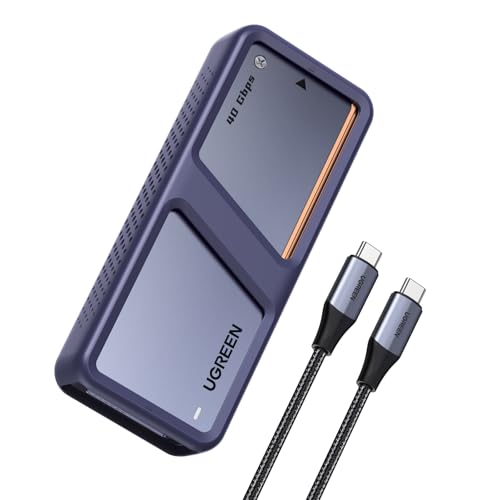
- Dual-chip 40G + 10G design
- Up to 3600MB/s on Thunderbolt 4
- Fan activates above 40°C
Best For: Fast external NVMe storage with strong cooling
All-in-One Mac Hub

- Two M.2 slots with NVMe/SATA support
- RAID 0/1/OM plus offline cloning
- 10-port hub with HDMI, Ethernet, and PD 60W
Best For: Creators who want dual storage and a full desktop dock
Compact Cooling Pick
UGREEN 40Gbps NVMe Enclosure with Fan

- Triple cooling with fan, pad, and aluminum body
- Supports 40Gbps USB4/Thunderbolt connections
- Fits 2230 to 2280 NVMe drives up to 4TB
Best For: Portable high-speed storage with active cooling
Premium Clone and RAID Pick
UGREEN 40Gbps Dual-Bay NVMe Cloner
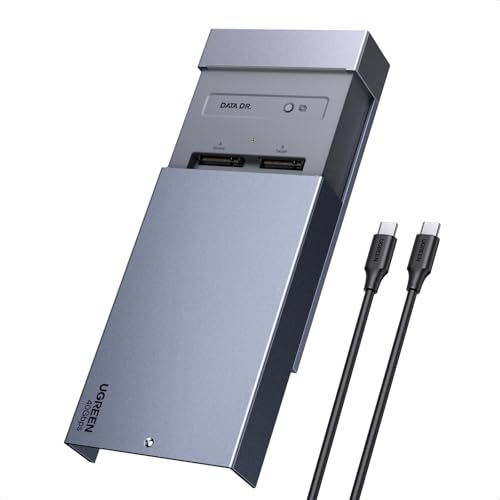
- 40Gbps USB-C support for fast transfers
- One-click offline cloning without a PC
- Software RAID 0/1/PM/Union modes
Best For: Mac users who need a fast dual NVMe enclosure with cloning and RAID
Most Flexible Drive-Type Pick
ORICO Dual NVMe and SATA Enclosure

- Separate bays for NVMe and M.2 SATA
- Tool-free setup with aluminum cooling
- Up to 10Gbps NVMe and 6Gbps SATA
Best For: Users who need one enclosure for both NVMe and M.2 SATA drives
Mac Studio dual-drive dock – Qwiizlab Mac mini Hub with Dual Drive Enclosure
If you want a Mac Studio dual SSD enclosure that also works as a desk dock, this Qwiizlab unit focuses on storage expansion and practical connectivity in one compact aluminum design. It supports M.2 PCIe SATA and NVMe SSDs plus 2.5-inch SATA drives, so it suits users who want flexible internal expansion alongside USB and card-reader access.
Best For: Mac Studio owners who want one compact hub with dual-drive expansion and useful front I/O.
Pros:
- Supports both M.2 NVMe/SATA SSDs and 2.5-inch SATA SSD/HDD options
- Includes multiple USB-A/USB-C ports plus SD and microSD card readers
- Fits several Mac Studio generations, including M1, M2, M3, and M4 models listed
- Low-profile aluminum build keeps the setup compact
Cons:
- It is a hub-style enclosure, so it is bulkier than a simple SSD case
- Performance details vary by drive type and port use
This is a strong all-in-one choice if your priority is combining Mac Studio storage expansion with everyday dock convenience. It is especially appealing when you want to add drives without sacrificing easy access to peripherals and card slots.
High-speed single NVMe enclosure – UGREEN 40Gbps M.2 NVMe Enclosure
If your goal is a Mac Studio dual SSD enclosure alternative for a single high-speed drive, this UGREEN enclosure is built for fast external NVMe storage rather than desk docking. It supports Thunderbolt 3/4 and USB4 with a claimed maximum of 3600MB/s, making it a straightforward option for moving large files quickly.
Best For: Users who want a compact, high-speed external NVMe enclosure for one drive.
Pros:
- Up to 3600MB/s with compatible Thunderbolt 4 or USB4 setups
- Aluminum body with double-sided fin heat dissipation
- Supports common M.2 NVMe sizes from 2230 to 2280
- Compatible with drives up to 8TB
Cons:
- Single-drive only, so it is not a dual-bay enclosure
- Does not support SATA NGFF or mSATA drives
- Max speed depends on compatible cables and devices
This is a better fit if you value speed and portability more than multi-drive expansion. For Mac Studio users, it works best as a fast external scratch or transfer drive when you do not need an integrated hub.
Dual NVMe speed enclosure – WAVLINK 20Gbps Dual NVMe Enclosure
For buyers searching for a Mac Studio dual SSD enclosure specifically for NVMe drives, this WAVLINK dual-bay model is built around capacity and transfer speed. It supports two PCIe NVMe SSDs, offers RAID 0, and uses active cooling to help maintain performance during longer transfers.
Best For: Mac Studio users who want dual NVMe storage with RAID 0 support and active cooling.
Pros:
- Dual-bay design supports two NVMe SSDs up to 8TB each
- RAID 0 support adds performance and combined capacity options
- Tool-free installation makes drive swaps easier
- Built-in fan and aluminum body help manage heat under load
Cons:
- NVMe-only design, so SATA SSDs are not supported
- Shares 20Gbps bandwidth between both drives when installed together
This is the most storage-focused option in the group if you want two fast NVMe drives in one enclosure. It makes sense for creators or power users who need a compact dual-drive setup with cooling and RAID flexibility.
Hub stand with SSD slot – Satechi Mac mini Hub & Stand with SSD Enclosure
If you are shopping for a Mac Studio dual SSD enclosure but also want a front-facing hub, this Satechi stand is aimed more at tidy desk integration than raw drive count. It supports one M.2 NVMe or SATA SSD and adds USB, card readers, and a 3.5mm audio jack in a compact aluminum design.
Best For: Mac mini M2/M1 users who want a neat hub stand with single-SSD expansion and extra ports.
Pros:
- Supports M.2 NVMe PCIe and NGFF SATA SSDs in 2242/2260/2280 sizes
- Includes USB-C, USB-A, microSD/SD, and 3.5mm audio jack
- Built-in airflow vents and aluminum finish help with cooling
- Comes with thermal pad, screw, screwdriver, and user manual
Cons:
- Single SSD only, so it is not a dual-drive enclosure
- Not compatible with Mac mini M4
- USB-A ports have device and charging limitations noted by the manufacturer
This is a smart choice if your priority is a clean desktop setup with useful front ports and one SSD slot. It is less about maximum storage expansion and more about matching the Mac mini and Mac Studio aesthetic while adding practical connectivity.
Premium 40Gbps Performance – UGREEN 40Gbps Dual-Chip NVMe Enclosure
If you want a Mac Studio dual SSD enclosure alternative that prioritizes speed and cooling, this UGREEN model is built for heavy external storage use. It uses a dual-chip design with a 40G JHL7440 chip and 10G RTL9210 chip, and it adds an aluminum body plus an auto-activating fan for better thermal control during demanding transfers.
Best For: Users who need fast 40Gbps external NVMe storage for large file work, backups, and macOS-compatible setups.
Pros:
- Supports up to 40Gbps performance, with claimed speeds up to 3600MB/s on Thunderbolt 4 hardware
- Dual-chip design is intended to reduce heat while maintaining high-speed transfer stability
- Smart cooling fan activates above 40°C for added thermal protection
- Supports up to 8TB M.2 NVMe drives and includes S.M.A.R.T. and TRIM support
Cons:
- Requires Thunderbolt 4 cables and devices to reach top speed
- Only supports M.2 NVMe M-Key or M&B Key 2280 drives
- Not compatible with SATA SSDs, PCIe 5.0 SSDs, or 9100 SSDs
For buyers focused on raw throughput and active cooling, this enclosure is a strong fit. It is more of a high-performance single-drive solution than a multi-bay dock, but it covers the essentials well for fast external storage on Mac systems.
All-in-One Mac Hub – ORICO MiniRaid Dual-Bay Dock
For a Mac Studio dual SSD enclosure style setup that also replaces a desk hub, the ORICO MiniRaid combines dual M.2 storage with a broad set of ports. It supports two independent M.2 slots for NVMe or SATA drives, hardware RAID modes, offline cloning, and a full dock layout for video, networking, cards, and peripherals.
Best For: Mac users who want dual-drive expansion plus docking features in one compact desktop accessory.
Pros:
- Two M.2 slots support NVMe and SATA drives up to 8TB each
- Hardware RAID 0/1/OM modes plus offline cloning add flexibility for speed or backup
- Includes HDMI 4K@60Hz, USB-A, USB-C, Ethernet, SD/TF, audio, and PD 60W charging
- Full aluminum shell and temperature-controlled fan support long-term stability
Cons:
- When mixing different drive protocols, only the drive in Slot 1 is recognized
- Designed as a dock, so it takes more desk space than a simple enclosure
- Power and feature set are more complex than a basic SSD enclosure
This is the most versatile option in the group if you want storage expansion and connectivity in one unit. It makes sense for creators and Mac desktop users who want fewer cables and more front-line functionality.
Compact Cooling Pick – UGREEN 40Gbps NVMe Enclosure with Fan
If your goal is a Mac Studio dual SSD enclosure-style external drive setup, this UGREEN enclosure is a compact single-bay choice with a strong focus on cooling. It uses a pure aluminum shell, silicone thermal pad, and PWM turbo fan to help stabilize NVMe performance during sustained use, while the USB4-compatible interface supports modern high-speed connections.
Best For: Mac, Windows, and Linux users who want a portable high-speed NVMe enclosure with active cooling.
Pros:
- Built-in fan, aluminum body, and thermal pad form a triple heat-dissipation system
- Supports USB4 and Thunderbolt 3/4 connections with claimed up to 40Gbps capability
- Compatible with 2230/2242/2260/2280 NVMe drives up to 4TB
- Includes S.M.A.R.T. monitoring, TRIM support, and a silicone protective case
Cons:
- Supports only one SSD, so it is not a true dual-bay enclosure
- Does not support SSDs with heatsinks
- Not compatible with PCIe 5.0 SSDs
For buyers who care most about thermals and portability, this is an easy enclosure to recommend. It is not the most expandable option here, but it offers a practical balance of speed, cooling, and compatibility for everyday external storage.
Premium Clone and RAID Pick – UGREEN 40Gbps Dual-Bay NVMe Cloner
If you want a Mac Studio dual SSD enclosure that does more than just hold drives, this UGREEN model stands out with 40Gbps transfer support, offline cloning, and software RAID options. It is built for MacBook M4/Pro/Max and Mac mini users who want a fast dual-bay NVMe setup for cloning, storage expansion, or flexible file handling.
Best For: Mac users who need a fast dual NVMe enclosure with one-click cloning and RAID support.
Pros:
- One-click offline cloning works without a PC, which is useful for quick drive duplication.
- Supports Software RAID 0, 1, PM, and Union modes for more flexible storage setups.
- 40Gbps USB-C performance is aimed at high-speed transfers on compatible devices.
- Aluminum shell plus 40mm cooling fan help manage heat during longer workloads.
Cons:
- Target disk must be larger than the source data disk for cloning.
- Uses active cooling, so it may not be the quietest option for ultra-minimal setups.
This is the strongest fit if your priority is a dual-bay NVMe enclosure that combines speed, cloning convenience, and RAID features in one tool. For Mac Studio owners who regularly move large projects or duplicate drives, it offers more functionality than a basic enclosure.
Straightforward Dual-NVMe Option – ORICO Dual M.2 NVMe SSD Enclosure
For buyers looking for a straightforward Mac Studio dual SSD enclosure, this ORICO option keeps the focus on dual NVMe support, tool-free installation, and 10Gbps USB-C connectivity. It is a practical pick when you want to read two NVMe drives independently without adding extra complexity or a power adapter.
Best For: Users who want an easy dual-NVMe enclosure for everyday storage work.
Pros:
- Two independent NVMe bays let you run one SSD or read both with separate cables.
- Tool-free setup makes drive installation quick and simple.
- Aluminum body with heat sinks and thermal pads helps with heat dissipation.
- Supports UASP and Trim for more stable NVMe performance.
Cons:
- Limited to NVMe M-Key SSDs only, so SATA drives are not supported.
- 10Gbps is slower than higher-end enclosures built for maximum throughput.
This enclosure makes sense if you want a clean, easy dual-drive solution for a Mac Studio setup and do not need cloning or RAID features. It is best treated as a reliable, no-frills expansion tool for general storage access.
Most Flexible Drive-Type Pick – ORICO Dual NVMe and SATA Enclosure
If your Mac Studio dual SSD enclosure needs to handle different drive types, this ORICO model is the most flexible of the group. It includes separate bays for NVMe and SATA M.2 drives, with clear protocol labeling and tool-free installation for users who want a simple way to access mixed SSD inventories.
Best For: Users who need one enclosure for both NVMe and M.2 SATA drives.
Pros:
- Supports both NVMe and M.2 SATA drives in separate bays.
- Tool-free, plug-and-play design keeps setup fast and simple.
- Aluminum construction, heat sinks, and thermal pads support cooling.
- USB 3.2 Gen2 Type-C interface offers up to 10Gbps for NVMe and 6Gbps for SATA.
Cons:
- Bays are protocol-specific, so the wrong drive type can cause problems.
- Transfer speed depends on which bay the SSD is installed in.
This is the best fit if your workflow includes both NVMe and SATA M.2 drives and you want one enclosure to cover both. Just be careful with installation, since the bays are not interchangeable and each supports only its intended protocol.
How We Picked the Best Mac Studio Dual SSD Enclosure
We looked for models that make sense for Mac users who want reliable external expansion rather than a generic storage box. Priority went to USB4 and Thunderbolt-ready options, dual-bay designs, solid thermal management, and support for common NVMe sizes. We also considered whether the enclosure is easy to install, whether it supports RAID or cloning, and how well it fits a desk setup around a Mac Studio.
Quick Comparison: What Matters Most
Not every Mac Studio Dual SSD Enclosure is built for the same job. Some are best for maximum transfer speed, while others focus on flexible storage modes, hub functionality, or compact desktop organization. If you need a simple high-speed scratch disk, look for 40Gbps-class connectivity and strong cooling. If you want two-drive redundancy or combined capacity, choose a dual-bay model with RAID support.
Key Buying Factors for a Mac Studio Dual SSD Enclosure
Connection Speed
For best results, match the enclosure to your Mac’s fastest supported port. USB4 and Thunderbolt 3/4 enclosures can deliver noticeably better real-world performance than standard USB-C 10Gbps models, especially with large media files or active project work.
Thermal Design
High-speed NVMe drives generate heat, and dual-bay setups can get warm quickly. Look for aluminum housings, heat sinks, thermal pads, or active cooling if you plan to move big files often or run sustained workloads.
Drive Support
Check whether the enclosure supports only NVMe, or both NVMe and SATA. Also confirm SSD length compatibility, such as 2230 through 2280, since not every dual-bay unit supports every size.
RAID, Cloning, and Flexibility
A Mac Studio Dual SSD Enclosure with RAID 0 can increase performance, while RAID 1 adds redundancy. Some models also include cloning or software RAID support, which is useful if you want a mirrored backup or easier migration between drives.
Who Should Buy Which Mac Studio Dual SSD Enclosure?
If you want the fastest possible external storage for editing, production, or scratch use, choose a 40Gbps or Thunderbolt-capable dual enclosure with strong cooling. If you prefer a desk-friendly dock that adds ports as well as storage, a hub-style model may be the better fit.
If your goal is backup and safety, prioritize RAID 1 support or a cloning-friendly enclosure. If you are mostly expanding everyday project storage, a simple tool-free dual-bay enclosure may be all you need. The best choice is the one that matches your speed needs, your drive type, and how you actually work on your Mac Studio.