Looking for a cleaner way to mount your Mac Studio? The right Mac Studio VESA mount can free up desk space, improve cable management, and make your workstation feel more organized.
Below, we focus on the most practical options for under-desk, wall, and VESA arm setups so you can choose the mount style that fits your workspace and your Mac Studio model.
Best 10 Mac Studio VESA Mount Picks for 2026
Heat-Forward Wall & Under-Desk Choice
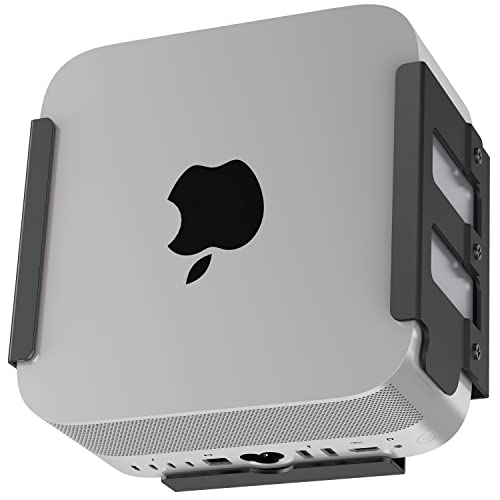
- Ventilation-focused aluminum design
- Wall, under-desk, or monitor-back mounting
- Silicone lining helps prevent scratches
Best For: Users who want a secure, space-saving mount with airflow in mind
Studio Display VESA Converter
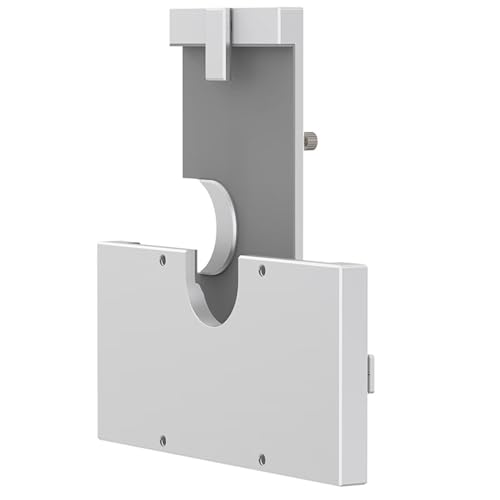
- Adds VESA support to 27-inch Studio Display
- All-aluminum alloy with silicone protection
- Works with standard 75x75mm mounts
Best For: Studio Display owners needing a protective VESA adapter
Space-Saving Under-Desk Pick

- Under-desk mount saves desktop space
- 2mm steel with foam padding
- Open design helps avoid overheating
Best For: Users who want a secure under-desk holder for Mac Studio
Tool-Free Studio Display Adapter
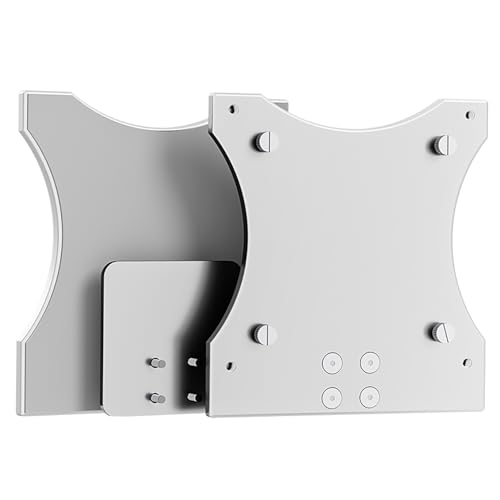
- Tool-free install with thumb screws
- Keeps original stand attached
- Silicone cover helps prevent scratches
Best For: Studio Display users who want a quick, no-tools adapter
Oeveo Mount
Mac Studio VESA mount for under-desk or wall use

- Includes mounting hardware
- 100 mm x 100 mm VESA pattern
- Made in the USA
Best For: People who want a straightforward Mac Studio mount for desk or wall placement
Apple Display Pick
Studio Display with optional VESA mounting

- 27-inch 5K Retina panel
- VESA mount adapter option
- Center Stage camera and spatial audio
Best For: Users building a premium Mac setup with a mountable display
Compulocks Security Mount
Locking Mac Studio VESA mount with cable management

- Keyed lock for added security
- 100 mm and 75 mm VESA patterns
- Ventilated aluminum construction
Best For: Shared workspaces or home offices that need theft protection
Made in USA VESA Mount

- Includes all required mounting hardware
- 100 mm x 100 mm VESA pattern adds flexibility
- Designed to reduce clutter and support airflow
Best For: A white, U.S.-made mount for flexible Mac Studio placement
Flexible Steel Mount
Mac Studio Under Desk and Wall Bracket

- Three mounting options: under desk, monitor, or wall
- High-strength steel with rust-resistant finish
- Includes foam pads, cable ties, screws, and manual
Best For: A versatile black mount for organized Mac Studio setups
Black VESA Desk Mount
Oeveo Mac Studio Computer Mount

- Includes all required mounting hardware
- 100 mm x 100 mm VESA pattern adapts to different setups
- Designed to hold the Mac Studio securely and reduce clutter
Best For: A black, U.S.-made mount for an organized Mac Studio workspace
Heat-Forward Wall & Under-Desk Choice – IFCASE Mac Studio Mount
If you want a Mac Studio VESA mount that focuses on airflow as much as desk space, this IFCASE model is built around both. The aluminum wrap design and open heat dissipation structure are meant to keep ventilation moving while giving you a tidy wall, under-desk, or monitor-back setup.
Best For: Users who want a sturdy, scratch-protected mount with ventilation-friendly design and flexible placement.
Pros:
- Heat dissipation structure helps improve air ventilation around the Mac Studio.
- Can be mounted on a wall, under a desk, or on the back of a monitor.
- Silicone anti-scratch inner pad helps protect the device and reduce slipping.
- Hard aluminum construction is designed to resist rust and accidental damage.
Cons:
- Installed with included screws, so it is not a tool-free option.
- Requires an under-desk surface at least 3/4″ thick for installation.
This is a practical pick if your priority is both organization and cooling support. It is especially appealing for users who want a durable Mac Studio VESA mount that stays secure while keeping the setup neat.
Studio Display VESA Converter – HEHELISAIL 27-inch VESA Kit
If your goal is to add VESA support to a 27-inch Apple Studio Display, this adapter is a straightforward compatibility piece rather than a Mac Studio VESA mount. It is designed for displays without VESA holes and connects to standard 75x75mm VESA stands or wall brackets using the included hardware.
Best For: Studio Display owners who need a converter for standard 75x75mm VESA mounting.
Pros:
- Designed specifically for 27-inch audio displays without VESA holes.
- Compatible with standard 75x75mm VESA mounts.
- All-aluminum alloy construction is intended to resist deformation.
- Silicone cover helps protect the display from scratches.
Cons:
- Built for the Apple Studio Display, not for mounting a Mac Studio itself.
- Compatibility is limited to a 27-inch display size.
This kit makes sense when you need a mounting bridge for the Studio Display rather than a computer enclosure. The included hardware and protective cover make it a practical, fixed-position option for a clean monitor-arm or wall setup.
Space-Saving Under-Desk Pick – bylitco Mac Studio Mount
For buyers looking for a true Mac Studio VESA mount alternative that tucks the machine out of the way, this under-desk bracket is built to save space and reduce clutter. The steel plate construction, foam padding, and open design are aimed at keeping the device secure, scratch-free, and able to breathe.
Best For: Anyone who wants an under-desk Mac Studio holder with padded protection and a simple minimalist look.
Pros:
- Under-desk installation frees up desk space and helps keep the unit dust-free.
- Foam padding helps prevent scratches and accidental drops.
- 2mm steel plate construction is designed for durability and strength.
- Open layout avoids blocking air outlets and supports heat dissipation.
Cons:
- Made specifically for under-desk mounting, so it is less flexible than multi-position mounts.
- Not a VESA plate solution for monitors or display arms.
This is a solid fit if your main goal is to clear desktop space without sacrificing protection. It offers a simple, sturdy mounting approach for Mac Studio owners who prefer a hidden, organized setup.
Tool-Free Studio Display Adapter – LeapMars VESA Mount Plate
This option is for users who need a VESA mounting solution for the 27-inch Apple Studio Display, not a Mac Studio VESA mount for the computer itself. The adapter is designed to install without removing the original stand, using hand-tightened thumb screws and a standard 75x100mm VESA mounting plate.
Best For: Studio Display owners who want a tool-free adapter that keeps the original stand in place.
Pros:
- Tool-free installation with hand-tightened thumb screws.
- No need to remove the original stand during setup.
- Premium aluminum alloy build with a sandblasted finish.
- Silicone cover and non-slip screws help protect the display.
Cons:
- Designed for the Apple Studio Display, so it is not for Mac Studio towers.
- Uses a 75x100mm VESA plate, which may limit mount compatibility to supported hardware.
For display owners, this is a convenience-focused adapter that aims to make mounting fast and clean. Its protection-first design and no-tools setup are the main reasons to consider it.
Oeveo Mount – Mac Studio VESA mount for under-desk or wall use
If you want a Mac Studio VESA mount that helps clear desk space while keeping the computer accessible, this Oeveo bracket is built for that job. It includes the required mounting hardware, supports under-desk use, and adds a 100 mm x 100 mm VESA pattern for broader placement options.
Best For: Users who want a simple under-desk or wall-friendly mount made in the USA.
Pros:
- Includes all required mounting hardware for installation.
- 100 mm x 100 mm VESA hole pattern adds versatility.
- Designed to safely hold Mac Studio while helping with cooling and clutter.
- Made in the USA.
Cons:
- Primarily designed for mounting rather than added security.
- Single silver finish may not match every setup.
This is a practical choice if you want a purpose-built Mac Studio mount that emphasizes easy installation and flexible placement. It focuses on secure support and workspace organization rather than extra features.
Apple Display Pick – Studio Display with optional VESA mounting
If your goal is a Mac Studio VESA mount-style setup for the display side of the workstation, this Studio Display configuration gives you Apple’s 27-inch 5K panel with a VESA mount adapter option. It is aimed at users who want a premium display that pairs naturally with Mac hardware and can be mounted instead of using the built-in stand.
Best For: Buyers who want an Apple Studio Display with a VESA mount adapter option for a clean desk setup.
Pros:
- 27-inch 5K Retina display with 14.7 million pixels.
- Includes a VESA mount adapter option.
- 12MP Center Stage camera, studio-quality mics, and six-speaker sound.
- Two Thunderbolt 5 ports plus two USB-C ports.
Cons:
- VESA mount adapter is sold separately from the base display configuration.
- More of a premium monitor purchase than a Mac Studio enclosure or holder.
This is a strong fit if you need a high-end display to complement a Mac Studio and want the flexibility of VESA mounting. It stands out for its image quality, camera, and audio features more than budget value.
Compulocks Security Mount – Locking Mac Studio VESA mount with cable management
Compulocks Mac Studio Security Mount Black | Secure aluminum tablet wall mount by Compulocks
Check Price On AmazonFor a Mac Studio VESA mount that adds security as well as organization, this Compulocks bracket is built around a locking design. It can be attached to a counter or wall, includes cable management, and uses ventilated aluminum construction to support a tidy workspace.
Best For: Offices or home setups that need a locking Mac Studio mount with cable management.
Pros:
- Keyed lock adds anti-theft protection.
- Supports 100 mm x 100 mm and 75 mm x 75 mm VESA patterns.
- Ventilated aluminum design helps airflow.
- Built-in cable management keeps the setup cleaner.
Cons:
- Bulkier than a basic holder due to the security hardware.
- Less focused on simple minimal mounting than on protection.
This mount makes sense if security is a priority and you want more than just a simple bracket. It combines mounting flexibility with protection and cable control, which is useful in shared or public-facing spaces.
Made in USA VESA Mount – White Oeveo Mac Studio Mount
If you want a Mac Studio VESA mount that can work under a desk, on the wall, or with a 100 mm x 100 mm VESA pattern, this Oeveo model is built for that kind of flexibility. It is designed for the Mac Studio, includes the required hardware, and aims to keep the computer secured while improving airflow and reducing clutter.
Best For: Users who want a white, U.S.-made Mac Studio mount with flexible VESA and under-desk use.
Pros:
- Includes all required mounting hardware for installation.
- 100 mm x 100 mm VESA hole pattern adds mounting flexibility.
- Designed to safely hold the Mac Studio while helping reduce desk clutter.
- Made in the USA with a white finish that suits clean setups.
Cons:
- Only listed as compatible with Mac Studio generations such as M2 Ultra, M2 Max, M1 Max, and M1 Ultra.
- Wall-mount type may not suit every workspace layout.
This is a practical choice if you want a straightforward mount that focuses on secure placement, cooling-friendly open use, and adaptable installation options. The white finish is also a good fit for lighter desks and office spaces.
Flexible Steel Mount – Mac Studio Under Desk and Wall Bracket
This Mac Studio VESA mount is built for users who want more than one installation option. It supports under-desk, behind-monitor, and wall placement, and the open structure is meant to make docking, removal, and heat dissipation easier. The included cable ties and screws make it a practical workspace organizer.
Best For: Buyers who want a black steel mount with multiple placement options and cable management.
Pros:
- Supports under-desk, behind-monitor, and wall mounting.
- Made from high-strength steel with a rust-resistant finish.
- Anti-scratch foam pads help protect the Mac Studio during use.
- Includes cable ties, screws, and a manual for quick installation.
Cons:
- Compatibility is limited to listed Mac Studio models only.
- Black finish may not match every workspace aesthetic.
Overall, this is a strong pick if you want a versatile bracket that helps free up desk space without giving up a secure, tidy setup. Its open design and included accessories make it especially appealing for practical home or studio workstations.
Black VESA Desk Mount – Oeveo Mac Studio Computer Mount
For buyers looking for a Mac Studio VESA mount with a darker finish, this Oeveo model is designed for under-desk use and can adapt to different applications thanks to its 100 mm x 100 mm VESA pattern. It includes the required mounting hardware and is intended to hold the Mac Studio securely while helping reduce clutter and supporting better cooling.
Best For: Users who want a black, American-made Mac Studio mount for a tidy under-desk or VESA setup.
Pros:
- Includes all required mounting hardware.
- 100 mm x 100 mm VESA pattern supports flexible installation.
- Designed to help declutter the workspace and promote better cooling.
- Made in the USA with a black painted finish.
Cons:
- Compatibility is limited to listed Mac Studio generations.
- Primarily described as an under-desk mount, so it may not fit every use case equally well.
This model is a sensible option if you want the same practical Oeveo approach in a black finish. It keeps the focus on secure mounting, simple installation, and a cleaner desk layout.
How We Picked These Mac Studio VESA Mount Options
We looked for mounts that matched real buyer needs: compatibility with multiple Mac Studio generations, secure fit, dependable materials, and mounting styles that make sense for home offices, studios, and professional workspaces. We also favored designs with protective padding, ventilation-friendly layouts, and clear VESA support.
Quick Comparison
In this roundup, you will see a mix of under-desk brackets, wall-ready mounts, adapter plates, and security-focused holders. Some products are designed specifically for the Mac Studio itself, while others are meant for pairing Apple hardware with a VESA monitor arm or display setup.
Key Buying Factors for a Mac Studio VESA Mount
Compatibility
Start by confirming support for your exact Mac Studio generation, especially if you own M1, M2, M3, or M4 variants. Some mounts fit multiple versions, while others are sized more precisely.
Mounting Location
Decide whether you want an under-desk mount, wall mount, or an adapter for a VESA arm. Under-desk solutions are great for saving surface space, while wall mounts can improve accessibility and airflow in tight setups.
Protection and Ventilation
Because the Mac Studio is a compact desktop computer with active cooling, look for designs that do not block vents and that use padding, silicone, or smooth aluminum contact points to reduce scratches.
Security and Convenience
If your setup is shared, public-facing, or frequently moved, a locking or more enclosed mount may be worth it. For private desks, a simpler bracket may be easier to install and reposition.
Build Quality
Metal construction usually offers the best long-term stability for a Mac Studio VESA Mount, especially if the unit will be attached under a desk or used in a permanent workstation build.
Who Should Buy Which Mac Studio VESA Mount?
If you want the cleanest desk setup, choose an under-desk holder or wall case. If you need more security, a locking mount is the better fit. If you are building around a Studio Display or VESA arm, an adapter-style product may be the most practical choice. For most buyers, the best option is the one that balances fit, airflow, and the exact mounting style your workspace already supports.