If you shoot high-resolution photos or 4K/8K video, the right reader can save a surprising amount of time. A good memory card reader with UHS II support helps you move large files quickly without bottlenecks.
Below, we focus on speed, compatibility, port type, and real-world usability so you can pick the best option for your workflow.
Best 10 Memory Card Reader with Uhs Ii Support Picks for 2026
Best Budget 2-in-1 Pick
BENFEI SD 4.0 Card Reader, USB-C/USB-A 2-in-1

- UHS-II SD slot up to 312 MB/s
- USB-C and USB-A 2-in-1 cable
- Dual SD and microSD slots
Best For: Budget-conscious users with mixed USB-C and USB-A devices
Fast Dual-Slot Minimalist
SABRENT USB-C Card Reader, Dual-Slot UHS-II

- UHS-II SD and microSD support
- Built-in 6-inch USB-C cable
- Plug-and-play, bus-powered design
Best For: USB-C users who want a compact, fast dual-slot reader
Most Versatile Phone-and-PC Option
UGREEN USB C SD 4.0 Card Reader

- USB-A and USB-C 2-in-1 design
- UHS-II speeds up to 312 MB/s
- Supports SD and microSD cards up to 2TB
Best For: People switching between computers, tablets, and OTG phones
Best Premium Creator Pick
uni USB-C SD 4.0 Card Reader, UHS-II SD Adapter

- UHS-II SD support up to 312 MB/s
- Compact aluminum body with 15 cm cable
- Dual slots for SD and microSD
Best For: Photographers and creators who want a sleek USB-C travel reader
ProGrade Dual-Slot Performance
ProGrade Digital SD UHS-II Dual-Slot Card Reader USB 3.2
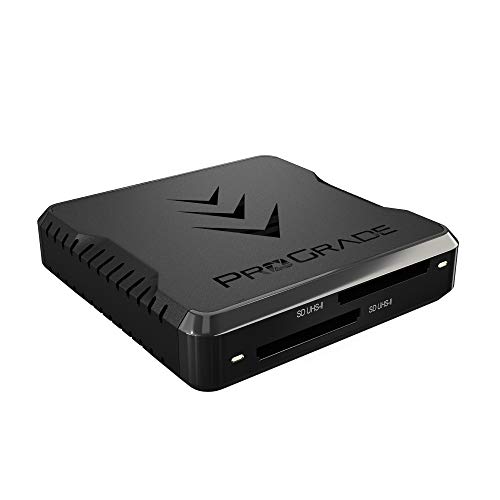
- Up to 1.25GB/s transfer speed
- Dual SD UHS-II slots with simultaneous use
- Magnetic plate and 2-year warranty
Best For: Creators who need fast dual-slot SD transfers and a rugged reader for mobile work.
UGREEN Mobile UHS-II Reader
UGREEN USB C SD 4.0 Card Reader

- Supports SD 4.0 UHS-II up to 312MB/s
- Reads SD and microSD cards together
- USB-C plug-and-play with durable build
Best For: Users who want a compact USB-C reader for UHS-II SD and microSD cards on many devices.
Internal Bay Workhorse
StarTech Internal Card Reader USB 3.0 UHS-II 3.5in Bay
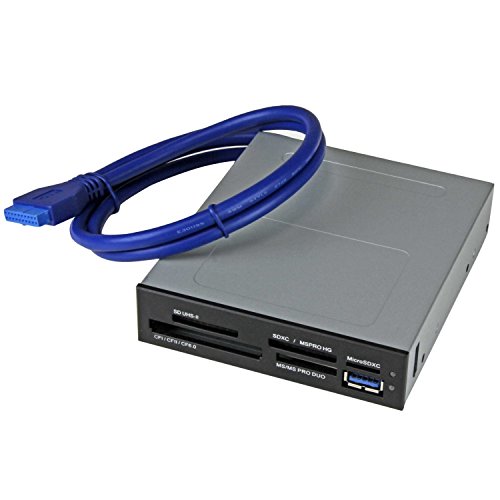
- 3.5-inch internal bay installation
- Supports SD, microSD, CF, Memory Stick, and xD
- Four-slot simultaneous access for multiple cards
Best For: Desktop users who want a front-bay internal multi-card reader for frequent file transfers.
Compact USB-C everyday pick
Lexar Dual-Slot SD/Micro SD Card Reader
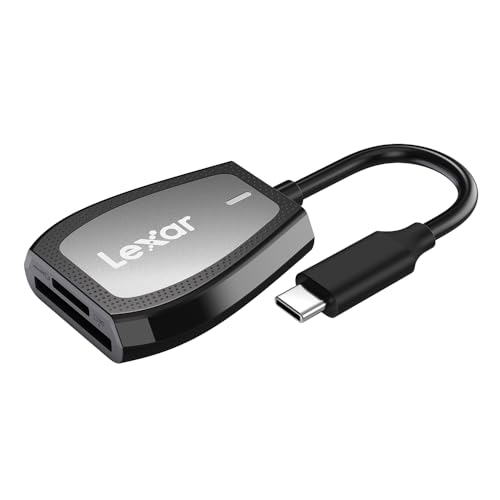
- Up to 312MB/s read speed
- Dual SD and microSD slots
- Backwards compatible with UHS-I cards
Best For: USB-C users who need a compact dual-slot reader
Fast dual-slot UHS-II option
WISYIFIL USB C SD 4.0 Card Reader
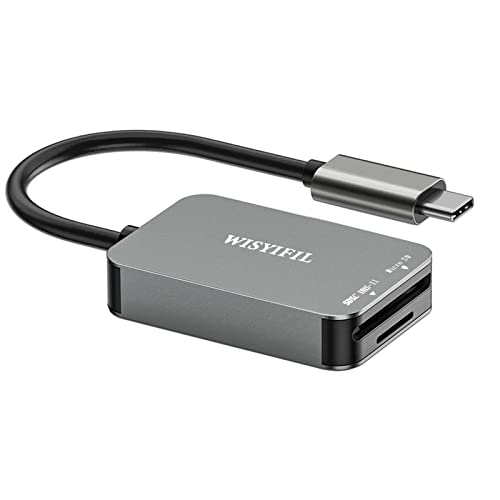
- UHS-II support up to 312MB/s
- Dual SD and microSD slots
- Aluminum body with plug-and-transfer use
Best For: Photographers who want a simple fast USB-C card reader
Pocket-size creator pick
UANTIN USB C SD Card Reader 4.0

- Up to 312MB/s with UHS-II support
- Reads SD and microSD at the same time
- Pocket-size aluminum design
Best For: Creators who need a compact fast reader for travel
Best Budget 2-in-1 Pick – BENFEI SD 4.0 Card Reader, USB-C/USB-A 2-in-1
If you want a memory card reader with uhs ii support that can work across older and newer ports, this BENFEI model keeps things simple. It combines SD and microSD slots with a USB-C/USB-A 2-in-1 cable design, so it fits well into mixed-device setups without needing extra adapters.
Best For: Users who need an affordable dual-slot reader that works with both USB-C and USB-A computers.
Pros:
- UHS-II SD slot supports transfer speeds up to 312 MB/s
- USB-C and USB-A 2-in-1 design broadens compatibility
- Dual slots handle SD and microSD cards
- Braided nylon cable and aluminum casing add durability
Cons:
- Top speed depends on the card and the USB port used
- MicroSD performance is tied to the connected system
This is a practical pick if flexibility matters more than premium extras. The hardware is built for everyday reliability, and the included 18-month warranty adds some peace of mind for routine photo and file transfers.
Fast Dual-Slot Minimalist – SABRENT USB-C Card Reader, Dual-Slot UHS-II
This memory card reader with uhs ii support is aimed at users who want fast transfers without extra setup. SABRENT pairs UHS-II SD and microSD support with a built-in USB-C cable and plug-and-play operation, making it a clean fit for modern laptops and desktops.
Best For: Users who want a compact USB-C reader with fast dual-slot performance and no driver hassle.
Pros:
- UHS-II SDXC and microSDXC support up to 312 MB/s
- Integrated 6-inch USB 3.2 Gen1 Type-C cable
- Plug-and-play with no drivers required
- LED power indicator and bus-powered operation
Cons:
- USB-C only, so it is less flexible for older USB-A systems
- Best performance still depends on card speed and host connection
If you mainly use USB-C gear, this is a straightforward reader that prioritizes speed and convenience. Its compact build and dual-slot layout make it a good everyday tool for quick card dumps and simultaneous transfers.
Most Versatile Phone-and-PC Option – UGREEN USB C SD 4.0 Card Reader
If you need a memory card reader with uhs ii support that can move between computers and mobile devices, this UGREEN model is built for that job. It uses USB-A and USB-C connectivity, supports a wide range of SD and microSD formats, and is rated for up to 312 MB/s with UHS-II cards.
Best For: People who want one reader for laptops, desktops, tablets, and OTG-capable phones.
Pros:
- USB-A and USB-C 2-in-1 design improves compatibility
- UHS-II support can reach up to 312 MB/s
- Two slots support SD and microSD cards up to 2TB
- Compact, plug-and-play design with eject mechanism
Cons:
- Maximum speed depends on the card and connected device
- Some of the listed mobile compatibility depends on OTG support
This is a strong pick if you jump between a PC and a phone or tablet and want one compact adapter for both. The broad compatibility and simple design make it easy to keep in a bag for everyday file transfers.
Best Premium Creator Pick – uni USB-C SD 4.0 Card Reader, UHS-II SD Adapter
For creators shopping for a memory card reader with uhs ii support, the uni model focuses on speed, portability, and a polished build. It offers UHS-II transfer speeds up to 312 MB/s, dual card slots, and a compact aluminum body with a short cable for easy travel.
Best For: Photographers, videographers, and content creators who want a compact USB-C reader for fast card dumps.
Pros:
- UHS-II SD slot supports up to 312 MB/s
- Dual slots work with SD and microSD cards
- Compact anodized aluminum design with a 15 cm cable
- Plug-and-play operation with broad USB-C device support
Cons:
- Not compatible with iPhone or iPad Lightning ports
- USB-C only, so it is not the best fit for USB-A-only setups
This reader stands out if you want a travel-friendly tool that still feels refined on a desk. The combination of fast UHS-II support, dual slots, and strong device compatibility makes it a practical choice for modern content workflows.
ProGrade Dual-Slot Performance – ProGrade Digital SD UHS-II Dual-Slot Card Reader USB 3.2
If you want a memory card reader with uhs ii support that’s built for fast photo and video offloads, the ProGrade Digital PG08 is a strong pick. Its dual SD UHS-II slots and USB 3.2 Gen 2 connection are aimed at reducing wait time in busy post-production workflows.
Best For: Creators who need fast dual-slot SD transfers and a rugged reader for mobile work.
Pros:
- Transfers up to 1.25GB/s and supports simultaneous use of both cards.
- Dual SD UHS-II slots are made for efficient file transfers and post-production workflows.
- Includes a magnetic mounting plate for a compact mobile workstation setup.
- Backed by a 2-year warranty and built for demanding use.
Cons:
- Designed for SD cards, so it is not a universal multi-format reader.
- Best speeds depend on compatible UHS-II cards and USB 3.2 Gen 2.
Overall, this is the most workflow-focused option in the group if speed and dual-card convenience matter more than broad media support. It’s a practical fit for photographers and videographers who want dependable performance on the go.
UGREEN Mobile UHS-II Reader – UGREEN USB C SD 4.0 Card Reader
This memory card reader with uhs ii support is a versatile pick if you move data between SD and microSD cards across phones, tablets, laptops, and more. The UGREEN USB C reader supports SD 4.0 UHS-II speeds and can read and write two cards at once, which helps streamline quick transfers.
Best For: Users who want a compact USB-C reader for UHS-II SD and microSD cards on many devices.
Pros:
- Supports SD 4.0 UHS-II cards with speeds up to 312MB/s.
- Two-in-one design reads both SD and microSD cards, including simultaneous transfer.
- USB-C plug-and-play setup works with many devices, including laptops and phones.
- Aluminum alloy case and braided cable add durability.
Cons:
- Speed benefits depend on using compatible UHS-II cards and a supported device.
- Android use requires OTG support.
For everyday creators who need flexibility more than a desktop-style dock, this reader covers the bases well. Its combination of UHS-II support, dual-format compatibility, and broad device support makes it a practical travel companion.
Internal Bay Workhorse – StarTech Internal Card Reader USB 3.0 UHS-II 3.5in Bay
If you prefer a built-in memory card reader with uhs ii support for a desktop tower, the StarTech 3.5-inch bay model is a straightforward install-and-forget option. It connects internally to a 20-pin motherboard header and gives you access to multiple common card formats from the front of a PC.
Best For: Desktop users who want a front-bay internal multi-card reader for frequent file transfers.
Pros:
- Fits a 3.5-inch drive bay and connects to a 20-pin motherboard header.
- Supports multiple card formats, including SD, microSD, CompactFlash, Memory Stick, and xD.
- Can access four different card slots simultaneously, excluding same-type media.
- OS independent and backed by a 2-year warranty with lifetime support.
Cons:
- Requires an internal desktop installation rather than a portable plug-in setup.
- Only suitable for PCs with an available 3.5-inch bay and compatible header.
This is the right choice if you want convenience at the front of a desktop and don’t need a portable reader. It’s especially useful when you regularly juggle several card types in a studio or editing workstation.
Compact USB-C everyday pick – Lexar Dual-Slot SD/Micro SD Card Reader
If you need a memory card reader with uhs ii support for a USB-C laptop, the Lexar Dual-Slot reader is built for fast transfers from SD and microSD media while staying simple to use. It reaches up to 312MB/s, includes dual slots, and still works with UHS-I cards if your workflow mixes newer and older media.
Best For: USB-C users who want a compact, dual-slot reader with strong backwards compatibility.
Pros:
- Up to 312MB/s read speed for fast offloads
- Dual SD and microSD slots in a compact body
- USB-C connection with LED activity light
- Backwards compatible with SD and microSD UHS-I cards
Cons:
- MicroSD performance is limited to UHS-I backward compatibility
- Designed for USB-C systems, so it is less convenient for USB-A-only setups
This is a practical pick if you mainly need a reliable USB-C reader for everyday card transfers and want straightforward compatibility across SD and microSD formats. It keeps the feature set focused, which makes it easy to carry and easy to trust.
Fast dual-slot UHS-II option – WISYIFIL USB C SD 4.0 Card Reader
If you are shopping for a memory card reader with uhs ii support, this WISYIFIL model is aimed at users who want the full speed benefit from compatible SD cards. It supports UHS-II transfers up to 312MB/s, includes SD and microSD slots, and is designed for plug-and-transfer use with USB-C devices.
Best For: Photographers and heavy card users who want a simple USB-C UHS-II reader with dual slots.
Pros:
- Supports UHS-II cards up to 312MB/s
- Dual SD and microSD card slots
- Aluminum housing for heat dissipation
- Plug-and-transfer design with no driver needed
Cons:
- MicroSD slot is limited to UHS-I speed
- USB-C only, so USB-A users need an adapter
This reader makes sense when your priority is fast SD-card transfer in a compact USB-C form factor. The feature set is straightforward, with broad device support and enough versatility for mixed SD and microSD workflows.
Pocket-size creator pick – UANTIN USB C SD Card Reader 4.0
For buyers focused on a memory card reader with uhs ii support, the UANTIN USB C SD Card Reader 4.0 adds fast 312MB/s performance in a very small package. It supports SD and microSD slots at the same time, works with UHS-II and UHS-I cards, and is built for creators who move RAW photos and 4K video between devices.
Best For: Creators who want a pocket-size USB-C reader with UHS-II support and broad device compatibility.
Pros:
- Up to 312MB/s read and write speeds
- Dual SD and microSD slots with simultaneous use
- Compact, lightweight aluminum shell
- Supports UHS-II, UHS-I, and plug-and-play operation
Cons:
- USB-C only, so it is not directly compatible with USB-A ports
- Focuses on card transfer rather than extra hub features
This is the most travel-friendly option in the group if you want fast transfers without carrying a bulky accessory. Its strength is combining speed, portability, and broad device support in a reader that is easy to keep in a bag or pocket.
How We Picked the Best Memory Card Reader with Uhs Ii Support
We prioritized UHS-II performance, broad SD and microSD support, USB-C convenience, and trustworthy build quality. We also looked for readers that fit common use cases, from compact travel setups to desktop editing stations. Where a model supports both SD and microSD, that flexibility mattered too.
Quick Comparison
If you want the fastest workflow, choose a reader that clearly supports UHS-II and matches your computer’s port speed. USB 3.2 and USB-C models are often the best all-around picks for modern laptops and desktops. If you work with both SD and microSD cards, dual-slot designs reduce the need for extra adapters.
Key Buying Factors for a Memory Card Reader with Uhs Ii Support
Card Format Support
Make sure the reader supports the cards you actually use. Many photographers need full-size SD, while drone pilots, action-camera users, and mobile creators may also need microSD.
Host Connection and Speed
A Memory Card Reader with Uhs Ii Support is only as fast as the port and cable behind it. USB-C is the easiest choice for newer laptops, but verify the reader’s USB generation and your computer’s available bandwidth.
UHS-II Vs. UHS-I
UHS-II cards use a second row of pins and can deliver much higher transfer rates than UHS-I cards, but only when paired with a compatible reader. If your workflow involves large raw bursts or video files, that speed difference matters.
Portability and Power
Travel shooters may prefer compact readers that fit easily in a bag. Desktop users may value stable, always-connected options, including internal bay readers for permanent workstation setups.
Build Quality and Workflow
Look for solid connectors, good heat handling, and a design that makes card insertion easy. Busy creators should also consider whether the reader can transfer from one or two cards efficiently.
Who Should Buy Which Memory Card Reader with Uhs Ii Support?
Choose a compact USB-C reader if you need the simplest everyday option for a laptop. Pick a dual-slot model if you regularly move files from multiple card types. Go with a desktop or internal bay reader if you edit at a fixed workstation and want a more permanent setup. If your cards are mostly UHS-II, avoid budget readers that only advertise general SD compatibility, since they may limit transfer speeds.
In short, match the reader to your cards, your computer ports, and your workload. That is the easiest way to get the full benefit of UHS-II speeds without paying for features you will not use.