The best micro-ATX computer cases make it possible to build a compact PC without giving up practical cooling, modern graphics-card support, or a clean desktop footprint. However, layouts vary widely, especially when it comes to radiator clearance, power-supply placement, and included fans.
This roundup compares 10 standout options across airflow-focused, panoramic-glass, wood-accented, and value-oriented designs. Use the guide below to match each case with your hardware, cooling plan, and preferred build style.
Best 10 Micro Atx Computer Cases Picks for 2026
Best RGB Showcase

- Dual tempered-glass panels
- Three included 120mm ARGB fans
- Supports 340mm GPUs and 280mm radiators
Best For: RGB gaming builds with visible components
Best Compact Hardware Support

- 26.3-liter compact design
- Supports 415mm GPUs and 360mm radiators
- Flexible ATX, SFX, and SFX-L PSU mounting
Best For: Compact high-performance builds
Best Airflow-Focused Design
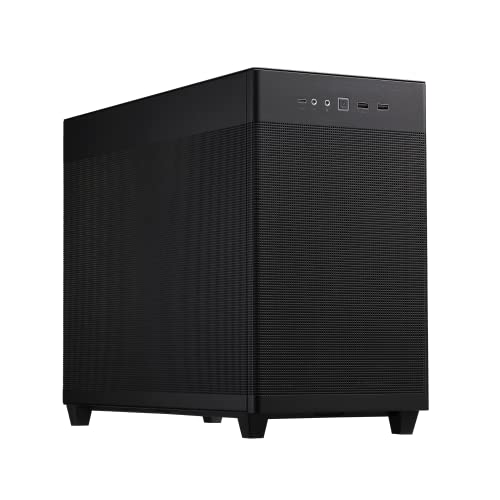
- Fine mesh panels promote airflow
- Supports up to 360mm radiators
- Tool-free panels and 32mm cable gap
Best For: Cool, high-performance mATX systems
Best Budget-Friendly Flexibility

- Supports 360mm GPUs and 240mm AIOs
- Adjustable modular I/O panel
- Perforated panels with magnetic dust filters
Best For: Affordable, adaptable gaming builds
Budget Ready-to-Build Pick

- 400W power supply included
- Supports Micro-ATX and Mini-ITX
- 240mm radiator support and three drive bays
Best For: Affordable office PCs and modest gaming builds
Simple Air-Cooled Pick

- Three 120mm ARGB fans included
- Quick-release panoramic glass panels
- Air cooling only with 309mm GPU limit
Best For: Mainstream air-cooled M-ATX gaming builds
Best for Design-Focused Builds
JONSBO V12 Walnut Micro ATX Case

- 270-degree curved glass display
- Solid walnut decorative panel
- Supports GPUs up to 260mm
Best For: Showcase-oriented compact desktop builds
Best for Panoramic Gaming Displays

- 270-degree tempered-glass panel
- Three fans pre-installed
- Supports Micro ATX and Mini-ITX
Best For: Compact gaming builds with visible components
Best for Airflow and Wood Accents
Okinos Cypress 3 Micro ATX Case

- Four 120mm fans included
- Three-sided mesh intake design
- GPU clearance up to 320mm
Best For: Air-cooled builds needing strong intake and Type-C
Best RGB Showcase – Thermaltake View 170 TG ARGB
For builders seeking micro atx computer cases with standout presentation, the Thermaltake View 170 TG ARGB combines front-and-side tempered-glass panels with three included ARGB fans. It also leaves room for a 340mm graphics card and a top-mounted radiator up to 280mm.
Best For: RGB gaming builds that prioritize component visibility and included lighting.
Pros:
- Front and side pillarless tempered-glass design creates a clear showcase.
- Includes three 120mm ARGB fans.
- Supports a top radiator up to 280mm and graphics cards up to 340mm.
Cons:
- Limited front I/O consists of two USB 3.0 ports and HD Audio.
- Its four expansion slots may restrict larger expansion configurations.
The View 170 TG ARGB is a practical choice when appearance, included lighting, and mainstream cooling support matter more than maximum expansion flexibility.
Best Compact Hardware Support – Lian Li A3-mATX
The Lian Li A3-mATX is one of the more flexible micro atx computer cases for compact, high-performance builds. Its 26.3-liter design supports graphics cards up to 415mm, radiators up to 360mm, and several power-supply formats, though fans are not included.
Best For: Space-conscious builders fitting powerful hardware into a modular small-form-factor layout.
Pros:
- Compact 26.3-liter footprint supports mATX and ITX motherboards.
- Accommodates graphics cards up to 415mm and 360mm radiators.
- Flexible PSU placement supports ATX, SFX, SFX-L, and compatible LIAN LI EDGE units.
- Mesh panels and support for up to ten 120mm fans emphasize airflow potential.
Cons:
- No fans are included.
- Its compact layout may require more careful component and cable planning.
Choose the A3-mATX when hardware clearance and configuration flexibility are priorities. Budget separately for case fans to take full advantage of its airflow-oriented design.
Best Airflow-Focused Design – ASUS Prime AP201
The ASUS Prime AP201 is a strong all-around option among micro atx computer cases, using fine mesh panels to promote airflow while accommodating demanding hardware. It supports graphics cards up to 338mm, ATX power supplies up to 180mm, and radiators up to 360mm.
Best For: Performance-focused builds that need airflow, liquid-cooling support, and straightforward access.
Pros:
- Quasi-filter mesh uses more than 57,000 precision-machined holes for ventilation.
- Supports 280mm and 360mm radiators plus up to six fans.
- Tool-free side panels simplify component access.
- A 32mm cable-management gap helps conceal wiring.
Cons:
- The 338mm graphics-card limit is lower than some compact competitors.
- The 33-liter footprint is not the smallest option in this group.
The AP201 balances cooling capacity, component compatibility, and cable management particularly well. It is a sensible pick for high-performance systems where ventilation is more important than a glass showcase.
Best Budget-Friendly Flexibility – Cooler Master Q300L
The Cooler Master Q300L is a practical entry in the micro atx computer cases category, offering a ventilated layout, a transparent side panel, and flexible I/O placement. It supports Micro-ATX and Mini-ITX boards, graphics cards up to 360mm, and a 240mm liquid cooler.
Best For: Budget-conscious builders who want adaptable placement and broad compatibility for a basic gaming PC.
Pros:
- Supports graphics cards up to 360mm and CPU coolers up to 159mm tall.
- Can accommodate a 240mm liquid cooler and up to five fans.
- Modular I/O panel can be positioned at the front, top, or bottom on either side.
- Perforated panels and magnetic dust filters support ventilation and maintenance.
Cons:
- Storage capacity is limited to one listed internal bay.
- Its listed power-supply support is limited to 500 watts.
- The design is more functional than premium.
The Q300L makes sense for straightforward, cost-conscious builds where flexible access and airflow are more important than refined materials or extensive storage expansion.
Panoramic Cooling Pick – LIAN LI Vector V100 MINI
The LIAN LI Vector V100 MINI is a strong choice among micro atx computer cases for builders who want a compact M-ATX platform with a dramatic showcase design. Its tempered-glass front and side panels, included ARGB fans, and generous GPU clearance make it suited to performance-focused builds, provided you do not need a full-size ATX motherboard.
Best For: M-ATX or Mini-ITX gaming builds with panoramic glass, substantial GPU clearance, and expandable cooling.
Pros:
- Includes four 120mm ARGB PWM fans, with support for up to nine fans.
- Supports GPUs up to 415mm and CPU coolers up to 163.5mm.
- Accommodates a top-mounted 360mm or 240mm radiator.
- Supports standard and back-connect M-ATX, plus Mini-ITX motherboards.
Cons:
- Full-size ATX motherboards are not supported.
- Its 436 × 221.5 × 443.9mm footprint is compact for M-ATX but not ultra-small.
- The listed configuration includes a plastic, stainless-steel, and tempered-glass enclosure.
Choose this case when visual presentation and cooling flexibility matter more than the smallest possible footprint. Confirm motherboard compatibility and available desk space before ordering.
Budget Ready-to-Build Pick – Rosewill FBM-X5
The Rosewill FBM-X5 is one of the more practical micro atx computer cases for an affordable office or entry-level gaming system. It includes a non-modular 400W power supply and a rear fan, reducing the number of separate components needed for a basic build.
Best For: Cost-conscious Micro-ATX or Mini-ITX office PCs and modest gaming systems needing an included power supply.
Pros:
- Includes a CE/FCC-certified non-modular 400W power supply.
- Supports both Micro-ATX and Mini-ITX motherboards.
- Provides one 3.5-inch bay and two 2.5-inch drive bays.
- Supports additional front or top fans and a 240mm front radiator.
Cons:
- Only one 120mm fan is pre-installed.
- The included power supply is non-modular, which can make cable management less flexible.
- The 400W PSU may limit component choices compared with higher-wattage options.
This Rosewill is a sensible value option when a basic power supply and straightforward layout are priorities. Plan the component selection around the included 400W unit and add fans if your system needs more airflow.
Simple Air-Cooled Pick – Okinos Aqua UNO
The Okinos Aqua UNO keeps micro atx computer cases simple with an air-cooling-only layout, three pre-installed ARGB fans, and tool-free panoramic glass panels. It is a compact option for mainstream GPUs, but its 309mm graphics-card limit and lack of radiator support require careful component planning.
Best For: Air-cooled Micro-ATX gaming builds using mainstream-length GPUs and a clean, illuminated presentation.
Pros:
- Includes three 120mm ARGB fans for airflow and lighting out of the box.
- Quick-release tempered-glass panels simplify access to components.
- Removable top, side, and bottom dust filters support easier maintenance.
- Offers USB Type-C 5Gbps connectivity and organized cable-routing space.
Cons:
- Does not support radiator installation or liquid cooling.
- GPU clearance is limited to 309mm.
- No additional fan can be installed above the PSU shroud.
The Aqua UNO is best suited to builders who prefer straightforward air cooling and a tidy, accessible interior. Check both GPU length and CPU-cooler height before committing to the build.
Best for Design-Focused Builds – JONSBO V12 Walnut Micro ATX Case
The JONSBO V12 is one of the more distinctive micro atx computer cases for compact desktop builds. Its curved glass viewing panel and walnut accent suit display-oriented setups, while support for Micro ATX or Mini-ITX boards and standard ATX power supplies keeps the platform flexible. Check component dimensions carefully: the case supports graphics cards up to 260mm and CPU coolers up to 140mm.
Best For: Home-office or showcase builds prioritizing materials and a compact footprint over large-component compatibility.
Pros:
- 270-degree dual-curved glass provides a broad view of the hardware.
- 8mm solid North American black walnut panel adds a furniture-like finish.
- Includes two front fans and supports multiple 3.5-inch and 2.5-inch drive configurations.
- Offers USB 3.2 Gen 2 Type-C connectivity on the front panel.
Cons:
- 260mm GPU and 140mm CPU-cooler limits restrict component choices.
- ATX power supplies are limited to 220mm, depending on the build layout.
- The curved glass and wood-focused design may prioritize appearance over straightforward airflow.
Choose the V12 if the case itself is part of your room’s aesthetic. It is a specialized compact enclosure, so verify your graphics card and cooler measurements before buying.
Best for Panoramic Gaming Displays – MOROVOL V3 Micro ATX Case
The MOROVOL V3 is a practical option among micro atx computer cases for builders who want a gaming-focused presentation without adding fans separately. It supports Micro ATX and Mini-ITX motherboards, includes three pre-installed fans, and uses a 270-degree panoramic tempered-glass panel to keep the build visible. Its compact format is best matched with components that fit the listed case limits.
Best For: Entry-level or midrange gaming builds where panoramic hardware visibility and included cooling are priorities.
Pros:
- Three-sided 270-degree tempered glass offers an unobstructed view of the components.
- Three fans are pre-installed for out-of-box airflow.
- Supports both Micro ATX and Mini-ITX motherboards.
- Front-panel USB 3.0 provides convenient device connectivity.
Cons:
- The supplied notes do not specify maximum GPU or CPU-cooler dimensions.
- Only four expansion slots are listed, which may limit add-in-card flexibility.
- The panoramic glass design may require more frequent cleaning to maintain its appearance.
The V3 makes sense when the visual presentation of a gaming PC matters and you want basic cooling included. Confirm clearance details for your chosen graphics card, cooler, and power supply before finalizing the build.
Best for Airflow and Wood Accents – Okinos Cypress 3 Micro ATX Case
The Okinos Cypress 3 is a strong choice among micro atx computer cases for builders who want substantial included airflow and a warmer exterior style. It comes with four 120mm non-PWM, non-ARGB fans, three-sided mesh intake areas, a tempered-glass side panel, and a front USB Type-C port. It also provides more graphics-card and CPU-cooler clearance than the JONSBO option, though ATX power supplies are limited to 150mm deep.
Best For: Air-cooled Micro ATX systems that need generous intake, modern front connectivity, and walnut accents.
Pros:
- Four pre-installed 120mm fans support strong out-of-box airflow.
- Three-sided mesh intake design is built around cooling efficiency.
- GPU clearance reaches 285mm or 320mm depending on front-fan placement.
- Includes USB 3.2 Gen 2 Type-C and two USB 3.0 ports.
Cons:
- The included fans are 3-pin non-PWM and non-ARGB models.
- Standard ATX power supplies are limited to 150mm deep.
- Only Micro ATX motherboard support is listed.
The Cypress 3 is the most airflow-oriented pick in this group, especially for a compact air-cooled build. Its main planning constraint is power-supply depth, so check that specification alongside GPU placement before purchasing.
How We Picked the Best Micro Atx Computer Cases
We focused on the factors that matter most during a real compact PC build: motherboard compatibility, graphics-card clearance, cooling support, included fans, cable-management potential, construction, front-panel connectivity, and overall layout flexibility. We also included cases with distinct strengths rather than treating every model as interchangeable.
Specifications can vary by configuration, so confirm the manufacturer’s current clearance limits before buying. Pay particular attention to GPU length when using front-mounted radiators, and check whether a listed fan is included, pre-installed, or optional.
Quick Comparison
| Best For | What to Prioritize | Standout Options |
|---|---|---|
| High-airflow gaming | Mesh panels, multiple fan mounts, GPU clearance | Thermaltake View 170 TG ARGB, Cooler Master Q300L |
| Powerful compact builds | Long GPU support, flexible radiator placement | Lian Li A3-mATX, ASUS Prime AP201 |
| Ready-to-use cooling | Included fans and simple installation | LIAN LI Vector V100 MINI, MOROVOL V3 |
| Showcase styling | Tempered glass, lighting, distinctive materials | Okinos Aqua UNO, JONSBO V12, Okinos Walnut |
| Budget or office builds | Low cost, basic compatibility, included PSU | Rosewill Micro ATX Mini Tower |
Key Buying Factors for Micro-ATX Computer Cases
Cooling and Airflow
Mesh intake areas and several 120mm fan mounts generally provide more dependable cooling than a mostly sealed glass design. If you plan to use a high-wattage CPU or GPU, prioritize unrestricted intake and exhaust paths. Included fans can reduce setup cost, but verify their connector type and whether they support PWM control.
GPU, Radiator, and PSU Clearance
Measure the graphics card, including its power connectors, rather than relying only on the advertised maximum length. Radiators can reduce available GPU space, particularly in compact front-mounted layouts. Also confirm the supported power-supply format and its position, since some small cases require shorter units or create tighter cable-routing conditions.
Build Convenience and Connectivity
Removable panels, open interiors, dust filters, accessible fan brackets, and sensible cable-routing space make a noticeable difference during installation. Check the front I/O for the ports you actually use, such as USB 3.0, USB-C, and a combined audio jack.
Who Should Buy Which Micro Atx Computer Cases?
Choose the Lian Li A3-mATX or ASUS Prime AP201 if you want a flexible foundation for a powerful, compact system. The Thermaltake View 170 TG ARGB and LIAN LI Vector V100 MINI suit builders who want built-in lighting and a more finished gaming aesthetic. The Cooler Master Q300L is a practical value choice when airflow and affordability matter most.
The Rosewill model is best suited to straightforward office or entry-level builds where the included power supply is useful, though confirm its capacity and connector support for your components. For a display-focused setup, consider the Okinos Aqua UNO, MOROVOL V3, or JONSBO V12. The Okinos Walnut model is the natural pick for a warmer, furniture-friendly look, provided its cooling and clearance limits fit your hardware.