The right computer case does more than house your components. It affects airflow, noise, installation space, cable management, upgrade options, and the overall look of your finished PC.
We compared 10 options across compact, mid-tower, full-tower, and showcase designs to help you choose a case that fits your hardware and building priorities.
Best 10 Computer Cases Picks for 2026
Natural Airflow Pick

- Walnut front with tempered-glass side panel
- Includes two 140 mm PWM fans
- Supports ATX boards and GPUs up to 355 mm
Best For: Style-focused ATX gaming builds with strong out-of-box airflow
Compact High-Performance Pick

- 26.3-liter footprint for compact builds
- Fits GPUs up to 415 mm and 360 mm radiators
- Supports flexible ATX, SFX, and SFX-L PSU placement
Best For: Compact mATX or Mini-ITX systems with large components
Flexible Budget Pick

- Supports micro-ATX and Mini-ITX motherboards
- Fits 360 mm GPUs and 240 mm liquid coolers
- Perforated panels and magnetic dust filters
Best For: Compact, flexible builds with practical cooling features
Customizable Airflow Pick

- Includes three front RS ARGB PWM fans
- FRAME system supports future customization
- Flexible InfiniRail fan mounting and dual 360 mm radiator support
Best For: Customizable ATX builds with strong airflow and RGB lighting
Best Premium Display Case

- Built-in 14.9-inch 2.5K touchscreen
- Panoramic glass dual-chamber design
- Supports vertical GPUs and up to 10 fans
Best For: High-end showcase gaming builds
Best Compact Airflow Case

- Fine-mesh panels support high airflow
- Includes two 120mm fans
- Supports 360mm front radiators
Best For: Compact ATX airflow builds
Best Full-Tower Cooling Case

- Six PWM fans included
- Supports simultaneous 420mm and 360mm radiators
- E-ATX support with 10 internal bays
Best For: Large, high-performance enthusiast builds
Practical Airflow Pick
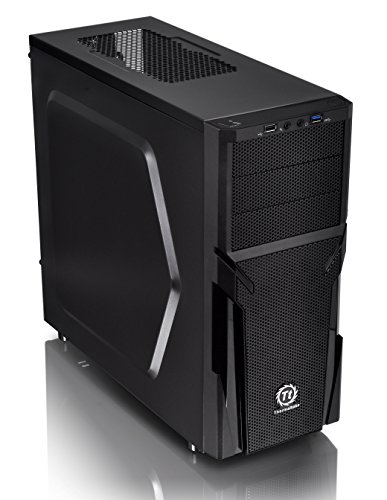
- Perforated panels promote ventilation
- Supports ATX and long graphics cards
- Tool-free installation with cable-management support
Best For: Budget-conscious ATX builders
High-Airflow Wood Accent Pick
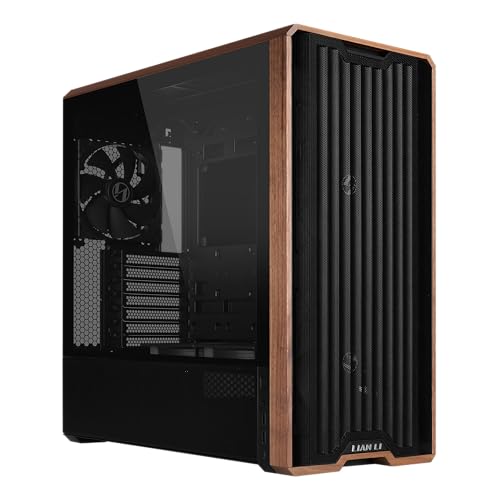
- Five pre-installed fans for strong airflow
- Real wood accents add a distinctive finish
- Back-connect motherboard and flexible PSU support
Best For: Airflow-focused enthusiast ATX builds
ARGB Expansion Pick

- Four PWM ARGB fans and a 26-LED strip included
- Fits 420 mm GPUs and 360 mm top radiators
- Supports multiple motherboard and back-connect formats
Best For: High-end, lighting-focused custom builds
Natural Airflow Pick – Fractal Design North
For builders who want computer cases to look as considered as the hardware inside, the Fractal Design North combines a charcoal-black finish, genuine walnut front bars, and a tempered-glass side panel. Its open mesh front supports natural ventilation, while ATX, micro-ATX, and Mini-ITX compatibility makes it suitable for a range of gaming builds.
Best For: Style-focused ATX gaming builds that need included airflow fans and room for a long graphics card.
Pros:
- Includes two 140 mm Aspect PWM fans for a head start on cooling.
- Supports GPUs up to 355 mm, or 300 mm with a 360 mm front radiator.
- Tempered-glass viewing panel and sustainably sourced walnut front details.
- Offers seven expansion slots and four total drive mounts.
Cons:
- The 360 mm front radiator reduces supported GPU length.
- Its wood-accented design may not suit minimalist all-metal setups.
The North is a strong choice when visual design and practical airflow matter equally. It provides useful expansion and storage flexibility without giving up its distinctive furniture-inspired appearance.
Compact High-Performance Pick – Lian Li A3-mATX
The Lian Li A3-mATX is one of the more compact computer cases for builders who still want substantial component support. Its 26.3-liter layout accepts micro-ATX or Mini-ITX motherboards, GPUs up to 415 mm, and radiators up to 360 mm, while steel mesh panels prioritize airflow.
Best For: Compact mATX or Mini-ITX systems using a large graphics card or 360 mm liquid cooler.
Pros:
- Compact 26.3-liter design supports GPUs up to 415 mm.
- Steel mesh side and top panels promote airflow.
- Supports a 360 mm radiator and up to ten 120 mm fans.
- Flexible front or side PSU positioning supports ATX, SFX, and SFX-L units.
Cons:
- Fans are not included.
- Limited to micro-ATX and Mini-ITX motherboards.
- Its compact modular layout may require more careful planning during assembly.
The A3-mATX focuses on fitting high-end hardware into a smaller footprint. It is particularly appealing for compact performance builds, provided you budget for fans and are comfortable with its flexible layout.
Flexible Budget Pick – Cooler Master Q300L
The Cooler Master Q300L is a practical option among computer cases for micro-ATX and Mini-ITX systems. Its perforated design promotes airflow, magnetic dust filters simplify maintenance, and the adjustable I/O panel gives builders flexibility when positioning the case.
Best For: Affordable compact builds that need broad ventilation, a transparent side panel, and flexible port placement.
Pros:
- Supports CPU coolers up to 159 mm and graphics cards up to 360 mm.
- Accommodates a 240 mm liquid cooler and up to five fans.
- Perforated panels and magnetic dust filters support cooling and maintenance.
- Adjustable I/O panel can be positioned on the front, top, or bottom on either side.
Cons:
- It is limited to micro-ATX and Mini-ITX motherboards.
- Provides only one internal 3.5-inch drive bay.
- The compact interior offers less expansion room than a mid-tower case.
The Q300L makes sensible compromises for smaller systems, pairing useful clearance with strong ventilation features. It is a straightforward choice for builders who value flexibility over premium materials or extensive storage capacity.
Customizable Airflow Pick – CORSAIR 4000D RS ARGB
The CORSAIR 4000D RS ARGB stands out among computer cases for its modular FRAME system and airflow-focused layout. It arrives with three front RS ARGB PWM fans, a perforated Y-pattern front panel, and InfiniRail mounting that lets you adjust fan placement for targeted cooling.
Best For: ATX builders who want pre-installed RGB airflow, flexible fan positioning, and a case that can be customized over time.
Pros:
- Includes three pre-installed RS ARGB PWM fans with Zero RPM mode.
- InfiniRail supports flexible front and roof fan positioning.
- FRAME system allows future customization of selected case components.
- Supports dual 360 mm radiators and includes a removable cable-cover or side-fan area.
Cons:
- Its feature-rich modular system may be more than basic builders need.
- RGB control requires connection to a motherboard’s 5V ARGB connector.
- Customization options may involve additional components beyond the base case.
The 4000D RS ARGB is a strong mid-tower option for builders who want cooling flexibility without starting from an empty chassis. Its modular design also gives the platform more room to evolve as your build changes.
Best Premium Display Case – HYTE Y70 Touch Infinite
The HYTE Y70 Touch Infinite is a showcase-focused choice among computer cases, pairing a panoramic tempered-glass design with a built-in touchscreen. Its dual-chamber layout, included PCIe 4.0 riser, and extensive cooling support make it suited to high-end gaming builds where presentation matters as much as performance.
Best For: Enthusiasts building a visually striking ATX gaming PC with a vertical graphics card and custom screen displays.
Pros:
- Integrated 14.9-inch 2.5K, 60Hz, 10-point touchscreen with HTYE Nexus customization.
- Panoramic three-piece glass design and dual-chamber interior create a premium presentation.
- Included color-matched PCIe 4.0 x16 riser supports four-slot vertical GPU mounting.
- Supports up to 10 fans and 360mm radiators in multiple positions.
Cons:
- Its 24.4-pound, large mid-tower design may be excessive for compact setups.
- The feature-rich design is aimed at premium builds rather than simple budget systems.
The Y70 Touch Infinite stands out for builders who want an attention-grabbing centerpiece and strong cooling flexibility. Choose it when the integrated display and showcase styling justify its larger footprint.
Best Compact Airflow Case – NZXT H5 Flow
The NZXT H5 Flow is a practical compact mid-tower among computer cases, emphasizing airflow and straightforward building. Fine mesh panels, two included 120mm fans, flexible radiator support, and organized cable-routing features make it a strong foundation for a first or space-conscious ATX build.
Best For: Builders who want a compact ATX case with dependable airflow and room to expand cooling later.
Pros:
- Ultra-fine mesh on the front, top, and side panels promotes airflow and dust filtering.
- Includes two 120mm Quiet Airflow fans for solid out-of-box ventilation.
- Supports radiators up to 360mm in front and 240mm on top.
- Wide cable channels, hooks, and straps simplify cable management.
Cons:
- The two additional 120mm PSU-shroud fans are not included.
- Its compact mid-tower format may offer less room than a full-tower case.
The H5 Flow keeps the focus on useful airflow and accessible assembly without adding unnecessary complexity. It is a sensible choice for a clean, well-ventilated gaming or general-purpose ATX system.
Best Full-Tower Cooling Case – Antec Flux Pro
The Antec Flux Pro is a spacious full-tower option among computer cases, designed for demanding builds that need substantial cooling and expansion room. Its six included PWM fans, E-ATX support, dual temperature display, and simultaneous 420mm-plus-360mm radiator support give it a performance-oriented feature set.
Best For: Enthusiasts building large E-ATX systems with extensive liquid cooling, multiple drives, or numerous expansion cards.
Pros:
- Includes six PWM fans and supports up to 12 fans simultaneously.
- Can accommodate a 420mm radiator and a 360mm radiator at the same time.
- Supports E-ATX, ATX, Micro-ATX, and ITX motherboards with eight expansion slots.
- Features a 90-degree iShift PSU mount and CPU/GPU temperature display.
Cons:
- The full-tower, 29-pound chassis requires considerable desk or floor space.
- Its advanced cooling and mounting features may be more than a basic build needs.
The Flux Pro is built for users who prioritize capacity, cooling, and expandability over a compact footprint. It is especially compelling for high-performance workstations or enthusiast PCs with complex cooling layouts.
Practical Airflow Pick – Thermaltake Versa H21
Thermaltake Versa H21 SPCC ATX Mid Tower Computer Chassis CA-1B2-00M1NN-00,Black
Check Price On AmazonThe Thermaltake Versa H21 is a straightforward choice among computer cases for a standard ATX gaming or general-purpose build. Its perforated front and top panels, raised feet, and support for long graphics cards make it suited to practical airflow and component compatibility.
Best For: Budget-conscious ATX builders who want accessible installation and basic ventilation.
Pros:
- Perforated front and top panels support heat dissipation and air intake.
- Supports ATX motherboards, long graphics cards, and CPU cooler installation.
- Includes tool-free installation features and cable-management support.
- Provides one USB 3.0 port, one USB 2.0 port, and front audio jacks.
Cons:
- Only one fan is listed as included.
- Its feature set is more basic than newer cases with extensive pre-installed cooling.
The Versa H21 focuses on compatibility and functional airflow rather than elaborate styling. It is a sensible option when you need a conventional ATX mid-tower with room for common gaming components.
High-Airflow Wood Accent Pick – Lian Li LANCOOL 217
The Lian Li LANCOOL 217 is a premium-looking option among computer cases, pairing real wood accents with five pre-installed fans. Its large front fans, flexible mounting positions, and back-connect motherboard support are designed for powerful, tidy ATX builds.
Best For: Enthusiasts who prioritize strong airflow, distinctive styling, and clean cable routing.
Pros:
- Includes five pre-installed fans, including two large 170 mm front fans.
- Offers flexible, tool-less fan configuration with a CPU-focused positioning option.
- Real wood accents provide a distinctive dark walnut appearance.
- Supports back-connect motherboards and two PSU mounting configurations.
Cons:
- The case is relatively heavy at 10.5 kg.
- It is listed with a one-year warranty.
With substantial included cooling and a refined exterior, the LANCOOL 217 is built for users who want performance and presentation without immediately adding aftermarket fans. Its ATX mid-tower layout also leaves room for flexible PSU and cable-management choices.
ARGB Expansion Pick – Lian Li V100
The Lian Li V100 is a flexible computer case for modern performance builds, with four pre-installed PWM-controlled ARGB fans and an integrated 26-LED strip. It supports several motherboard formats, back-connect layouts, large graphics cards, and a 360 mm top radiator.
Best For: Builders who want included lighting, adaptable cooling, and room for high-end hardware.
Pros:
- Includes four PWM-controlled 120 mm ARGB fans with daisy-chain connectivity.
- Supports GPUs up to 420 mm, CPU coolers up to 178 mm, and top radiators up to 360 mm.
- Compatible with ATX, Micro-ATX, Mini-ITX, and supported back-connect motherboards.
- Tool-less side panels and a dust filter simplify access and maintenance.
Cons:
- The listed warranty is one year.
- Lighting and included fans may be unnecessary for understated builds.
The V100 stands out for combining generous component clearance with ready-to-use ARGB cooling. It is a strong fit for builders planning a visually coordinated system or a substantial GPU-and-radiator configuration.
How We Picked the Best Computer Cases
We selected these Computer Cases based on the features that matter most during a real build: motherboard support, graphics-card clearance, cooling capacity, included fans, front-panel connectivity, storage flexibility, cable-management space, and ease of installation. We also considered different use cases, from affordable micro-ATX systems and compact gaming PCs to high-end ATX and E-ATX workstations.
Because case preferences vary, this list includes both practical airflow-focused chassis and design-led models with tempered glass, wood accents, mesh panels, or integrated displays. Always verify the latest specifications before buying, particularly when pairing a large graphics card, radiator, or power supply.
Quick Comparison
| Best For | Recommended Case Type | What to Prioritize |
|---|---|---|
| Budget compact builds | Micro-ATX case | Component compatibility and ventilation |
| Mainstream gaming PCs | ATX mid-tower | GPU clearance, airflow, and cable space |
| Quiet or attractive setups | Filtered mid-tower | Fan quality, panel design, and noise control |
| Extreme hardware | Full-tower or large ATX case | Radiator, drive, and expansion capacity |
| Showcase builds | Dual-chamber or display case | Visibility, cable routing, and presentation |
Key Buying Factors for Computer Cases
Size and Component Compatibility
Choose a chassis around your motherboard first, then check graphics-card length, CPU-cooler height, power-supply dimensions, and radiator support. A case that technically supports your hardware may still be difficult to build in if clearances are tight.
Airflow and Cooling
Mesh front and top panels generally support better ventilation than solid panels. Check how many fans are included and whether the layout supports your preferred intake and exhaust arrangement. For high-performance processors or graphics cards, leave room for additional fans or a liquid-cooling radiator.
Build Convenience
Look for removable dust filters, accessible fan mounts, a suitable CPU-backplate cutout, routing channels, and enough space behind the motherboard tray. These details reduce installation time and make future upgrades easier.
Front-Panel Features and Aesthetics
USB-C, multiple USB-A ports, audio connections, tempered glass, lighting controls, and wood or mesh detailing can all affect the daily experience. Prioritize features you will actually use rather than paying for appearance alone.
Who Should Buy Which Computer Cases?
Choose a micro-ATX model if you want a smaller, lower-cost system and do not need extensive expansion space. An airflow-focused ATX mid-tower is the safest choice for most gaming and productivity builds because it balances cooling, compatibility, and manageable size.
Consider a full-tower when you need multiple radiators, many storage drives, oversized components, or E-ATX support. A dual-chamber or display-equipped case suits builders who want the PC to be a visible centerpiece and are willing to spend more on presentation and cable management.
Before ordering, compare the case’s exact internal clearances with every major component in your parts list. That final check is the best way to avoid installation conflicts and ensure your new computer case supports future upgrades.