The best MIDI interface can make a crowded hardware setup easier to control, record, and expand without pushing your budget beyond $300. This roundup covers compact USB cables, multi-port MIDI hubs, standalone interfaces, and audio interfaces with built-in MIDI I/O.
Whether you need reliable computer connectivity, several independent MIDI ports, or an all-in-one recording interface, these options offer different ways to connect keyboards, controllers, synthesizers, and drum machines.
Best 10 Midi Interfaces Under 300 Picks for 2026
Best All-Rounder

- 3-in/3-out MIDI with standalone routing
- Broad computer and mobile OS compatibility
- Supports MPE, SysEx, clock, and MIDI timecode
Best For: Flexible home studios and live MIDI rigs
Simple USB Option

- USB-powered full-duplex operation
- Class-compliant Mac and Windows connectivity
- ASIO driver support for listed Windows systems
Best For: Basic computer-based MIDI setups
Best for Larger Setups

- Eight configurable MIDI ports
- Integrated three-port USB 3.0 hub
- Standalone routing and merging
Best For: Large studios and live MIDI systems
Best Compact 4x4
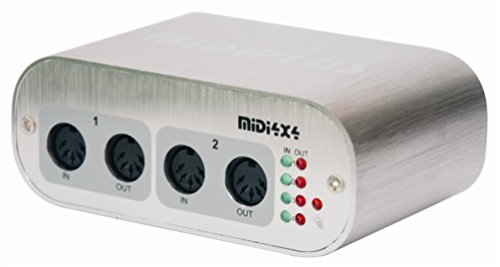
- Four MIDI inputs and four outputs
- USB powered with no driver required
- Port activity indicators and compact design
Best For: Desktop Mac and Windows MIDI rigs
Flexible Routing Pick

- Four MIDI ports with selectable routing modes
- Standalone MIDI split and merge functions
- Includes Bitwig 8-Track software
Best For: Multi-device MIDI rigs and flexible studio routing
Portable Audio Choice

- Two XLR/TRS inputs plus MIDI I/O
- Records up to 24-bit/96 kHz
- Battery-capable and iPad compatible
Best For: Portable MIDI and two-channel audio recording
Simple Cable Interface

- One-in/one-out USB-to-MIDI cable
- Plug-and-play across major operating systems
- Adds MIDI filtering and routing tools
Best For: Single-instrument computer connections and compact setups
High-Input Workhorse

- 4x4 USB audio plus MIDI I/O
- Four MIDAS preamps with phantom power
- 24-bit/192 kHz support
Best For: Multi-source home recording with MIDI gear
Hybrid MIDI Router

- Standalone USB host and 5-pin DIN MIDI
- Advanced routing, filtering, and mapping
- Works across major desktop and mobile OS
Best For: Hybrid hardware MIDI rigs and live routing
Compact Creator Pick

- USB audio interface with 5-pin MIDI
- Combo input with 48V phantom power
- Includes recording and music software
Best For: Solo creators and beginner home studios
Best All-Rounder – CME U6MIDI Pro
For shoppers comparing midi interfaces under 300, the CME U6MIDI Pro stands out as a flexible 3-in/3-out unit for computers or standalone MIDI routing. It supports USB-C connectivity across major operating systems and includes routing, filtering, merging, splitting, and mapping options through UxMIDI Tools.
Best For: Musicians who need dependable multi-device MIDI routing, broad operating-system compatibility, and low-latency performance.
Pros:
- 3-in/3-out standalone MIDI operation with router and filter functions.
- Works with macOS, iOS, Windows, Android, Linux, and Chrome OS.
- Supports standard MIDI messages, including clock, SysEx, MIDI timecode, and MPE.
- Compact, lightweight design with USB-C plug-and-play connectivity.
Cons:
- Advanced configuration requires UxMIDI Tools software.
- Audio is not supported; this is a MIDI-only interface.
The U6MIDI Pro is a strong choice when routing flexibility matters as much as basic connectivity. Its standalone operation and broad compatibility make it particularly useful for complex keyboard, synthesizer, and controller setups.
Simple USB Option – midiplus SmartfaceⅡ
If you want a straightforward option among midi interfaces under 300, the midiplus SmartfaceⅡ provides USB-powered, full-duplex connectivity for a computer-based setup. It includes a USB cable and supports class-compliant operation with older Mac and Windows systems, plus ASIO driver support for Windows.
Best For: Buyers seeking a basic USB MIDI setup for a compatible computer and music software.
Pros:
- USB powered, so no external power supply is required.
- Full-duplex operation supports simultaneous MIDI transmission.
- Class-compliant operation is available for listed Mac and Windows systems.
- Includes a USB cable and one-year warranty.
Cons:
- The listed operating-system support focuses on older Windows versions and Mac OS X.
- ASIO use on Windows requires the available ASIO driver.
- The supplied notes do not specify DIN MIDI port counts or standalone operation.
The SmartfaceⅡ is best considered a compact, computer-centered MIDI interface rather than an advanced routing hub. Confirm operating-system compatibility before buying, especially if using a current Windows version.
Best for Larger Setups – ESI M4U eX
Among midi interfaces under 300, the ESI M4U eX is designed for setups with many MIDI devices. Its eight adaptable ports can configure as inputs or outputs, while the integrated USB 3.0 hub adds three connectors for other USB equipment.
Best For: Studios and live rigs that need eight flexible MIDI ports, standalone routing, and an integrated USB hub.
Pros:
- Eight adaptable MIDI ports can function as inputs or outputs.
- Plug-and-play USB 3.0 operation is available for Windows and macOS.
- Standalone mode supports MIDI routing and merging without a computer.
- Built-in USB 3.0 hub provides three additional USB connectors.
Cons:
- It is larger and heavier than compact MIDI interfaces.
- The optional Windows MIDI Port driver may be needed for complex multi-device and multi-client use.
- Its extensive port count may be more than a small setup requires.
The M4U eX makes the most sense when expansion and flexible port assignment are priorities. Its hub and standalone functions can reduce the need for separate connectivity hardware in a busy studio.
Best Compact 4×4 – MIDI 4×4 USB Interface
For buyers comparing midi interfaces under 300, this MIDI 4×4 model offers four MIDI inputs and four outputs in a compact, USB-powered design. It connects to Mac or Windows computers without a driver and provides activity indicators for each port.
Best For: Computer-based MIDI users who need four independent inputs and outputs without external power.
Pros:
- Provides four MIDI inputs and four MIDI outputs.
- USB powered with no external power supply required.
- No driver is needed for listed Mac and Windows use.
- Port activity indicators make MIDI traffic easy to monitor.
Cons:
- Compatibility is specified for Mac and Windows rather than mobile operating systems.
- It uses a USB Type-B connection, which may require the included cable or an adapter for newer devices.
- The supplied notes do not mention standalone operation or advanced routing.
This interface is a practical choice for users who want a traditional 4×4 MIDI connection with minimal setup. Its compact size and USB power are useful for desktop rigs, while the four-port layout supports multiple instruments.
Flexible Routing Pick – Nektar MIDIFLEX4
For shoppers comparing midi interfaces under 300, the Nektar MIDIFLEX4 stands out when you need multiple MIDI ports and flexible routing. It can operate as a 1-in/3-out, 2-in/2-out, or 4-out interface, with automatic port detection and LED indicators.
Best For: Home studios and hardware-focused setups that need several MIDI outputs or standalone MIDI splitting and merging.
Pros:
- Four-port MIDI connectivity with configurable routing.
- Supports standalone 1-3 MIDI split or 2-1 MIDI merge functions.
- Works with Windows, Mac, Linux, and iOS.
- Includes Bitwig 8-Track with software instruments and effects.
Cons:
- It is a MIDI interface rather than a traditional audio interface.
- Its 180 kHz maximum sample-rate specification is not relevant to MIDI-only workflows.
The MIDIFLEX4 is the stronger choice here for users managing multiple external MIDI devices. Its selectable port configurations and standalone modes give it more routing flexibility than a basic one-in/one-out cable.
Portable Audio Choice – Zoom U-24
If your search for midi interfaces under 300 also includes recording audio, the Zoom U-24 combines MIDI I/O with two XLR/TRS combo inputs. Its portable design supports computer use and iPad connection, while battery operation makes mobile recording practical.
Best For: Musicians who need MIDI connectivity alongside two microphone or line inputs for portable recording.
Pros:
- Combines MIDI I/O with two XLR/TRS combo inputs.
- Supports recording and playback up to 24-bit/96 kHz.
- Can connect to an iPad with the required adapter and run from two AA batteries.
- Includes access to Pro Tools | First and Ableton Live 9 Lite.
Cons:
- Apple adapters and an optional AC adapter are sold separately.
- Its 96 kHz maximum sample rate is lower than the Nektar’s listed 192 kHz specification.
- The supplied software support includes older applications such as Ableton Live 9 Lite.
The U-24 is the most versatile option when audio recording matters as much as MIDI. Choose it over a MIDI-only interface if you need two mic or line inputs in a compact, battery-capable unit.
Simple Cable Interface – CME U2MIDI Pro
For a straightforward entry in the midi interfaces under 300 category, the CME U2MIDI Pro provides one MIDI input and one MIDI output in a 6.5-foot USB cable. It is plug and play across a broad range of operating systems and adds filtering, mapping, and routing through its supported tools.
Best For: Connecting one MIDI instrument or controller to a computer with minimal cable clutter and useful MIDI management features.
Pros:
- Plug-and-play support for macOS, iOS, Windows, Android, Linux, and ChromeOS.
- Includes filter, mapping, and routing features through free UxMIDI Tools software.
- Supports all MIDI channels and messages, including sysex, MTC, and MPE.
- Integrated 6.5-foot cable and LED indicators help simplify setup.
Cons:
- Provides only one MIDI input and one MIDI output.
- It does not provide audio inputs or outputs.
- Advanced filtering and routing require the UxMIDI Tools software on Mac or Windows.
The U2MIDI Pro is best when you need a compact connection for a single MIDI device rather than a multi-port studio hub. Its broad compatibility and MIDI processing tools make it more capable than a basic adapter cable.
High-Input Workhorse – Behringer U-PHORIA UMC404HD
For musicians comparing midi interfaces under 300, the Behringer U-PHORIA UMC404HD is a practical choice when you need multiple audio inputs alongside MIDI connectivity. Its 4×4 USB design supports simultaneous recording and playback, while four MIDAS mic preamps and 24-bit/192 kHz operation suit detailed home-studio work.
Best For: Home studios recording several microphones or instruments with MIDI hardware.
Pros:
- 4 inputs and 4 outputs plus dedicated MIDI I/O
- Four mic preamps with +48V phantom power
- 24-bit/192 kHz audio support and broad DAW compatibility
- Impact-resistant metal chassis
Cons:
- Larger and heavier than compact MIDI-focused interfaces
- Listed operating-system support starts with Windows XP or higher and Mac OS X
The UMC404HD stands out when audio-channel capacity matters as much as MIDI. Choose it over a smaller interface if you expect to record multiple sources at once.
Hybrid MIDI Router – CME H2MIDI Pro
Among midi interfaces under 300, the CME H2MIDI Pro is designed for connecting modern USB MIDI devices with traditional 5-pin DIN hardware. It can operate standalone without a computer, or connect over USB-C for computer and mobile setups, with routing tools for more advanced configurations.
Best For: Hybrid rigs combining USB keyboards, controllers, synths, drum machines, and legacy DIN MIDI equipment.
Pros:
- Standalone USB host operation with expansion for up to eight USB MIDI devices via hub
- USB-C client connection supports MacOS, Windows, iOS, Android, Linux, and ChromeOS
- Routing, filtering, mapping, and splitting through HxMIDI Tools
- Handles complex MIDI messages including clock, sysex, MTC, and MPE
Cons:
- Provides MIDI connectivity rather than audio recording inputs and outputs
- Advanced configuration may be more than a simple controller setup requires
Its compact size, standalone operation, and flexible routing make the H2MIDI Pro especially useful for performance and hardware-heavy workflows. It is a focused MIDI solution rather than an audio interface.
Compact Creator Pick – Arturia MiniFuse 1
For shoppers seeking midi interfaces under 300 that also support straightforward recording, the Arturia MiniFuse 1 combines a compact USB audio interface with 5-pin MIDI input and output. Its combo input, phantom power, headphone output, loopback feature, and included software make it approachable for vocals, guitar, synths, and content creation.
Best For: Beginners, solo musicians, and creators needing one audio input plus MIDI in a portable setup.
Pros:
- Combo mic/instrument/line input with 48V phantom power
- Dedicated 5-pin MIDI input and output
- Loopback support for voiceovers alongside in-app or in-game audio
- Includes Ableton Live Lite, Analog Lab Intro, and other creative software
Cons:
- Single-channel design is less suited to multi-microphone recording
- Only one headphone output is listed
The MiniFuse 1 is a well-rounded entry point for recording and MIDI production when portability and ease of use matter. Its included software and five-year warranty add value for first-time studio builders.
How We Picked the Best Midi Interfaces Under 300
We focused on practical connectivity, compatibility, port count, operating flexibility, and overall value. The selection includes simple USB-to-MIDI adapters for one-device setups, multi-port interfaces for hardware-heavy rigs, and audio interfaces that add MIDI alongside microphone and instrument inputs.
We also considered whether each model supports class-compliant plug-and-play operation, standalone use, portable setups, filtering or mapping features, and the connection types commonly found on modern computers and older MIDI hardware. Because requirements vary widely, the list is organized around different studio and performance needs rather than a single feature ranking.
Quick Comparison
| Best For | What to Look For |
|---|---|
| One keyboard or controller | Compact USB-to-MIDI cable with dependable input and output |
| Multiple synthesizers | Several independent MIDI ports and strong routing flexibility |
| Computer-free operation | Standalone functionality and reliable hardware routing |
| Recording and MIDI together | Audio inputs, MIDI I/O, and suitable monitoring connections |
| Portable performance | Small enclosure, bus power, and straightforward setup |
Key Buying Factors for MIDI Interfaces Under $300
Port Count and Routing
Count the actual MIDI devices you expect to connect at the same time. A single MIDI input and output may be enough for one keyboard, while a hardware studio may benefit from four or more independent ports. More ports can reduce cable swapping and make routing between instruments easier.
Compatibility and Connection Type
Check support for your operating system and computer ports before buying. Class-compliant models generally simplify setup, while older computers may require USB-A connectivity or an adapter. If you use DIN MIDI gear, confirm that the interface provides standard five-pin MIDI input and output rather than only USB.
Latency, Filtering, and Mapping
Fast data transfer and stable drivers help keep playing responsive. Filtering and mapping tools are useful when you need to remove unwanted MIDI messages, change control assignments, or manage complex hardware chains.
Audio Features
If you also record microphones or instruments, an audio/MIDI interface can save desk space and money. Compare preamp count, monitoring outputs, phantom power, recording resolution, and whether MIDI is available independently of the audio functions.
Who Should Buy Which Midi Interfaces Under 300?
Choose a compact USB-to-MIDI cable if you mainly connect one keyboard, controller, or synthesizer to a computer. A multi-port interface is the better choice for producers with several external instruments, especially when independent routing matters. Pick a standalone-capable model if you want to control hardware without relying on a computer.
Musicians who need both recording and MIDI connectivity should consider an audio interface with dedicated MIDI I/O, such as a compact two-channel model or a larger four-input unit. For travel, prioritize bus power and a small footprint. For a growing studio, spend more of the budget on port count and routing flexibility rather than features you will not use.