Choosing the right network document scanner for Mac can save time every day, especially if you need fast duplex scanning, reliable Wi-Fi, and smooth file handling across devices.
Below, we focus on models that balance performance, Mac compatibility, and real-world convenience for home offices, small businesses, and shared workspaces.
Best 10 Network Document Scanner for Mac Picks for 2026
Wireless Network ADF Scanner
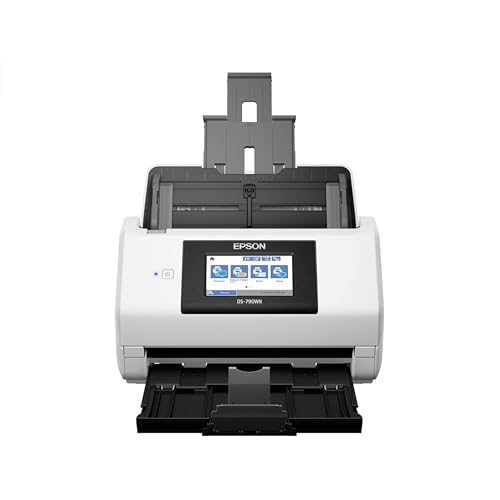
- Ethernet and USB connectivity
- 100-page ADF with duplex scanning
- Computer-free operation with touchscreen
Best For: Mac users who need shared, high-volume office scanning
Portable OCR Book Scanner

- Works with macOS and Windows
- About 1 second per page scanning
- OCR supports 180+ languages
Best For: Mac users scanning flat documents and thin books
One-Touch High-Speed Scanner

- Up to 45 ppm scanning speed
- 100-sheet feeder for batch jobs
- ScanSnap Home organizes documents
Best For: Mac users who want quick, simple desktop scanning
Compact Duplex Desktop Scanner
Epson WorkForce ES-C220 for Mac

- Ultra-compact space-saving design
- Duplex scanning in one pass
- 20-page ADF for daily batches
Best For: Mac users with limited desk space who need duplex scanning
Premium Wireless Mac Scanner

- Wi-Fi 6 and USB-C connectivity
- 100-sheet ADF with 45 ppm duplex scanning
- Large touchscreen with auto file organization
Best For: Mac users who want a fast, cloud-enabled scanner for shared workflows
Reliable Office Duplex Scanner

- 50-sheet ADF for efficient batch scanning
- Duplex scanning with double-feed detection
- ScanSmart software with OCR and cloud sharing
Best For: Mac and PC users who need a simple office scanner for paperwork
Best for Comfort

- Wi-Fi 6 and USB-C for Mac-friendly setup
- 100-sheet ADF with 45 ppm duplex scanning
- 5" touchscreen with automatic file organization
Best For: Mac users who want the iX2500 features in a white finish
Network-Ready Office Scanner
Canon imageFORMULA R50 for Mac and PC

- Wi‑Fi and USB connectivity for local or shared use
- 40 ppm duplex scanning with a 60-sheet ADF
- Color touchscreen for simple scan shortcuts
Best For: Small offices that want shared, Mac-compatible scanning with fast duplex performance
Compact Wireless Pick

- Very compact design for small desks
- USB and Wi‑Fi scanning to Mac, PC, and cloud
- 30 ppm duplex with automatic cleanup features
Best For: Mac users who want a space-saving wireless scanner for everyday documents
High-Capacity Wireless Choice
Epson WorkForce ES-580W for Mac

- Wi‑Fi scanning with touchscreen controls
- 100-sheet ADF for larger document stacks
- OCR can make searchable PDFs and editable files
Best For: Busy Mac workspaces that need a high-capacity wireless scanner
Wireless Network ADF Scanner – Epson DS-790WN for PC and Mac
If you want a network document scanner for Mac that can also work without a computer, the Epson DS-790WN is built for busy offices and shared workspaces. Its Ethernet connection, 100-page ADF, duplex scanning, and 4.3-inch color touchscreen make it a practical fit for fast batch jobs and day-to-day document handling.
Best For: Mac users who need a networked, computer-free office scanner with a large feeder.
Pros:
- Ethernet plus USB connectivity gives you flexible setup options.
- 100-sheet ADF supports larger scanning batches.
- Duplex scanning helps capture both sides in one pass.
- Color touchscreen and computer-free function add convenience.
Cons:
- It is a document-focused scanner, not a photo-first model.
- Uses a larger desktop footprint than compact portable scanners.
The DS-790WN stands out when your priority is shared access, feeder capacity, and straightforward office scanning. For Mac users who want network capability and strong batch handling, it is one of the more practical picks here.
Portable OCR Book Scanner – CZUR Shine Ultra for Mac
The CZUR Shine Ultra is a different kind of network document scanner for Mac alternative: it is a USB document camera and scanner designed for fast capture rather than traditional feeder-based scanning. It works with macOS and can scan A3/A4 material in about a second per page, which makes it useful for flat documents, thin books, and desk-based capture workflows.
Best For: Mac users who need a portable USB scanner for books, papers, and OCR.
Pros:
- Compatible with macOS 10.13 or later on Intel Macs and macOS 13 or later on Apple Silicon.
- About 1 second per page for fast flat-document scanning.
- OCR supports 180+ languages for text recognition.
- Foldable, lightweight design makes it easy to move and store.
Cons:
- Not compatible with Android or iOS.
- Best suited to flat papers and thinner books rather than thick volumes.
- Uses a 10-page standard sheet capacity, so it is not a batch feeder scanner.
This model is strongest when speed, portability, and OCR matter more than a traditional office ADF. If you scan books or flat documents from a Mac, it offers a very different but useful workflow.
One-Touch High-Speed Scanner – ScanSnap iX2400 for Mac
The ScanSnap iX2400 is a strong choice if you want a network document scanner for Mac experience focused on speed and simplicity, even though it connects by USB rather than Ethernet. It scans up to 45 pages per minute, includes a 100-sheet feeder, and uses ScanSnap Home software to organize documents, receipts, business cards, and photos.
Best For: Mac users who want a fast, easy one-touch desktop scanner with strong software support.
Pros:
- Up to 45 pages per minute for fast everyday scanning.
- 100-sheet feeder handles larger jobs with less reloading.
- ScanSnap Home software helps organize multiple document types.
- Automatic cleanup features reduce manual correction.
Cons:
- USB connection only, so it does not offer true network sharing.
- Requires macOS Monterey 12 or later for Mac use.
For Mac users who care more about reliability and workflow than Ethernet access, the iX2400 is a very polished option. Its one-touch operation and bundled software make it especially appealing for home offices and personal productivity.
Compact Duplex Desktop Scanner – Epson WorkForce ES-C220 for Mac
If desk space is tight, the Epson WorkForce ES-C220 is a compact network document scanner for Mac alternative that focuses on space-saving design and everyday reliability. It scans both sides in one pass, includes a 20-page ADF, and is built to handle standard paper along with cards and passports through its flexible scan path.
Best For: Mac users who need a very small duplex scanner for limited desk space.
Pros:
- Ultra-compact footprint saves desk space.
- Duplex scanning captures both sides in a single pass.
- 20-page ADF is useful for small to medium batches.
- Flexible scan path supports paper, cards, and passports.
Cons:
- USB-only connection, so it is not a true network scanner.
- 20-sheet capacity is smaller than larger office models.
- Resolution is 300 dpi, which is modest compared with some competitors.
The ES-C220 makes the most sense when you want a compact scanner that still feels capable for daily use. For Mac owners with limited space, it balances portability, duplex speed, and simple software well.
Premium Wireless Mac Scanner – ScanSnap iX2500 Black
If you want a network document scanner for Mac that feels built for heavy everyday use, the ScanSnap iX2500 is the most advanced option here. It combines Wi-Fi 6 and USB-C connectivity with a 100-sheet ADF, 45 ppm double-sided scanning, and automatic file handling for documents, photos, receipts, and business cards.
Best For: Mac users who want a fast, cloud-ready scanner with wireless sharing and a large touchscreen.
Pros:
- Built-in Wi-Fi 6 plus USB-C for flexible Mac or mobile setups
- Large 5″ touchscreen with personalized profiles and Quick Menu
- 100-sheet feeder and 45 ppm duplex scanning for bigger jobs
- Automatic optimize, name, and sort features for easier organization
Cons:
- More advanced than needed if you only scan occasionally
- Higher-capacity features may be overkill for light home use
The iX2500 stands out if speed, wireless convenience, and simple file routing matter more than keeping things basic. It is a strong fit for Mac workflows where you want to scan, organize, and share without much manual cleanup.
Reliable Office Duplex Scanner – Epson ES-400 II
The Epson Workforce ES-400 II is a practical network document scanner for Mac buyers who mainly want dependable desktop scanning over extras. It uses a 50-sheet ADF, duplex scanning, and Epson ScanSmart software to preview, name, email, and upload files with less effort.
Best For: Mac and PC users who want a straightforward duplex scanner for office paperwork and cloud sharing.
Pros:
- 50-sheet Auto Document Feeder handles moderate scanning stacks
- Duplex scanning with ultrasonic double feed detection and skew correction
- ScanSmart software supports previewing, emailing, cloud upload, and auto naming
- TWAIN driver helps it fit into many document management workflows
Cons:
- USB connection only, so it is less flexible than wireless models
- 300 dpi resolution is lower than the higher-end ScanSnap option
This model makes sense if your priority is efficient everyday document scanning rather than premium hardware features. For Mac users who want a stable, work-focused scanner with solid software support, it covers the essentials well.
Best for Comfort – ScanSnap iX2500 White
If you want a network document scanner for Mac with the same feature set in a lighter finish, the white ScanSnap iX2500 is an easy match. It brings Wi-Fi 6, USB-C, a 100-sheet feeder, 45 ppm double-sided scanning, and automatic optimization for documents, receipts, photos, and business cards.
Best For: Mac users who prefer a white scanner and want fast wireless scanning with cloud support.
Pros:
- Wi-Fi 6 and USB-C give you wireless or wired Mac connectivity
- 5″ touchscreen supports profiles, quick actions, and easy sharing
- 100-sheet ADF and 45 ppm duplex speed suit busy scanning sessions
- Automatic optimization, naming, and sorting reduce manual work
Cons:
- Feature-rich design may be more than casual users need
- Best value depends on whether you actually use the touchscreen and wireless tools
Choose this version if the white color fits your workspace and you want the same high-end Mac-friendly scanning features as the black model. It is best for users who want speed, convenience, and less time spent organizing files.
Network-Ready Office Scanner – Canon imageFORMULA R50 for Mac and PC
If you want a network document scanner for Mac that can also be shared on a small office network, the Canon imageFORMULA R50 is built for straightforward everyday scanning. Its Wi‑Fi and USB connectivity, color touchscreen, and 60-sheet ADF make it a practical fit for teams that need fast duplex scanning without a complicated setup.
Best For: Small offices and shared workspaces that need a Mac-compatible scanner with Wi‑Fi access and a simple touchscreen interface.
Pros:
- Supports both Wi‑Fi and SuperSpeed+ USB for local or networked use
- Scans both sides at once in color at up to 40 pages per minute
- 60-sheet automatic feeder helps with longer document batches
- Touchscreen shortcuts make destination selection and setup easier
Cons:
- Minimum system requirements list Windows 7, so Mac users should confirm their setup needs
- USB is the stated connection type in the details, which can be confusing beside the Wi‑Fi feature
- Not the most compact choice if desk space is tight
Overall, the R50 is a solid pick when you need a network-capable scanner that can handle mixed batches quickly and stay easy to use. It is especially appealing if shared scanning and one-touch workflow shortcuts matter more than ultra-compact size.
Compact Wireless Pick – ScanSnap iX1300 for Mac
The ScanSnap iX1300 is a strong network document scanner for Mac if you want wireless convenience in a very small footprint. It combines USB and Wi‑Fi connectivity with duplex scanning, so it can fit on a crowded desk while still handling documents, receipts, photos, cards, and more.
Best For: Mac users who want a compact scanner that is easy to place, easy to use, and flexible enough for everyday home-office filing.
Pros:
- Compact design saves desk space even during use
- USB and Wi‑Fi support lets you send scans to Mac, PC, mobile devices, and cloud services
- Up to 30 ppm duplex scanning with auto de-skew, color optimization, and blank page removal
- ScanSnap Home software helps organize documents, receipts, photos, and cards
Cons:
- 20-sheet standard capacity is lower than larger office scanners
- Best for lighter workflows rather than heavy batch scanning
- Wireless sharing is useful, but it is not built around the largest ADF in this group
For Mac buyers who care about space savings and simple day-to-day scanning, the iX1300 is one of the easiest options to live with. It is less about brute-force volume and more about a clean, flexible workflow.
High-Capacity Wireless Choice – Epson WorkForce ES-580W for Mac
If your priority is a network document scanner for Mac with higher paper capacity, the Epson WorkForce ES-580W is built for busy scanning stacks. Its Wi‑Fi connection, 100-sheet ADF, and touchscreen controls make it a practical fit for users who want to scan to a computer, cloud service, email, or USB without needing a direct cable connection.
Best For: Busy home offices and small businesses that need a wireless Mac-compatible scanner with a large feeder and flexible output options.
Pros:
- Wireless scanning with touchscreen controls and no-computer-needed options
- 100-sheet ADF supports larger batches of mixed paperwork
- Up to 35 pages per minute with double-sided scanning
- OCR support can create searchable PDFs and editable Word or Excel files
Cons:
- Resolution is listed at 300 dpi, which is lower than some alternatives
- The unit is larger and heavier than compact desktop models
- Mac support depends on version compatibility, so buyers should verify their OS version
The ES-580W stands out when you need capacity and wireless flexibility more than a tiny footprint. It is a strong choice for users who want to push a lot of paper through a Mac-friendly workflow with minimal friction.
How We Picked the Best Network Document Scanner for Mac
We prioritized Mac-friendly setup, network or wireless connectivity, duplex scanning, feeder capacity, scan speed, and ease of use. We also looked for models that handle common office tasks well, including receipts, multi-page contracts, and mixed document batches.
Quick Comparison
The best options generally fall into three groups: full-featured wireless desktop scanners for high-volume use, compact scanners for limited desk space, and portable or hybrid scanners for lighter workloads. A Network Document Scanner for Mac should fit both your scan volume and your preferred workflow, whether that means direct-to-cloud, saved folders, or one-touch scanning.
Key Buying Factors for a Network Document Scanner for Mac
Connectivity and Mac Workflow
Look for Wi-Fi, Ethernet, USB, or app-based workflows that work cleanly with macOS. If multiple people will scan to shared destinations, network support matters more than raw speed.
Duplex Scanning and ADF Capacity
Duplex scanning reduces manual flipping, while a larger automatic document feeder helps with multi-page jobs. For regular office use, these two features usually matter more than small differences in advertised speed.
Software and File Handling
Good OCR, searchable PDFs, and simple destination presets can make a scanner far more efficient on a Mac. Make sure the bundled software fits your preferred storage and naming workflow.
Size, Noise, and Daily Convenience
If your desk space is limited, compact footprint and easy paper handling may be just as important as performance. For shared offices, quiet operation and simple one-touch controls can improve usability.
Who Should Buy Which Network Document Scanner for Mac?
Choose a high-capacity wireless desktop model if you scan stacks of pages every week and want a true Network Document Scanner for Mac workflow. Pick a compact scanner if space is tight and your volume is moderate. If you mainly scan receipts, IDs, or occasional forms, a simpler USB or wireless model may be the better value. For mixed home and office use, the best choice is usually the scanner that offers the clearest Mac setup, the least friction, and enough feeder capacity for your busiest day.