Optical media can provide a useful offline archive for photographs, documents, video, and other files—especially when you want a storage copy that is disconnected from your everyday devices.
This roundup compares 10 optical disc drives for archiving, covering Blu-ray writers, DVD burners, slim internal mechanisms, and portable USB models. The right choice depends on your media capacity, computer connections, write support, and how often you plan to create or restore discs.
Best 10 Optical Disc Drives for Archiving Picks for 2026
Premium UHD Blu-ray Archiver
archgon External 4K Blu-ray Writer

- UHD Blu-ray capable on compatible PCs
- Supports M-DISC BD-R archiving
- Aluminum USB external enclosure
Best For: PC users needing UHD Blu-ray and M-DISC support
Ultra-Slim M-DISC Backup

- Supports M-DISC archival media
- Slim 9.5mm internal design
- 8x DVD writing over SATA
Best For: Slim laptops and systems needing internal DVD archiving
Portable Dual-Interface Archiver

- USB-C and USB 3.0 connectivity
- Writes Blu-ray, DVD, and CD media
- Compatible with Windows, Mac, and Linux
Best For: Portable cross-platform Blu-ray archiving
High-Speed Internal DVD Archiver
LG GH24NSC0 Internal DVD Drive

- Supports M-DISC and dual-layer DVDs
- Writes DVD-R at up to 24x
- Internal SATA 5.25-inch design
Best For: Desktop users archiving data to DVD and M-DISC media
Reliable Internal Burner

- Up to 24x DVD writing
- Supports dual-layer DVDs
- Includes software and SATA accessories
Best For: Desktop CD and DVD archiving
Slim Blu-ray Option
LG BU40N Ultra-Slim Optical Drive

- Supports Blu-ray, DVD, and CD media
- Slim 9.5mm SATA design
- Up to 6x optical write speed
Best For: Compatible laptops and compact PCs
Portable USB Archive Drive

- USB-A and USB-C connectivity
- Up to 8x DVD and 24x CD speeds
- Slim, portable, and plug-and-play
Best For: Portable CD/DVD archiving with laptops
Best Value Internal Drive

- Internal 5.25-inch half-height design
- SATA connection for compatible desktops
- Up to 24x media speed
Best For: Desktop CD and DVD archiving
Best Portable USB-C Drive
Amicool Ultra-Slim CD/DVD Burner
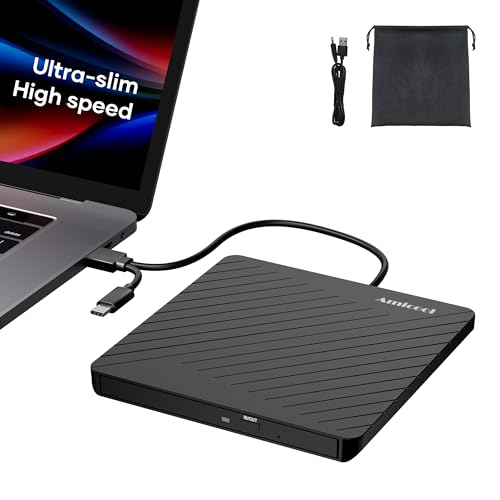
- 0.5-inch, 7.35-ounce portable design
- USB-A and USB-C interfaces
- Burns CDs and DVDs up to 24x/8x
Best For: Portable laptop-based archiving
Best Multifunction Hub Drive

- Optical drive plus USB and card-reader ports
- Reads and writes CDs and DVDs
- USB-A and USB-C compatibility
Best For: Archiving with photo and USB transfers
Premium UHD Blu-ray Archiver – archgon External 4K Blu-ray Writer
archgon Premium Aluminum External USB 3.0 UHD 4K Blu-Ray Writer Super Drive for PC and Mac
Check Price On AmazonFor shoppers comparing optical disc drives for archiving, the archgon external drive stands out for its UHD Blu-ray support and M-DISC BD-R compatibility. Its aluminum enclosure and USB connection make it a practical choice for PC users who need Blu-ray, DVD, and CD reading and writing in one external unit.
Best For: PC users archiving high-capacity data to Blu-ray, including M-DISC BD-R media.
Pros:
- Supports UHD 4K Blu-ray reading and regular Blu-ray, DVD, and CD writing with suitable software.
- Compatible with M-DISC BD-R for archival-oriented storage.
- Premium CNC aluminum enclosure with USB connectivity.
- Offers up to 12x optical writing speed.
Cons:
- UHD Blu-ray playback requires compatible PC hardware and separately purchased CyberLink PowerDVD.
- Mac users cannot use UHD Blu-ray functions according to the supplied notes.
- Software requirements should be checked before purchase.
This is the most capable option here for PC-based UHD Blu-ray archiving, but its advanced features depend on system compatibility and software. Mac owners should expect regular Blu-ray, DVD, and CD functionality rather than UHD support.
Ultra-Slim M-DISC Backup – ASUS Internal DVD Writer
The ASUS SDRW-08U1MT is a compact internal DVD writer for optical disc drives for archiving setups that prioritize M-DISC support. Its 9.5mm form factor suits compatible laptops and slim systems, while SATA connectivity and 8x DVD writing provide a straightforward archival workflow.
Best For: Users with compatible slim laptops or systems who want M-DISC DVD backup in an internal drive.
Pros:
- M-DISC is designed for archival-quality storage and long-term data protection.
- Ultra-slim 9.5mm form factor for space-constrained installations.
- Supports 8x DVD writing and SATA 6.0 Gb/s connectivity.
- E-Green technology helps reduce power use when inactive.
Cons:
- DVD-only, so it does not provide Blu-ray capacity.
- Requires an internal compatible installation rather than USB portability.
- System compatibility and mounting fit should be confirmed before purchase.
Choose this ASUS model when slim dimensions and M-DISC DVD longevity matter more than Blu-ray capacity. It is a focused internal solution rather than a flexible external drive.
Portable Dual-Interface Archiver – GOOBOX External Blu-ray Drive
The GOOBOX GBX-BD100 combines Blu-ray burning with USB 3.0 and USB-C connectivity, making it a convenient option for optical disc drives for archiving across newer laptops and traditional desktops. It supports BD, DVD, and CD media and includes a compact design with built-in cable storage.
Best For: Windows, Mac, and Linux users who need a portable Blu-ray writer with USB-C and USB 3.0 flexibility.
Pros:
- Writes Blu-ray at up to 6x, DVD at 8x, and CD at 24x.
- Dual USB 3.0 and USB-C connectors reduce the need for adapters.
- Supports Blu-ray, DVD, and CD reading and writing across Windows, macOS, and Linux.
- Portable slim design includes cable storage and shockproof pads.
Cons:
- Blu-ray playback requires third-party software.
- 3D playback additionally requires compatible software and a 3D-capable display.
- Low-power devices may need the included external power cable.
This drive offers the broadest operating-system and connector flexibility in the group. It is well suited to portable backups, provided you account for software requirements and power needs on some devices.
High-Speed Internal DVD Archiver – LG GH24NSC0 Internal DVD Drive
The LG GH24NSC0 is a conventional internal DVD writer for optical disc drives for archiving, with support for M-DISC media and a SATA interface. Its 24x DVD-R writing speed, broad DVD format compatibility, and buffer-under-run prevention make it a practical fit for desktop systems.
Best For: Desktop PC users seeking an affordable internal DVD and M-DISC writing drive.
Pros:
- Supports M-DISC and multiple DVD formats, including dual-layer media.
- Up to 24x DVD-R writing and 48x CD writing speeds.
- Can be mounted horizontally or vertically.
- Buffer-under-run prevention helps support reliable disc writing.
Cons:
- Does not support Blu-ray discs.
- Internal 5.25-inch SATA installation is required.
- Supplied operating-system details focus on older Windows versions.
This LG drive is a sensible choice for desktop DVD archiving when Blu-ray is unnecessary. Its M-DISC compatibility adds archival flexibility, while the internal format keeps the setup simple for compatible PCs.
Reliable Internal Burner – Lite-On 24X DVD Burner Kit
For desktop users building a dependable collection of optical disc drives for archiving, the Lite-On IHAS124 is a practical internal DVD and CD burner. It uses a 5.25-inch SATA interface, supports dual-layer DVD media, and includes Nero 12 Essentials software, a SATA cable, and mounting screws.
Best For: Desktop computers, servers, and workstations that need an internal drive for routine CD and DVD backups.
Pros:
- Writes DVD+R and DVD-R media at up to 24x and supports DVD+R DL at 8x.
- Reads CDs at up to 48x and DVDs at up to 16x.
- Includes burning software, SATA cable, and mounting screws.
- Works with Windows and Linux systems.
Cons:
- Requires an available 5.25-inch bay and internal SATA connection.
- Limited to CD and DVD media; it does not support Blu-ray.
- The included software and SATA interface may be less convenient for modern laptops.
This kit is a strong value for a compatible desktop archive setup, especially when you want the necessary accessories included. Confirm that your computer has a 5.25-inch bay and SATA power and data connections before buying.
Slim Blu-ray Option – LG BU40N Ultra-Slim Optical Drive
LG Electronics 183663 LG Ultra Slim Bd DVDRW 6X SATA 9.5mm Tray Retail Optical Drive BU40N
Check Price On AmazonThe LG BU40N is a slim SATA optical drive for laptops and compact PCs. For optical disc drives for archiving, its Blu-ray support expands capacity beyond standard DVDs, while the 9.5mm slim form factor suits systems where a full-size 5.25-inch drive will not fit.
Best For: Laptop or slim-PC owners who want a compact internal drive with Blu-ray support for higher-capacity optical media.
Pros:
- Supports Blu-ray in addition to CD and DVD formats.
- Uses a slim 9.5mm form factor for compatible laptops and compact systems.
- Connects through Serial ATA and supports Windows operating systems listed by the manufacturer.
Cons:
- Its 6x write speed is slower than the Lite-On desktop burner.
- Requires a compatible slim SATA bay and mounting arrangement.
- The supplied notes do not identify included burning software or mounting accessories.
The BU40N is the more versatile choice when Blu-ray capacity matters and your computer accepts a slim internal drive. Check the bay height, connector arrangement, and system compatibility carefully before installation.
Portable USB Archive Drive – ORIGBELIE External DVD Burner
The ORIGBELIE external drive is a convenient choice for flexible optical disc drives for archiving, particularly when you use several computers or lack an internal drive bay. It connects by USB 3.0 with Type-A and Type-C support, reads and writes CDs and DVDs, and is slim enough for travel.
Best For: Laptop users and households that need a portable CD/DVD reader and burner for backups, software installation, or media playback.
Pros:
- USB 3.0 connectivity is backward compatible with USB 2.0 and 1.1.
- Supports CD and DVD formats including DVD-RAM and dual-layer DVD media.
- Offers plug-and-play operation without additional drivers on supported systems.
- Includes an integrated data cable, charging cable, storage bag, and manual.
Cons:
- Does not support Blu-ray discs.
- Some computers may require the included charging cable or an external power source.
- Not compatible with several listed devices and systems, including Chromebooks, Ubuntu, phones, tablets, and game consoles.
This is the most convenient option for occasional or multi-computer archiving because it avoids internal installation. Its broad CD/DVD format support is useful, but verify your operating system and keep the extra-power cable available if your USB port cannot supply enough power.
Best Value Internal Drive – Lite-On 24X SATA DVD±RW
For desktop users building a straightforward collection of optical disc drives for archiving, the Lite-On IHAS124-14 offers an internal SATA connection and DVD/CD read-write capability. Its half-height 5.25-inch design is intended for compatible PC cases rather than portable use.
Best For: Desktop PC owners who want a basic internal drive for reading and writing CDs and DVDs.
Pros:
- Internal half-height 5.25-inch form factor fits compatible desktop cases.
- SATA connectivity is suited to desktop PC installations.
- Supports media speeds up to 24x.
Cons:
- Internal installation is less convenient than an external USB drive.
- The supplied notes do not indicate Blu-ray support.
- Compatibility depends on having an available SATA connection and drive bay.
This is a practical, no-frills choice for a desktop archiving setup. Choose it when installation inside a PC matters more than portability or plug-and-play convenience.
Best Portable USB-C Drive – Amicool Ultra-Slim CD/DVD Burner
The Amicool external drive is a flexible option for optical disc drives for archiving when you move between computers. Its ultra-slim 0.5-inch design, USB-A and USB-C interfaces, and included storage pouch make it convenient for laptops, desktops, and travel.
Best For: Laptop users who need portable CD/DVD reading, writing, and occasional archival access.
Pros:
- Ultra-slim 0.5-inch body weighs 7.35 ounces.
- USB-A and USB-C connectivity supports many Windows, Mac, and Linux computers.
- Reads and burns CDs and DVDs at up to 24x CD and 8x DVD speeds.
- Includes error correction, emergency eject access, and a soft storage pouch.
Cons:
- Does not support Blu-ray discs.
- Chrome OS, smartphones, tablets, TVs, and cars are listed as unsupported.
- Very thin laptops may need the dedicated power connection for reliable operation.
With broad computer compatibility and both USB connector types, this drive is well suited to mobile archival workflows. It is especially useful for digitizing older discs, creating backups, or accessing archived media away from a desktop.
Best Multifunction Hub Drive – 8-in-1 External CD/DVD Burner
This 8-in-1 external drive combines CD/DVD archiving with added connectivity. Alongside optical reading and burning, it provides USB hubs, USB-C, and SD/TF card readers, making it useful when transferring photos or videos while managing disc backups.
Best For: Laptop and desktop users who want one portable accessory for optical discs, memory cards, and USB devices.
Pros:
- Combines a CD/DVD burner with one USB 3.0 port, three USB 2.0 ports, USB-C, and SD/TF card readers.
- Supports CD and DVD reading and writing, including DVD-RAM.
- USB 3.0 offers high-speed connectivity and backward compatibility with USB 2.0.
- Supports Windows, Mac OS, Linux, USB-A, and USB-C systems.
Cons:
- SD and TF cards cannot be used simultaneously.
- Some Windows 10/11 systems may require the extra power cable if USB power is insufficient.
- Does not support Blu-ray discs, smartphones, tablets, TVs, cars, or projectors.
The integrated ports make this more versatile than a basic external optical drive, particularly for photo and video workflows. Consider it when consolidating several backup and transfer functions is more important than having the thinnest possible accessory.
How We Picked These Optical Disc Drives for Archiving
We selected a range of internal and external drives that cover the most practical archiving setups: Blu-ray writers for higher-capacity discs, DVD drives for economical document backups, slim mechanisms for compact systems, and portable USB models for laptops. We also considered interface compatibility, write capabilities, support for archival-oriented media such as M-DISC where listed, installation requirements, and general convenience for reading or burning CDs and DVDs.
Specifications can vary by revision and seller, so confirm the exact model, included cables, operating-system support, and media compatibility before buying. A drive is only one part of an archive; reliable discs, verification, labeling, and multiple copies matter just as much.
Quick Comparison
| Drive type | Best suited to | Main advantage | Important limitation |
|---|---|---|---|
| External Blu-ray writer | Large photo, video, and project archives | Higher disc capacity | Usually costs more and may need suitable software |
| External CD/DVD writer | Laptops and occasional backups | Portable and easy to connect | Lower capacity than Blu-ray |
| Internal DVD writer | Desktop upgrades and dedicated archive systems | Clean, stable installation | Requires an available bay or SATA connection |
| Slim internal drive | Small PCs and compatible notebooks | Compact form factor | May require a caddy, adapter, or specific mounting hardware |
Key Buying Factors for Optical Disc Drives for Archiving
Capacity and Media Type
Choose the drive around the discs you intend to use. DVD media is inexpensive and suitable for smaller batches, while Blu-ray offers substantially more space per disc and can reduce the number of discs needed for larger archives. Check whether the drive writes the exact formats you plan to use, including dual-layer or rewritable media.
Archival-Media Support
If long-term preservation is a priority, look for explicit support for archival media such as M-DISC. This does not eliminate the need for careful storage or backups, but it can make the drive a better fit for a planned optical preservation workflow.
Connection and Installation
USB 3.0 and USB-C external drives are convenient for modern laptops and can often be moved between computers. Internal SATA models make sense for desktops or a dedicated archive workstation, but verify the bay size, mounting hardware, power connection, and SATA compatibility before ordering.
Writing Reliability and Verification
Burning speed is less important than consistent writing and accurate verification. Use quality, compatible media, avoid maximum speed when reliability matters, and verify each disc after burning. Keep at least one additional copy in a separate location.
Who Should Buy Which Optical Disc Drives for Archiving?
Choose an external Blu-ray writer if you archive large photo collections, video, or project files and want fewer discs. Choose a portable USB CD/DVD drive for laptop use, occasional backups, software discs, or reading an existing collection. Choose an internal DVD writer for a desktop archive station where permanent installation and straightforward media handling are priorities. Choose a slim internal drive only after confirming your computer’s physical dimensions and mounting requirements.