Choosing the right wide-format printer can save time, reduce outsourcing, and keep your in-house printing workflow moving. For small teams, the best options balance print quality, footprint, operating cost, and ease of use.
This roundup of the best plotter printers for small businesses highlights dependable models for CAD drawings, posters, and everyday business graphics so you can match the printer to your workload.
Best 10 Plotter Printers for Small Businesses Picks for 2026
CAD & Poster Plotter Pick
HP DesignJet T210 24-inch Plotter Printer

- 24-inch roll printing for CAD, posters, and maps
- HP Click helps reduce waste with error checking and auto-nesting
- Supports direct printing and mobile management with HP Smart
Best For: Small businesses needing a compact large-format printer for technical drawings and posters
Office All-in-One Choice
Brother INKvestment 6560 11x17 All-in-One

- Print, copy, scan, and fax in one machine
- Handles up to 11" x 17" paper with duplex printing
- Wireless, Ethernet, USB, and cloud/mobile support
Best For: Small offices needing a productive 11" x 17" multifunction printer
Budget Media Supply
ACYPAPER 36 x 150 Plotter Paper Rolls

- 36" x 150' rolls for wide-format print jobs
- 20 lb. bond paper with 96 brightness
- Four-roll box helps reduce frequent reordering
Best For: Businesses needing dependable wide-format plotter paper for CAD output
High-Detail Technical Option
Canon imagePROGRAF TM-240 24-inch Printer

- 24-inch large-format printer with 2400 x 1200 dpi
- UV- and water-resistant inks for durable output
- Automatic media detection simplifies setup
Best For: Small businesses needing sharp, durable technical prints and outdoor signage
Compact Desktop CAD Plotter
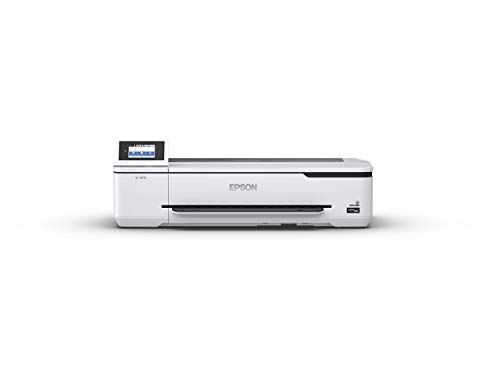
- A1/D prints in 34 seconds
- Ultra-small desktop footprint
- Wireless and Wi-Fi Direct printing
Best For: Small offices needing a compact print-only wide-format device
Multifunction Wide-Format Office Hub

- Print, copy, and scan in one unit
- Supports roll media up to 24 inches
- Cloud printing and scanning included
Best For: Teams needing a wide-format multifunction printer with enlargement support
High-Capacity Wide-Format Workhorse

- Print, copy, scan, and fax
- Up to 13 x 19-inch wide format
- 500-sheet capacity with duplexing
Best For: Busy offices wanting a wide-format all-in-one for everyday business printing
Compact Wide-Format Starter
HP DesignJet T230 24-inch Plotter

- 24-inch roll printing for CAD, posters, and maps
- Includes 2-year Care Pack onsite support
- Optional sheet feeder and automatic cutter help simplify jobs
Best For: Small businesses that need an entry-level wide-format plotter for drawings and posters
High-Volume Office Plotter
HP DesignJet T630 36-inch with Stand

- 36-inch rolls plus included sheet feeder and media bin
- HP Click software helps reduce waste and simplify printing
- Gigabit Ethernet, Wi-Fi, and USB connectivity
Best For: Small businesses that need a larger 36-inch plotter for frequent technical and poster printing
Color Poster Specialist
Canon imagePROGRAF TM-340 36-inch

- 5-color pigment inks for crisp text and vivid posters
- Automatic media detection and color calibration
- Includes stand, catch basket, starter ink, and 2-year warranty
Best For: Small businesses focused on posters and color-rich wide-format printing
CAD & Poster Plotter Pick – HP DesignJet T210 24-inch Plotter Printer
HP DesignJet T210 Large Format 24-inch Plotter Printer, for Easy CAD & Poster Prints (8AG32D)
Check Price On AmazonIf you need plotter printers for small businesses that handle technical work without a lot of setup friction, the HP DesignJet T210 is built for straightforward CAD drawings, posters, maps, and sewing patterns. It supports 24-inch roll media and wide-format sheets with the optional automatic sheet feeder, making it a practical fit for mixed-size print jobs.
Best For: Small teams that want a compact large-format printer for CAD linework, posters, and multi-size projects.
Pros:
- Prints up to 24-inch wide rolls and up to 13″ x 19″ sheets with the optional feeder.
- HP Click software helps with PDF error checking, auto-nesting, and print-job simplification.
- Supports direct printing from common CAD and design applications, plus mobile management with HP Smart.
- Built-in cutter and multi-source media handling help streamline everyday use.
Cons:
- Print-only device, so it will not scan, copy, or fax.
- Optional sheet feeder is needed for the full sheet-size flexibility.
- Designed more for technical and poster output than office all-in-one tasks.
Overall, this is a solid choice when accuracy, simple operation, and wide-format capability matter more than multifunction features.
Office All-in-One Choice – Brother INKvestment 6560 11×17 All-in-One
For small businesses looking at plotter printers for small businesses but also needing day-to-day office versatility, the Brother INKvestment 6560 stands out as a multifunction alternative. It prints, copies, scans, and faxes, while supporting up to 11″ x 17″ media for larger documents and spreadsheets.
Best For: Small offices that want an 11″ x 17″ inkjet all-in-one with fast everyday productivity features.
Pros:
- Prints, copies, scans, and faxes in one device.
- Supports up to 11″ x 17″ paper with automatic duplex printing.
- Includes a 250-sheet tray and 50-page ADF for heavier office use.
- Wireless, Ethernet, USB, Wi-Fi Direct, cloud printing, and mobile app support add flexibility.
Cons:
- Not a true large-format plotter for wide roll media.
- Best fit is office document work rather than precision CAD plotting.
- Uses Brother Genuine LC506-series ink recommendations.
This is a strong pick if your business needs larger-than-standard paper handling and a productive all-in-one, rather than a dedicated wide-format plotter.
Budget Media Supply – ACYPAPER 36 x 150 Plotter Paper Rolls
Not every shopping decision in the plotter printers for small businesses category is about the printer itself—paper matters too. ACYPAPER’s 36″ x 150′ rolls give you a reliable wide-format media supply for CAD drawings, architectural plans, and design work on compatible inkjet plotters.
Best For: Businesses that need compatible wide-format bond paper for CAD and technical printing.
Pros:
- 36″ x 150′ rolls are sized for wide-format plotter workflows.
- 20 lb. bond paper with 96 brightness supports sharp, readable output.
- Four rolls per box help reduce reordering and keep jobs moving.
- Compatible with a variety of plotters and large-format inkjet printers.
Cons:
- Paper only; it is not a printer.
- Uncoated finish may not suit presentation-focused glossy output needs.
- Requires a compatible wide-format inkjet printer.
If your shop already owns a plotter, this is a practical supply pick that supports steady output without frequent restocking.
High-Detail Technical Option – Canon imagePROGRAF TM-240 24-inch Printer
The Canon imagePROGRAF TM-240 is a strong fit for small businesses that need precise wide-format output from a compact 24-inch printer. It is built for clean lines and sharp text, with a high-resolution print engine and inks designed for UV and water resistance.
Best For: Small businesses printing technical drawings, outdoor signs, and durable poster graphics.
Pros:
- 24-inch large-format printing with up to 2400 x 1200 dpi resolution.
- 5-color ink set is made for sharp lines, text, and consistent image quality.
- UV- and water-resistant inks suit outdoor job-site documents and signage.
- Automatic media detection helps simplify setup and operation.
Cons:
- Print-only device, so no scan or copy functions.
- Focused on technical and sign work rather than office multitasking.
- Best value depends on whether you need durable wide-format output specifically.
For businesses that care most about detail, consistency, and weather-resistant output, this Canon is one of the more capable wide-format choices here.
Compact Desktop CAD Plotter – Epson SureColor T3170
If you need plotter printers for small businesses that can sit neatly on a desk, the Epson SureColor T3170 is built around speed and a small footprint. It produces A1/D-size prints in 34 seconds, includes wireless and Wi-Fi Direct printing, and uses a 4.3-inch color touchscreen to keep everyday print jobs simple.
Best For: Small offices that want a compact, print-only wide-format printer for quick desktop plotting.
Pros:
- 34-second A1/D-size print speed for fast turnaround.
- Compact, clean design with an ultra-small footprint.
- 4.3-inch LCD touchscreen makes operation easier.
- Wireless and Wi-Fi Direct support for flexible printing.
Cons:
- Print-only design, so it does not scan or copy.
- One tray and a 30-sheet output capacity keep it focused on lighter workflows.
- Optional stand is sold separately if you do not want it on a desktop.
This is a strong fit when space is tight and speed matters more than multifunction features. For small businesses that mainly need accurate wide-format prints, it offers a practical balance of convenience and compact design.
Multifunction Wide-Format Office Hub – Canon imagePROGRAF TC-21M
For small businesses looking at plotter printers for small businesses with more than basic print output, the Canon imagePROGRAF TC-21M adds copying, scanning, and wide-format printing in one machine. It supports roll media up to 24 inches wide, includes a flatbed scanner for enlarging smaller originals, and offers cloud printing and scanning for added flexibility.
Best For: Small teams that want a multifunction wide-format printer for printing, copying, and simple enlargements.
Pros:
- Multifunction design with copy support and a flatbed scanner.
- Can enlarge smaller originals directly from the scanner.
- Cloud printing and scanning add convenient remote workflows.
- Auto sheet feeder holds up to 100 letter sheets or 50 sheets of 11 x 17 paper.
Cons:
- It is still a simplex printer, so it does not offer automatic duplexing.
- Touchscreen is 2.7 inches, which is smaller than some rivals.
- Bulky enough that it is better suited to a shared office space than a tiny desk.
This model makes sense if your business wants one device to handle wide-format printing plus everyday office tasks. It is especially useful when enlargements and cloud access are part of the workflow.
High-Capacity Wide-Format Workhorse – Epson WorkForce Pro WF-7840
The Epson WorkForce Pro WF-7840 is a practical pick for small businesses that want wide-format output without moving into a dedicated plotter. It prints, copies, scans, and faxes, supports paper sizes up to 13 x 19 inches, and adds a 500-sheet capacity plus automatic duplexing to help busy offices stay productive.
Best For: Offices that need a wide-format all-in-one printer for high-volume everyday business work.
Pros:
- All-in-one functionality with print, copy, scan, and fax.
- Wide-format support up to 13 x 19 inches.
- 500-sheet capacity is built for heavier office demands.
- Automatic duplexing helps save paper on standard jobs.
Cons:
- Does not reach true large-format plotter sizes like A1 or 24-inch rolls.
- It is larger and heavier than a compact desktop printer.
- Best suited to office workflows rather than specialized plotting tasks.
For small businesses that need dependable wide-format printing alongside everyday document handling, this model is very capable. It fits well when throughput and all-in-one convenience matter more than dedicated plotter output.
Compact Wide-Format Starter – HP DesignJet T230 24-inch Plotter
If you’re comparing plotter printers for small businesses, the HP DesignJet T230 is a practical entry point for technical drawings, posters, maps, and sewing patterns. Its 24-inch roll support, optional sheet feeder, and automatic cutter make it easier to handle mixed-size jobs without constant media changes.
Best For: Small teams that need a space-saving plotter for CAD drawings, blueprints, posters, and other everyday wide-format prints.
Pros:
- 24-inch wide roll printing plus support for up to 13″ x 19″ sheets with the optional feeder
- Includes a 2-year Care Pack / onsite warranty support
- Automatic horizontal cutter and network-ready connectivity
- Touchscreen control and compatibility with common platforms including Windows, macOS, ChromeOS, and AirPrint
Cons:
- Print speed is modest at 1.7 ppm
- Sheet feeder is optional rather than included
- Best suited to print-only workflows, not scanning or copying
For small businesses that need reliable wide-format output without jumping to a larger 36-inch system, the T230 keeps setup simple and the feature set focused. It balances professional output with a more compact footprint.
High-Volume Office Plotter – HP DesignJet T630 36-inch with Stand
Among plotter printers for small businesses, the HP DesignJet T630 stands out for teams that need wider output and faster day-to-day handling. With 36-inch roll support, an included automatic sheet feeder, media bin, and stand, it is built to reduce manual steps for technical drawings, posters, and maps.
Best For: Small offices or growing teams that want a 36-inch plotter with convenient paper handling and network connectivity.
Pros:
- 36-inch wide-format printing with included automatic sheet feeder
- Media bin, stand, and automatic sheet/roll switching support efficient workflows
- HP Click software adds PDF error checking, auto-nesting, and drag-and-drop printing
- Gigabit Ethernet, USB 2.0, and Wi-Fi connectivity for flexible setup
Cons:
- Large footprint and 123-pound weight make it less compact
- 1-year limited warranty is shorter than some alternatives
- Still a print-only device, so no scan or copy functions
This model makes sense when a small business is producing wide-format work often enough that handling speed matters. The included accessories and workflow software make it a strong productivity-focused option.
Color Poster Specialist – Canon imagePROGRAF TM-340 36-inch
If your small business needs plotter printers for small businesses that can handle posters as well as precise line work, the Canon imagePROGRAF TM-340 is built for that mix. Its 5-color pigment ink system, automatic media detection, and color calibration are aimed at producing crisp text and consistent results with less manual setup.
Best For: Businesses that need a 36-inch poster and plotter printer with consistent color output and easy media handling.
Pros:
- 5-color pigment ink system delivers sharp lines, crisp text, and vibrant images
- Automatic media selection detects type, width, and remaining length
- Automatic color calibration helps keep output consistent
- Includes stand, catch basket, starter ink, and a 2-year warranty
Cons:
- Heavy at 130.5 pounds, so it is not easy to move
- Ethernet-only connectivity may be limiting for some offices
- Print-only design means it does not add scanning or copying
The TM-340 is a strong fit when output quality and ease of operation matter more than compact size. For small businesses producing posters or detailed graphics, it offers a polished, professional workflow.
How We Picked the Best Plotter Printers for Small Businesses
We focused on Plotter Printers for Small Businesses that offer a practical mix of print width, output quality, speed, and usability. Priority went to models that are easier to integrate into a small office, studio, or jobsite workflow, rather than oversized systems meant for heavy enterprise deployment.
We also considered multifunction flexibility, support options, and setup convenience, since small teams usually need a printer that can do more than one job without demanding constant maintenance.
Quick Comparison
In general, 24-inch models fit most CAD, plan, and poster needs while taking up less space and costing less to operate. 36-inch systems make sense when you regularly print larger drawings or marketing displays. Multifunction units can be especially valuable if you scan, copy, or archive documents in the same workspace.
Key Buying Factors for Plotter Printers for Small Businesses
Print Width and Workload
Start with the maximum media width you actually need. If your output is mostly architectural plans, engineering drawings, and standard posters, a 24-inch device is often the sweet spot. If your business frequently handles oversized graphics or larger-format plans, a 36-inch model may be worth the added space.
Color Quality and Media Handling
For presentation graphics, retail signage, and marketing materials, look for strong color calibration and reliable media detection. For technical output, consistency and line accuracy matter more than saturated color.
Footprint and Office Fit
Small businesses should think beyond print specs. Stand size, sheet feeder design, catch baskets, and access for loading rolls all affect daily convenience. A compact desktop unit can be ideal if space is tight.
Running Costs and Workflow
Ink efficiency, paper compatibility, and maintenance demands can shape long-term value more than the purchase price alone. If your team prints frequently, choose a model that supports efficient wide-format workflows instead of relying on frequent outsourcing.
Who Should Buy Which Plotter Printers for Small Businesses?
If you need dependable CAD and plan output in a compact package, a 24-inch plotter is usually the best fit. If your business produces larger drawings, posters, or presentation graphics, step up to a 36-inch model. Teams that want scanning or copying in addition to printing should consider a multifunction unit, while offices with mixed document and wide-format needs may benefit from an all-in-one device that can handle both everyday pages and larger sheets.
For most buyers comparing Plotter Printers for Small Businesses, the best choice is the one that matches your media width, output volume, and available workspace without adding unnecessary complexity.