The best right-angle Thunderbolt cables make high-speed connections easier to route around laptops, docks, monitors, and external drives. A 90-degree connector can reduce strain and keep cables closer to the edge of your setup.
This roundup compares 10 options across Thunderbolt 4, Thunderbolt 5, USB4, charging power, cable length, display support, and compact adapter designs so you can choose the right fit for your hardware.
Best 10 Right Angle Thunderbolt Cables Picks for 2026
Best Overall
Silkland 40Gbps Right Angle USB4 Cable
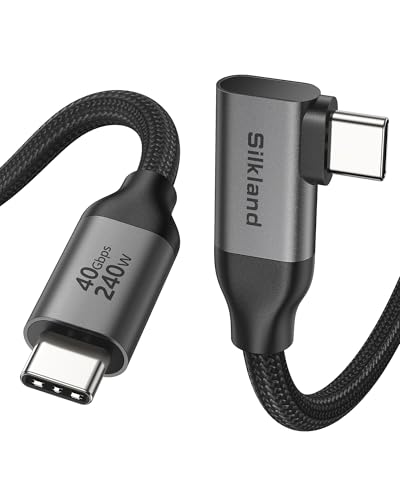
- 40Gbps data transfer for USB4 and Thunderbolt devices
- Supports up to 8K video and 240W PD 3.1 charging
- Compact 3.3-foot right-angle design for tidy setups
Best For: Versatile desk, dock, and charging setups
Best Certified Thunderbolt 5 Pick
Cable Matters 80G Right Angle Cable
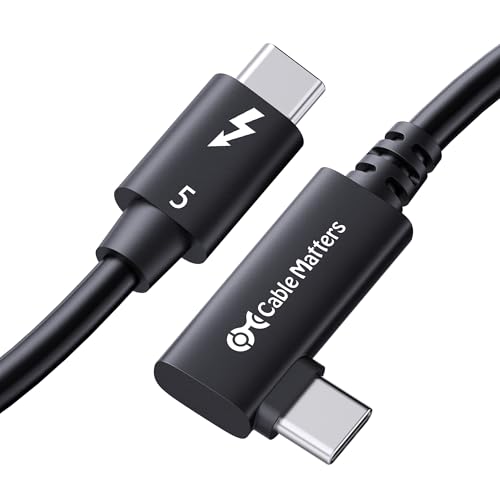
- Intel-certified Thunderbolt 5 cable with 80Gbps data speeds
- Supports up to 120Gbps video bandwidth and multi-display setups
- Provides 240W charging with broad backward compatibility
Best For: Thunderbolt 5 creative and multi-monitor workstations
Best Long Display Cable
Silkland Right Angle USB-C Monitor Cable

- Five-foot reach for USB-C monitor and portable display setups
- Supports up to 8K@30Hz and 4K@144Hz video
- Adds 20Gbps data transfer and 240W charging
Best For: USB-C monitors and longer desktop display connections
Best Premium Thunderbolt 5 Cable
Plugable 80Gbps Right Angle Cable

- Intel-certified Thunderbolt 5 performance at 80Gbps
- Supports up to 120Gbps video bandwidth and 240W charging
- Designed for docks, eGPUs, storage, and multi-display setups
Best For: High-performance Thunderbolt 5 workstations
Best for Thunderbolt 5
Silkland 80Gbps USB4 Right Angle Cable
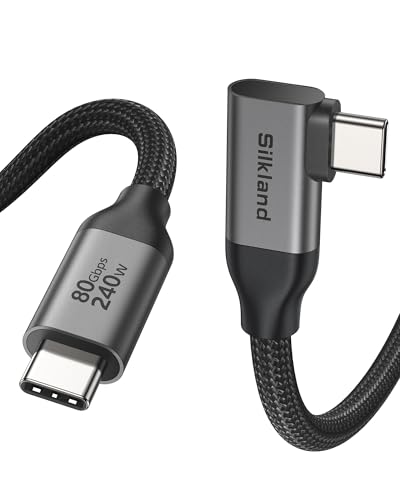
- 80Gbps data transfer with up to 120Gbps display bandwidth
- 240W charging for high-performance devices
- Braided, shielded construction with a 90-degree connector
Best For: Thunderbolt 5 workstations, multi-display setups, and fast SSDs
Best Adapter Kit
Cable Matters Right Angle USB-C Adapter Combo
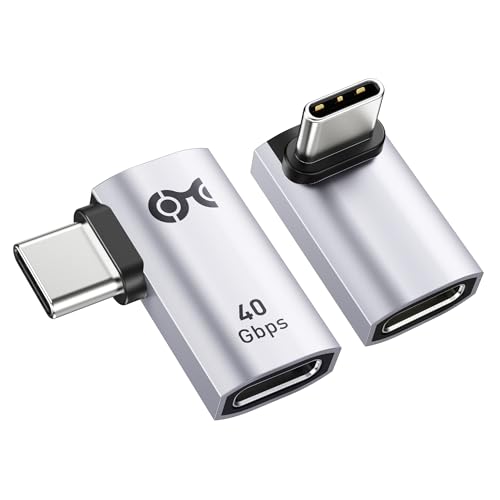
- Two angle orientations for flexible cable routing
- Up to 40Gbps, 240W, and 8K at 60Hz support
- Works with USB4 and Thunderbolt 3/4 devices
Best For: Rerouting existing USB-C cables in tight or changing setups
Best for Maximum Bandwidth
aceyoon 240W 80Gbps Right-Angle Cable

- Up to 80Gbps data transfer
- 240W PD 3.1 charging
- Compact female-to-male extension design
Best For: High-speed SSD, dock, and 8K display setups
Best Compact Value
Poyiccot 5-Inch 240W Right-Angle Cable

- 40Gbps data and 8K video support
- 240W PD 3.1 charging
- Flexible, tangle-free 5-inch design
Best For: Portable laptops, docks, monitors, and SSDs
Best for Monitor Durability

- 40Gbps USB4 and 8K video support
- 240W charging with E-marker chip
- Braided cable rated for 35,000 bends
Best For: Portable monitors and frequently moved USB-C setups
Best Overall – Silkland 40Gbps Right Angle USB4 Cable
For shoppers comparing right angle thunderbolt cables, the Silkland S3630 is a versatile USB4 option that combines 40Gbps data transfer, high-resolution display support, and up to 240W charging in a compact 3.3-foot length. Its 90-degree connector is particularly useful for tidy desk, dock, and charging setups.
Best For: Workstations that need fast file transfers, display connectivity, and high-power USB-C charging in a short cable.
Pros:
- Supports 40Gbps data transfer with Thunderbolt 4/3 and USB4 compatibility.
- Handles single 8K, 5K, or 4K@144Hz displays, plus dual 4K@60Hz with compatible devices.
- Supports up to 240W PD 3.1 charging and includes a durable braided, triple-layer construction.
Cons:
- Optimal 40Gbps and display performance depends on compatible device ports and DP Alt Mode support.
- The 3.3-foot length may be limiting for setups requiring more reach.
- Cases must be under 1.5mm thick for compatibility.
This is a strong all-around choice when you want one compact cable for high-speed storage, docks, monitors, and charging. Verify your devices support the advertised bandwidth and display modes before buying.
Best Certified Thunderbolt 5 Pick – Cable Matters 80G Right Angle Cable
The Cable Matters 80G is one of the most advanced right angle thunderbolt cables in this roundup. Its Intel-certified Thunderbolt 5 design offers 80Gbps bidirectional data transfer, up to 120Gbps of video bandwidth, and 240W power delivery for demanding modern systems.
Best For: Thunderbolt 5 laptops, creative workstations, and multi-monitor setups that need maximum bandwidth in a space-saving cable.
Pros:
- Intel-certified Thunderbolt 5 performance with 80Gbps bidirectional data transfer.
- Supports dual 6K or 8K displays, or triple 4K@144Hz configurations with compatible hardware.
- Offers up to 240W PD 3.1 charging and backward compatibility with Thunderbolt 3, Thunderbolt 4, USB4, and USB-C devices.
Cons:
- Its high-end capabilities require compatible Thunderbolt 5 or other supporting devices.
- The 2.6-foot length is best for nearby components rather than longer cable runs.
- The supplied details do not identify compatible phone models.
Choose this cable if you are building around Thunderbolt 5 and want substantial bandwidth for storage, docks, and high-resolution displays. For older systems, its full performance may not be realized, although backward compatibility adds flexibility.
Best Long Display Cable – Silkland Right Angle USB-C Monitor Cable
If your priority is connecting a USB-C laptop to a monitor, the five-foot Silkland cable is a practical alternative to shorter right angle thunderbolt cables. It supports high-resolution video, USB 3.2 Gen 2 data transfer, and up to 240W charging while helping reduce cable bend and port strain.
Best For: USB-C monitor connections, portable displays, and desk setups where a longer five-foot reach is useful.
Pros:
- Supports 8K@30Hz, 5K@60Hz, and 4K@144Hz video with compatible USB-C display hardware.
- Provides USB 3.2 Gen 2 data transfer up to 20Gbps for hubs, docks, and SSDs.
- Combines a five-foot length, right-angle connector, 240W charging, and reinforced braided construction.
Cons:
- Video output requires USB-C DP Alt Mode support on the source device.
- It is a USB 3.2 Gen 2 cable, so it does not provide the 40Gbps or 80Gbps speeds of higher-tier Thunderbolt options.
- Thick device cases may interfere with the connector; the listed charging note specifies cases under 2.5mm.
This cable makes sense when display connectivity and reach matter more than top-tier Thunderbolt bandwidth. Check both the laptop’s DP Alt Mode support and the monitor’s required resolution before purchase.
Best Premium Thunderbolt 5 Cable – Plugable 80Gbps Right Angle Cable
The Plugable TBT5-240W80R is a premium option among right angle thunderbolt cables, pairing Intel-certified Thunderbolt 5 connectivity with 80Gbps bidirectional bandwidth, up to 120Gbps Bandwidth Boost for video, and 240W EPR charging. Its 2.6-foot right-angle design is made for compact high-performance setups.
Best For: Thunderbolt 5 docks, eGPUs, high-speed NVMe storage, and professional multi-display workstations.
Pros:
- Delivers 80Gbps bidirectional Thunderbolt 5 bandwidth and up to 120Gbps for supported video workloads.
- Supports dual 8K@60Hz or triple 4K@144Hz displays with compatible systems.
- Provides 240W EPR charging, backward compatibility, a reinforced 90-degree connector, and lifetime support.
Cons:
- Full Thunderbolt 5 and multi-display performance requires compatible host devices and peripherals.
- The 2.6-foot length is intended for close-range connections.
- Its advanced specifications may be unnecessary for basic USB-C charging or standard display use.
This is a compelling choice for demanding users who want a certified, future-oriented cable for docks, eGPUs, storage, and high-resolution displays. It is best matched with hardware capable of using Thunderbolt 5’s higher bandwidth.
Best for Easy Setup – Cable Matters 40Gbps Right Angle USB4 Cable
For most setups, the Cable Matters 40Gbps Right Angle USB4 Cable is a practical choice among right angle thunderbolt cables. Its 6.6-foot length, 40Gbps bandwidth, 240W USB-C PD 3.1 support, and compatibility with Thunderbolt 4 make it useful for laptops, docks, monitors, and tight desktop spaces.
Best For: Everyday high-speed charging, data transfer, and display connections where extra cable length is helpful.
Pros:
- Supports up to 40Gbps data transfer and 8K video.
- USB-C PD 3.1 supports charging up to 240W.
- Backward compatible with USB 3.1, USB 3.2, USB 2.0, and Thunderbolt 4.
- 6.6-foot length and right-angle connector suit tight or complex setups.
Cons:
- Listed for indoor use only.
- It is a fixed cable rather than a swappable adapter design.
This is a well-rounded option if you want one right-angle USB4 cable for charging, video, and high-speed peripherals. Verify that your devices support the advertised power, display, and data modes to get the full performance.
Best for Thunderbolt 5 – Silkland 80Gbps USB4 Right Angle Cable
The Silkland 80Gbps USB4 cable is aimed at demanding Thunderbolt 5 users who need maximum bandwidth in a compact right-angle format. It combines 80Gbps bidirectional data transfer, up to 120Gbps display bandwidth, 240W charging, and a 4-foot braided design for docks, high-resolution displays, SSDs, and performance-focused workstations.
Best For: Thunderbolt 5 systems, multi-display workstations, high-speed storage, and high-wattage laptop charging.
Pros:
- Supports up to 80Gbps bidirectional data transfer.
- Supports display configurations including dual 8K/6K at 60Hz and single 4K at 540Hz, depending on the device.
- Provides up to 240W charging with PD 3.1 and QC 4.0+ compatibility.
- Braided nylon, aluminum housing, triple shielding, and testing over 5,000 bends support durability.
Cons:
- The 4-foot length may be limiting for larger desk layouts.
- Actual speed depends on the connected devices.
- Its advanced capabilities may be unnecessary for basic USB-C charging or data transfer.
Choose this cable when your hardware can take advantage of Thunderbolt 5-level throughput or demanding display configurations. For simpler equipment, a 40Gbps cable may provide better value without unused capacity.
Best Adapter Kit – Cable Matters Right Angle USB-C Adapter Combo
The Cable Matters Combo-Pack is a flexible alternative to buying a dedicated right-angle cable. It includes two USB-C male-to-female adapters—one top/bottom angle and one left/right angle—so you can reroute existing cables around laptops, phones, game consoles, and other devices while retaining support for USB4 and Thunderbolt 3/4 features.
Best For: Repositioning existing USB-C cables in cramped ports, gaming setups, and portable device configurations.
Pros:
- Includes both top/bottom and left/right 90-degree adapter orientations.
- Supports up to 40Gbps data transfer, 240W charging, and 8K at 60Hz video output.
- Compatible with USB4, Thunderbolt 3, and Thunderbolt 4 standards.
- Aluminum shells and gold-plated connectors are designed for durability and corrosion resistance.
Cons:
- Adapters add an extra connection point instead of replacing the cable.
- Compatibility is listed for USB-C devices, but performance still depends on the connected cable and hardware.
- The package quantity is two adapters, not two complete cables.
This kit is a smart space-saving choice if you already own suitable USB-C cables and need more connector flexibility. It is especially useful when the required angle varies between devices or ports.
Best for Maximum Bandwidth – aceyoon 240W 80Gbps Right-Angle Cable
If you need right angle thunderbolt cables for demanding transfers and high-resolution displays, this aceyoon model stands out for its rated 80Gbps bandwidth, 240W charging support, and compact 0.65-foot design. Its female-to-male layout is especially useful for extending an existing USB-C cable or reaching ports in tight spaces.
Best For: Creative professionals, laptop-to-dock setups, external SSD users, and anyone who needs maximum listed data-transfer performance in a compact connection.
Pros:
- Supports up to 80Gbps data transfer and 8K@60Hz video output.
- Rated for up to 240W PD 3.1 charging.
- 90-degree flat design helps reduce clutter and port strain in cramped setups.
- Works with Thunderbolt 4/3, USB4, USB 3, and USB 3.2 Gen 2×2 devices.
Cons:
- Its 0.65-foot length is intended for short connections rather than general-purpose cable runs.
- The female-to-male connector arrangement is less versatile than a standard male-to-male cable.
This is the most feature-heavy option of the three on paper, particularly for users who can take advantage of 80Gbps transfers. Confirm that your connected devices support the advertised standards, since real-world performance depends on the weakest link.
Best Compact Value – Poyiccot 5-Inch 240W Right-Angle Cable
For a tidy short connection, this Poyiccot cable is one of the more practical right angle thunderbolt cables. Its 5-inch length, flat flexible construction, 40Gbps transfer rating, and 240W charging support make it suited to reducing slack between laptops, docks, monitors, and external SSDs.
Best For: Users who want a portable, low-clutter USB-C cable for high-speed charging, data transfer, and compatible 8K displays.
Pros:
- Supports up to 240W PD 3.1 charging with an E-marker chip.
- Provides up to 40Gbps data transfer and 8K@60Hz video support.
- Short, lightweight, flat construction helps avoid cable clutter.
- Compatible with Thunderbolt 4/3, USB4, USB 3.x, and USB 2.0 devices.
Cons:
- At 5 inches, it may be too short when devices are positioned farther apart.
- Its 40Gbps rating is lower than the 80Gbps rating of the aceyoon option.
The Poyiccot is a sensible choice when cable length and portability matter more than maximum bandwidth. It covers the common high-performance USB-C use cases while keeping a compact setup neat.
Best for Monitor Durability – ZeroneTeck 6-Inch USB4 Cable
This 6-inch option is a strong pick among right angle thunderbolt cables for monitor connections and portable displays. It combines a 90-degree connector with 40Gbps USB4 performance, 240W PD charging, broad video support, and a braided exterior rated for 35,000 bends in the supplied testing claim.
Best For: Portable-monitor users and anyone who frequently connects laptops, phones, tablets, or displays in tight spaces.
Pros:
- Supports 40Gbps transfers and video up to 8K@60Hz, with listed 5K and 4K@144Hz support.
- Provides up to 240W PD 3.1 charging through an E-marker chip.
- Braided cable and reinforced right-angle joints are designed for frequent bending.
- Includes stated 36-month after-sales service.
Cons:
- The 0.5-foot length limits it to close-proximity connections.
- The product notes specify a phone-case thickness limit of 5mm for the right-angle design.
- Its 40Gbps rating does not match the aceyoon cable’s listed 80Gbps maximum.
Choose this cable when durability and monitor connectivity are priorities. Its reinforced construction and broad display support are useful for mobile workstations, though users should verify port capabilities and clearance around thick cases.
How We Picked the Best Right Angle Thunderbolt Cables
We selected these right-angle Thunderbolt cables by comparing their advertised bandwidth, charging capacity, connector design, length, display support, and compatibility claims. The list includes Thunderbolt 4 and Thunderbolt 5 cables, USB4 alternatives, short 90-degree cords, longer desktop options, and an adapter kit.
Bandwidth matters most when moving large files, connecting fast external storage, or driving high-resolution displays. We also considered practical routing: a short cable may be ideal for a portable SSD, while a 5- or 6.6-foot option is more useful for a desktop dock or monitor.
Quick Comparison
- Best for Thunderbolt 5: Choose an Intel Certified 80Gbps cable or another clearly labeled Thunderbolt 5 option.
- Best for Thunderbolt 4 and USB4: Look for a 40Gbps cable with 240W USB Power Delivery if your devices support it.
- Best for high-power charging: Select a cable rated for 240W, while confirming that the charger and device support the required USB PD profile.
- Best for tight spaces: Short 5-inch to 0.65-foot cables minimize slack around drives, hubs, and portable devices.
- Best for flexible desktop routing: Cables around 3 to 6.6 feet provide more reach between a computer, dock, monitor, or storage device.
Key Buying Factors for Right-Angle Thunderbolt Cables
Bandwidth and Certification
Thunderbolt 4 and USB4 cables commonly support up to 40Gbps, while Thunderbolt 5 models can reach up to 80Gbps in compatible configurations. Certification and clear specifications are preferable to vague “high-speed” claims. Actual performance depends on both connected devices, the host port, and the workload.
Power Delivery
A 240W rating can provide useful headroom for compatible laptops and accessories, but it does not guarantee 240W charging in every setup. Check the charger, computer, and cable requirements together. Some devices may support only lower USB PD levels.
Display Support
For monitors, verify resolution and refresh-rate support rather than relying only on the cable’s bandwidth number. A cable advertised for 8K, 5K, or 4K may still require compatible graphics hardware, display inputs, and the correct Thunderbolt or USB4 mode.
Connector Orientation and Durability
Right-angle connectors are not universally oriented the same way. Check whether the bend points toward or away from your device’s port. Reinforced strain relief and a suitable length can help prevent sharp bends and accidental tension.
Who Should Buy Which Right Angle Thunderbolt Cables?
Choose a Thunderbolt 5 cable if you already own, or plan to buy, Thunderbolt 5 computers, docks, or storage and want maximum bandwidth. A 40Gbps Thunderbolt 4 or USB4 cable is generally the sensible choice for current Thunderbolt 4 laptops, monitors, docks, and external SSDs.
Pick a longer cable for a permanent desk setup, a compact cable for portable storage, and a short adapter-style option when a standard connector would stick out too far. If you need to connect several device types, the combo adapter kit may be more useful than a single-purpose cable. Before ordering, confirm port standards, required length, charging wattage, display resolution, and the connector’s bend direction.