The best right-angle USB-C cables make charging more convenient by directing the connector away from crowded ports, cases, and tight desk or car spaces. They can also reduce cable strain when your phone, tablet, laptop, or controller is used while plugged in.
This roundup covers 10 options ranging from compact 1-foot cables to 10-foot charging leads, including high-wattage USB-C-to-USB-C models, monitor cables, CarPlay-friendly picks, and USB-A-to-USB-C alternatives.
Best 10 Right Angle USB C Cables Picks for 2026
Best Overall
AINOPE 60W Right-Angle USB-C Cable 2-Pack

- Two 6.6-foot USB-C to USB-C cables
- 60W PD/QC fast charging support
- Reinforced 90-degree design rated for 40,000 bends
Best For: Everyday multi-device charging and keeping a spare cable
Best for Monitors
Silkland Right-Angle USB-C Monitor Cable

- Supports 8K, 5K, and high-refresh 4K video
- USB 3.2 Gen 2 speeds up to 20Gbps
- Up to 240W charging with compatible equipment
Best For: USB-C monitors, portable displays, and fast data connections
Best Long Cable
AINOPE 240W 10-Foot Right-Angle USB-C Cable

- Extra-long 10-foot reach
- Up to 240W PD 3.1 charging support
- Durable 90-degree design with E-Marker chip
Best For: Charging laptops and devices far from the power outlet
Best Compact Option
UGREEN 60W 3.3-Foot Right-Angle USB-C Cable

- Short 3.3-foot cable for tidy setups
- 60W charging with USB-C PD support
- Comfortable 90-degree connector for handheld use
Best For: Short-range phone, tablet, and handheld-device charging
Best High-Wattage Pick
Anker 240W Right-Angle USB-C Cable

- 240W USB-C Power Delivery
- 6-foot braided 2-pack
- Rated for 10,000+ bends
Best For: High-power USB-C laptop and tablet charging
Best for Cars and Gaming
60W Case-Friendly Right-Angle USB-C Cable
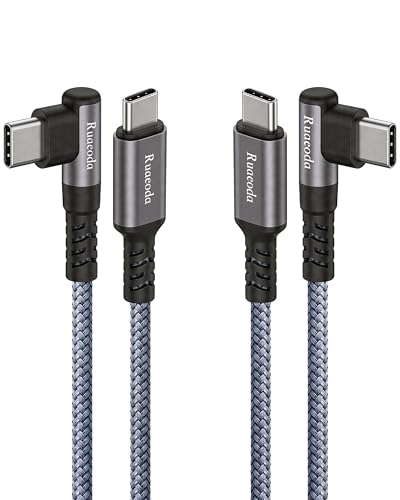
- CarPlay and Android Auto support
- Case-friendly 90-degree plug
- 60W charging and 480Mbps syncing
Best For: In-car connectivity, gaming, and rugged phone cases
Best High-Power Pick
UGREEN 240W Right-Angle USB C Cable

- Up to 240W PD 3.1 charging
- 90-degree connector for gaming and handhelds
- 6.6ft braided cable with 480Mbps data
Best For: High-wattage laptops, gaming devices, and longer cable runs
Best Short-Cable Value
1ft Right-Angle USB C Cable 3-Pack

- Three compact 12-inch cables
- Right-angle plugs on both ends
- Up to 65W charging and 480Mbps data
Best For: Power banks, charging hubs, and portable kits
Best for Tight Spaces
3.3FT 60W Right-Angle USB C Cable 2-Pack

- Useful 3.3ft length in a two-pack
- 90-degree profile for cars, stands, and gaming
- 60W charging with 480Mbps data
Best For: Tesla ports, phone stands, gaming, and confined spaces
Best Overall – AINOPE 60W Right-Angle USB-C Cable 2-Pack
If you need dependable right angle USB C cables for everyday charging, this two-pack from AINOPE combines a space-saving L-shaped connector with 60W USB-C Power Delivery support. The 6.6-foot nylon-braided cables suit phones, tablets, and compatible laptops while helping reduce strain at the port.
Best For: Everyday charging of USB-C phones, tablets, and compatible laptops, especially when you want a spare cable.
Pros:
- Two 6.6-foot USB-C to USB-C cables are included.
- Supports up to 60W charging, PD 3.0, and QC 3.0.
- 90-degree design is useful while gaming, watching videos, or reading.
- Reinforced construction is rated for 40,000 bends.
Cons:
- USB 2.0 data speeds are limited to 480Mbps.
- USB-C to USB-C only; it does not connect to USB-A ports.
This is a well-rounded pick if you want two durable right-angle charging cables without prioritizing high-speed data or video output. Its 60W ceiling covers many common devices, though higher-powered laptops may need a more capable cable.
Best for Monitors – Silkland Right-Angle USB-C Monitor Cable
Among right angle USB C cables, the Silkland cable stands out for monitor connectivity. Its USB 3.2 Gen 2 design supports high-resolution video and up to 20Gbps data transfer, while the angled connector helps keep desk and portable-monitor setups more organized.
Best For: USB-C monitors, portable displays, docking stations, SSDs, and other setups that require video and fast data transfer.
Pros:
- Supports up to 8K at 30Hz, 5K at 60Hz, and 4K at 144Hz where devices support those modes.
- USB 3.2 Gen 2 data transfer reaches up to 20Gbps.
- Supports up to 240W charging with a compatible PD 3.1 charger.
- Nylon braiding and an aluminum shell support durability and cable organization.
Cons:
- Video output requires USB-C ports with DisplayPort Alt Mode.
- Phone cases thicker than 2.5mm may not fit properly.
- Excessive cable movement can interrupt data transmission.
This is the most capable option here for display and high-speed data use. Confirm that both connected devices support the desired resolution, refresh rate, and USB-C video mode before buying.
Best Long Cable – AINOPE 240W 10-Foot Right-Angle USB-C Cable
For charging from a distant outlet, this 10-foot AINOPE cable offers substantial reach and a 90-degree connector. It is one of the more powerful right angle USB C cables for charging, supporting up to 240W with compatible USB-C Power Delivery equipment.
Best For: Long-distance charging at home, school, work, or while using a USB-C laptop away from the outlet.
Pros:
- 10-foot length provides flexibility around desks, beds, and seating areas.
- Supports up to 240W charging with compatible PD 3.1 equipment.
- 90-degree connector improves comfort during charging and reduces cable bending.
- Reinforced construction is rated for 40,000 bends and includes an E-Marker chip.
Cons:
- USB 2.0 data speeds are limited to 480Mbps.
- It does not support USB 3.0 data or 4K video.
- The connector may not fit phone cases with charging-port openings thicker than 5.5mm.
Choose this cable when reach and charging power matter more than display connectivity or fast file transfers. Its 240W rating is useful for compatible high-power devices, but the charger and device must also support the required standard.
Best Compact Option – UGREEN 60W 3.3-Foot Right-Angle USB-C Cable
The UGREEN cable is a compact choice for close-range charging. This 3.3-foot USB-C to USB-C cable uses a right-angle connector for easier handheld use and supports up to 60W charging with compatible USB-C Power Delivery chargers.
Best For: Phones, tablets, handheld consoles, and short cable runs where a tidy setup is more useful than extra length.
Pros:
- Compact 3.3-foot length helps reduce excess cable clutter.
- Supports up to 60W charging and is backward compatible with lower-power chargers.
- 90-degree design is comfortable for gaming, reading, and watching videos while charging.
- Supports file transfers up to 480Mbps.
Cons:
- Not suitable for video output or monitor extension.
- Maximum supported phone-case thickness is 2mm.
- USB-C to USB-C only, so it requires a compatible USB-C charger or port.
This is a practical pick for everyday charging when the device and power source are close together. It covers common 60W charging needs, but shoppers needing monitor support, longer reach, or faster data should consider another option.
Best High-Wattage Pick – Anker 240W Right-Angle USB-C Cable
If you need right angle usb c cables for a laptop, tablet, or phone, this Anker 2-pack combines a space-saving 90-degree connector with 240W power delivery. The 6-foot braided construction is rated for more than 10,000 bends, while the USB-C-to-USB-C design supports charging and data transfer at up to 480Mbps.
Best For: USB-C laptop and tablet users who want high-power charging, extra reach, and a cable that routes neatly away from the device.
Pros:
- Supports up to 240W charging for compatible devices.
- 6-foot braided cables are rated for more than 10,000 bends.
- Two cables are included, with broad compatibility across USB-C phones, tablets, and laptops.
- 90-degree connectors can make charging more comfortable in tight spaces.
Cons:
- Not recommended for heavy or bulky cases; case compatibility is specified up to 3 mm.
- Data transfer is limited to 480Mbps rather than higher-speed USB standards.
This is the strongest option here for high-wattage USB-C charging, especially with a MacBook or other compatible laptop. Just verify that your case is within the stated fit limit and that your device supports the advertised power level.
Best for Cars and Gaming – 60W Case-Friendly Right-Angle USB-C Cable
Among right angle usb c cables, this 6-foot 2-pack stands out for in-car connections and handheld gaming. Its 90-degree, extended plug is designed to fit around rugged cases, while the built-in chip supports stable Apple CarPlay and Android Auto connections. It also offers up to 60W charging and 480Mbps data transfer.
Best For: Drivers using CarPlay or Android Auto, mobile gamers, and anyone who needs a case-friendly cable for everyday USB-C charging.
Pros:
- Designed for stable Apple CarPlay and Android Auto connections.
- Extended right-angle plug is intended to fit thick or rugged cases.
- Supports up to 60W charging and 480Mbps data syncing.
- Nylon braiding and reinforced strain relief are rated for more than 20,000 bends.
Cons:
- It does not provide the 240W capacity of the higher-powered Anker USB-C option.
- Compatibility and charging performance can vary by vehicle, device, and charger.
This is a practical multipurpose cable when sideways routing matters, particularly in a car or while holding a gaming device in landscape orientation. Its case-friendly connector and included replacement service add useful everyday convenience.
Best USB-A Option – Anker Right-Angle USB-A to USB-C Cable
If your charger, computer, or other source still uses USB-A, this Anker cable is one of the more useful right angle usb c cables to consider. It includes two 6-foot braided USB-A-to-USB-C cables, a 90-degree USB-C connector, USB-IF certification, and 15W output for charging and basic data transfer.
Best For: USB-A chargers, older computers, and users who want a durable, long cable for USB-C phones and tablets without a straight connector sticking out.
Pros:
- USB-A-to-USB-C format works with many existing USB-A power sources.
- 6-foot braided cables are rated for more than 10,000 bends.
- USB-IF certification supports a safety-focused charging design.
- Two cables are included, with 90-degree routing for tighter spaces.
Cons:
- 15W output is much lower than the USB-C-to-USB-C alternatives.
- Not recommended for heavy or bulky cases; compatibility is specified up to 3 mm.
- USB-A connection limits compatibility with USB-C-only chargers and ports.
This cable makes the most sense when your available power source has USB-A ports. It is a durable, affordable-feeling everyday option, but users seeking fast laptop charging should choose a higher-wattage USB-C-to-USB-C cable instead.
Best High-Power Pick – UGREEN 240W Right-Angle USB C Cable
If you need right angle usb c cables for demanding laptops, gaming devices, or everyday charging, this 6.6-foot UGREEN cable stands out with up to 240W PD 3.1 charging. Its 90-degree connector helps keep the cable flush against your device, while the braided exterior is designed for regular use.
Best For: High-wattage laptop charging, gaming devices, and longer cable runs.
Pros:
- Supports up to 240W charging with PD 3.1 and E-Marker power negotiation.
- 90-degree design and reinforced joint suit gaming and handheld-device use.
- Nylon braiding, aluminum housing, and 480Mbps data transfer add everyday versatility.
Cons:
- 480Mbps data speed is far below USB 3.x transfer rates.
- It is longer and more powerful than necessary for simple short-distance charging.
This is the most capable option here for users who want one right-angle USB-C cable that can handle high-power laptops as well as phones and tablets. Just remember that its data performance is limited to USB 2.0 speeds.
Best Short-Cable Value – 1ft Right-Angle USB C Cable 3-Pack
HOTNOW USB C to USB C Cable Right Angle 1ft 3Pack, 12inch PD 65W Type C USB 2.0 Fast Charge Cord
Check Price On AmazonThese right angle usb c cables are designed for compact setups where excess cable gets in the way. The three-pack includes 12-inch USB-C-to-USB-C cords with right-angle plugs on both ends, making them especially convenient for power banks, charging hubs, and short-distance connections.
Best For: Power banks, USB charging hubs, and portable cable kits.
Pros:
- Three short 1-foot cables are easy to carry and store.
- Dual right-angle connectors work well in compact or horizontal setups.
- Supports up to 65W PD charging and 480Mbps USB 2.0 data transfer.
Cons:
- One-foot length is restrictive for desks, bedsides, and larger devices.
- Does not support video output.
This three-pack is a practical choice when you want tidy, low-clutter charging around a power bank or hub. Its short length and lack of display support make it less suitable as an all-purpose cable.
Best for Tight Spaces – 3.3FT 60W Right-Angle USB C Cable 2-Pack
For right angle usb c cables that balance reach and compact positioning, this two-pack offers 3.3-foot cords with a 90-degree connector. The design is suited to Tesla storage compartments, phone stands, and gaming setups where a straight plug can press against a surface or interfere with your hands.
Best For: Tesla charging ports, phone stands, gaming, and other tight spaces.
Pros:
- 90-degree design helps reduce cable bending in confined spaces.
- Supports up to 60W charging and 480Mbps data transfer.
- Two 3.3-foot braided cables provide useful everyday reach.
Cons:
- Not suitable for video output to monitors or projectors.
- 60W capacity is lower than the 240W option for high-power laptops.
This is a well-rounded option for organized charging in cars, stands, and gaming spaces. It offers more reach than the 1-foot pack while retaining a compact right-angle profile, though its USB 2.0 data and charging-only video limitation should be considered.
How We Picked the Best Right Angle USB C Cables
We compared these cables by connector design, charging capacity, length, construction, compatibility, and intended use. Wattage ratings were treated as maximum supported power rather than a guarantee that every device will charge at that speed; the charger, device, and charging protocol must also support the required output.
We also considered practical details such as braided jackets, strain relief, case clearance, pack size, and whether a cable is designed for data or video in addition to charging. For monitor use, bandwidth and resolution support matter as much as the connector angle.
Quick Comparison
| Best For | What to Look For |
|---|---|
| Phones and tablets | 60W support, flexible braiding, and a case-friendly connector |
| Gaming laptops | 140W–240W USB-C PD support and a suitable high-output charger |
| Cars and CarPlay | Reliable data support, useful length, and a compact right-angle plug |
| Monitors | USB 3.x or higher data bandwidth and stated display-resolution support |
| Desk cable management | Short lengths, low-profile connectors, and durable strain relief |
Key Buying Factors for Right-Angle USB-C Cables
Power and Charging Protocol
A 60W cable is adequate for most phones, tablets, handheld consoles, and many ultrabooks. Choose a 240W-rated cable for demanding USB-C laptops when you want greater power headroom, but verify that it supports the charger’s USB Power Delivery profile. Higher wattage does not make a device charge faster if the device or charger is limited.
Data and Video Capability
Some USB-C cables are primarily charging cables and use USB 2.0 data speeds. That is usually fine for charging or basic accessories but can be unsuitable for external displays, docks, or fast file transfers. For monitors, select a cable with explicit support for the needed resolution, refresh rate, and DisplayPort Alt Mode.
Length, Angle, and Fit
Measure the distance between the port and charger before choosing. A 1-foot cable keeps a desk tidy, while 6.6- or 10-foot options are better for beds, couches, and standing desks. Check whether the angled plug points in the direction your setup requires, and look for a case-friendly housing if your device has a thick protective case.
Build Quality
Braided exteriors, reinforced joints, and flexible strain relief can help a cable withstand repeated bending. Avoid sharply folding the cable directly behind the connector, even when the plug is angled.
Who Should Buy Which Right Angle USB C Cables?
Choose a compact 1-foot or 3.3-foot model for power banks, controllers, and organized desktop setups. A 5- or 6-foot 60W cable is the most versatile choice for phones, tablets, CarPlay, and everyday charging. Select a 240W USB-C-to-USB-C cable for high-power laptops or future-proofing. If your setup uses an older USB-A charger, choose the USB-A-to-USB-C option rather than assuming a USB-C-to-USB-C cable will fit. For an external monitor, prioritize stated video specifications over wattage alone.