Smart displays can make everyday life easier for older adults by putting reminders, calendars, photos, and calls on one easy-to-read screen.
In this roundup, we focus on the best options for visibility, simplicity, and family support so you can choose a model that fits real daily needs.
Best 10 Smart Displays for Seniors Picks for 2026
Compact Alexa Display
Amazon Echo Show 5 for Daily Check-Ins
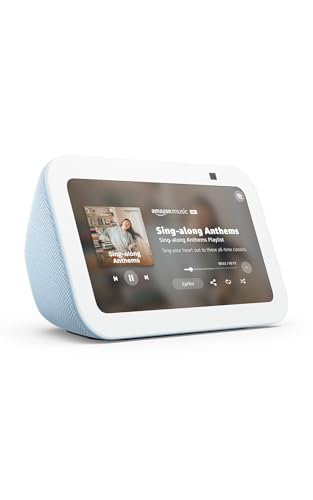
- 5.5-inch screen for weather, news, and photos
- Built-in camera for video calls and home checks
- Mic/camera off button plus camera shutter
Best For: Seniors wanting a small Alexa display for everyday check-ins
Photo-and-Calendar Frame
ApoloSign 14" Smart Desk Display

- 14.1-inch FHD touchscreen with bright photo detail
- Frameo app shares photos and videos over Wi-Fi
- Calendar sync plus clock, weather, and DND mode
Best For: Families who want a photo frame and calendar in one
Large Kitchen Hub
Echo Show 15 for Home Organization

- 15.6-inch Full HD screen is easy to read
- Widgets organize calendars, weather, and tasks
- Built-in Fire TV adds streaming and video calls
Best For: Seniors who want a large central display for the home
Easy Family Planner
15.6" Smart Calendar and Photo Frame

- 15.6-inch touchscreen for schedules and tasks
- Calendar, chore chart, meal plan, and photo frame
- Syncs with Google, iCloud, Outlook, Cozi, and Yahoo
Best For: Families needing a simple shared planner for seniors and kids
Senior Daily Routine Clock
10.1" WiFi Touchscreen Clock for Seniors

- 10.1-inch display shows time, date, weather, and temperature
- Up to 64 customizable alarms and reminders
- Auto-dimming plus WiFi sync for easier daily use
Best For: Seniors and caregivers who want a large reminder clock with clear, automatic updates
Family Video Frame

- Auto-answer video calling for hands-free family check-ins
- Share photos, videos, captions, and reminders remotely
- 15.6-inch 1080p display with private family sharing
Best For: Grandparents and families who want simple video calls plus photo sharing
Simple Care Reminder Board
Memoryboard Digital Reminder Board

- Large white-on-black display is easy to read
- No app, login, tapping, or swiping needed on the senior side
- Supports medication, hydration, meal, and appointment prompts
Best For: Aging parents who need a simple, always-visible reminder board
Family Planning Hub
Dragon Touch 15.6" Smart Family Planner

- 15.6-inch full-HD touchscreen
- Syncs iOS and Google calendars
- Includes chores, meals, and photos
Best For: Households wanting a shared smart calendar with extra organizer tools
Large-Display Reminder Clock

- 7-inch HD screen with large text
- 20 alarms plus 20 custom reminders
- Adjustable brightness and sleep mode
Best For: Seniors who need a clear clock and dependable reminder support
Compact Smart Organizer
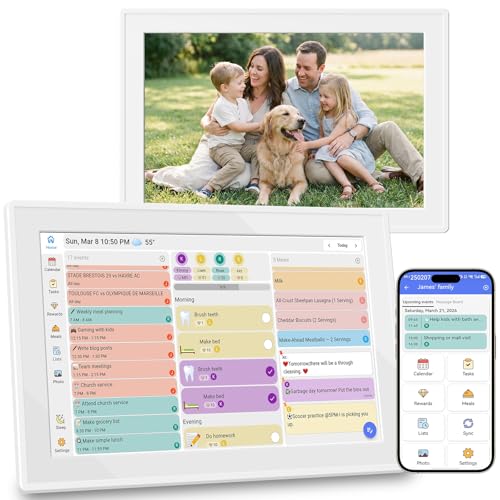
- 10.1-inch touchscreen with no subscription
- Syncs Google, iCloud, and Outlook
- Handles chores, meals, lists, and reminders
Best For: Smaller households wanting a subscription-free shared calendar
Compact Alexa Display – Amazon Echo Show 5 for Daily Check-Ins
If you’re comparing smart displays for seniors, the Echo Show 5 is a simple option for quick glances at weather, news, photos, and video calls. Its 5.5-inch screen keeps the device compact for a nightstand or side table, while Alexa voice control helps reduce the need to navigate menus.
Best For: Seniors who want a small, easy-to-place Alexa display for calls, photos, reminders, and home checks.
Pros:
- 5.5-inch display shows news, weather, song titles, and more at a glance
- Built-in camera supports drop-in checks, family video calls, and compatible doorbell viewing
- Controls compatible smart home devices like lights and thermostats
- Privacy features include mic/camera off button and a built-in camera shutter
Cons:
- Small screen may feel limited for users who want a larger viewing area
- 2 MP camera is designed for basic calling and check-ins, not premium video quality
The Echo Show 5 is a practical pick when you want a compact smart display that handles the basics well. It focuses on convenience, connectivity, and privacy in a size that fits easily into smaller rooms.
Photo-and-Calendar Frame – ApoloSign 14" Smart Desk Display
Among smart displays for seniors, this ApoloSign frame stands out for families who want a photo frame that also functions as a synced calendar. It combines a bright 14.1-inch touchscreen, easy app-based sharing, and built-in clock and weather tools in one desktop-friendly display.
Best For: Families who want to send photos remotely while keeping schedules visible in one attractive display.
Pros:
- 14.1-inch FHD touchscreen with clear photo detail
- Frameo app lets family and friends send photos and short videos over Wi-Fi
- Smart calendar syncs with Google, Outlook, iCloud, or iCal links
- Includes clock, weather, Do Not Disturb mode, and expandable storage
Cons:
- More of a photo-and-calendar display than a voice assistant smart display
- Requires Wi-Fi and app setup for sharing and syncing features
This is a strong choice if the goal is a simple, always-visible family display rather than an Alexa-style hub. Its calendar and photo features make it especially useful for keeping seniors connected to both schedules and family memories.
Large Kitchen Hub – Echo Show 15 for Home Organization
If you’re looking at smart displays for seniors that are easy to read from across the room, the Echo Show 15 offers a large 15.6-inch Full HD screen and simple widget-based organization. It can keep calendars, to-do lists, weather, smart home controls, and entertainment in one central place.
Best For: Seniors and families who want a large, wall-friendly smart display for schedules, TV, and home control.
Pros:
- Large 15.6-inch Full HD display is easy to see at a glance
- Customizable widgets show calendars, to-do lists, weather, and smart home info
- Built-in Fire TV adds streaming access to major apps
- Centered camera with auto-framing supports more natural video calls
Cons:
- Larger size is less discreet than smaller tabletop displays
- Best value depends on using widgets, Fire TV, and smart home features regularly
The Echo Show 15 is a better fit when visibility and organization matter more than compact size. For a busy household, it can serve as a central hub that combines entertainment, communication, and daily planning.
Easy Family Planner – 15.6" Smart Calendar and Photo Frame
For shoppers comparing smart displays for seniors, this 15.6-inch calendar focuses on simplicity, visibility, and household organization. It combines a touchscreen family planner, chore chart, meal plan board, and photo frame without a subscription fee for the included features.
Best For: Families who want a large shared schedule display that is simple enough for seniors to use.
Pros:
- 15.6-inch HD touchscreen makes schedules and tasks easy to view
- Works as a digital calendar, chore chart, meal planner, and photo frame
- Syncs with Google, iCloud, Outlook, Cozi, and Yahoo calendars
- Can be used on a wall or desk and includes weather forecasts and sleep/wake mode
Cons:
- Primarily focused on scheduling and family organization rather than entertainment
- Requires Wi-Fi and app setup for syncing and photo uploads
This model is especially useful when the main goal is keeping everyone aligned on schedules and chores. Its large screen and straightforward layout make it a practical family dashboard for daily routines.
Senior Daily Routine Clock – 10.1" WiFi Touchscreen Clock for Seniors
For smart displays for seniors that focus on daily structure, this 10.1-inch WiFi touchscreen clock is built to show time, date, day, weather, and temperature in a format that’s easy to read across the room. It also adds reminders and alarms for medications, appointments, and family calls, making it a practical pick for households that want simple, visible support without a complicated setup.
Best For: Seniors, dementia care, and families who want a large, easy-to-read reminder clock with automatic updates.
Pros:
- Large 10.1-inch touchscreen shows time, date, day, weather, and temperature clearly.
- Supports up to 64 customizable alarms and reminders for meds, appointments, and calls.
- Auto-dimming and WiFi sync reduce manual adjustments and keep the display current.
- Includes multiple language support and simple plug-and-go setup.
Cons:
- It is primarily a reminder clock, not a full media or communication device.
- Requires WiFi for automatic time and weather syncing.
- The feature set may be more than needed for very basic users.
This is a strong choice if you want a senior-friendly display that prioritizes orientation, reminders, and readability. The large screen and automatic functions make it especially useful in bedrooms, living rooms, or kitchens.
Family Video Frame – Smart Frame by ViewClix
If you’re comparing smart displays for seniors that are built around family connection, the ViewClix Smart Frame stands out with video calling, photo sharing, captions, and reminder features. It’s designed to feel simple on the senior side, with auto-answer video calls and remote management that lets family handle setup and content from a phone or computer.
Best For: Grandparents and families who want an easy video-calling photo frame with remote sharing.
Pros:
- Auto-answer video calling helps make hands-free calls simple for seniors.
- Family can share photos, videos, captions, and reminders remotely.
- 15.6-inch 1080p display gives shared photos and videos plenty of room.
- Private share list and encrypted calls add a layer of family-focused privacy.
Cons:
- Requires a Premier Membership after the included first month.
- The frame uses buttons rather than a touchscreen control method.
- Best features depend on ongoing app or portal use by family members.
This is a strong fit if your goal is staying visually connected rather than managing routine tasks. The frame’s ease of use for seniors and remote control for caregivers make it especially practical for long-distance family communication.
Simple Care Reminder Board – Memoryboard Digital Reminder Board
For smart displays for seniors that keep instructions and encouragement front and center, the Memoryboard Digital Reminder Board uses a high-contrast black screen with large white text to show reminders, messages, and photos automatically. It’s meant to be very simple for the person receiving it, with no app, tapping, or login required on their side.
Best For: Aging parents and loved ones who need an always-visible reminder board with minimal interaction.
Pros:
- Messages and reminders appear automatically in large, easy-to-read text.
- No phone, app, tapping, swiping, or login required for the senior.
- Supports routines like medication, hydration, meal prompts, and appointment alerts.
- No required monthly subscription.
Cons:
- Focused on reminders and messages rather than video calls or entertainment.
- Screen size is limited to 10.1 inches in this version.
- Family members still need to send content from their phones.
This is a practical option if your main need is a clear, low-friction reminder display. Its simplicity is the main appeal, especially for seniors who may not want to interact with apps or menus.
Family Planning Hub – Dragon Touch 15.6" Smart Family Planner
If you’re comparing smart displays for seniors that also work as a household organizer, this Dragon Touch 15.6-inch touchscreen is built around clarity and convenience. It combines a full-HD calendar, chore chart, dinner planner, grocery list, and photo frame in one wall- or desk-mountable screen, making it useful for families who want a central place for schedules and reminders.
Best For: Families who want a large, easy-to-see shared planner that can double as a digital picture frame.
Pros:
- 15.6-inch 1080p touchscreen with clear, large-format viewing
- Syncs multiple calendars like iOS and Google into one interface
- Includes chore chart, dinner planner, grocery list, and photo frame features
- Can be managed from the eCalendar app from anywhere
Cons:
- More of a family scheduler than a dedicated senior clock
- Some advanced tools are paid, including Magic Import
- May be larger than needed if you only want basic date and time display
This is a strong pick if you want an all-in-one home command center rather than a simple clock. The large touchscreen and unified calendar view make it practical for keeping everyone aligned, while the photo-frame mode adds everyday value when scheduling is done.
Large-Display Reminder Clock – Elderly Day-and-Date Clock
For shoppers focused on smart displays for seniors, this 7-inch digital calendar clock is designed around readability and reminders. It shows the time, date, day of the week, and time-of-day icons in a large HD layout, while also offering alarms and custom reminders for everyday routines like medication, hydration, birthdays, and appointments.
Best For: Older adults who need an easy-to-read clock with reminders and simple day-and-date visibility.
Pros:
- 7-inch HD display with large font and clear day/date information
- Supports 20 normal alarms and 20 custom reminders
- 10 brightness levels plus one-touch sleep mode
- Includes 12 themes, 9 volume levels, and 3/5/9-minute snooze
Cons:
- Requires outlet power for normal use
- Battery backup is for settings only, not full operation
- Feature-rich interface may be more than some buyers need
This model stands out for practical senior-friendly visibility and reminder support. If the goal is to reduce confusion about time, day, and routine tasks, it offers a focused set of features without relying on a complicated setup.
Compact Smart Organizer – 10.1" Family Calendar Display
This 10.1-inch touchscreen is a practical option if you want smart displays for seniors that also keep the whole household organized. It syncs Google Calendar, iCloud, and Outlook in real time, while also handling chore lists, meal planning, grocery lists, reminders, weather, and a photo-frame mode with no subscription required.
Best For: Families and caregivers who want a smaller wall-mounted smart calendar with broad scheduling tools.
Pros:
- No subscription and real-time calendar sync with major services
- Supports chore lists, to-dos, meal planning, and grocery lists
- Photo frame mode and weather/reminder features add everyday usefulness
- Compact 10.1-inch size works well in tighter spaces
Cons:
- Smaller screen than larger family planner displays
- More organizer-focused than a dedicated senior clock
- May be best for households comfortable using app-based setup
For buyers who want a cleaner, space-saving family hub, this display covers the essentials without a recurring fee. Its smaller footprint and broad organizer tools make it a strong middle-ground choice for homes that need both reminders and shared planning.
How We Picked These Smart Displays for Seniors
We looked for displays that are easy to read, simple to set up, and practical for daily use. Priority went to large, clear screens, strong reminder and calendar features, voice or touch controls, and options that make it easier for family members to help manage schedules remotely.
We also considered whether the device works well as a countertop hub, wall planner, bedside reminder, or photo-and-video communication tool. For Smart Displays for Seniors, usability matters more than raw specs.
Quick Comparison
Think of these devices in three main groups: Alexa-style smart displays for voice help and entertainment, dedicated digital calendars and chore boards for household organization, and reminder clocks or memory boards for highly focused day-to-day support. The best choice depends on whether the user needs communication, scheduling, or a simple visual prompt system.
Key Buying Factors for Smart Displays for Seniors
Screen Size and Readability
A larger screen with bold text is usually easier to use, especially for calendars, medication reminders, and family messages. High contrast and bright displays help in kitchens, bedrooms, and living rooms.
Ease of Setup and Controls
Choose a device with straightforward onboarding, simple menus, and either touch controls, voice support, or both. The best Smart Displays for Seniors reduce steps, not add them.
Reminder and Calendar Tools
Look for flexible alerts, recurring reminders, shared calendars, and task lists. If the goal is medication tracking or appointment support, make sure the display can handle repeated notifications reliably.
Family Sharing and Remote Updates
Many buyers want to update schedules from another phone or manage photos and messages remotely. This is especially useful for adult children or caregivers helping a parent or grandparent stay organized.
Placement and Purpose
Wall-mounted family hubs are great for shared spaces, while compact countertop models work better in bedrooms or smaller apartments. If the main need is communication, consider a model with video calling. If the main need is memory support, choose a dedicated reminder board or clock.
Who Should Buy Which Smart Displays for Seniors?
Choose a smart speaker-style display if you want voice assistance, photos, entertainment, and general household convenience. Pick a digital calendar or family planner if you need a shared scheduling center for appointments, chores, and meal plans. Go with a reminder clock or simplified display if the priority is clear time, day, date, and low-stress daily prompts.
For many households, the best match is the one that fits the user’s cognitive comfort level and the family’s willingness to manage updates. If you want the most practical solution, focus on clarity, reliability, and the fewest taps possible.