Video editing needs more than just storage—it needs fast, stable, and cool-running performance that can keep up with large files, multicam timelines, and high-bitrate footage.
These best SSD enclosures for video editing in 2026 highlight the key speed, thermal, and compatibility features that matter most when your workflow depends on smooth transfers and dependable playback.
Best 10 SSD Enclosures for Video Editing Picks for 2026
Portable 40Gbps Pick
Satechi USB4 NVMe SSD Pro Enclosure

- 40Gbps USB4 support for fast transfers
- Fits 2280/2260/2242/2230 M.2 drives
- Tool-free install with thermal pad included
Best For: Creators who want a compact, fast enclosure for portable editing storage
Mobile Recording Pick
ACASIS Magnetic NVMe Enclosure

- Magnetic design for phone-based workflows
- Built-in fan plus aluminum thermal design
- Supports 4K@60 ProRes on compatible iPhones
Best For: Mobile creators and iPhone users recording ProRes video to external storage
Pro Editor Pick

- 80Gbps bandwidth with up to 7061MB/s read speed
- Fanless aluminum body for silent cooling
- Supports Thunderbolt 5/4/3 and USB4
Best For: Professional video editors needing maximum speed and quiet operation
Tool-Free 40Gbps Pick
Yottamaster USB4 NVMe Enclosure

- Tool-free install with clear cover
- Active cooling fan plus aluminum body
- Supports 40Gbps Thunderbolt 4 and USB4
Best For: Editors wanting an easy-to-use, cooled enclosure for 4K workflows
Thunderbolt 5 Speed Pick
MOKiN 80Gbps M.2 NVMe SSD Enclosure with LCD Display

- 80Gbps transfer rate for massive media moves
- LCD shows temperature and fan status
- Active cooling helps reduce thermal throttling
Best For: Editors needing maximum speed and live status monitoring
Quiet 40Gbps Choice
UGREEN 40Gbps M.2 NVMe Enclosure

- Up to 3600MB/s with USB4/Thunderbolt 4
- Fanless design keeps operation quiet
- Supports NVMe drives up to 8TB
Best For: Editors wanting quiet portable storage for daily work
Budget-Friendly Editor Pick
SABRENT USB-C NVMe Enclosure & Reader

- Tool-free flip-open installation
- 10Gbps USB-C with plug-and-play use
- Aluminum design improves heat transfer
Best For: Editors needing simple portable storage for routine transfers
Editor’s Choice
ACASIS 40Gbps Aluminum Cooling Enclosure

- Fanless aluminum fin cooling
- USB4 and Thunderbolt support
- Up to 8TB NVMe capacity
Best For: Quiet, high-speed editing and backup workflows
Best Cooling on the Go
Rosewill 40Gbps Fan-Cooled NVMe Enclosure
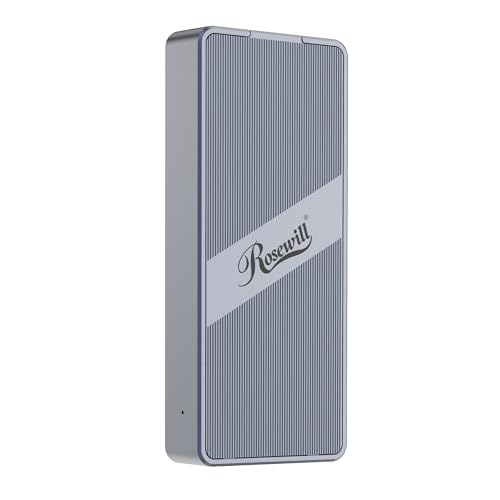
- Built-in fan for sustained cooling
- Up to 3187MB/s over 40Gbps
- Works with macOS and Windows
Best For: Portable editing setups that need active cooling
Best Multi-Drive Expansion
TERRAMASTER D4 4-Bay NVMe Enclosure

- Four NVMe bays and up to 32TB
- 40Gbps with active cooling
- Tool-free hot-swappable design
Best For: High-capacity editing storage and multi-drive workflows
Portable 40Gbps Pick – Satechi USB4 NVMe SSD Pro Enclosure
If you want one of the fastest SSD enclosures for video editing, the Satechi USB4 NVMe SSD Pro Enclosure is built for high-speed offload and scratch-disk use. Its USB4 connection, support for PCIe Gen 4×4 drives, and compact aluminum design make it a strong fit for creators who need fast transfers on Mac, Windows, or Linux.
Best For: Editors who want a compact 40Gbps enclosure for fast file transfers and portable use.
Pros:
- USB4 connection with up to 40Gbps transfer rates and support for PCI-E Gen 4×4 drives.
- Supports M.2 sizes 2280/2260/2242/2230 and up to 16TB capacity.
- Tool-free installation with included silicone pin, plus plug-and-play setup.
- Includes thermal pad and USB-C cable for the basic setup.
Cons:
- SSD is not included.
- Short included cable may be less convenient for some desk setups.
Overall, this is a polished choice for creators who value speed, portability, and broad OS support in a small enclosure. It focuses on fast external storage without adding much bulk to a travel kit.
Mobile Recording Pick – ACASIS Magnetic NVMe Enclosure
The ACASIS 10Gbps Magnetic M.2 NVMe SSD Enclosure is aimed at mobile workflows, especially if you want one of the more versatile SSD enclosures for video editing on the go. With a built-in cooling fan, aluminum alloy body, magnetic attachment, and 4K@60 ProRes recording support for compatible iPhone models, it is designed for creators who work between phone and laptop.
Best For: Mobile editors, iPhone ProRes shooters, and creators who need magnetic SSD storage for field use.
Pros:
- Built-in silent cooling fan with aluminum alloy body and thermal pad for heat management.
- Supports 4K@60 ProRes recording on compatible iPhone 15/16/17/18 Pro and Pro Max models.
- Magnetic attachment helps the enclosure stay secured to a compatible phone setup.
- 10Gbps transfer speed is suitable for moving photos, videos, and files.
Cons:
- Only supports 2230 NVMe SSDs.
- New drives may need formatting before use.
- Large SSDs or multiple devices may need external power for stable performance.
This enclosure makes the most sense if your editing workflow starts on a phone and continues on a laptop. It is less about raw desktop throughput and more about practical, portable capture and storage.
Pro Editor Pick – TERRAMASTER D1 SSD Pro 80Gbps
If your priority is maximum speed, the TERRAMASTER D1 SSD Pro stands out among SSD enclosures for video editing thanks to its 80Gbps bandwidth and claimed read speeds up to 7061MB/s. It is built for demanding workflows like real-time 12K editing, and its fanless aluminum cooling design makes it a strong fit for quiet production environments.
Best For: Professional editors who need very high bandwidth for large media timelines and studio use.
Pros:
- 80Gbps bandwidth with up to 7061MB/s read speed in tested conditions.
- Fanless, all-aluminum cooling design for silent operation.
- Supports Thunderbolt 5/4/3 and USB4/USB 3.2/3.1/3.0.
- Includes protective case, thermal pad, screwdriver, and USB-C cable.
Cons:
- Diskless, so you need to supply your own SSD.
- Supports M.2 NVMe 2280 drives only.
- Premium performance may be more than casual users need.
This is the most performance-focused option in the group, especially if you work with large video files and want silent cooling. It is aimed squarely at serious editing rather than basic portable storage.
Tool-Free 40Gbps Pick – Yottamaster USB4 NVMe Enclosure
The Yottamaster M.2 NVMe SSD Enclosure is a practical choice if you want a simple 40Gbps option for video editing with easy setup. It offers tool-free installation, active cooling, and broad compatibility with Thunderbolt 4 and USB4 hosts, making it a flexible external drive case for editors who move between devices.
Best For: Editors who want a tool-free, well-cooled enclosure for 4K editing and everyday use.
Pros:
- Tool-free installation with a clear cover for quick visual access.
- Active cooling fan and aluminum construction for better thermal handling.
- 40Gbps support with Thunderbolt 4 and USB4 compatibility.
- Supports M.2 2230/2242/2260/2280 SSD sizes up to 8TB.
Cons:
- Real-world speeds vary, with stated sustained rates around 2800 to 3200 MB/s.
- Hardware platform listing is Windows-focused.
For editors who want easy installation and stable performance without a complicated setup, this enclosure is a sensible middle ground. It is especially appealing if you want a transparent, portable design with active cooling built in.
Thunderbolt 5 Speed Pick – MOKiN 80Gbps M.2 NVMe SSD Enclosure with LCD Display
If you’re shopping for SSD enclosures for video editing, this MOKiN model is built for very heavy media workflows and fast project transfers. Its 80Gbps rating, Thunderbolt 5 support, and active cooling make it a strong fit when you need quick offloads, backups, and smooth access to large 4K or higher-resolution files.
Best For: Editors who want the fastest possible portable NVMe enclosure and clear temperature monitoring during long transfers.
Pros:
- Up to 80Gbps transfer rate for very fast large-file moves.
- LCD display shows real-time temperature and fan status.
- Built-in fan helps prevent thermal throttling during intensive workloads.
- Supports NVMe drives up to 8TB across common M.2 sizes.
Cons:
- 80Gbps speeds require a Thunderbolt 5 port and cable.
- Not compatible with SATA M.2 SSDs.
- Best performance depends on the connected device and SSD.
For editors moving huge footage libraries or working under tight turnaround times, this enclosure is the most performance-focused choice here. The status screen and active cooling are especially useful when sustained transfers matter more than simple portability.
Quiet 40Gbps Choice – UGREEN 40Gbps M.2 NVMe Enclosure
For SSD enclosures for video editing, this UGREEN model balances fast transfers with a quiet, fanless design. Its 40Gbps USB4/Thunderbolt support and strong heat-dissipation layout make it a practical option for moving edit files, proxy libraries, and project backups without adding noise to your workspace.
Best For: Creators who want a quiet, compact enclosure for everyday editing and portable project storage.
Pros:
- Up to 3600MB/s max speed with compatible USB4 or Thunderbolt 4 setups.
- Double-sided fin design is built for improved heat dissipation.
- Fanless operation keeps things quiet.
- Supports NVMe drives up to 8TB in multiple M.2 sizes.
Cons:
- Top speed requires Thunderbolt 4 cables and devices.
- Does not support SATA NGFF or mSATA drives.
- Some thicker SSDs may need thinner thermal pads to fit properly.
This is a solid middle-ground pick if you want fast external storage without the complexity of active cooling. It should suit most editors who value quiet operation and easy portability over the absolute highest transfer rates.
Budget-Friendly Editor Pick – SABRENT USB-C NVMe Enclosure & Reader
If you need a straightforward option among SSD enclosures for video editing, this SABRENT case covers the essentials well. The 10Gbps USB-C connection, tool-free flip-open design, and thermal-pad contact make it a practical choice for cloning drives, carrying project files, and handling lighter editing workflows.
Best For: Editors who want an easy, tool-free NVMe enclosure for portable project storage and routine transfers.
Pros:
- Tool-free flip-open design makes SSD installation quick.
- Aluminum enclosure presses the thermal pad against the SSD for better heat transfer.
- Supports NVMe M.2 sizes from 2230 to 2280 and up to at least 8TB.
- USB-C plug-and-play with no drivers or external power needed.
Cons:
- 10Gbps is slower than higher-end Thunderbolt or USB4 enclosures.
- NVMe only; not compatible with M.2 SATA SSDs.
- Compatible devices are listed broadly, but top speed is limited to USB 3.2 Gen 2 performance.
This enclosure makes sense when ease of use matters as much as speed. It is a sensible choice for editors who need reliable portable storage without paying for high-end bandwidth they may not fully use.
Editor’s Choice – ACASIS 40Gbps Aluminum Cooling Enclosure
If you want ssd enclosures for video editing that prioritize speed and silence, this ACASIS model is built for exactly that kind of workflow. Its fanless aluminum fin design aims to keep an NVMe drive cool without adding noise, while USB4 and Thunderbolt support make it a strong fit for large media transfers and bootable external storage on Mac or PC.
Best For: Editors who want quiet, high-speed external NVMe storage for 4K projects, backups, and on-the-go use.
Pros:
- Fanless dual-sided aluminum fins for silent passive cooling
- 40Gbps USB4 support with Thunderbolt 5/4/3 compatibility
- Real-world speeds up to around 2700MB/s; tested up to 2805/2734 MB/s
- Compact, pocket-sized design with support for up to 8TB NVMe SSDs
Cons:
- Performance depends on host port and installed SSD
- Single-drive enclosure, so capacity is limited to one NVMe at a time
For editors who value a quiet desk setup and fast transfers, this enclosure is a practical premium pick. It focuses on thermal control and broad compatibility rather than extra features, which makes it especially appealing for streamlined post-production workflows.
Best Cooling on the Go – Rosewill 40Gbps Fan-Cooled NVMe Enclosure
For ssd enclosures for video editing where sustained performance matters, this Rosewill enclosure leans into active cooling. The built-in fan and vented design are meant to help the drive stay stable during longer transfers, and the 40Gbps interface supports fast offload speeds for mobile editors who move large footage libraries between systems.
Best For: Editors who need a portable enclosure with active cooling for longer high-speed transfers and cross-platform use.
Pros:
- Built-in fan and vent design for sustained heat dissipation
- 40Gbps support with speeds up to 3187MB/s
- Portable, pocket-friendly metal enclosure
- Compatible with Thunderbolt 4/3, USB4, macOS, and Windows
Cons:
- Fan adds moving parts and may be less ideal for ultra-quiet spaces
- Speed will vary by system and SSD
This is a sensible choice if your editing work involves long copy jobs and you want extra thermal headroom. It trades silent operation for active cooling, which may be a fair swap when sustained throughput is the priority.
Best Multi-Drive Expansion – TERRAMASTER D4 4-Bay NVMe Enclosure
When your ssd enclosures for video editing need more than single-drive speed, this TERRAMASTER 4-bay unit gives you capacity and flexibility. It supports four M.2 NVMe SSDs, offers 40Gbps connectivity, and is designed for large media libraries, backups, and multi-drive workflows where storage volume matters as much as transfer rates.
Best For: Editors who need high-capacity external storage with multiple NVMe drives for large projects and backups.
Pros:
- Supports four M.2 NVMe SSDs up to 8TB each
- Up to 32TB total capacity for large video libraries
- 40Gbps connection with up to 3224MB/s using four drives
- Tool-free, hot-swappable design with active cooling
Cons:
- No built-in RAID; soft RAID requires third-party tools
- Larger and less minimal than single-bay enclosures
- Requires external power adapter
If you need a desk-friendly expansion unit for serious editing storage, this model stands out for capacity first and speed second. It is a better fit for content creators managing multiple projects, backups, or shared libraries than for minimal travel setups.
How We Picked the Best SSD Enclosures for Video Editing
For SSD Enclosures for Video Editing, we prioritized real-world transfer speed, enclosure thermal design, SSD compatibility, connection standard, and capacity limits. We also looked for models that make sense for editing workflows, not just general file storage.
Quick Comparison
The biggest decision is interface speed. 10Gbps enclosures are fine for light editing and project archives, while 40Gbps USB4/Thunderbolt models are better for active 4K workflows. 80Gbps options are the premium choice for heavier timelines, higher-end RAID-like setups, or future-proofing. Cooling also matters: aluminum bodies, heat fins, and fans can help sustain speeds under long transfers.
Key Buying Factors for SSD Enclosures for Video Editing
Connection Speed
Match the enclosure to your computer’s port. A fast enclosure will not perform at its full potential if your laptop or desktop only supports a slower USB mode.
Thermal Management
Long exports and large transfers can cause thermal throttling. For editing use, look for enclosures with metal housings, heat pads, fins, or active cooling.
Drive Support and Capacity
Check the supported M.2 size, NVMe generation, and maximum capacity. If you work with 4K or higher-resolution media, larger SSD support is worth paying attention to.
Workflow Fit
Some editors need one fast scratch disk, while others need more storage for libraries and project handoffs. A single-bay enclosure is usually best for portability, while multi-bay units make more sense for larger media libraries.
Who Should Buy Which SSD Enclosures for Video Editing?
If you want the best balance of speed and portability, a 40Gbps USB4 or Thunderbolt enclosure is the sweet spot for many editors. Choose a 10Gbps model if your work is lighter, budget-focused, or mostly archival. Step up to 80Gbps if you want premium throughput for demanding editing sessions or want extra headroom for future systems. If you need multiple drives in one place, a multi-bay enclosure is the most practical option for expanding your editing storage without clutter.