Standing presentations demand more than readable text. You need a teleprompter that keeps your script visible while preserving eye contact, natural movement, and a professional on-camera presence.
We compared 10 options across screen size, camera compatibility, portability, viewing distance, and setup flexibility to help you choose the right fit for classrooms, studios, livestreams, and corporate presentations.
Best 10 Teleprompters for Standing Presentations Picks for 2026
Best Built-In Display

- Built-in 9-inch Full HD display
- Works with cameras, webcams, and computers
- Camera Hub and Stream Deck support
Best For: Computer-controlled prompting for streaming, calls, and presentations
Best Large Mirror

- 15-inch high-definition beamsplitter mirror
- Supports tablets up to 15 inches
- Remote and free prompting app included
Best For: Tablet-based conference presentations and video production
Best for Conferences
Proaim Professional Speech Teleprompter

- Telescopic stand for adjustable height
- Supports displays up to 17 inches
- 60/40 beamsplitter glass
Best For: Formal speeches, conferences, and professional event setups
Best Full-Size Screen
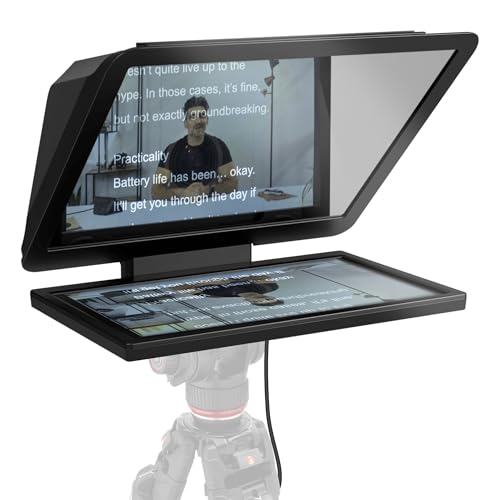
- 15.6-inch removable Full HD display
- Readable from an extended distance
- Fits DSLR, mirrorless, and studio cameras
Best For: Studio presentations requiring a large, flexible viewing surface
Best Long-Range Readability
NEEWER X12 14-Inch Teleprompter

- Readable from up to 10 feet away
- Supports tablets up to 9.84 x 8.68 inches
- Includes remote, app support, and carrying case
Best For: Standing presenters who need clear text from several feet away
Best Large-Screen Option
GVM 18.5-Inch Teleprompter Kit

- Features an 18.5-inch integrated display
- Works with cameras, camcorders, and SLRs
- Includes app and Bluetooth remote controls
Best For: Studio and fixed-position standing presentations
Best Simple Portable Setup
NEEWER BASICS X12B Teleprompter

- Requires no assembly
- 12-inch display is readable up to 10 feet away
- Folds flat and includes a carry case
Best For: Portable tablet-and-camera presentation setups
Best Compact Pick
LENSGO TC7S Foldable Phone Teleprompter

- Folds in one second for easy transport
- Supports phones and tablets below 8 inches
- Includes Bluetooth remote and TCQI app
Best For: Portable phone-based standing presentations
Best Large-Display Pick
LENSGO TC12P Wide-Angle Teleprompter
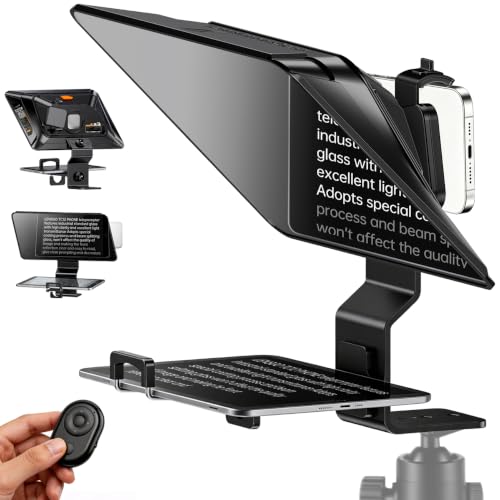
- Uses a large 14.5-inch HD glass screen
- Supports phones and tablets up to 7.3 inches
- Includes remote control and anti-glare light sealing
Best For: Longer standing presentations and walk-and-talk videos
Best Versatile Setup
Desview T5 Multi-Device Teleprompter

- Works with phones, tablets under 11 inches, and DSLRs
- Includes 49mm–82mm adapter rings
- Supports TXT and DOCX scripts in the Desview app
Best For: Multi-device standing presentation and video setups
Best Built-In Display – Elgato Prompter
For standing presentations that also involve a camera, the Elgato Prompter combines a built-in 9-inch Full HD display with a compact desktop design. It lets you move scripts or other windows onto the prompter without relying on a separate tablet or phone screen.
Best For: Presenters, streamers, and video-call users who want an integrated screen and computer-controlled prompting.
Pros:
- Built-in display eliminates the need for an extra tablet or smartphone.
- Supports DSLR cameras, webcams, smartphones, and personal computers.
- Camera Hub allows customization of text and chat appearance.
- Works with Stream Deck and supports professional eye contact during calls.
Cons:
- DisplayLink software is required on Mac and Android.
- The 9-inch screen may offer less viewing area than full-sized models.
- Its desktop form factor may be less suitable for large venues.
The Elgato is a convenient choice when you want a streamlined, computer-connected setup for standing presentations, streaming, or conferencing. Its integrated monitor reduces setup clutter, though presenters needing a larger reading surface may prefer a dedicated full-sized model.
Best Large Mirror – Desview TP150 Teleprompter
The Desview TP150 is a substantial option for standing presentations, using a 15-inch high-definition beamsplitter mirror that accommodates tablets up to 15 inches. Its included remote and free app support make it practical for editing scripts and adjusting reading speed while presenting.
Best For: Presenters who want a large tablet-based prompting surface for conferences, video production, or travel.
Pros:
- 15-inch mirror provides a generous viewing area.
- Compatible with DSLR and mirrorless cameras, camcorders, and tablets.
- Bluetooth remote and free Desview app support script control.
- Aluminum construction and included carry case support transport.
Cons:
- The Bluetooth remote requires a battery, which is not included.
- At 4.45 kg, it is relatively heavy for portable use.
- A separate compatible tablet is needed for displaying scripts.
With its large mirror, tablet compatibility, and carry case, the TP150 suits presenters who prioritize readable text and flexible setup. Its weight and need for a separate tablet are the main tradeoffs for standing presentations on the move.
Best for Conferences – Proaim Professional Speech Teleprompter
Designed around a telescopic conference stand, the Proaim Professional Speech Teleprompter is built for standing presentations, speeches, and event environments. Its 60/40 beamsplitter glass supports tablets, laptops, and monitors up to 17 inches while preserving a natural line of sight.
Best For: Conference speakers, broadcasters, trainers, and presenters who need adjustable height positioning.
Pros:
- Telescopic stand helps position the display at a comfortable height.
- Supports tablets, laptops, and monitors up to 17 inches.
- 60/40 beamsplitter glass provides clear script visibility.
- Suitable for conferences, studios, training sessions, and houses of worship.
Cons:
- Its 18.5-pound weight makes it less convenient for frequent transport.
- A display device is not identified as included in the supplied components.
- The large stand footprint may require dedicated presentation space.
The Proaim is a strong fit for formal standing presentations where height adjustment and a large display matter more than compact portability. It is especially suited to fixed venues and professional production environments.
Best Full-Size Screen – Elgato Prompter XL
The Elgato Prompter XL gives standing presentations a larger 15.6-inch Full HD reading surface, making scripts easier to view from a greater distance. Its removable display can also serve as a spare monitor for video conferencing and multitasking.
Best For: Presenters who need extended reading range and compatibility with DSLR, mirrorless, or studio cameras.
Pros:
- 15.6-inch Full HD display provides a large reading area.
- Removable screen can be used as a spare monitor.
- Compatible with DSLR, mirrorless, and studio cameras.
- Voice Sync can scroll at the presenter’s natural pace with compatible hardware.
Cons:
- Voice Sync requires an NVIDIA RTX GPU or Apple M1-or-newer system.
- Its larger dimensions and 7.43-pound weight reduce portability.
- It is a substantial setup for small desktop presentation spaces.
The Prompter XL is the most suitable choice here for presenters who read from farther away or want a full-sized display. Its removable-monitor function adds flexibility, while the larger chassis favors studio and dedicated presentation setups.
Best Long-Range Readability – NEEWER X12 14-Inch Teleprompter
For standing presentations where you may be several feet from the camera, the NEEWER X12 is a practical choice among teleprompters for standing presentations. Its beam-splitter glass reflects text clearly enough to read from up to 10 feet away, while the adjustable hood helps accommodate different camera and phone lenses.
Best For: Presenters who need long-distance script readability, tablet compatibility, and remote-controlled scrolling.
Pros:
- Text can be read from up to 10 feet away.
- Supports tablets up to 9.84 x 8.68 inches, including iPad and iPad Air models.
- Includes remote control, app support, phone holder, and carrying case.
- Folds for storage and transport and uses a lightweight aluminum-alloy construction.
Cons:
- Not compatible with wide-angle lenses.
- Camera lens focal length must be more than 28mm.
- Not compatible with the 12-inch iPad Pro.
The X12 stands out when presentation distance matters. Verify your camera lens and tablet dimensions before buying, but its readable range and included accessories make it a well-equipped option for teaching, streaming, and formal presentations.
Best Large-Screen Option – GVM 18.5-Inch Teleprompter Kit
The GVM 18.5-inch kit is a strong choice for teleprompters for standing presentations when a larger integrated display is more useful than a compact setup. Its colorless beam splitter and wide-viewing-angle design are intended to keep scrolling text clear while you look directly into the camera.
Best For: Studio presenters, instructors, interview subjects, and video creators who want a large screen with broad camera compatibility.
Pros:
- Large 18.5-inch Android integrated display.
- Compatible with SLRs, camcorders, digital cameras, and DV machines.
- Colorless beam splitter is designed for clear, ghost-free text with high-definition lenses.
- App and Bluetooth remote offer font, speed, background, and playback controls.
Cons:
- The 18.5-inch design is less compact than smaller teleprompters.
- The supplied notes do not specify a carrying case.
- It is not water resistant.
If you present from a fixed position and value a generous display, the GVM offers a studio-oriented format with flexible controls and camera support. Its larger body is best suited to a dedicated presentation or recording setup.
Best Simple Portable Setup – NEEWER BASICS X12B Teleprompter
The NEEWER BASICS X12B keeps the setup straightforward for teleprompters for standing presentations. Its no-assembly design, 12-inch HD display, and fold-flat construction make it convenient for presenters who want a portable tablet-and-camera teleprompter without unnecessary extras.
Best For: Presenters, online-course creators, and tutorial makers who prioritize quick setup, portability, and essential script controls.
Pros:
- No-assembly design makes it quick to set up.
- 12-inch display provides reflected text readable from up to 10 feet away.
- Remote and app control support playback, speed, page, and font adjustments.
- Folds flat and includes a durable carry case.
Cons:
- Not intended for phone shooting.
- It does not function as a monitor or provide direct on-screen self-viewing.
- AAA battery for the RT113 remote is not included.
The X12B is a sensible budget-focused option when you want a portable, installation-free workflow. Make sure your setup uses a compatible tablet and camera, and remember that it is designed to reflect script text rather than serve as a camera monitor.
Best Compact Pick – LENSGO TC7S Foldable Phone Teleprompter
For standing presentations recorded with a phone, the LENSGO TC7S is a compact teleprompter for standing presentations that folds in one second and supports both indoor and outdoor use. Its coated beam-splitter glass, phone compatibility, and included Bluetooth remote make it practical for presenters who need a portable setup.
Best For: Phone-based standing presentations, vlogs, online classes, interviews, and live streams where portability matters.
Pros:
- One-second folding design for travel and quick storage
- Works with smartphones, iPhones, Android devices, and tablets below 8 inches
- Bluetooth remote supports play, pause, speed adjustment, and script controls
- Coated glass is designed for clear prompting without reducing image quality
Cons:
- Its 9.7-inch display is smaller than the screens on larger teleprompters
- Designed primarily for phone and small-tablet prompting rather than DSLR use
The TC7S is a sensible choice when a standing presenter wants a lightweight, phone-first teleprompter without bringing a bulky studio setup.
Best Large-Display Pick – LENSGO TC12P Wide-Angle Teleprompter
The LENSGO TC12P gives standing presenters a larger reading area than compact phone prompters, with 14.5-inch HD beam-splitter glass and support for phones or tablets. Its adjustable front panel, anti-glare design, and remote-controlled scrolling suit longer presentations and walk-and-talk recordings.
Best For: Standing presentations, longer scripts, walk-and-talk videos, Zoom calls, and creators who prefer larger text.
Pros:
- Large 14.5-inch glass helps reduce eye strain and scrolling interruptions
- Supports smartphones and iPads or tablets up to 7.3 inches horizontally
- Switches between horizontal and vertical shooting
- Includes Bluetooth remote, TCQI app support, foam padding, and light sealing
Cons:
- Built for smartphone and tablet shooting rather than DSLR cameras
- Larger design is less compact than a mini foldable prompter
Choose the TC12P if readable text at a comfortable distance is more important than minimizing equipment size for your standing presentation setup.
Best Versatile Setup – Desview T5 Multi-Device Teleprompter
The Desview T5 is a flexible teleprompter for standing presentations because it works with smartphones, tablets under 11 inches, and DSLR cameras. Its broad adapter-ring range, adjustable shooting position, coated glass, and app-based script controls make it suitable for presenters who may change cameras or recording formats.
Best For: Presenters and video creators using phones, tablets, or DSLR cameras for streaming, vlogging, and recorded presentations.
Pros:
- Supports smartphones, tablets under 11 inches, and DSLR cameras
- Includes adapter rings from 49mm through 82mm for broad camera compatibility
- Desview app supports TXT and DOCX imports, formatting controls, mirroring, rotation, and a countdown timer
- Offers horizontal or vertical shooting plus adjustable positioning
Cons:
- More setup options may be unnecessary for users who only record with a phone
- At 0.52 kg, it is heavier than the supplied TC7S specifications
The T5 is the strongest all-around option for a standing presentation kit that may need to accommodate different devices, lenses, and shooting styles over time.
How We Picked the Best Teleprompters for Standing Presentations
We focused on the features that matter most when you are presenting on your feet: readable text at a practical distance, stable mounting, clear beam-splitter glass, broad camera or device compatibility, and convenient script control. We also considered whether each model suits a compact desk setup, a dedicated studio, or a larger stage-style presentation.
Because standing presenters often move, gesture, and maintain eye contact for longer periods, we gave extra weight to viewing area, height and angle flexibility, quick setup, and remote or app support. Product specifications and intended use cases were compared across the selected models.
Quick Comparison
| Best For | Look For | Typical Format |
|---|---|---|
| Portable presentations | Folding design and low weight | Phone or small tablet |
| Solo video creators | Simple app control and camera adapters | Compact tablet teleprompter |
| Corporate or classroom use | Larger glass and stable construction | 12- to 15-inch tablet models |
| Studio and stage production | Wide viewing area and rigid mounting | Full-size monitor or laptop setup |
Key Buying Factors for Teleprompters for Standing Presentations
Viewing Distance and Text Size
A standing presenter is usually farther from the screen than someone seated at a desk. Larger 12- to 18.5-inch designs make scripts easier to read from several feet away, while compact phone models are better for close-range recording. Choose a display that lets you use comfortable font sizes without showing too much text at once.
Camera and Device Compatibility
Check whether the teleprompter supports your camera body, lens diameter, phone, tablet, laptop, or external monitor. Adapter rings and adjustable mounts are particularly useful if you switch between a DSLR, camcorder, webcam, and smartphone.
Glass Quality and Presenter Position
Clear beam-splitter glass helps preserve image quality and reduces distracting reflections. Make sure the design lets you position the glass near the camera lens while keeping the text visible from your normal standing height. A height-adjustable tripod or stand may be necessary.
Portability and Control
For mobile presenters, folding frames, aluminum construction, and quick assembly can matter more than maximum screen size. Remote controls and compatible apps make it easier to start, pause, and adjust scrolling without touching the device.
Who Should Buy Which Teleprompters for Standing Presentations?
Choose a compact phone model if you record short videos, travel frequently, or present from a close distance. These are convenient but generally offer less reading range.
Choose a 12- to 15-inch tablet teleprompter for most standing presentations, online courses, interviews, and corporate videos. This size provides a useful balance of readability, portability, and compatibility.
Choose a full-size or monitor-compatible model for studios, stages, long scripts, and presenters who need to stand several feet from the camera. Expect a larger footprint and a more involved setup, but gain a wider reading area and better long-distance visibility.