The right cable can determine whether an external GPU delivers a stable connection, consistent performance, and dependable power. This roundup compares 10 Thunderbolt and USB4 options, from certified short cables to longer high-bandwidth models.
We focus on compatibility, bandwidth, power delivery, connector design, and practical fit for eGPU docks used with laptops, handhelds, and gaming systems.
Best 10 Thunderbolt Cable for External GPU Picks for 2026
High-Bandwidth eGPU Hub

- Includes Thunderbolt 5 cable with up to 80Gbps bandwidth
- Supports many NVIDIA and AMD graphics cards
- Adds M.2, SD 4.0, Ethernet, and USB-A expansion
Best For: Thunderbolt 5 eGPU workstations needing expansion
Space-Saving Certified Cable
Cable Matters 80G Right-Angle Thunderbolt 5
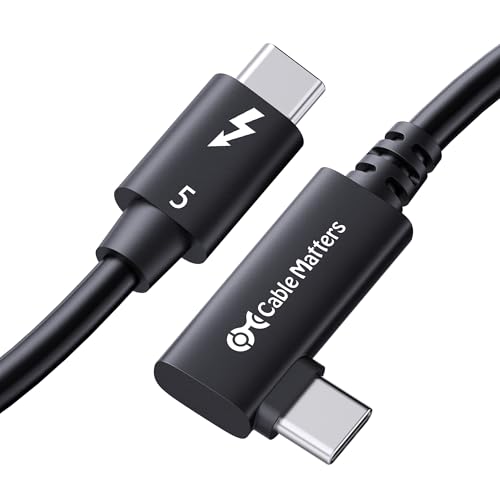
- Right-angle plug helps in tight spaces
- Supports 80Gbps data and up to 120Gbps video bandwidth
- Provides up to 240W PD 3.1 power delivery
Best For: Compact eGPU and docking-station layouts
Best Expandable eGPU Dock

- Supports compatible NVIDIA and AMD graphics cards
- Adds Ethernet, display, USB, and card-reader ports
- Includes a 39-inch Thunderbolt 4 cable
Best For: Windows systems and consoles needing a feature-rich eGPU dock
Best High-Bandwidth USB4 Cable
Silkland 80Gbps Thunderbolt 5 Cable

- Offers up to 80Gbps bidirectional data
- Supports up to 240W PD 3.1 charging
- Backward compatible with Thunderbolt 3 and 4
Best For: Modern Thunderbolt 5 and USB4 setups needing one versatile cable
Best Premium eGPU Cable
CalDigit Thunderbolt 5 Pro Cable

- Supports up to 120Gbps Thunderbolt 5 bandwidth
- Handles up to 240W power delivery
- Braided and tested for at least 20,000 bends
Best For: Thunderbolt 5 desktops and laptops with demanding eGPU workflows
Reliable 40Gbps Pick

- 40Gbps transfer and 240W PD 3.1
- Supports 8K or dual 4K displays
- Braided, USB-IF-certified construction
Best For: Thunderbolt docks, SSDs, and compatible eGPU setups
High-Bandwidth Upgrade
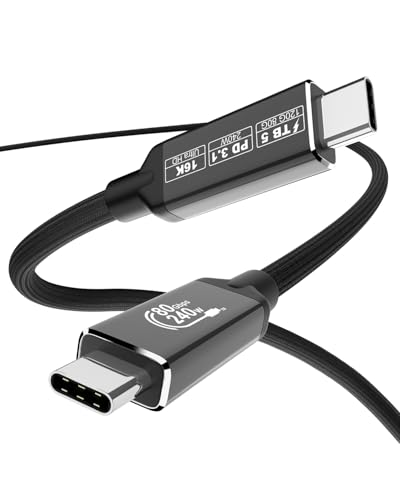
- 80Gbps transfer with claimed 120Gbps boost
- PCIe Gen 4 support for eGPU and SSD use
- 240W charging and up to 16K display support
Best For: Thunderbolt 5 eGPU and workstation setups
Trusted Everyday Option

- 40Gbps transfer for fast file movement
- Supports 8K60 and 240W charging
- Tested for 5,000 bends with 18-month warranty
Best For: Everyday Thunderbolt 4/3 and USB4 eGPU connections
High-Bandwidth eGPU Hub – PELADN S-3 Thunderbolt 5 Dock
The PELADN S-3 is more than a thunderbolt cable for external gpu setups: it is a Thunderbolt 5 eGPU dock that includes the required cable. Its 80Gbps Thunderbolt 5 connection, PCIe 4.0 x4 slot, and support for ATX or SFX power supplies make it a flexible choice for compatible Windows 10 or 11 laptops and Mini PCs.
Best For: Users building a feature-rich Thunderbolt 5 eGPU workstation with storage, networking, and card-reader expansion.
Pros:
- Includes a Thunderbolt 5 cable and supports up to 80Gbps bidirectional bandwidth.
- Supports a broad range of NVIDIA RTX and AMD Radeon graphics cards, according to the supplied specifications.
- Adds PCIe 3.0 M.2, SD 4.0, 2.5G Ethernet, and USB-A connectivity.
- Accepts ATX power supplies up to 180mm or SFX units.
Cons:
- Requires a separate compatible graphics card and power supply.
- Its larger enclosure may be more than needed for buyers seeking only a cable.
- The listed operating-system support is limited to Windows 10 and Windows 11.
Choose the PELADN S-3 when expansion matters as much as external graphics. It is a complete dock platform rather than a standalone cable, with useful ports and storage options for a desktop-style setup.
Space-Saving Certified Cable – Cable Matters 80G Right-Angle Thunderbolt 5
The Cable Matters 80G is a practical thunderbolt cable for external gpu connections when port clearance is tight. Its 90-degree connector helps route the cable neatly around a desktop or dock, while Thunderbolt 5 support provides up to 80Gbps bidirectional data transfer and compatibility with Thunderbolt 3, Thunderbolt 4, USB4, and USB-C devices.
Best For: Compact eGPU, docking-station, and workstation setups where a right-angle connection can reduce cable strain.
Pros:
- Right-angle design suits space-constrained desktops and docking stations.
- Intel-certified Thunderbolt 5 cable supports up to 80Gbps data and up to 120Gbps video bandwidth.
- Supports up to 240W power delivery with PD 3.1.
- Works with Thunderbolt 3, Thunderbolt 4, USB4, and USB-C devices.
Cons:
- The 2.6-foot length may not suit every eGPU placement.
- Right-angle orientation may not match the port direction on every device.
- Performance depends on the capabilities of the connected devices.
This cable is a strong fit for tidy, high-performance connections where a straight plug would create awkward bends. Verify the connector orientation and available length before ordering.
Budget eGPU Adapter – OwlTree PCIe 3.0 x16 Thunderbolt 4 Dock
The OwlTree dock is an open-style PCIe 3.0 x16 solution for connecting an external graphics card to a compatible Windows, Linux, or console system. It includes a Thunderbolt 4 cable, supports Thunderbolt 3, Thunderbolt 4, and USB4, and uses the JHL6340 controller for approximately 22Gbps transfer speeds.
Best For: DIY eGPU users who already have a compatible NVIDIA or AMD card and want flexible external power-input options.
Pros:
- Supports NVIDIA and AMD graphics cards with available official drivers.
- Compatible with many Windows 10/11 and Linux systems plus some USB4 consoles.
- Includes a 23.6-inch Thunderbolt 4 cable and 24-pin power jumper.
- Offers CPU, Molex, USB PD 3.0, and DC5521 power-input choices.
Cons:
- It is a dock board rather than a protective enclosed case.
- Listed transfer performance is approximately 22Gbps, below newer Thunderbolt 5 solutions.
- Intel graphics cards are not recommended in the supplied specifications.
Consider this OwlTree model when flexibility and compatibility with existing parts matter more than enclosure convenience. You will need to provide the graphics card and select an appropriate power method.
Future-Ready Cable – SABRENT Thunderbolt 5 120Gbps Cable
The SABRENT CB-T5M1 is a standalone thunderbolt cable for external gpu connections, docks, monitors, and high-speed storage. This 3-foot Thunderbolt 5 cable supports up to 120Gbps with Bandwidth Boost, 80Gbps in standard mode, four-lane PCIe passthrough, and up to 240W USB PD 3.1 EPR.
Best For: Thunderbolt 5 eGPU and workstation users who want a certified cable with high bandwidth, display support, and substantial power delivery.
Pros:
- Supports up to 120Gbps with Bandwidth Boost and 80Gbps standard bandwidth.
- Thunderbolt 5 certified and compatible with Thunderbolt 3/4, USB4, and USB devices.
- Supports DisplayPort 2.1, four-lane PCIe passthrough, and daisy chaining.
- Delivers up to 240W through USB PD 3.1 EPR.
Cons:
- Its capabilities depend on compatible Thunderbolt 5 devices and peripherals.
- The fixed 3-foot length may be limiting for distant eGPU placements.
- It is a cable only and does not include an eGPU enclosure or graphics card.
For a newer eGPU setup, the CB-T5M1 offers generous bandwidth and power headroom in a manageable 3-foot length. It is especially appealing if you also plan to connect high-resolution displays or other demanding peripherals.
Best Expandable eGPU Dock – 24Gbps Thunderbolt eGPU Dock
If you need a thunderbolt cable for external gpu setups plus expansion features, this OwlTree dock provides a broader workstation-style solution. It supports Thunderbolt 3, Thunderbolt 4, and USB4 connections and includes a Thunderbolt 4 cable in the box.
Best For: Windows laptops, desktops, and compatible gaming consoles that need an external graphics card dock with networking, display, storage, and USB expansion.
Pros:
- Supports compatible NVIDIA and AMD graphics cards with available official drivers.
- Includes dual 40Gbps Thunderbolt ports, DisplayPort, 2.5Gbps Ethernet, UHS-II SD and TF card readers, and dual 10Gbps USB ports.
- Offers four power-input options, including USB-C PD, DC inputs, and an 8-pin ATX connection.
Cons:
- Graphics card and power supply are not included.
- Maximum DC input is limited to 330W, and DC and ATX wiring requirements differ.
- Compatibility may require a BIOS update on some USB4 consoles.
This is more than a cable: it is a flexible eGPU platform for users who want ports and power-input choices alongside external graphics support. Check your host port, GPU drivers, and power setup before buying.
Best High-Bandwidth USB4 Cable – Silkland 80Gbps Thunderbolt 5 Cable
For a thunderbolt cable for external gpu use, the Silkland cable offers USB4 Version 2.0 bandwidth and broad backward compatibility. Its 4-foot length and 240W power rating also make it suitable for connecting compatible docks, laptops, monitors, and storage devices.
Best For: Users with Thunderbolt 5 or USB4 Version 2.0 hardware who want one cable for high-speed data, displays, and power delivery.
Pros:
- Supports up to 80Gbps bidirectional data transfer and up to 120Gbps display bandwidth with compatible hardware.
- Provides up to 240W charging with PD 3.1 and backward compatibility with 60W, 100W, and 140W charging.
- USB-IF certified, E-Marker equipped, braided, triple-shielded, and compatible with Thunderbolt 3, Thunderbolt 4, and USB4.
Cons:
- Actual performance depends on the connected devices and their supported specifications.
- Its highest bandwidth requires compatible Thunderbolt 5 or USB4 Version 2.0 hardware.
- The notes do not specify a dedicated eGPU certification or included adapter.
This is a forward-looking cable for high-bandwidth setups, but an external GPU will still be limited by the host port, dock, and graphics enclosure. Confirm your system’s Thunderbolt or USB4 capabilities before expecting the top speeds.
Best Premium eGPU Cable – CalDigit Thunderbolt 5 Pro Cable
The CalDigit Thunderbolt 5 Pro is a premium choice when you want a durable thunderbolt cable for external gpu connections. It supports Thunderbolt 3, 4, 5, and USB4 devices, while its 1-meter braided design is intended for demanding desktop and laptop setups.
Best For: Thunderbolt 5 users connecting eGPUs, fast storage, docks, or high-resolution displays and looking for a robust, certified cable.
Pros:
- Supports up to 120Gbps Thunderbolt 5 bandwidth and 64Gbps PCIe performance for compatible devices.
- Delivers up to 240W power delivery and is listed as suitable for Thunderbolt eGPUs, storage, docks, and displays.
- Braided construction, low-profile connectors, and durability testing to at least 20,000 bends.
Cons:
- Maximum performance requires a Thunderbolt 5 host device.
- Devices with older Thunderbolt or USB specifications will operate at their respective limits.
- At 1 meter, it may not suit setups requiring a longer cable run.
This cable is a strong fit for performance-focused systems where durability and broad compatibility matter. Its premium specifications are most useful with Thunderbolt 5 hardware; older systems can use it, but cannot reach the advertised maximum performance.
Reliable 40Gbps Pick – Silkland USB4 Cable
If you need a dependable thunderbolt cable for external gpu setups, the Silkland USB4 cable offers 40Gbps data transfer, 240W charging, and broad Thunderbolt 4/3 compatibility. Its 4-foot length provides useful reach while remaining within the brand’s recommended limit for docking setups.
Best For: Thunderbolt docks, external SSDs, and compatible eGPU setups that need high-speed data and substantial USB-C power delivery.
Pros:
- 40Gbps data transfer with Thunderbolt 4/3 and USB4 compatibility
- Supports up to 240W PD 3.1 charging with an E-Marker chip
- Supports up to 8K at 60Hz, 4K at 144Hz, or dual 4K at 60Hz
- Braided construction, aluminum shell, and USB-IF certification
Cons:
- Actual performance depends on the connected devices
- The manufacturer recommends cables under 5 feet for stable docking performance
This is a well-rounded choice when your eGPU enclosure, laptop, and display support Thunderbolt 4 or USB4. It emphasizes strong compatibility and durability rather than the higher bandwidth offered by newer Thunderbolt 5 cables.
High-Bandwidth Upgrade – Starinnox Thunderbolt 5 Cable
For a future-focused thunderbolt cable for external gpu use, the Starinnox Thunderbolt 5 cable is designed for high-throughput hardware. It combines 80Gbps bidirectional transfer, a claimed 120Gbps bandwidth boost, PCIe Gen 4 support, and a compact 2-foot length.
Best For: Thunderbolt 5-capable laptops, eGPU enclosures, high-speed SSDs, and demanding multi-display workstations.
Pros:
- Supports 80Gbps bidirectional transfer and a claimed 120Gbps asymmetric bandwidth boost
- Designed to support PCIe Gen 4 performance for eGPU and SSD applications
- Supports up to 16K, dual 8K, or triple 4K displays according to the listing
- Offers up to 240W PD 3.1 charging and backward compatibility with Thunderbolt 4/3 and USB4
Cons:
- Connected hardware must support the advertised Thunderbolt 5 or USB4 capabilities
- Its approximately 2-foot length may be limiting for some desk layouts
- The listing contains varying length references, so verify the package specification before ordering
This is the most performance-oriented option in the group, especially for newer systems that can use Thunderbolt 5 bandwidth and PCIe Gen 4. It is less compelling for older Thunderbolt 3 or 4 equipment that cannot take advantage of those upgrades.
Trusted Everyday Option – Anker 515 USB4 Cable
The Anker 515 is a practical thunderbolt cable for external gpu users who want a familiar 3.3-foot cable with 40Gbps USB4 performance. It also supports up to 240W charging and high-resolution display output when the connected equipment is compatible.
Best For: Everyday Thunderbolt 4/3 and USB4 connections between laptops, eGPU enclosures, monitors, and other USB-C peripherals.
Pros:
- 40Gbps transfer speeds for large files and media libraries
- Supports up to 8K at 60Hz or 4K at 144Hz display output
- Supports up to 240W charging with a compatible charger
- Rated to withstand up to 5,000 bends and includes an 18-month warranty
Cons:
- It does not offer the newer Thunderbolt 5 bandwidth of the Starinnox option
- Specific smartphone compatibility is not listed
- Performance depends on the capabilities of the connected devices and charger
Anker’s cable is a straightforward fit for established Thunderbolt 4/3 and USB4 systems. Choose it when 40Gbps is sufficient and you value a conventional 3.3-foot length, durability testing, and included warranty support.
How We Picked the Best Thunderbolt Cable for External GPU
We selected cables and eGPU dock bundles based on advertised Thunderbolt or USB4 standards, bandwidth ratings, power-delivery support, connector quality, length, and compatibility claims. Certified cables receive extra consideration because certification can provide greater confidence in signal integrity and device interoperability. We also included both Thunderbolt 4 and Thunderbolt 5 models, since the best choice depends on the host computer, dock, and graphics hardware.
Bandwidth figures are maximum specifications rather than guaranteed graphics performance. An eGPU setup may still be limited by the computer’s Thunderbolt controller, PCIe tunneling implementation, operating system, or dock design.
Quick Comparison
- Best for next-generation systems: Thunderbolt 5 cables rated for 80Gbps or 120Gbps.
- Best broad-compatibility option: A certified Thunderbolt 4 cable with USB4 support.
- Best for tight desk setups: A short or right-angle cable that reduces connector strain.
- Best for long runs: Choose an active or manufacturer-rated cable designed to maintain high-speed performance at its listed length.
- Best value: A dependable 40Gbps Thunderbolt 4 or USB4 cable when the computer and dock do not support Thunderbolt 5.
Key Buying Factors for a Thunderbolt Cable for External GPU
Compatibility and Certification
Check the ports on both the computer and eGPU dock before buying. Thunderbolt 3 and 4 accessories commonly work together, while Thunderbolt 5 can provide higher performance but may fall back to earlier standards. USB-C describes the connector, not the speed. Look for explicit Thunderbolt or USB4 support rather than relying on the shape of the plug.
Bandwidth and PCIe Performance
Higher cable bandwidth does not automatically make every graphics card faster. The effective eGPU connection is often constrained by PCIe tunneling and the dock’s internal interface. A 40Gbps cable is usually sufficient for many Thunderbolt 3 and 4 systems; a 120Gbps-rated Thunderbolt 5 cable makes more sense for compatible newer hardware and future upgrades.
Power Delivery and Construction
Power-delivery ratings such as 100W or 240W describe charging capability, not the power supplied to the desktop graphics card inside an eGPU enclosure. Prioritize robust connectors, appropriate shielding, strain relief, and a length that avoids unnecessary slack. Braided jackets and right-angle plugs can improve everyday durability and cable management.
Length and Direction
Use the shortest cable that comfortably connects the host to the dock. Very long passive cables may not sustain their advertised top speed. A right-angle connector can be useful when a laptop port sits close to a desk surface, but verify which direction the plug faces before ordering.
Who Should Buy Which Thunderbolt Cable for External GPU?
Choose a Thunderbolt 5 model if both your computer and eGPU dock support the newer standard or if you want additional headroom for future hardware. Choose a certified Thunderbolt 4 cable for a reliable general-purpose setup using a Thunderbolt 3 or 4 laptop. A 40Gbps USB4 cable is a practical value pick when its specifications match the dock and host.
Gamers using a desktop-style eGPU dock should favor a short, well-built cable with clearly stated PCIe compatibility. Creators connecting multiple displays should verify the dock’s display and bandwidth limits separately. Finally, confirm return support and test the connection under sustained gaming or rendering loads, since intermittent links often indicate a marginal cable, incompatible port, or dock limitation.