The right Thunderbolt cable can do more than charge a laptop. It can also carry high-speed data, support demanding displays, and simplify a modern USB-C workstation.
We compared 10 Thunderbolt 4 and Thunderbolt 5-compatible options by charging capacity, bandwidth, display support, certification, length, and everyday value.
Best 10 Thunderbolt Cables for Fast Charging Picks for 2026
Best Overall
Anker Prime Thunderbolt 5 Cable

- Up to 240W charging
- 80Gbps data transfers
- Dual 8K display support
Best For: Power users with Thunderbolt 5 setups
Best Value

- 240W charging support
- 40Gbps data transfer
- USB4 and Thunderbolt compatible
Best For: Mixed USB-C and Thunderbolt workstations
Best Two-Pack

- Two 3.3-foot cables
- 80Gbps and 240W support
- Braided, bend-resistant design
Best For: Multi-device USB4 peripheral setups
Best Long Cable
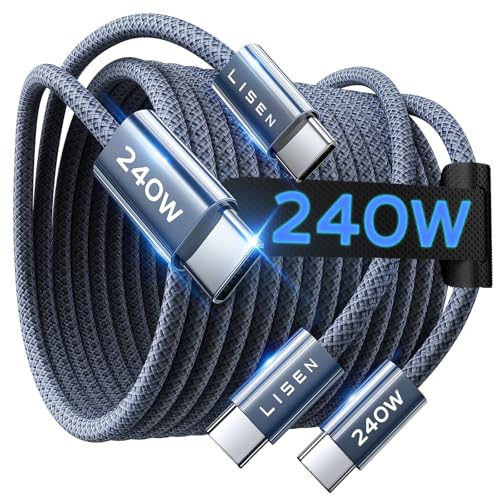
- 6.6-foot charging reach
- Up to 240W PD3.1 charging
- Durable nylon-braided design
Best For: Long-distance USB-C device charging
Best Value 2-Pack
Maxonar USB4/Thunderbolt 4 Cable

- 40Gbps transfers and 240W charging
- Supports single 8K or dual 4K displays
- Two braided cables with 2-year support
Best For: Home and office setups needing two versatile USB-C cables
Best Certified Pick
Anker Prime Thunderbolt 4 Cable

- 240W charging with 40Gbps transfers
- Supports 8K or dual 4K displays
- Thunderbolt 4 certified and USB4 compliant
Best For: Single-cable Thunderbolt 4 laptop and display setups
Best for Next-Gen Bandwidth
Silkland USB4 Version 2.0 Cable

- 80Gbps data and up to 120Gbps display bandwidth
- 240W PD 3.1 charging with protection features
- 5-foot, USB-IF-certified cable for Thunderbolt 5
Best For: High-performance workstations and multi-display setups
Best with Extra Features
Anker 240W Thunderbolt 4 Cable

- 240W charging support
- 40Gbps data transfer
- Up to 8K display support
Best For: Laptop users needing charging, data, and display support in one cable
Best for Maximum Bandwidth
UGREEN 240W Thunderbolt 5 Cable

- 80Gbps USB4 Gen4 transfer
- 240W PD 3.1 charging
- Up to 16K display output
Best For: High-performance workstations, creators, and multi-display setups
Best Value 40Gbps Pick
UGREEN 240W Thunderbolt 4 Cable

- 240W PD 3.1 charging
- 40Gbps data transfer
- Durable 10,000-bend design
Best For: Everyday USB-C laptop, phone, monitor, and storage connections
Best Overall – Anker Prime Thunderbolt 5 Cable
If you want thunderbolt cables for fast charging that can also handle demanding data and display workloads, the Anker Prime Thunderbolt 5 Cable is a high-performance option. It supports up to 240W charging, 80Gbps data transfers, and dual 8K displays at 60Hz, provided your connected devices support those capabilities.
Best For: Power users with Thunderbolt 5 laptops, fast external storage, and multi-display setups.
Pros:
- Supports up to 240W USB-C charging.
- Offers up to 80Gbps data transfer speeds.
- Supports dual 8K displays at 60Hz.
- Includes an 18-month warranty.
Cons:
- Thunderbolt 5-level performance requires compatible devices.
- Its 3.3-foot length may be limiting for some desk setups.
This is the strongest choice here for buyers who need one cable for high-power charging, rapid file transfers, and advanced display connectivity. Its capabilities may be more than necessary for basic phone or tablet charging.
Best Value – Amazon Basics USB-C 4 Cable
For shoppers seeking thunderbolt cables for fast charging without stepping up to Thunderbolt 5, this Amazon Basics USB-C 4 cable offers broad compatibility and useful performance. It supports up to 240W charging, 40Gbps data transfer, and 8K video when paired with compatible hardware.
Best For: Everyday laptop, tablet, phone, monitor, and storage connections across USB-C, USB4, Thunderbolt 3, and Thunderbolt 4 devices.
Pros:
- Supports up to 240W charging at 48V/5A with compatible equipment.
- Works with USB4, Thunderbolt 4, and Thunderbolt 3 devices.
- Handles up to 40Gbps data and 8K video.
- Tested to withstand 5,000 bends at 95 degrees.
Cons:
- It does not match the 80Gbps speed of the Thunderbolt 5 options.
- 240W charging requires an EPR-capable device, charger, and cable.
This cable is a sensible all-purpose pick when 40Gbps performance is sufficient. Its USB-IF certification, 240W rating, and wide backward compatibility make it particularly practical for mixed-device households and workstations.
Best Two-Pack – USB4 Thunderbolt 5 Cable Set
This two-pack is worth considering if you need thunderbolt cables for fast charging in more than one location. Each 3.3-foot cable is rated for up to 80Gbps data transfer, 240W charging, and dual 8K display output, although the notes caution that the cables are not compatible with Thunderbolt displays and docks.
Best For: Users who want two high-speed cables for compatible USB4 or Thunderbolt 4/3 peripherals, laptops, and displays.
Pros:
- Includes two 3.3-foot cables.
- Supports up to 80Gbps data transfer.
- Offers up to 240W charging with suitable equipment.
- Braided construction is rated for more than 50,000 bends.
Cons:
- The product notes say it is not compatible with Thunderbolt displays or docks.
- 80Gbps performance depends on compatible devices.
- A suitable USB-C power adapter is required for charging.
The two-pack provides useful flexibility for dual-device setups and spare-cable coverage. Verify your display and dock requirements before buying, since the stated Thunderbolt display and dock limitation is important.
Best Long Cable – LISEN 240W USB-C Cable
If charging reach matters more than Thunderbolt-level data speeds, the 6.6-foot LISEN cable is a practical alternative among thunderbolt cables for fast charging. It uses USB-C to USB-C connections, supports up to 240W charging, and provides data transfer up to 480Mbps.
Best For: Charging laptops, tablets, and other USB-C devices from a greater distance.
Pros:
- Provides a longer 6.6-foot reach.
- Supports up to 240W PD3.1 EPR charging.
- Includes an E-Marker 3.0 chip and stated overheat and surge protection.
- Military-grade nylon construction is rated for more than 40,000 flex cycles.
Cons:
- Data transfer is limited to 480Mbps.
- It is USB-C to USB-C only and does not include USB-A.
- It is not the right choice for high-speed Thunderbolt storage or display workloads.
This cable is best viewed as a long-reach charging cord rather than a high-bandwidth Thunderbolt cable. Its 240W rating and durable braided design suit desk, bedside, or travel charging where extra length is useful.
Best Value 2-Pack – Maxonar USB4/Thunderbolt 4 Cable
If you need thunderbolt cables for fast charging without buying separate cables for charging, data, and displays, the Maxonar 2-pack is a flexible choice. It combines 40Gbps transfers, up to 240W power delivery, and support for a single 8K or dual 4K displays in a durable braided design.
Best For: Home and office setups that need two versatile USB-C cables for laptops, docks, SSDs, and high-resolution monitors.
Pros:
- 40Gbps data transfer supports fast external-SSD and large-file workflows.
- 240W power delivery with an E-Marker chip supports automatic power negotiation.
- Supports one 8K display or dual 4K displays through DisplayPort Alt Mode.
- Two braided 3.3-foot cables offer useful value for desk and travel setups.
Cons:
- The included 3.3-foot length may be limiting for computers positioned far from a dock or monitor.
- Display and charging performance still depends on the connected devices and ports.
This is a strong all-purpose option when you want high-speed charging, data, and display support in one package. Its 2-year support and available longer lengths add flexibility for more demanding desk layouts.
Best Certified Pick – Anker Prime Thunderbolt 4 Cable
The Anker Prime is a focused choice among thunderbolt cables for fast charging, pairing 240W charging with 40Gbps data transfer in a compact 3.3-foot cable. Thunderbolt 4 certification and USB4 compliance make it suitable for compatible laptops, monitors, storage, and multi-display setups.
Best For: Users who want a single certified Thunderbolt 4 cable for fast laptop charging, file transfers, and display connections.
Pros:
- 240W charging can power compatible laptops quickly, including the stated 14-inch MacBook Pro example.
- 40Gbps transfer speeds are suitable for large files and fast external storage.
- Supports a single 8K or dual 4K displays when the connected hardware supports the required modes.
- Thunderbolt 4 certification and USB-IF compliance provide clear standards support.
Cons:
- Only one cable is included.
- The 3.3-foot length may not suit longer desk or docking-station layouts.
- Dual-display daisy-chaining requires compatible USB-C DisplayPort Alt Mode or Thunderbolt ports.
Choose this cable if certification and straightforward Thunderbolt 4 compatibility matter more than getting a two-pack or extra length. The included 18-month warranty adds some additional purchase reassurance.
Best for Next-Gen Bandwidth – Silkland USB4 Version 2.0 Cable
For demanding workstations, the Silkland cable stands out among thunderbolt cables for fast charging with 80Gbps bidirectional data transfer and up to 240W PD 3.1 charging. Its USB-IF certification, 5-foot length, and advanced display capabilities make it suited to high-performance setups using Thunderbolt 5 and USB4 devices.
Best For: Power users, video editors, designers, and gaming-laptop owners who need very high bandwidth, extended display support, and a longer cable.
Pros:
- 80Gbps bidirectional data transfer supports demanding file and storage workflows.
- Up to 120Gbps unidirectional display bandwidth supports configurations including dual 8K or triple 4K displays, subject to device support.
- 240W PD 3.1 charging supports compatible workstations and gaming laptops.
- USB-IF certification and compatibility with Thunderbolt 5, 4, 3, USB4, and USB 3.2 devices provide broad versatility.
Cons:
- Actual data and display performance depends on the connected devices and standards.
- Its advanced capabilities may be unnecessary for basic charging or standard USB-C accessories.
- Only one 5-foot cable is included.
This is the most performance-oriented option in the group. Its 5-foot reach and reinforced, triple-shielded construction suit complex desks, but the cable makes the most sense when both the source and peripherals can take advantage of its higher bandwidth.
Best with Extra Features – Anker 240W Thunderbolt 4 Cable
For shoppers comparing thunderbolt cables for fast charging, the Anker 515 combines 240W power delivery with 40Gbps data transfer in a compact 3.3-foot cable. It can also support up to 8K at 60Hz or 4K at 144Hz for compatible displays.
Best For: Laptop users who want one certified-feeling, high-speed USB-C cable for charging, file transfers, and external displays.
Pros:
- Supports up to 240W charging for compatible USB-C devices.
- 40Gbps transfer speeds can move large files quickly.
- Supports up to 8K@60Hz or 4K@144Hz video output.
- Tested to withstand up to 5,000 bends and includes an 18-month warranty.
Cons:
- Its 3.3-foot length may be limiting for some desk setups.
- Full charging and display performance depends on compatible devices and chargers.
This is a balanced choice if you need fast charging without giving up high-speed data or display support. Its shorter length suits tidy laptop and monitor setups.
Best for Maximum Bandwidth – UGREEN 240W Thunderbolt 5 Cable
The UGREEN Thunderbolt 5 cable is aimed at demanding setups, pairing 240W charging with USB4 Gen4 speeds up to 80Gbps. It also supports DisplayPort 2.1 video modes up to 16K at 60Hz when paired with compatible hardware.
Best For: Creators, developers, gamers, and workstation users moving very large files or driving high-resolution multi-display setups.
Pros:
- USB4 Gen4 supports data transfer speeds up to 80Gbps.
- Supports up to 240W PD 3.1 charging and backward compatibility with 140W, 100W, and 65W devices.
- Supports up to 16K@60Hz, dual 8K@60Hz, or triple 4K@144Hz display configurations.
- Nylon braiding and reinforced construction are rated for up to 10,000 bends.
Cons:
- The advanced bandwidth and display modes require compatible devices.
- Its 3.3-foot length may not suit larger workstations.
Choose this cable when maximum throughput matters more than basic charging alone. It offers substantial headroom for modern laptops, fast storage, and demanding display arrangements.
Best Value 40Gbps Pick – UGREEN 240W Thunderbolt 4 Cable
For thunderbolt cables for fast charging that balance speed and durability, this UGREEN model delivers 240W charging, 40Gbps data transfer, and up to 8K at 60Hz video output. Its 1-meter braided design is built for frequent everyday connections.
Best For: Users who want high-speed charging and file transfers for USB-C laptops, phones, tablets, monitors, and storage devices.
Pros:
- Supports 240W PD 3.1 charging, including backward compatibility with 140W, 100W, and 65W devices.
- 40Gbps transfer speeds can move a 20GB 4K movie in a stated three seconds under suitable conditions.
- Supports up to 8K@60Hz video output.
- Nylon braiding and reinforced connectors are rated for up to 10,000 bends.
Cons:
- Maximum charging, transfer, and display performance depends on the connected equipment.
- The 1-meter length may be short for some desktop arrangements.
This is a practical alternative to the higher-bandwidth Thunderbolt 5 option, retaining 240W charging and 40Gbps performance in a durable braided cable. It is well suited to everyday high-performance USB-C setups.
How We Picked the Best Thunderbolt Cables for Fast Charging
We focused on cables that combine high-wattage USB-C Power Delivery with strong data performance. Every option in this roundup is rated for up to 240W charging, while advertised bandwidth ranges from 40Gbps to 80Gbps. We also considered Thunderbolt 3 and 4 compatibility, Thunderbolt 5 or USB4 support, display capabilities, cable length, certification claims, and whether the listing provides clear specifications.
A 240W rating does not guarantee that every laptop will charge at 240W. Your computer, charger, dock, and power source must all support the required USB Power Delivery profile. Likewise, actual transfer speeds depend on the connected devices and storage hardware.
Quick Comparison
- Best for Thunderbolt 5 systems: Choose an 80Gbps USB4 or Thunderbolt 5 cable, such as the Anker Prime, UGREEN, or Silkland options.
- Best for Thunderbolt 4 setups: A certified 40Gbps cable offers dependable performance for docks, external drives, and displays.
- Best for value: Two-packs can be useful for a desk, travel bag, or multi-device setup.
- Best for longer reach: The 5-foot and 6.6-foot choices provide more flexibility, though short cables are often easier to manage and may be preferable for maximum reliability.
Key Buying Factors for Thunderbolt Cables for Fast Charging
Charging Wattage
Look for a 100W, 140W, or 240W rating based on your equipment. A 240W cable provides the most headroom, but it will not increase charging speed beyond the limits of your charger and device.
Bandwidth and Protocol
Thunderbolt 4 and USB4 cables rated at 40Gbps are suitable for most docks, SSDs, and single-display workflows. Thunderbolt 5 and 80Gbps USB4 cables make more sense for newer systems, high-resolution displays, and heavier data workloads.
Display Support
Check the resolution and refresh-rate requirements of your monitor setup. “8K support” is not a universal guarantee; the computer, dock, monitor, and cable must support the same video standard and configuration.
Certification and Construction
USB-IF certification or clear Thunderbolt compatibility claims can provide extra confidence. Braided jackets, reinforced connectors, and appropriately labeled cables may improve everyday durability, but they do not replace verified performance ratings.
Who Should Buy Which Thunderbolt Cables for Fast Charging?
Buy an 80Gbps cable if you own Thunderbolt 5 hardware or want maximum bandwidth for future upgrades. Choose a 40Gbps Thunderbolt 4 cable for established docks, external SSDs, and most professional USB-C workstations. Pick a longer cable when your desk layout demands extra reach, but use the shortest practical length for a compact setup. Choose a two-pack if you regularly move between home, office, and travel gear. For straightforward laptop charging without demanding data or display needs, a less expensive USB-C cable may be enough; for one-cable docking and fast storage, prioritize certified bandwidth and the correct Thunderbolt generation.