The right Thunderbolt cable can turn a laptop into a powerful workstation, connecting fast storage, high-resolution displays, docks, and chargers through one compact port.
We selected 10 strong options across Thunderbolt 4, Thunderbolt 5, and USB4 standards, with attention to bandwidth, charging support, certification, length, and everyday compatibility.
Best 10 Thunderbolt Cables for Laptops Picks for 2026
Top Certified Pick
Cable Matters Thunderbolt 4 Cable

- Intel-certified Thunderbolt 4 and USB4 cable
- 40Gbps data and up to 240W charging
- Supports one 8K or two 4K displays
Best For: Certified laptop workstation setups
Best Everyday Value

- USB-IF-certified 40Gbps USB4 cable
- Supports up to 240W charging
- Durable jacket tested for 5,000 bends
Best For: Mixed USB-C charging and data needs
Best Flexible USB4 Option
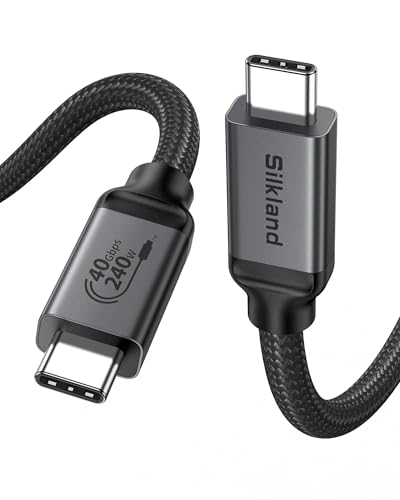
- USB-IF-certified 40Gbps performance
- 240W charging with E-Marker safety chip
- Supports 8K or dual 4K displays
Best For: Short desktop and dock connections
Best Premium Pick
Anker Prime Thunderbolt 4 Cable

- Thunderbolt 4 certified and USB4 compliant
- 40Gbps transfers with 240W charging
- Supports single 8K or dual 4K displays
Best For: Premium laptop workstation performance
Top Thunderbolt 5 Pick

- 80Gbps data and 240W charging
- Up to 120Gbps display bandwidth
- USB-IF certified, braided, and shielded
Best For: Power users and multi-monitor creative workstations
Best Value Set
Maxonar USB4 Thunderbolt 4 Cable 2-Pack

- Two 40Gbps cables in one pack
- 240W charging and 8K support
- Braided build with 2-year support
Best For: Home, office, and travel setups
Best Compact Thunderbolt 5 Cable

- 80Gbps transfers and 240W charging
- 120Gbps display bandwidth
- Compact, case-friendly 4-foot design
Best For: High-performance laptop desks with limited cable clutter
Best All-Around Value

- 40Gbps data and 8K@60Hz video support
- Up to 240W charging with compatible hardware
- Braided, durable USB4 design
Best For: Versatile laptop, monitor, dock, and SSD connections
Best for Maximum Bandwidth

- Up to 80Gbps USB4 Gen4 data transfer
- 240W PD 3.1 charging support
- Up to 16K video with compatible hardware
Best For: High-bandwidth storage, displays, and workstation setups
Best Extended-Length Option

- Long 6.6-foot length for flexible setups
- 40Gbps data and 8K display support
- Up to 240W charging with compatible devices
Best For: Longer laptop-to-monitor, charger, dock, and SSD connections
Top Certified Pick – Cable Matters Thunderbolt 4 Cable
For shoppers comparing thunderbolt cables for laptops, this Intel-certified Cable Matters model combines Thunderbolt 4 and USB4 support in a compact 3.3-foot length. It is designed for high-speed data, laptop charging, and demanding display setups.
Best For: Professional laptop, monitor, and docking-station setups that need certified 40Gbps performance and high-wattage charging.
Pros:
- Supports 40Gbps data transfer and up to 240W USB PD 3.1 charging.
- Can drive one 8K display or two 4K displays with compatible equipment.
- Backward compatible with Thunderbolt 3, USB4, USB-C 3.2, 3.1, and 2.0 devices.
Cons:
- The 3.3-foot length may be limiting for devices positioned farther apart.
- Full performance depends on compatible laptops, chargers, displays, and peripherals.
Its certification, broad compatibility, and 240W power capability make it a strong all-around choice for high-performance laptop workstations.
Best Everyday Value – Amazon Basics USB-C 4 Cable
This USB-IF-certified Amazon Basics cable is a practical option among thunderbolt cables for laptops, especially if you also connect phones, tablets, storage drives, and chargers. Its USB4 design supports fast data, charging, and video over a 3.3-foot cable.
Best For: Everyday USB-C laptop users who want one cable for charging, file transfers, and compatible external displays.
Pros:
- Supports up to 40Gbps data transfer and 240W charging when the complete setup is compatible.
- Handles one 8K display, 4K at 120Hz, or dual 4K at 60Hz with supported devices.
- USB-IF certified and backward compatible with Thunderbolt 4, Thunderbolt 3, USB 3.2, and USB 2.0.
- Tested to withstand 5,000 bends at 95 degrees and includes a one-year limited warranty.
Cons:
- Video output requires a laptop or other USB-C device with DisplayPort Alternate Mode.
- 240W charging requires compatible 48V/5A EPR equipment throughout the setup.
With broad device compatibility and durability testing, this is a versatile choice for mixed USB-C households and laptop desks.
Best Flexible USB4 Option – Silkland USB4 Cable
The Silkland USB4 cable offers a compact solution for shoppers seeking thunderbolt cables for laptops, docks, monitors, and SSDs. It combines 40Gbps transfers, 240W charging, and high-resolution display support in a USB-IF-certified design.
Best For: Side-by-side laptop and monitor connections, portable docks, and users who want USB4 compatibility with Thunderbolt 3 and 4 equipment.
Pros:
- Supports 40Gbps data transfer and up to 240W PD 3.1 charging with compatible equipment.
- Can support one 8K display, 6K/5K at 60Hz, or dual 4K at 60Hz when devices allow it.
- USB-IF certified and compatible with Thunderbolt 4, Thunderbolt 3, USB 3.2, and USB 2.0.
- Includes an E-Marker chip and an aluminium-and-nylon outer construction.
Cons:
- The 3.3-foot version may be too short when a device is positioned on the floor.
- Actual transfer speeds and display capabilities depend on the connected hardware.
Its short length suits tidy desktop connections, while the stated USB4 and Thunderbolt compatibility keeps it useful across several laptop accessories.
Best Premium Pick – Anker Prime Thunderbolt 4 Cable
Anker’s Prime Thunderbolt 4 cable is a premium contender among thunderbolt cables for laptops, pairing 40Gbps transfers with 240W charging in a 3.3-foot USB-C-to-USB-C design. It is also built for compatible high-resolution display setups.
Best For: Laptop users who want certified Thunderbolt 4 performance for fast file transfers, high-power charging, and multiple displays.
Pros:
- Thunderbolt 4 certified and USB4 compliant.
- Supports up to 40Gbps data transfer and 240W charging.
- Supports a single 8K display or dual 4K displays with compatible connections.
- Includes an 18-month warranty and customer service support.
Cons:
- The 3.3-foot length may not suit larger desk layouts.
- Dual-display daisy chaining requires compatible USB-C DisplayPort Alt Mode or Thunderbolt ports.
- Maximum charging and transfer performance depends on the connected devices and accessories.
This cable is a polished choice for demanding laptop workspaces, particularly when certification, display support, and warranty coverage are priorities.
Top Thunderbolt 5 Pick – Silkland USB4 80Gbps Cable
For shoppers comparing thunderbolt cables for laptops, this USB-IF-certified Silkland cable stands out for its combination of 80Gbps data transfer, 240W charging, and advanced display support. Its 5-foot length suits laptop-to-dock, monitor, and storage setups.
Best For: Power users, video editors, graphics professionals, and laptop owners building high-resolution multi-monitor workstations.
Pros:
- Supports 80Gbps bidirectional data transfer and USB4 Version 2.0 compatibility.
- Offers 240W PD 3.1 charging with an E-Marker chip and safety protections.
- Supports up to 120Gbps display bandwidth, including dual 8K or triple 4K displays.
- Braided nylon, aluminum housing, and triple shielding improve durability and signal stability.
Cons:
- Its highest data and display capabilities require compatible Thunderbolt 5 or USB4 Version 2.0 hardware.
- A 5-foot cable may be longer than necessary for compact desk setups.
This is a forward-looking option for demanding laptop workstations, although the advertised performance depends on the connected devices and ports.
Best Value Set – Maxonar USB4 Thunderbolt 4 Cable 2-Pack
This Maxonar 2-pack is a practical choice among thunderbolt cables for laptops when you need matching cables for home, office, or travel. Each 3.3-foot cable supports 40Gbps transfers, 240W power delivery, and high-resolution display connections.
Best For: Laptop users who want a spare cable or separate cables for a desk and travel bag.
Pros:
- Two cables provide useful value for home and office setups.
- Supports 40Gbps data transfer, 240W charging, and single 8K or dual 4K displays.
- Braided nylon and reinforced connectors are designed for frequent plugging and unplugging.
- Includes 2-year support and is available in multiple lengths.
Cons:
- The 3.3-foot length may be restrictive when a laptop sits far from a dock or monitor.
- Its 40Gbps specification is below the 80Gbps capability of newer Thunderbolt 5-oriented cables.
Choose this set for dependable Thunderbolt 4 and USB4 connectivity at a convenient two-cable price, especially if you regularly switch between workspaces.
Best Compact Thunderbolt 5 Cable – Silkland USB4 80Gbps 4ft
This 4-foot Silkland cable is designed for high-performance laptop connections without excessive slack. It combines USB-IF-certified 80Gbps data transfer with 240W charging and 120Gbps display bandwidth for compatible Thunderbolt 5 and USB4 setups.
Best For: Laptop users who need a compact cable for docks, SSDs, monitors, and demanding creative or gaming displays.
Pros:
- Delivers 80Gbps bidirectional data transfer and supports USB4 Version 2.0.
- Provides 240W PD 3.1 charging with backward compatibility for lower-wattage devices.
- Supports dual 8K or triple 4K at 144Hz displays, with stated support for up to 16K.
- Features a case-friendly shell, braided nylon, aluminum housing, and triple shielding.
Cons:
- Full 80Gbps and 120Gbps performance depends on compatible connected hardware.
- The 4-foot length offers less reach than the longer cable options in some desk layouts.
With its shorter profile and broad backward compatibility, this cable is a strong fit for organized laptop workstations where high bandwidth matters but extra cable length does not.
Best All-Around Value – Acer USB4 40Gbps Cable
For shoppers comparing thunderbolt cables for laptops, this Acer USB4 cable is a versatile option for high-speed file transfers, displays, and charging. It supports up to 40Gbps data, 8K video at 60Hz, and up to 240W charging with compatible equipment.
Best For: Laptop owners who want one cable for docks, monitors, SSDs, charging, and Thunderbolt 3 or 4 devices.
Pros:
- Supports 40Gbps data transfer and 8K@60Hz video.
- Up to 240W PD 3.1 charging with compatible chargers and devices.
- Braided construction, aluminum housing, and bend-resistant design.
- Compatible with USB4 and Thunderbolt 3/4 equipment.
Cons:
- Actual performance depends on the connected host, device, charger, and display.
- At 3.3 feet, it may be short for some desk setups.
This is a strong general-purpose pick when you need reliable connectivity across several USB-C devices. Its combination of display, data, and charging support makes it especially practical for laptop docking setups.
Best for Maximum Bandwidth – UGREEN Thunderbolt 5 Cable
Among thunderbolt cables for laptops, the UGREEN USB-C cable stands out for its stated USB4 Gen4 bandwidth. It supports up to 80Gbps data transfer, 240W charging, and advanced DisplayPort 2.1 video capabilities for compatible systems.
Best For: Power users moving very large files, running high-resolution displays, or building demanding laptop and workstation setups.
Pros:
- Up to 80Gbps data transfer for fast SSD, NAS, and computer connections.
- Supports up to 240W PD 3.1 charging and backward compatibility with lower-power devices.
- Supports up to 16K@60Hz, dual 8K@60Hz, or triple 4K@144Hz with compatible hardware.
- Nylon braid, aluminum housing, and triple shielding are designed for durability.
Cons:
- The highest data and display specifications require compatible USB4 Gen4 or Thunderbolt hardware.
- Its 3-foot length may not suit every workstation layout.
This cable is the most performance-focused choice in the group. It makes sense for users whose laptop, storage, and display equipment can take advantage of its higher bandwidth rather than for basic charging alone.
Best Extended-Length Option – Silkland USB4 6.6-Foot Cable
If you need extra reach, this 6.6-foot Silkland cable is a useful alternative among thunderbolt cables for laptops. It offers 40Gbps data transfer, up to 240W charging, and support for 8K or dual 4K displays with compatible USB4 and Thunderbolt devices.
Best For: Laptop users who need a longer cable for monitors, chargers, docks, SSDs, or flexible desk arrangements.
Pros:
- 6.6-foot length provides more setup flexibility than shorter cables.
- Supports 40Gbps data, 8K@60Hz, and dual 4K@60Hz displays.
- Up to 240W charging with PD 3.1 and an E-Marker chip for supported charging setups.
- Compatible with Thunderbolt 3/4, USB4, and older USB standards.
Cons:
- The manufacturer recommends cables under 5 feet for stable docking performance.
- Maximum speeds and charging require compatible devices and accessories.
This is the practical pick when cable length matters. It provides broad compatibility and strong specifications, though users connecting a dock may prefer a shorter cable based on the manufacturer’s guidance.
How We Picked the Best Thunderbolt Cables for Laptops
We focused on cables that clearly state their data rate, power delivery, display support, and compatibility with Thunderbolt or USB4 devices. Certification was another priority: Intel or USB-IF certification can provide extra confidence that a cable meets the advertised performance requirements.
The lineup includes compact 1-meter cables, longer 2-meter choices, multipacks, and newer Thunderbolt 5 or USB4 Gen 4 models. We also considered whether each cable suits common laptop setups, including docks, external SSDs, monitors, and high-wattage USB-C chargers.
Quick Comparison
| What to Check | Best Match |
|---|---|
| Thunderbolt 4 connectivity | 40Gbps certified cables |
| Thunderbolt 5 systems | 80Gbps or higher USB4/Thunderbolt 5 cables |
| High-power laptop charging | Cables rated for 240W |
| Desk setups and docks | 3.3-foot to 6.6-foot options, depending on placement |
| Multiple devices or backups | Two-pack options |
Key Buying Factors for Thunderbolt Cables for Laptops
Bandwidth and Standards
Thunderbolt 4 typically supports up to 40Gbps, while Thunderbolt 5 and compatible USB4 Gen 4 cables can reach 80Gbps or more under supported hardware. A faster cable cannot upgrade a slower laptop, dock, or drive, so check the limits of every device in the chain.
Charging and Display Support
Many premium cables support USB Power Delivery up to 240W, but the charger and laptop must also accept the required wattage. For displays, verify resolution and refresh-rate support. An 8K claim may depend on the laptop’s graphics hardware, display, and dock.
Length and Construction
Short cables generally make tidy connections and can be convenient for portable drives. Longer cables provide more flexibility around a desk, but cable quality becomes especially important at higher speeds. Choose the shortest length that comfortably reaches your devices.
Certification and Compatibility
Look for Intel Thunderbolt certification or USB-IF certification where available. Thunderbolt 4 cables are backward-compatible with many Thunderbolt 3 and USB-C devices, but USB-C ports do not all support Thunderbolt. Confirm the port symbols, specifications, and required features before buying.
Who Should Buy Which Thunderbolt Cables for Laptops?
Choose a certified 40Gbps Thunderbolt 4 cable if you use a Thunderbolt 3 or 4 laptop with a dock, external SSD, or monitor. A 240W-rated model is a sensible choice for users who want one cable that can handle demanding laptop charging as well as data.
Thunderbolt 5 laptop owners should select an 80Gbps-or-faster cable to take advantage of the newer standard. A longer 2-meter cable suits fixed desktop setups, while a 1-meter cable is better for travel and compact workspaces. If you need cables for several devices, a two-pack can offer better value, provided both cables list the required performance.