The best thunderbolt cables for travel make it easier to connect laptops, docks, storage drives, monitors, and chargers without packing a tangle of separate cords. The right cable combines fast data transfer, dependable charging, and enough flexibility for a mobile setup.
We selected 10 USB-C cables with Thunderbolt 3, Thunderbolt 4, or Thunderbolt 5 compatibility, covering compact everyday options, longer travel-friendly lengths, and high-power 240W models.
Best 10 Thunderbolt Cables for Travel Picks for 2026
Future-Ready Powerhouse
UGREEN 240W Thunderbolt 5 Cable

- 80Gbps data transfer
- 240W USB-C charging
- Up to 16K video output
Best For: High-performance travel setups and large-file workflows
Premium High-Speed Pick
Anker Prime Thunderbolt 5 Cable

- 80Gbps Thunderbolt 5 transfers
- 240W charging support
- Dual 8K display capability
Best For: Traveling professionals with high-end laptops and docks
Best Two-Cable Value
Maxonar USB4 Thunderbolt 4 Cable 2-Pack

- Two 3.3-foot cables
- 40Gbps data transfer
- 240W charging and 8K support
Best For: Travelers who need a spare for home or office
Reliable Everyday Option

- USB-IF certified
- 40Gbps and 240W support
- Up to 8K video output
Best For: General charging, data, and display use while traveling
Best USB4 Travel Pick
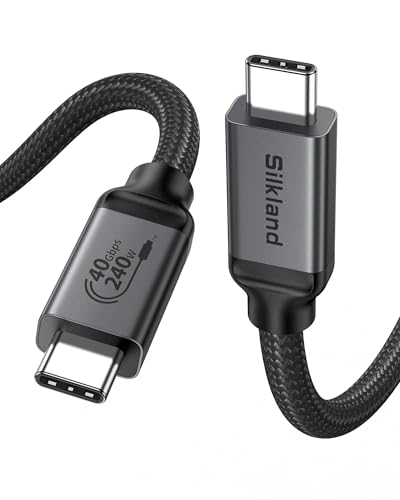
- 40Gbps transfers with 8K or dual 4K display support
- Up to 240W charging with USB-IF certification
- Compact 3.3-foot length for nearby devices
Best For: Compact laptop, dock, monitor, and SSD travel setups
Best Thunderbolt 5 Performance
Anker Prime Thunderbolt 5 Cable
- Up to 80Gbps transfers for large files
- Supports dual 8K displays at 60Hz
- Delivers up to 240W USB-C charging
Best For: High-performance mobile workstations and multi-display travel setups
Best Long Thunderbolt 5 Cable

- 80Gbps transfers and up to 120Gbps display bandwidth
- Supports up to 240W charging and high-resolution displays
- 5-foot braided cable with triple shielding
Best For: Longer high-performance workstation and display connections
Best Overall

- 240W charging with 40Gbps data
- Supports 8K at 60Hz video
- Braided design rated for 10,000 bends
Best For: One-cable travel setups spanning laptops, phones, storage, and displays
Best for Longer Reach

- 4-foot length for flexible setups
- 40Gbps, 240W, and 8K support
- USB-IF certified with braided protection
Best For: Travelers connecting laptops to docks, monitors, and SSDs
Best Simple High-Speed Pick

- 40Gbps transfers and up to 240W charging
- Supports 8K60 and 4K144 displays
- Compact 3.3-foot design with 5,000-bend testing
Best For: Everyday laptop, monitor, tablet, and USB-C travel connections
Future-Ready Powerhouse – UGREEN 240W Thunderbolt 5 Cable
For travelers carrying a high-performance laptop, fast SSD, or multiple display accessories, this UGREEN cable is a powerful choice among thunderbolt cables for travel. It combines 240W charging, 80Gbps data transfer, and advanced video support in a durable 3.3-foot braided design.
Best For: Power users moving large files or connecting high-end laptops, docks, and displays on the go.
Pros:
- Supports up to 240W charging and 80Gbps data transfer.
- Handles DisplayPort 2.1 output up to 16K at 60Hz, with additional multi-display configurations.
- Braided construction, aluminum housing, triple shielding, and testing for up to 10,000 bends.
Cons:
- The advanced capabilities require compatible devices, chargers, and displays.
- At 3.3 feet, it may be short for some desk or hotel-room setups.
Its unusually high bandwidth and charging capacity make it a strong long-term travel cable, especially if you regularly handle large media files or demanding workstation connections.
Premium High-Speed Pick – Anker Prime Thunderbolt 5 Cable
This Anker Prime cable is a compact option for travelers who want Thunderbolt 5 performance without carrying separate charging and data cables. It offers 80Gbps transfers, 240W charging, and support for dual 8K displays in a short USB-C-to-USB-C format.
Best For: Travelers using powerful laptops, multi-display workstations, external drives, or docks.
Pros:
- Thunderbolt 5 specification with up to 80Gbps data transfer.
- Supports 240W USB-C charging and dual 8K displays at 60Hz.
- Includes an 18-month warranty and compatibility with a broad range of laptops, phones, tablets, monitors, and docks.
Cons:
- The supplied listing contains inconsistent length details, describing the cable as both 1.7 feet and 3.3 feet.
- Its advanced performance depends on compatible Thunderbolt 5 hardware and accessories.
For a premium travel kit, this is an appealing all-in-one cable, provided you confirm the delivered length and have devices capable of using its top specifications.
Best Two-Cable Value – Maxonar USB4 Thunderbolt 4 Cable 2-Pack
For travelers who want a spare cable in a second bag or workspace, this Maxonar 2-pack offers practical flexibility. Each 3.3-foot cable supports 40Gbps transfers, 240W power delivery, and high-resolution display connections for Thunderbolt 4 and USB4 devices.
Best For: Travelers splitting time between home, office, and mobile setups who need a backup cable.
Pros:
- Two cables provide convenient value and an easy travel spare.
- Supports 40Gbps data transfer, 240W charging, and single 8K or dual 4K displays.
- Braided nylon jackets and reinforced connectors are designed for repeated plugging and unplugging.
Cons:
- 40Gbps bandwidth is lower than the Thunderbolt 5 options in this roundup.
- The 3.3-foot length may not suit distant monitors or docks.
This is a sensible choice for everyday travel because the second cable can stay in a laptop bag while the other remains at home or the office. Its two-year support adds useful peace of mind.
Reliable Everyday Option – Amazon Basics USB-C 4 Cable
This USB-IF-certified Amazon Basics cable is a straightforward choice for everyday charging, file transfers, and display connections. Among thunderbolt cables for travel, it stands out as a broadly compatible 3.3-foot option with 40Gbps speeds, 240W charging, and Thunderbolt 3 and 4 compatibility.
Best For: General travel use with USB-C phones, tablets, laptops, chargers, storage devices, and compatible displays.
Pros:
- USB-IF-certified and compatible with Thunderbolt 3, Thunderbolt 4, USB4, USB 3.2, and USB 2.0.
- Supports up to 240W charging and 40Gbps data transfer when paired with compatible equipment.
- Offers single 8K, 4K at 120Hz, or dual 4K at 60Hz video support.
- TPE construction was tested for 5,000 bends and includes a one-year limited warranty.
Cons:
- It does not offer the 80Gbps bandwidth of the Thunderbolt 5 cables.
- 240W charging requires the device, charger, and cable to support the necessary 48V/5A EPR setup.
For most travelers, this cable covers the core USB-C needs without paying for the highest-end bandwidth. Its broad compatibility and USB-IF certification make it an uncomplicated bag essential.
Best USB4 Travel Pick – Silkland USB4 40Gbps Cable
For travelers who want one compact cable for charging, displays, and fast file transfers, the Silkland USB4 cable is a versatile choice among thunderbolt cables for travel. Its 3.3-foot length suits side-by-side laptop, dock, monitor, and phone setups, while USB-IF certification and Thunderbolt 3/4 compatibility add confidence for mixed-device kits.
Best For: Travelers connecting a laptop or tablet to a nearby dock, monitor, SSD, or compatible charger.
Pros:
- Supports up to 40Gbps data transfer and single 8K or dual 4K displays when devices support the required standards.
- Offers up to 240W PD3.1 charging with an E-Marker chip and backward compatibility with lower charging levels.
- USB-IF certified and compatible with Thunderbolt 4, Thunderbolt 3, USB4, and older USB standards.
Cons:
- The 3.3-foot length may be too short for floor-level devices or separated travel setups.
- Display and transfer performance depends on the connected host and device support.
This is a practical all-rounder for a compact travel bag, especially when your devices are close together. Choose a longer version if your hotel desk or workspace requires more reach.
Best Thunderbolt 5 Performance – Anker Prime Thunderbolt 5 Cable
The Anker Prime Thunderbolt 5 cable is aimed at travelers carrying high-performance laptops and multi-display gear. For thunderbolt cables for travel, its 3.3-foot length keeps a portable workstation tidy while supporting 80Gbps transfers, dual 8K displays, and up to 240W USB-C charging.
Best For: Power users who need fast transfers, high-resolution displays, and high-wattage charging from one short cable.
Pros:
- Thunderbolt 5 performance supports up to 80Gbps data transfers.
- Supports dual 8K displays at 60Hz with up to 120Gbps display bandwidth.
- Provides up to 240W USB-C charging and includes an 18-month warranty.
Cons:
- The 3.3-foot length is best for close-range connections rather than across-room setups.
- Its advanced capabilities require compatible Thunderbolt 5, display, and charging hardware.
Choose this cable when your travel workflow involves large files or demanding multi-monitor setups. For basic charging and everyday peripherals, its Thunderbolt 5 performance may be more than necessary.
Best Long Thunderbolt 5 Cable – Silkland USB4 80Gbps Cable
Travelers who need extra reach can consider this 5-foot Silkland USB4 Version 2.0 cable. It stands out among thunderbolt cables for travel with 80Gbps transfers, 120Gbps display bandwidth, 240W charging, and reinforced construction for demanding laptop, dock, monitor, and SSD connections.
Best For: Users who need a longer cable for workstation layouts, high-resolution displays, or powerful laptops.
Pros:
- Supports 80Gbps data transfer and up to 120Gbps unidirectional display bandwidth.
- Handles dual 8K, triple 4K at 144Hz, or single 4K at 540Hz when compatible equipment supports those modes.
- USB-IF certified, supports up to 240W charging, and uses braided nylon, aluminum, and triple shielding.
Cons:
- Its 5-foot length takes more space in a compact cable pouch than a shorter option.
- Maximum speeds, resolutions, and charging output depend on the connected devices.
This is the strongest fit when flexibility and high-end display support matter more than minimal pack size. Its longer length can make hotel-room or shared-desk setups easier, while the reinforced build is suited to frequent handling.
Best Overall – UGREEN 240W USB4 Cable
For travelers who want one cable for charging, displays, and fast file transfers, this UGREEN model is a versatile pick among thunderbolt cables for travel. It supports up to 240W charging, 40Gbps data transfer, and 8K at 60Hz video over a compact 3.3-foot length.
Best For: Travelers carrying USB-C laptops, phones, tablets, external SSDs, or monitors who want a single high-capability cable.
Pros:
- Supports up to 240W PD 3.1 charging and is backward compatible with lower-power devices.
- Provides 40Gbps data transfer and up to 8K at 60Hz video output.
- Nylon braiding, aluminum housing, triple shielding, and testing for up to 10,000 bends support frequent travel use.
Cons:
- The 3.3-foot length may be limiting in larger workspaces.
- Maximum charging, data, and display performance depends on the connected devices and charger.
This is a strong all-in-one travel cable for users who want maximum charging headroom without giving up fast storage transfers or high-resolution display support.
Best for Longer Reach – Silkland 4FT USB4 Cable
The Silkland 4-foot cable adds useful reach while retaining the core features travelers expect from thunderbolt cables for travel. It offers 40Gbps transfers, up to 240W PD 3.1 charging, and support for 8K or dual 4K displays.
Best For: Travelers who need extra flexibility between a laptop, dock, monitor, charger, or portable SSD.
Pros:
- Its 4-foot length provides more positioning flexibility than a typical 3.3-foot cable.
- Supports up to 40Gbps data transfer, 240W charging, and single 8K or dual 4K display configurations.
- USB-IF certification, an E-Marker chip, braided construction, and aluminum housing add useful travel-oriented durability and safety features.
Cons:
- The manufacturer recommends cables under 5 feet for stable docking-station performance.
- Full performance requires compatible USB4, Thunderbolt, charger, display, and host hardware.
Choose this model when a little extra length matters, especially for hotel desks or temporary dock-and-monitor setups, while keeping high-speed connectivity available.
Best Simple High-Speed Pick – Anker 515 USB4 Cable
The Anker 515 is a straightforward 3.3-foot option for travelers who prioritize fast transfers and broad USB-C charging support. Like other capable thunderbolt cables for travel, it handles up to 40Gbps data, up to 240W charging, and high-resolution external displays.
Best For: Travelers who want a familiar, compact cable for laptops, monitors, tablets, and everyday USB-C devices.
Pros:
- Transfers files at up to 40Gbps and supports displays up to 8K at 60Hz or 4K at 144Hz.
- Supports up to 240W charging with a compatible charger.
- Its 3.3-foot length is easy to pack, and lab testing rates it for up to 5,000 bends.
Cons:
- It offers less stated bend endurance than the UGREEN cable.
- The short length may not suit distant outlets, docks, or monitors.
- Maximum performance depends on compatible USB-C devices and accessories.
This is a sensible travel companion for users who want strong speed and charging capability in a compact cable from an established accessory brand.
How We Picked the Best Thunderbolt Cables for Travel
We focused on cables that balance portability with useful performance. Every option in this roundup supports USB-C connectivity and is marketed for Thunderbolt or USB4 use, while many add 240W Power Delivery, 40Gbps or 80Gbps data rates, and high-resolution display support.
We also considered length, certification claims, compatibility, and the practical needs of travelers. A short cable can reduce desk clutter and fit neatly in a tech pouch, while a 4- or 5-foot cable gives more freedom around hotel desks, airports, and shared workspaces.
Quick Comparison
| What to prioritize | Best fit |
|---|---|
| Maximum bandwidth | Thunderbolt 5 or 80Gbps USB4 cables |
| Reliable everyday connectivity | USB4 or Thunderbolt 4 cables rated for 40Gbps |
| High-power charging | Cables supporting up to 240W Power Delivery |
| Smallest travel footprint | 1.7- to 3.3-foot cables |
| Flexible placement | 4- to 5-foot cables |
Key Buying Factors for Thunderbolt Cables for Travel
Bandwidth and Device Compatibility
Check the limits of your laptop, dock, drive, and monitor before paying for the highest specification. Thunderbolt 4 and USB4 cables rated at 40Gbps are sufficient for many external SSDs and displays. Thunderbolt 5 and 80Gbps USB4 models are better suited to newer systems that can use their additional bandwidth, but they will not upgrade an older port.
Charging Power
A 240W rating provides useful headroom for compatible laptops and accessories, but the computer, charger, and power adapter must also support the required USB Power Delivery profile. A high-wattage cable does not make an incompatible charger deliver more power.
Length and Portability
Short cables are usually easiest to store and can help maintain a clean connection between a laptop and a nearby hub. Longer cables are more convenient when a monitor, dock, or charger sits across a desk. For frequent travel, avoid choosing extra length unless you genuinely need it.
Certification and Construction
USB-IF certification can provide added reassurance for USB4 performance claims, while clear Thunderbolt compatibility is important for docks and high-speed peripherals. Look for reinforced connectors and a durable outer jacket, especially if the cable will be unplugged and packed often.
Who Should Buy Which Thunderbolt Cables for Travel?
Choose a compact 1.7- or 3.3-foot cable if you mainly connect a laptop to a portable SSD, charger, or travel dock. A 4- or 5-foot option is better for hotel desks or setups where the accessory sits farther away. Select a Thunderbolt 5 or 80Gbps model if you own compatible next-generation hardware and want maximum transfer performance. For most travelers using Thunderbolt 3, Thunderbolt 4, or USB4 devices, a certified 40Gbps cable with 240W charging is the practical sweet spot.