If you want fast external storage for a Mac, a dual-bay Thunderbolt enclosure can be a smart upgrade. It gives you room for two NVMe drives, high transfer speeds, and flexible setups for editing, backups, or workspace expansion.
Below, we focus on options that make sense for Mac users who want reliable performance, solid cooling, and the right mix of features without paying for extras they may never use.
Best 10 Thunderbolt Dual NVMe Enclosure for Mac Picks for 2026
Editor’s Pick
UGREEN 40Gbps Dual-Chip Cooling Enclosure
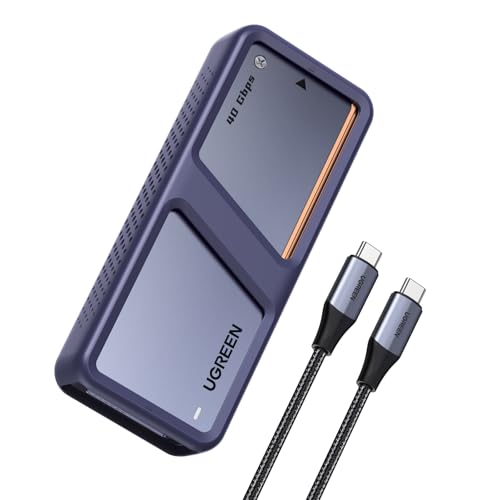
- 40Gbps support with dual-chip design
- Smart fan and aluminum body for cooling
- Up to 8TB NVMe support
Best For: Mac users needing fast transfers and active cooling
Quiet Performer
UGREEN 40Gbps Slim Fin-Cooled Enclosure

- ASM2464PD chip with up to 3600MB/s
- Fanless double-sided fin cooling
- Supports up to 8TB NVMe drives
Best For: Mac users who want quiet, portable high-speed storage
High-Capacity Pick
WAVLINK 20Gbps Dual NVMe Enclosure

- Dual-bay support up to 16TB total
- RAID 0 and automatic cooling fan
- UASP and Trim support
Best For: Mac users needing dual-drive capacity and RAID 0
Ultra-fast portable build
OWC Express 1M2 40Gb/s Portable NVMe SSD

- Up to 40Gb/s USB4 speed with claimed 3836MB/s real-world performance.
- Patented aluminum heat-dissipating enclosure for cooler operation.
- Supports NVMe 2280, 2242, and 2230 drives.
Best For: Portable Mac users who want a fast, cooling-focused single-drive NVMe enclosure
Dual-bay clone and RAID
UGREEN 40Gbps Dual-Bay M.2 NVMe SSD Cloner
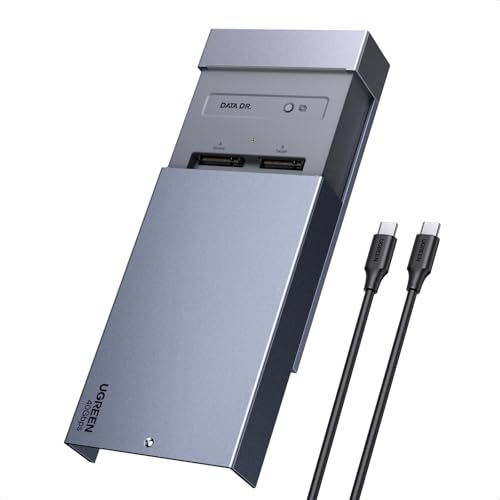
- One-click offline cloning without needing a computer.
- Supports software RAID 0, 1, PM, and Union modes.
- Active cooling with aluminum shell and 40mm fan.
Best For: Mac users who want a dual-drive enclosure for cloning and RAID
Tool-free USB4 performer
WAVLINK 40Gbps PCIe NVMe SSD Enclosure

- USB4 enclosure with claimed speeds up to 40Gbps and 3800MB/s.
- Tool-free installation for easy SSD swaps.
- Active cooling with fan, thermal pad, and aluminum shell.
Best For: Mac users who want a simple, fast, tool-free single NVMe enclosure
Portable Cooling Pick
ACASIS 40Gbps Thunderbolt NVMe Enclosure

- 40Gbps USB4/Thunderbolt 4/3 support
- Built-in fan and aluminum body
- Supports 2230 through 2280 M.2 sizes
Best For: Mac users who want a compact, cooled single-drive enclosure
Editor’s Pick – UGREEN 40Gbps Dual-Chip Cooling Enclosure
If you want a Thunderbolt dual NVMe enclosure for Mac that leans toward speed and thermal control, this UGREEN model is built for heavy transfers and larger projects. It combines a 40G chip with a 10G chip, and the aluminum body plus smart fan are aimed at keeping performance stable during extended use.
Best For: Mac users who want a fast 40Gbps NVMe enclosure with active cooling for large files, backups, and editing.
Pros:
- Dual-chip design with JHL7440 and RTL9210 for fast transfer handling
- Aluminum housing plus smart cooling fan that activates above 40°C
- Supports up to 8TB NVMe drives and works with Thunderbolt 3/4, USB4, and more
- S.M.A.R.T. and TRIM support help with drive health and stable performance
Cons:
- To reach 3600MB/s, Thunderbolt 4 cables and devices are required
- Not compatible with SATA SSDs, PCIe 5.0 SSDs, or 9100 SSDs
This is the strongest pick if your priority is speed with active cooling. It is especially well suited to users moving large media files or backing up high-capacity drives on a Mac setup.
Budget Dual-Bay – ORICO Tool-Free Dual NVMe Enclosure
This ORICO dual NVMe enclosure is a straightforward option if you need two independent drives in one compact USB-C case. For a Thunderbolt dual NVMe enclosure for Mac search, it stands out more for practical dual-drive access than for peak speed, making it a useful pick for everyday storage tasks.
Best For: Mac users who want an easy, tool-free dual-drive enclosure for general file access and portable storage.
Pros:
- Two independent M.2 NVMe slots that can be used separately
- Tool-free installation with plug-and-play support
- All-aluminum body with heat sinks and thermal pads
- Supports NVMe M-Key drives in 2230/2242/2260/2280 sizes up to 2x4TB
Cons:
- 10Gbps USB 3.2 Gen2 speed is much lower than 40Gbps Thunderbolt options
- Not designed for SATA SSDs
This enclosure makes sense if you value simple dual-drive handling over top-end throughput. It is best suited to users who want an affordable way to manage two NVMe drives from a Mac without extra setup.
Quiet Performer – UGREEN 40Gbps Slim Fin-Cooled Enclosure
If you want a Thunderbolt dual NVMe enclosure for Mac-style portability but prefer a single-drive design with no fan noise, this UGREEN enclosure focuses on quiet heat management. Its ASM2464PD chip, double-sided fin cooling, and slim aluminum body are aimed at fast, compact external storage.
Best For: Mac users who want a quiet, portable 40Gbps NVMe enclosure with strong passive cooling.
Pros:
- ASM2464PD chipset with up to 3600MB/s claimed speed
- Fanless double-sided fin design for quiet cooling
- Supports 2230/2242/2260/2280 NVMe drives up to 8TB
- Compatible with Windows, Mac OS, Linux, and Android
Cons:
- Single-drive enclosure only, not a dual-bay model
- Not compatible with SATA NGFF or mSATA drives
- Some thicker SSDs may need thinner thermal pads to fit properly
This is a solid choice if you want Thunderbolt-class speed in a quieter design. It works well for users who care about portability and thermal control more than multi-drive flexibility.
High-Capacity Pick – WAVLINK 20Gbps Dual NVMe Enclosure
If you need a Thunderbolt dual NVMe enclosure for Mac use but are focused on capacity and dual-drive flexibility rather than top-end Thunderbolt speed, this WAVLINK enclosure is a capable option. It supports two NVMe drives, includes active cooling, and adds RAID 0 support for users who want combined performance.
Best For: Mac users who want a dual-bay NVMe enclosure with RAID 0, cooling, and large total capacity.
Pros:
- Dual-bay design supports two NVMe drives up to 8TB each
- RAID 0 support for faster combined performance and expanded capacity
- Active cooling with an automatic fan and aluminum body
- Includes UASP and Trim support for better responsiveness and drive maintenance
Cons:
- 20Gbps USB 3.2 Gen 2×2 is slower than 40Gbps Thunderbolt 3/4 enclosures
- SATA drives are not supported
- USB-A compatibility is limited to up to 10Gbps
This model makes sense when you want two drives in one enclosure and care about total capacity. It is a practical fit for backups, media libraries, and desktop storage on macOS systems.
Ultra-fast portable build – OWC Express 1M2 40Gb/s Portable NVMe SSD
If you want a Thunderbolt dual NVMe enclosure for Mac experience in a smaller, single-drive format, the OWC Express 1M2 is built around speed and flexibility. This USB4/Thunderbolt-compatible enclosure is a strong fit for Mac users who want a portable DIY NVMe solution with consistent performance and broad USB-C device support.
Best For: Mac users who want a fast, bus-powered portable NVMe enclosure for one SSD and value cooling-focused design.
Pros:
- Up to 40Gb/s USB4 performance with real-world speeds claimed up to 3836MB/s.
- Patented heat-dissipating aluminum enclosure helps keep the SSD cool and stable.
- Supports NVMe M.2 2280, 2242, and 2230 drives.
- Includes a 40Gb/s USB-C cable and screwdriver in the box.
Cons:
- Enclosure only, so you still need to supply the NVMe SSD.
- Single-drive design is not a dual-bay enclosure.
- Best performance depends on a compatible USB4/Thunderbolt system and SSD.
Overall, this is a solid choice if your priority is a compact, fast, and reliable external NVMe setup for a Mac. It is not a dual-bay model, but it does deliver the kind of portable high-speed storage many Mac workflows need.
Dual-bay clone and RAID – UGREEN 40Gbps Dual-Bay M.2 NVMe SSD Cloner
This Thunderbolt dual NVMe enclosure for Mac alternative is aimed at users who need two-drive workflows, not just simple external storage. The UGREEN dual-bay enclosure supports one-click offline cloning and software RAID modes, making it practical for MacBook and Mac mini owners who move data between drives or want flexible storage layouts.
Best For: Mac users who need a dual-bay NVMe enclosure for cloning, RAID setups, or splitting work across two SSDs.
Pros:
- One-click offline cloning works without a PC once the drives are installed.
- Supports software RAID 0, RAID 1, PM, and Union modes.
- Built-in 40mm fan plus aluminum shell for active cooling.
- Supports two M.2 NVMe drives up to 16TB total capacity.
Cons:
- Requires separate NVMe SSDs; drives are not included.
- The clone target must be larger than the source data disk.
- Uses a USB-C connection rather than a Thunderbolt-branded port in the specs.
For Mac users who want more than basic storage, this enclosure stands out because it combines dual-drive support with cloning and RAID options. If those features matter more than a minimalist portable design, it is a capable workflow tool.
Tool-free USB4 performer – WAVLINK 40Gbps PCIe NVMe SSD Enclosure
For Mac users looking at a Thunderbolt dual NVMe enclosure for Mac setup, the WAVLINK is really a high-speed single-drive USB4 option that focuses on convenience and cooling. It supports PCIe NVMe M.2 2280 drives, promises up to 40Gbps transfer rates, and adds tool-free installation for quick setup on compatible Mac systems.
Best For: Mac users who want a fast, tool-free single NVMe enclosure with strong cooling and simple plug-and-play use.
Pros:
- USB4 connection with claimed speeds up to 40Gbps and up to 3800MB/s.
- Tool-free installation makes drive swaps easier.
- Aluminum body, built-in fan, thermal pad, and aluminum strip for cooling.
- Supports UASP, Trim, S.M.A.R.T., and plug-and-play operation.
Cons:
- Single-drive enclosure only, not a dual-bay model.
- Supports 2280 PCIe NVMe SSDs, so drive size options are more limited.
- SSD is not included.
This is a practical choice if you want a straightforward external NVMe enclosure for Mac with easy installation and active cooling. It is best suited to users who value speed and simplicity over multi-drive features.
Portable Cooling Pick – ACASIS 40Gbps Thunderbolt NVMe Enclosure
If you want a Thunderbolt dual NVMe enclosure for Mac-style speed in a single-drive format, the ACASIS TBU405 Pro is built for high-throughput work with active cooling. It pairs a 40Gbps USB4/Thunderbolt 4/3 connection with a built-in fan and aluminum shell to help keep a fast NVMe drive stable during heavy transfers.
Best For: Mac users, creators, and power users who want a compact 40Gbps NVMe enclosure with active cooling.
Pros:
- Built-in cooling fan plus heat-dissipation holes to help reduce thermal throttling
- Intel JHL7440 chip with Thunderbolt 4/3 and USB4 compatibility
- Supports M.2 sizes 2280/2260/2242/2230 for flexible drive matching
- Tested up to 2805/2734 MB/s with a Samsung 980 Pro on MacBook
Cons:
- Single-drive enclosure, so it is not a true dual-bay option
- Fan must be switched on manually
This is a strong pick if your priority is speed and cooling rather than multi-drive expansion. It fits neatly into a Mac workflow where sustained performance matters more than extra ports or cloning features.
Desktop Dock Pick – ACASIS Dual-Bay NVMe Dock for Mac
For buyers seeking a Thunderbolt dual NVMe enclosure for Mac that also adds docking features, this ACASIS model combines dual M.2 storage with a 6-in-1 desktop hub layout. It is designed for 40Gbps hosts and includes active cooling, dual monitor support, and RAID capability for users who want more than simple storage expansion.
Best For: Mac mini and laptop users who need dual NVMe storage plus dock-style ports and display output.
Pros:
- Dual-bay M.2 enclosure with support for two SSDs
- Software RAID support, including faster RAID 0 use with dual drives
- Built-in fans and aluminum body for heat management
- Includes HDMI, USB-A, two 40Gbps USB-C ports, and 100W PD
Cons:
- Only compatible with 40Gbps host devices
- More of a dock-plus-enclosure than a simple portable enclosure
If you want a desk-focused Mac accessory, this model stands out for blending storage, display expansion, and connectivity in one unit. It makes the most sense for users who will actually use the extra ports and dual-monitor features.
Clone Tool Pick – MOKiN Dual-Bay USB4 NVMe Duplicator
If your priority is copying drives rather than just attaching them, this Thunderbolt dual NVMe enclosure for Mac stands out as a dual-bay offline cloner. The MOKiN UD1501 supports one-key offline duplication, uses a built-in fan for heat control, and works across macOS, Windows, Linux, and Chrome OS.
Best For: Users who need an offline NVMe duplicator for Mac maintenance, upgrades, or drive-to-drive cloning.
Pros:
- One-key offline clone function with no computer required
- Supports two NVMe drives in 2230/2242/2260/2280 sizes
- Built-in cooling fan for better heat handling during use
- Tool-free design makes SSD installation quick and easy
Cons:
- Requires the power adapter for offline cloning
- Target SSD must be at least as large as the source SSD
This is the best fit when drive copying is the main job, not general docking or port expansion. For Mac users doing maintenance, upgrades, or testing multiple SSDs, the dedicated clone workflow is the main advantage.
How We Picked These Thunderbolt Dual NVMe Enclosure for Mac Options
We prioritized real-world Mac compatibility, sustained transfer performance, thermal design, and ease of use. For a Thunderbolt Dual NVMe Enclosure for Mac, the most important details are Thunderbolt or USB4 support, stable NVMe compatibility, and an enclosure that can keep speeds consistent during longer transfers.
We also looked at whether each model favors simple external storage, RAID flexibility, or offline cloning, since those are the main reasons buyers choose a dual-bay enclosure instead of a single-drive case.
Quick Comparison
In general, 40Gbps Thunderbolt or USB4 models are the best fit for Mac users who want the highest ceiling for performance. 20Gbps enclosures can still be a good value if your workload is lighter or if you mainly need fast portable storage rather than top-end speeds. Cooling is another divider: fanless aluminum designs are quieter, while fan-cooled units are better for long sustained transfers and heavy-duty use.
Key Buying Factors for Thunderbolt Dual NVMe Enclosure for Mac
Speed Standard
Look for Thunderbolt 3, Thunderbolt 4, or USB4 if you want the best Mac experience. These interfaces help you get far more from modern NVMe drives than older USB options.
Cooling and Sustained Performance
Dual-drive enclosures can build heat quickly. Aluminum bodies, thermal pads, fin designs, and active fans all help reduce throttling, especially during video editing, backups, or large file copies.
Drive and Size Support
Most buyers should confirm M.2 2280 support first, then check whether the enclosure supports other lengths such as 2230, 2242, or 2260. Also verify whether it accepts M-Key only or broader B+M compatibility.
RAID, Cloning, and Use Case
If you want redundancy or combined capacity, RAID support may matter. If you need a workflow for migration or system duplication, choose a dual-bay model with offline cloning. For simple plug-and-play storage, those extras may not be necessary.
Who Should Buy Which Thunderbolt Dual NVMe Enclosure for Mac?
Creative pros working on a MacBook Pro or Mac mini should lean toward 40Gbps, fan-cooled options for better sustained performance. Budget-minded shoppers or general users can save with a 20Gbps enclosure if they mainly need fast everyday storage. If your priority is duplication or drive management, a dual-bay cloner is the most practical choice. If you want a quieter desk setup, a well-designed aluminum, fanless enclosure may be the best fit.
In short, the best choice depends on whether you value peak speed, lower noise, cloning convenience, or the best balance of price and performance for your Mac.