If you need quick access to bare drives, a good dock can make storage upgrades, backups, and recovery far easier.
These USB-C options are built for practical use: faster connections, simple drive swaps, and the right mix of SATA, NVMe, and cloning features.
Best 10 USB C Hard Drive Docking Stations Picks for 2026
Dual-Bay SATA Cloner Dock
SABRENT EC-CH2B dual-bay USB-C cloner dock

- Clones one SATA drive to another offline
- Mounts two SATA drives as separate volumes
- USB-C cable included; tool-free hot-swap design
Best For: People who need a simple two-bay SATA dock with offline cloning
NVMe + SATA Lay-Flat Dock
SABRENT DS-UFNC NVMe and SATA USB-C dock

- Supports NVMe and 2.5/3.5-inch SATA drives
- Includes USB-C and USB-A cables in the box
- Offline cloning with tool-free, lay-flat design
Best For: Users who need one dock for NVMe and SATA drives
Classic Dual-Bay SATA Dock
SABRENT EC-HD2B basic dual-bay SATA dock

- Two-bay dock for 2.5-inch and 3.5-inch SATA drives
- Offline cloning support up to 60Mbps
- Plug-and-play USB 3.0 setup with included cable
Best For: Users who only need a simple SATA cloning dock
Aluminum USB-C SATA Dock
ORICO 6616C3 single-bay USB-C SATA dock

- Handles 2.5-inch and 3.5-inch SATA drives up to 18TB
- Supports USB-C and USB-A connections with included cable
- UASP support and up to 6Gbps transfer speed
Best For: People who want a single-bay SATA dock with USB-C and USB-A support
Dual-Bay Cloning Dock
WAVLINK USB-C Dual-Bay Clone Station
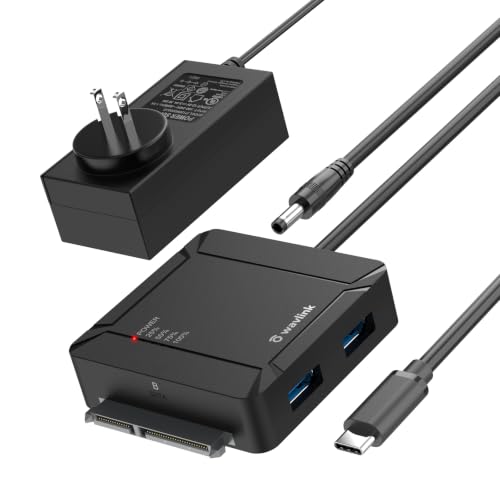
- Offline A-to-B cloning without a PC
- Dual SATA bays with up to 36TB capacity
- Two USB 3.0 hub ports add convenience
Best For: People who want a dual-bay dock with easy cloning and extra USB ports
10Gbps Single-Bay Pick
SABRENT USB-C 10Gbps SATA Dock

- 10Gbps USB-C connection for faster transfers
- Tool-free single-bay design with hot-swap support
- Includes USB-A and USB-C cables plus power adapter
Best For: Anyone who wants a fast, simple single-drive SATA dock
Dual-Bay Clone Dock
UGREEN 48TB Dual-Bay SATA Dock

- Offline cloning with no computer required
- Dual-bay SATA support for two drives at once
- Cooling-focused design with dust cover and anti-slip pads
Best For: People who want a dual-drive dock for backups and cloning
Triple-Bay NVMe Cloner

- Triple-bay design for simultaneous drive access
- Offline cloning for NVMe and SATA drives
- USB 3.2 Gen 2 with included USB-C/USB-A cable
Best For: People who need a flexible three-bay cloning dock for mixed drive types
Dual-Bay SATA Clone Dock

- Dual-bay dock for 2.5-inch and 3.5-inch SATA drives
- UASP support with up to 6 Gbps transfer speeds
- Offline cloning plus built-in power switch
Best For: Anyone wanting a simple SATA-only dock with cloning support
Simple Dual-Bay SATA Dock

- Dual-bay dock for two SATA HDDs/SSDs
- Offline cloning with plug-and-play setup
- USB 3.0 speeds up to 5 Gbps
Best For: Users who need an uncomplicated SATA dock for cloning and daily access
Dual-Bay SATA Cloner Dock – SABRENT EC-CH2B dual-bay USB-C cloner dock
If you want usb c hard drive docking stations for simple drive access and easy cloning, this SABRENT dual-bay model keeps things straightforward. It handles two SATA drives at once over USB-C, so you can browse files on both bays or copy one drive to another without opening your computer.
Best For: Users who want a two-bay SATA dock with offline cloning and USB-C connectivity.
Pros:
- Offline 1-to-1 cloner works without a computer.
- Reads and writes two SATA drives at the same time.
- Hot-swappable, tool-free design with per-bay LEDs.
- USB-C cable included for plug-and-play use on Windows and Mac.
Cons:
- SATA only; no IDE/PATA, M.2, or NVMe support.
- Offline cloning is limited to up to 60MBps by design.
- Drives are not included.
For straightforward SATA backup, transfer, or cloning work, this dock covers the essentials well. It is best suited to users who already have bare 2.5-inch or 3.5-inch SATA drives and want a simple two-bay setup.
NVMe + SATA Lay-Flat Dock – SABRENT DS-UFNC NVMe and SATA USB-C dock
Among usb c hard drive docking stations, this SABRENT dock stands out for supporting both M.2 PCIe NVMe SSDs and 2.5-inch or 3.5-inch SATA drives in one unit. The lay-flat, tool-free design makes it easy to swap drives, and the included USB-C and USB-A cables help it fit newer and older computers.
Best For: Anyone who wants one dock for both NVMe and SATA drives, plus offline cloning.
Pros:
- Supports M.2 PCIe NVMe and SATA 2.5-inch/3.5-inch drives.
- Includes both USB-C to USB-C and USB-A to USB-C cables.
- Offline clone function with direction switch and progress LEDs.
- Tool-free, hinged lid design works across Windows, macOS, and Linux.
Cons:
- Drives are not included.
- Real-world speed depends on the drive type installed.
- Only one drive is mounted at a time for normal use.
This is the most flexible pick here if you work across NVMe and SATA media. It is a strong fit for backups, drive swaps, and cross-platform use when you want one dock to cover multiple drive formats.
Classic Dual-Bay SATA Dock – SABRENT EC-HD2B basic dual-bay SATA dock
If you need a practical usb c hard drive docking station style setup for SATA drives, this older SABRENT dual-bay model keeps the formula simple. It supports standard 2.5-inch and 3.5-inch SATA hard drives or SSDs, offers offline cloning, and works as a plug-and-play dock without drivers.
Best For: Basic two-drive SATA docking and offline duplication at USB 3.0 speeds.
Pros:
- Supports two 2.5-inch or 3.5-inch SATA drives.
- Offline cloning up to 60Mbps.
- Plug and play with no drivers needed.
- Includes power supply, USB 3.0 cable, and manual.
Cons:
- Uses USB 3.0 rather than USB-C.
- Does not support M.2 or NVMe drives.
- Real-world speed is capped by the drive type used.
This dock is a solid no-frills option for SATA-only workflows. It makes the most sense if you mainly need drive reading, copying, or cloning and do not require newer USB-C or NVMe support.
Aluminum USB-C SATA Dock – ORICO 6616C3 single-bay USB-C SATA dock
For users comparing usb c hard drive docking stations, this ORICO model focuses on single-bay SATA convenience with a 6Gbps-rated interface and UASP support. It works with 2.5-inch and 3.5-inch SATA drives up to 18TB, and the included 2-in-1 cable supports both USB-C and USB-A devices.
Best For: Single-drive SATA access, backups, and transfers with USB-C or USB-A compatibility.
Pros:
- Supports 2.5-inch and 3.5-inch SATA drives up to 18TB.
- USB 3.1 Gen 1 with UASP support and up to 6Gbps transfer speed.
- Includes a 2-in-1 cable plus USB-A adapter support.
- Aluminum design with LED indicator and automatic sleep mode.
Cons:
- Single-bay design only.
- Does not support M.2 or NVMe drives.
- Best speeds depend on UASP-capable host systems and drive type.
This is a clean choice for everyday SATA drive handling when you do not need cloning or multi-bay expansion. Its broad device compatibility and included cable options make it easy to plug into mixed USB-C and USB-A setups.
Dual-Bay Cloning Dock – WAVLINK USB-C Dual-Bay Clone Station
If you want a practical USB C hard drive docking station for backups, drive swaps, and simple expansion, this WAVLINK dual-bay model covers a lot of ground. It supports two SATA drives at once, includes offline cloning, and adds two USB 3.0 ports for extra everyday convenience.
Best For: Users who want a dual-bay dock with one-button cloning and built-in USB hub ports.
Pros:
- One-button offline cloning copies drive A to drive B without connecting to a PC.
- Supports 2.5-inch and 3.5-inch SATA HDDs and SSDs with up to 36TB total capacity.
- Built-in dual USB 3.0 ports can handle peripherals or simple file transfer tasks.
- USB 3.0 with UASP support is rated up to 5Gbps for faster transfers.
Cons:
- Cloning only works from A to B, and the destination drive must be equal or larger.
- 3.5-inch drives require the included 12V/3A power adapter.
- The dock is limited to two SATA drives rather than broader storage formats.
This is a good fit if you want a straightforward dual-bay dock that doubles as a clone tool and a small USB hub. The feature set is especially useful for users who back up drives often and want simple, plug-and-play operation.
10Gbps Single-Bay Pick – SABRENT USB-C 10Gbps SATA Dock
Among USB C hard drive docking stations, this SABRENT model stands out if you want a simple single-bay dock with faster 10Gbps connectivity. It handles 2.5-inch and 3.5-inch SATA drives, supports hot-swapping, and ships with both USB-A and USB-C cables for flexible setup.
Best For: Users who want a fast, tool-free single-bay SATA dock for backup and drive access.
Pros:
- 10Gbps USB 3.2 Gen 2×1 connection is faster than standard 5Gbps docks.
- Tool-less design makes drive insertion and removal quick and easy.
- Includes a power adapter for 3.5-inch HDDs plus USB-A and USB-C cables.
- Supports 2.5-inch and 3.5-inch SATA SSDs and HDDs, including high-capacity drives 20TB and larger.
Cons:
- It supports only one drive at a time.
- There is no offline cloning feature.
- The plastic build is simpler than some heavier-duty docks.
This is the better pick if speed and simplicity matter more than multi-drive features. It keeps the setup compact while still offering the cable options and compatibility most users need for everyday backup work.
Dual-Bay Clone Dock – UGREEN 48TB Dual-Bay SATA Dock
If your shortlist of USB C hard drive docking stations needs dual-drive support plus cloning, this UGREEN dock is built for backup workflows and larger storage setups. It supports two SATA drives at once, includes offline cloning, and adds cooling-focused touches like a surround-cooling design and dust cover.
Best For: Users who want a dual-bay dock with offline cloning and attention to cooling.
Pros:
- Offline cloning lets you copy one drive to another without connecting to a computer.
- Supports two 2.5-inch or 3.5-inch SATA drives simultaneously.
- Rated for up to 32TB x 2, with a listed total capacity of 48TB in the product title.
- Includes a 1-meter USB B to USB-C cable for easier placement.
Cons:
- Transfer speed is 5Gbps, so it is not as fast as 10Gbps docks.
- Cloning requires the destination drive to be equal to or larger than the source.
- Compatibility details are narrower than some newer docks and are listed around older OS versions.
This dock is a solid match if you want a dual-bay storage station with cloning and cooling-oriented design elements. It favors practical backup use over raw speed, which makes it appealing for routine drive management.
Triple-Bay NVMe Cloner – ICY BOX USB-C 10Gbps Dock
If you want usb c hard drive docking stations that can handle mixed drive types, this ICY BOX model stands out for its three-bay layout and one-touch offline cloning. It supports M.2 PCIe NVMe SSDs plus 2.5-inch and 3.5-inch SATA SSDs/HDDs, making it a flexible pick for users who regularly move data between different storage setups.
Best For: Users who need a triple-bay dock with offline cloning and broad NVMe/SATA support.
Pros:
- One-touch offline cloning with no software installation required.
- Supports NVMe-to-NVMe and SATA-to-NVMe cloning for more flexibility.
- Three independent slots let you connect and access multiple drives at once.
- USB 3.2 Gen 2 and the included USB-C/USB-A combo cable make 10 Gbps connectivity straightforward.
Cons:
- It is built around a three-bay desktop design, so it is not a compact travel dock.
- Cloning focus may be overkill if you only need a basic single-drive reader.
This is the most versatile option here if your workflow includes both NVMe and SATA drives and you want a dock that can clone without a computer. The triple-bay setup adds convenience for professionals, but the extra capability also makes it the least minimal choice in the group.
Dual-Bay SATA Clone Dock – WAVLINK USB-C/USB 3.0
Among usb c hard drive docking stations for SATA-only setups, this WAVLINK dock is a practical dual-bay option with UASP support and offline cloning. It works with 2.5-inch and 3.5-inch SATA HDDs/SSDs, so it fits well for routine backups, drive swaps, and simple desktop storage access.
Best For: Users who want a straightforward dual-bay SATA dock with offline cloning and UASP.
Pros:
- Supports 2.5-inch and 3.5-inch SATA HDDs/SSDs.
- UASP support delivers up to 6 Gbps transfer speeds.
- Offline cloning works without a computer.
- Built-in power switch and 30-minute sleep mode add convenience and efficiency.
Cons:
- It only supports SATA drives, not NVMe.
- Mac support excludes M1/M2-based systems.
- Offline cloning is limited to source-to-target use, with no online clone support.
This dock is a good fit if your storage is SATA-based and you want a no-fuss cloning station with dependable desktop operation. It is less versatile than NVMe-capable models, but that simplicity can be exactly what many buyers need.
Simple Dual-Bay SATA Dock – FIDECO USB 3.0 Reader
If you want usb c hard drive docking stations style convenience but only need SATA support, this FIDECO dual-bay dock keeps things simple. It handles 2.5-inch and 3.5-inch SATA HDDs/SSDs, offers offline cloning, and is designed for plug-and-play use across Windows, Mac OS, and Linux systems.
Best For: Buyers who want an easy dual-bay SATA dock for everyday use and offline cloning.
Pros:
- Supports two SATA HDDs/SSDs at the same time.
- USB 3.0 speeds up to 5 Gbps for quick reads and writes.
- Offline clone mode works without needing a computer.
- Plug-and-play setup with wide compatibility across major operating systems.
Cons:
- SATA-only design does not support NVMe drives.
- New drives may need initialization before they are recognized.
This is a solid choice if you mainly work with SATA drives and want a straightforward dock for backup or duplication. It does not offer the advanced flexibility of NVMe-capable stations, but it covers the essentials well for standard desktop storage tasks.
How We Picked the Best USB C Hard Drive Docking Stations
We focused on the features that matter most in real-world use: drive compatibility, transfer speed, cloning support, bay count, power delivery, and how well each dock fits common desktop workflows. For USB C Hard Drive Docking Stations, ease of use matters just as much as raw speed, so we favored models that are simple to connect and dependable for routine backups or drive management.
Quick Comparison
Most buyers will choose between single-bay and dual-bay designs. Single-bay docks are simpler and often better for occasional access, while dual-bay models are more useful for cloning, comparing drives, or handling larger backup jobs. If you work with SSDs, look for 10Gbps USB-C; if you mostly handle older hard drives, a solid 5Gbps dock may be enough. NVMe support is a major plus for mixed-drive users, but SATA-only docks are still the most straightforward option for 2.5-inch and 3.5-inch drives.
Key Buying Factors for USB-C Hard Drive Docking Stations
Drive Type Support
Check whether the dock supports 2.5-inch and 3.5-inch SATA drives, SSDs, and NVMe M.2 drives. Buying the wrong interface is the most common mistake.
Speed and Port Standard
USB-C does not always mean the same performance. For quicker file transfers and better SSD use, prefer 10Gbps. For general storage access, 5Gbps can still be perfectly fine.
Cloning and Offline Copying
If you plan to duplicate drives without a computer, choose a model with offline cloning. Make sure the bay layout and cloning controls are easy to understand.
Power and Drive Size
3.5-inch HDDs usually need external power, so confirm the included adapter matches the dock’s supported capacity. Higher-capacity multi-bay units are better for larger backup libraries.
Build and Workflow Fit
Aluminum housings, clear status indicators, and stable drive retention can make everyday use more reliable. If you swap drives often, a top-load or lay-flat design may be more convenient than a vertical dock.
Who Should Buy Which USB C Hard Drive Docking Stations?
If you want the simplest setup for occasional backups, choose a basic SATA dock with USB-C and one bay. If you need to clone drives, a dual-bay dock is the better choice. Users with both SATA and NVMe media should look at hybrid models, since they reduce the need for multiple devices. For heavier workflows, power users and small-office buyers may prefer higher-speed 10Gbps USB C Hard Drive Docking Stations with stronger power delivery and broader compatibility.
In short, match the dock to your drive types, transfer-speed needs, and how often you swap or clone drives. That approach will narrow the field quickly and help you buy the right dock the first time.