The right video switcher can turn a multi-camera event into a polished live production. Whether you are streaming a conference, concert, class, worship service, or corporate presentation, the best setup makes it easier to change angles, manage audio, monitor sources, and send a reliable program feed.
We selected 10 event-ready switchers spanning simple HDMI mixers, touchscreen systems, SDI-capable production consoles, and higher-end options with recording, PTZ control, multiview, or direct streaming features.
Best 10 Video Switcher for Events Picks for 2026
Professional Production Pick

- Six SDI plus two 4K HDMI inputs
- 17.3-inch monitor with integrated controls
- RTMP, recording, PTZ, and professional audio
Best For: Mobile multi-camera event production
Touchscreen Event Mixer

- Four HDMI and one SDI input
- 10.1-inch touchscreen multiview
- USB 3.0 computer streaming and PTZ support
Best For: Medium multi-camera events and live streams
Compact Budget Option

- Two 1080p sources at 60Hz
- Plug-and-play USB-C 3.0 connection
- 3.5mm microphone and audio ports
Best For: Small two-source event streams
Versatile Touchscreen Choice

- Four HDMI and one SDI input
- 10.1-inch multiview touchscreen
- Effects, audio mixing, and USB 3.0 streaming
Best For: Feature-rich PC-based event streaming
Best Overall

- Four SDI and four HDMI inputs with four-source selection
- PTZ joystick, multiview, recording, and USB capture
- NDI, SRT, RTMP, Super Source, and chroma key support
Best For: Advanced multi-camera events and professional live productions
Best Compact Option

- Four HDMI inputs for cameras, computers, and consoles
- USB 3.0 webcam-style output for streaming software
- Compact design with preview, transitions, and LAN control
Best For: Small HDMI-based events and solo streamers
Best Value HDMI Mixer
RIJER 4-Channel Video Switcher

- Four HDMI inputs with two HDMI outputs
- 1080p60 output and 4K/30Hz input support
- Digital audio mixing, PiP, and dual-screen modes
Best For: Affordable HDMI event switching and presentations
Best Portable Pick
Mixer Plus Compact 4-Channel Switcher

- Four HDMI inputs with zero-latency switching
- Built-in 4-inch multiview display
- PTZ, keying, PIP, overlays, and AUX output
Best For: Portable four-source HDMI event productions
Best Advanced Control
Touch-S 10.1-Inch HDMI/SDI Switcher
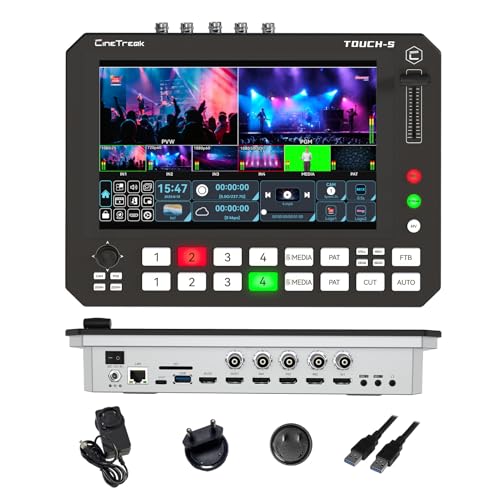
- 10.1-inch touchscreen plus physical shortcut keys
- Four HDMI and four SDI input channels
- Super Source, PTZ control, USB capture, and recording
Best For: Complex mixed-format event and webinar productions
Best Straightforward Streaming Value

- Four 1080p HDMI inputs
- USB 3.0 output for computer streaming
- Physical controls, preview screen, and 14 transitions
Best For: Small HDMI event broadcasts and live streams
Professional Production Pick – Shark S6 Plus
The AVMATRIX Shark S6 Plus is a strong video switcher for events that need extensive camera connectivity, built-in monitoring, professional audio, and direct streaming or recording. Its integrated 17.3-inch display and portable design make it practical for mobile production teams.
Best For: Multi-camera event crews, live productions, churches, and field-based broadcasts requiring SDI, HDMI, PTZ control, and professional audio.
Pros:
- Supports six 3G-SDI and two 4K HDMI inputs.
- Built-in 17.3-inch Full HD display combines monitoring and control.
- Offers RTMP streaming, USB or SD recording, and USB-C capture.
- Includes XLR/TRS audio inputs with 48V phantom power, plus PTZ control.
Cons:
- Its broad feature set may be more than smaller event setups require.
- Uses an AC adapter rather than a stated battery-powered design.
Choose this model when your event workflow benefits from professional inputs, integrated production tools, and fewer external devices. It is especially well suited to teams handling multiple cameras and mixed SDI/HDMI sources.
Touchscreen Event Mixer – FEELWORLD L4 Plus
The FEELWORLD L4 Plus is a practical video switcher for events using several HDMI cameras and an SDI source. Its 10.1-inch touchscreen, multiview monitoring, T-bar, and USB 3.0 streaming connection support straightforward live production.
Best For: Weddings, church activities, sports events, classes, concerts, and medium-sized live streams using two to five cameras.
Pros:
- Provides four HDMI inputs and one SDI input.
- Large touchscreen previews inputs and helps manage setup.
- T-bar and buttons enable quick source switching.
- Supports PTZ controller integration and USB 3.0 streaming to a computer.
Cons:
- Its input configuration is less expansive than higher-capacity production switchers.
- The supplied notes do not specify built-in recording or direct RTMP streaming.
This is a sensible choice for event operators who want a visible multiview interface without moving up to a larger production system. It balances hands-on controls with a touchscreen workflow.
Compact Budget Option – Fabater 2-Input Switcher
The Fabater live streaming switcher is a compact video switcher for events or broadcasts that only need two 1080p sources. Its plug-and-play USB-C 3.0 connection and 3.5mm audio ports keep a simple PC-based setup easy to configure.
Best For: Small presentations, basic event streams, gaming broadcasts, and two-source camera or computer switching.
Pros:
- Switches between two HD multimedia inputs.
- Supports 1080p at 60Hz input and output.
- Plug-and-play compatibility is listed for major operating systems and streaming software.
- Includes 3.5mm microphone and audio input/output connections.
Cons:
- Only provides two video inputs, limiting larger multi-camera events.
- Its listed warranty is 90 days.
- The supplied notes do not mention multiview, transitions, or onboard recording.
For a small event team that needs basic source switching rather than a full production console, this model offers a straightforward starting point. Consider a larger switcher if you expect to expand beyond two sources.
Versatile Touchscreen Choice – FEELWORLD L4
The FEELWORLD L4 is a flexible video switcher for events with up to five connected video sources. It combines four HDMI inputs, one SDI input, touchscreen multiview, tactile switching controls, production effects, and USB 3.0 streaming.
Best For: Churches, weddings, sports, e-learning, live commerce, and other events needing accessible multi-camera switching and computer streaming.
Pros:
- Connects four HDMI sources and one SDI source.
- 10.1-inch touchscreen provides multiview and setup control.
- Includes 13 transitions, chroma key, logo overlay, and PiP.
- Supports two-channel audio mixing and USB 3.0 streaming to a PC.
Cons:
- USB streaming requires connection to a computer.
- The supplied notes do not confirm onboard recording or direct platform streaming without a PC.
- Power is listed as battery powered, but battery details are not provided.
This L4 version suits event operators who want an approachable touchscreen workflow with useful visual effects. It is a good middle ground for teams that need more than basic switching but do not require the larger input count of a professional studio system.
Best Overall – SPROLINK NeoLIVE R5S PRO
For demanding productions, the SPROLINK NeoLIVE R5S PRO is a highly capable video switcher for events, combining SDI and HDMI connectivity with recording, streaming, PTZ control, and multiview monitoring. Its eight-input design lets you select any four active sources, making it suitable for multi-camera event coverage and more advanced live production setups.
Best For: Churches, esports, studios, and professional event productions needing SDI, HDMI, PTZ, and streaming features in one unit.
Pros:
- Combines four SDI and four HDMI inputs, including two HDMI inputs supporting 4K at 60 fps.
- Offers a 5.5-inch FHD screen and joystick control for up to five PTZ cameras.
- Includes SDI, HDMI, multiview, and USB 3.0 UVC outputs, plus USB, SD, and HDD recording.
- Supports NDI, SRT, RTMP, Super Source, chroma key, audio mixing, and browser control.
Cons:
- Its broad feature set may be more than a small or occasional event requires.
- Program output is specified at 1080p60, despite support for selected 4K inputs.
The R5S PRO is the strongest choice here for complex productions where flexible inputs, PTZ operation, hardware streaming, and recording matter more than simplicity. It is a substantial step up from basic HDMI-only switchers.
Best Compact Option – FEELWORLD LIVEPRO L1 V1
The FEELWORLD LIVEPRO L1 V1 is a compact video switcher for events that prioritizes straightforward multi-camera switching. With four HDMI inputs, real-time production, USB 3.0 computer connectivity, and a simple control layout, it is well suited to smaller crews and single-operator streaming setups.
Best For: Small events, presenters, social media streams, classrooms, and single-person live production using HDMI cameras or computers.
Pros:
- Provides four HDMI inputs for switching among cameras, computers, consoles, and playback sources.
- USB 3.0 output works with streaming software as a webcam-style input.
- Compact, lightweight design can be mounted on a tripod and operated by one person.
- Offers preview and program monitoring, transition effects, audio display, and LAN-based XPOSE control.
Cons:
- It is an HDMI-focused 1080p switcher without the SDI, PTZ, or advanced streaming features of the SPROLINK.
- The listed configuration includes one HDMI output, limiting display-routing flexibility.
Choose the LIVEPRO L1 V1 when portability and ease of use are more important than extensive routing or production effects. Its USB webcam-style output makes it a practical entry point for computer-based event streaming.
Best Value HDMI Mixer – RIJER 4-Channel Video Switcher
The RIJER 4-channel mixer is a practical video switcher for events that need basic multi-source HDMI production at 1080p60. It accepts four HDMI inputs, provides two HDMI outputs for viewing and previewing sources, and adds digital audio mixing, PiP, and dual-screen presentation modes.
Best For: Budget-conscious event teams using HDMI cameras, laptops, media players, or other consumer and professional HDMI sources.
Pros:
- Supports four HDMI inputs and two HDMI outputs for flexible source and preview monitoring.
- Accepts 4K/30Hz HDMI input while delivering 1920×1080 at 60Hz output.
- Includes digital audio mixing for balancing multiple audio sources with video.
- Offers seamless and gradual switching, picture-in-picture, and dual-screen display modes.
Cons:
- It is limited to HDMI connectivity and does not list USB capture, SDI, PTZ, or built-in streaming functions.
- Its feature set is more focused on core switching than advanced broadcast production.
The RIJER is a sensible middle ground for HDMI-only event setups. Its dual outputs and audio controls add useful production flexibility, while the 1080p60 output suits typical live presentations and streams.
Best Portable Pick – Mixer Plus Compact 4-Channel Switcher
If you need a video switcher for events that is easy to transport and monitor, the Mixer Plus combines four HDMI inputs with a built-in 4-inch multiview screen. Its switching, overlay, and monitoring tools suit compact multi-camera productions, presentations, and live streams.
Best For: Portable event setups using up to four HDMI cameras or sources.
Pros:
- Built-in 4-inch screen provides multiview monitoring without requiring a separate display.
- Supports four HDMI inputs, customizable transitions, and four scene presets.
- Includes PTZ control, chroma key, luma key, PIP, DSK, and logo overlay features.
- Customizable AUX HDMI output supports multiple signal choices.
Cons:
- Inputs and connector support are centered on HDMI, which may limit mixed-format event systems.
- The compact screen is useful for monitoring but smaller than a dedicated production monitor.
The Mixer Plus is a practical choice when portability and built-in monitoring matter more than a larger control surface. It offers a strong set of production features for small event crews working with HDMI sources.
Best Advanced Control – Touch-S 10.1-Inch HDMI/SDI Switcher
For demanding event productions, the Touch-S combines a 10.1-inch touchscreen with physical shortcut keys and flexible HDMI/SDI connectivity. Its multiview, Super Source, PTZ control, audio, recording, and media-channel features are designed for complex live workflows.
Best For: Corporate events, education, webinars, and productions using mixed HDMI and SDI sources.
Pros:
- Large touchscreen and physical controls provide two ways to manage live switching.
- Four HDMI and four SDI ports allow flexible source selection across four channels.
- Super Source supports up to four simultaneous PIP windows.
- Includes customizable AUX outputs, portrait and landscape modes, and a multimedia channel.
Cons:
- Its broader feature set may be more than needed for simple four-camera events.
- The notes do not specify the exact recording or audio-I/O details.
The Touch-S stands out for teams that need a more adaptable event switcher with mixed video formats and advanced layouts. Its touchscreen, shortcut keys, and multiple output options can reduce the need for additional production hardware.
Best Straightforward Streaming Value – FEELWORLD L1 4-Input Mixer
The FEELWORLD L1 is a straightforward video switcher for events with four HDMI inputs, a front-panel preview screen, and USB 3.0 output for computer-based streaming. It is suited to small live broadcasts that need physical controls and basic transition management.
Best For: Small HDMI-based events, camera productions, presentations, and social-media live streams.
Pros:
- Four HDMI inputs support 1080p signals and can be switched from the front panel.
- USB 3.0 output connects to a computer for streaming software.
- Front TFT screen can show four preview windows, logos, and source names.
- Provides 14 transition effects plus audio input and output connections.
Cons:
- It offers one HDMI output, which is less flexible than switchers with multiple AUX outputs.
- Compared with the other options, it has fewer advanced layout and control features in the supplied specifications.
- The listed preview display is only 2 inches.
The FEELWORLD L1 makes sense for users who want a focused HDMI switcher with direct controls and USB streaming. It is less suited to complex broadcast designs, but its simple workflow can be helpful for smaller event teams.
How We Picked the Best Video Switcher for Events
We compared these models by looking at the features that matter most during live productions: input type and count, supported resolutions and frame rates, output flexibility, monitoring, audio control, streaming connectivity, portability, and ease of operation. We also considered whether each unit fits a particular event workflow rather than treating every switcher as interchangeable.
HDMI-focused models are often the simplest choice for cameras, laptops, and consumer production gear. SDI inputs are more practical for longer cable runs and professional event systems. Touchscreens, multiview displays, PTZ control, chroma keying, recording, and built-in streaming can reduce the amount of extra equipment an operator needs.
Quick Comparison
Before choosing, identify your cameras and delivery format. Compact four-input HDMI switchers are suitable for small events, online classes, meetings, and basic multi-camera streams. Models with four HDMI and one SDI input offer more flexibility when an event uses mixed equipment. Systems with multiple SDI and HDMI inputs are better suited to larger venues, production teams, and installations that require longer cable runs.
Also check the output specification carefully. A switcher may accept high-resolution sources but provide a lower-resolution program output, while another may support 1080p60 but not 4K. Confirm whether USB output appears as a webcam source, whether streaming is handled internally, and whether recording requires external storage.
Key Buying Factors for a Video Switcher for Events
Inputs and Compatibility
Count the cameras, presentation computers, playback devices, and backup sources you expect to connect. Leave at least one spare input if possible. HDMI is common and affordable; SDI is preferable for professional cameras and long runs. Adapters can help, but native compatibility is usually more dependable during a live show.
Resolution and Frame Rate
Match the switcher to your cameras and delivery platform. For most event streaming, 1080p at 30 or 60 frames per second is practical. Choose 4K support only when your cameras, displays, recording workflow, and distribution platform can use it.
Monitoring and Operation
A built-in screen or multiview output helps an operator preview every source and confirm the program feed. Touch controls can speed up switching, while physical buttons may be easier to use by feel in a busy booth. Chroma key and picture-in-picture are valuable for presentations, branding, and remote guests.
Streaming, Recording, and Audio
Look for USB webcam output, RTMP support, onboard recording, and suitable audio inputs if you want fewer external devices. Verify audio mixing features, headphone monitoring, embedded-audio support, and whether the switcher can keep audio stable when video sources change.
Portability and Reliability
For traveling crews, prioritize a compact chassis, clear controls, dependable power, and cable management. For permanent venues, prioritize input capacity, SDI connectivity, expansion options, and straightforward operation for different staff members.
Who Should Buy Which Video Switcher for Events?
- Small events and online classes: Choose a compact HDMI switcher with USB output and simple controls.
- Conferences and presentations: Look for multiview monitoring, picture-in-picture, reliable audio handling, and enough inputs for cameras and presentation laptops.
- Worship, concerts, and venue productions: An SDI-capable model with more inputs and robust monitoring is usually the better long-term choice.
- Streaming teams: Select a switcher with direct RTMP streaming, recording, USB connectivity, or PTZ control to reduce setup complexity.
- Professional mixed-camera workflows: Consider a model supporting both HDMI and SDI, while confirming that all sources share compatible formats.
The best Video Switcher for Events is the one that matches your current cameras, output requirements, crew skill level, and expansion plans. A simple system is often more reliable than an oversized console, but paying for extra inputs, SDI, or PTZ control can prevent an expensive replacement as your productions grow.