A great wired mechanical keyboard for Mac Mini should feel fast, save desk space, and work cleanly with macOS right out of the box. The best options balance typing comfort, layout efficiency, and reliable wired performance.
In this roundup, we focus on keyboards that fit a Mac Mini workspace well, from compact and low-profile boards to full-size choices for users who want more keys and shortcuts.
Best 10 Wired Mechanical Keyboard for Mac Mini Picks for 2026
Mac-Friendly TKL Pick
Keychron C1 Wired Mechanical Keyboard for Mac and Windows

- 87-key TKL layout saves desk space
- USB-C wired connection is stable and simple
- Includes Mac and Windows keycaps
Best For: Mac Mini users who want a compact mechanical board with cross-platform support
Travel-Friendly Compact Option
Portable 60% Mechanical Gaming Keyboard

- 61-key 60% layout maximizes desk space
- Detachable Type-C cable helps with travel
- Blue switches deliver clicky tactile feedback
Best For: Mac Mini users who want a tiny keyboard for travel, gaming, or tight desks
Feature-Rich 75% Pick
Newmen GM326 Wired Mini Backlit Mechanical Keyboard

- 75% layout saves space but keeps key access practical
- Hot-swappable design adds customization
- Multi-function knob simplifies volume control
Best For: Users who want a compact mechanical keyboard with extra controls and customization
Compact Everyday Choice
Macally Small USB Wired Keyboard for Mac and Windows
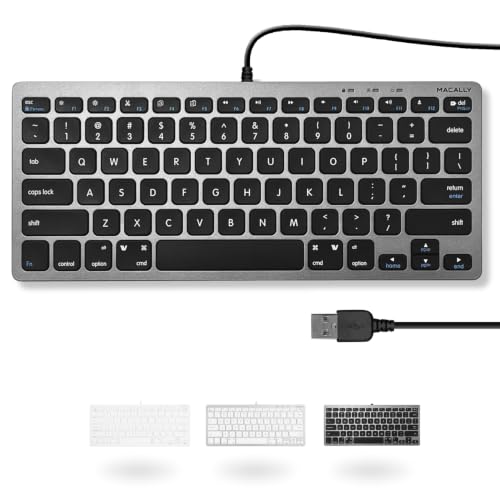
- 78-key compact layout saves space
- USB plug-and-play with 4'7" cable
- 13 Mac shortcut keys for quick control
Best For: Mac Mini users who want a compact wired keyboard with simple setup and Mac shortcuts
Full-Size Mechanical Pick
Keychron C2 Wired Mechanical Keyboard
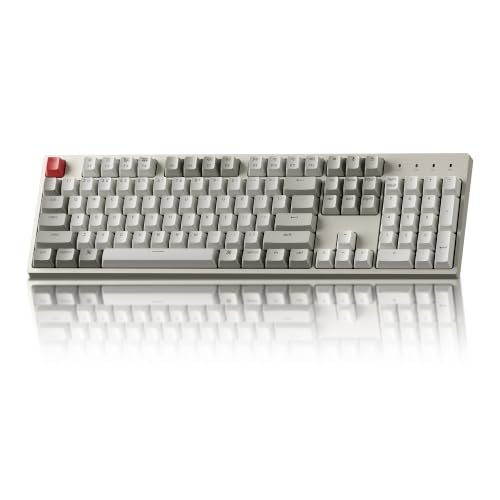
- 104-key full-size layout with number pad
- USB-C wired mechanical design
- Mac-optimized with included extra keycaps
Best For: Mac Mini users who want a full-size mechanical keyboard with a number pad
Readable Low-Light Option
Macally Large Print Backlit Wired Keyboard for Mac

- Large-print keys improve readability
- Backlit scissor-switch design for dim rooms
- USB-C and USB-A connection options
Best For: Mac Mini users who need a compact, readable wired keyboard for low-light use
Compact Starter Pick
MageGee MK-Box 68-Key Wired Mechanical Keyboard

- 68-key compact layout with arrow and function keys
- Linear red switches for a smooth typing feel
- USB plug-and-play support for Mac, Windows, and Linux
Best For: Mac Mini users who need a compact wired mechanical keyboard on a budget
Best Mac-First Slim Option
Keychron K3 Low-Profile Wired/Wireless Keyboard

- 75% compact layout with Mac multimedia keys
- Low-profile tactile switches and white backlight
- Works with Mac and Windows, plus wired or Bluetooth
Best For: Mac Mini owners who want a slim, Mac-friendly mechanical keyboard
Budget RGB Pick
Guiheng 68-Key Wired RGB Mechanical Keyboard

- Compact 68-key layout with long USB cable
- RGB backlighting and conflict-free key handling
- Dust-proof and splash-proof design for daily use
Best For: Shoppers who want a compact wired mechanical keyboard with RGB lighting
Mac-Friendly TKL Pick – Keychron C1 Wired Mechanical Keyboard for Mac and Windows
If you want a wired mechanical keyboard for Mac Mini that still works well on Windows, the Keychron C1 is a practical middle ground. Its 87-key TKL layout keeps arrow keys and function keys while saving desk space, and the USB-C wired connection gives you a stable plug-and-play setup for everyday work, typing, and light gaming.
Best For: Mac Mini users who want a compact mechanical board with Mac and Windows compatibility.
Pros:
- Mac and Windows keycaps included for flexible cross-platform use
- 87-key TKL layout leaves more room for mouse movement
- USB-C wired connection avoids pairing and charging hassles
- Gateron G Pro Brown switches offer tactile feedback for typing
Cons:
- Not as small as a 60% keyboard if you want maximum desk space
- White backlight is single-color only
- Brown switches are tactile, so they may not suit users who want silent keys
For a Mac Mini desk setup, this is a balanced option that prioritizes reliability and typing comfort over extreme compactness. It fits office, study, coding, and casual gaming use without forcing you to give up Mac-friendly controls.
Travel-Friendly Compact Option – Portable 60% Mechanical Gaming Keyboard
For buyers who want a wired mechanical keyboard for Mac Mini but care most about portability, this 60% model keeps things very compact. The 61-key layout frees up space on the desk, while the detachable Type-C cable and plug-and-play USB wired connection make it easy to pack and use across different setups.
Best For: Mac Mini users who want a tiny keyboard for travel, gaming, or a crowded desk.
Pros:
- 61-key 60% layout leaves plenty of room for mouse movement
- Detachable Type-C cable is easier to carry and store
- Blue switches provide tactile, clicky feedback for typing
- Plug-and-play compatibility works with Mac OS and Windows
Cons:
- No dedicated arrow cluster without using Fn shortcuts
- Blue switches are noisy, which may not suit shared spaces
- More gaming-focused than a traditional office keyboard
This keyboard makes sense if you value size and portability above all else. It can work well at a Mac Mini station, but the ultra-compact layout is best for users who are comfortable with function-layer shortcuts.
Mac-Only Wired Comfort – OMOTON Wired Keyboard for Mac Devices ONLY
If your priority is a straightforward wired mechanical keyboard for Mac Mini-style daily use, the OMOTON is built specifically for Mac devices. It supports macOS 11.3 or later, uses a wired connection with no Bluetooth pairing, and its compact 78-key layout keeps the desk cleaner without going full ultra-compact.
Best For: Mac users who want a simple, Mac-only wired keyboard with a compact footprint.
Pros:
- Designed for Mac devices, including Mac mini, iMac, and MacBook
- Dual USB-C and USB-A interface adds connection flexibility
- 78-key compact layout saves desk space
- Low-profile scissor-switch keys and 8° tilt angle support comfortable typing
Cons:
- Not compatible with Windows, Android, or Chrome OS
- Requires macOS 11.3 or later
- Older Macs made before 2013 are not supported
This is the most focused Mac-first choice in the group. It is less about mechanical-switch feel and more about smooth, comfortable everyday typing with a clean wired setup.
Feature-Rich 75% Pick – Newmen GM326 Wired Mini Backlit Mechanical Keyboard
The Newmen GM326 is a strong wired mechanical keyboard for Mac Mini setups if you want more features in a compact layout. Its 75% size saves desk space, while the hot-swappable design, multi-function knob, and Mac/Windows switching make it a flexible pick for gaming, typing, and general use.
Best For: Users who want a compact mechanical keyboard with extra controls and customization.
Pros:
- 75% layout balances compact size with practical key access
- Hot-swappable switches allow more customization
- Multi-function knob adds quick volume control
- Works with Mac OS 10.10 or later and Windows PCs
Cons:
- Linear red switches may feel too light for users who prefer tactile feedback
- Rainbow backlighting may not suit minimal desk setups
- More gaming-oriented than a plain office keyboard
For Mac Mini users who want a compact board with more tuning options, this one stands out. It offers a good mix of convenience and customization without giving up the essential keys most people still need.
Compact Everyday Choice – Macally Small USB Wired Keyboard for Mac and Windows
If you want a wired mechanical keyboard for Mac Mini setup that keeps things simple, this Macally compact model is built for plug-and-play use. Its 78-key scissor-switch layout, small footprint, and 13 Mac shortcut keys make it a practical pick for everyday typing on a desk with limited space.
Best For: Users who want a space-saving wired keyboard for Mac Mini use with Mac-friendly shortcuts and easy setup.
Pros:
- Compact 78-key design saves desk space
- Plug-and-play USB setup with no charging required
- Includes 13 shortcut keys for Mac and multimedia control
- Compatible with both Mac and Windows systems
Cons:
- Uses scissor switches, not a true mechanical switch design
- No backlighting
- No numeric keypad
Overall, this is a straightforward low-profile option for Mac Mini owners who value convenience, compact sizing, and Mac-oriented shortcuts over mechanical-style feel.
Full-Size Mechanical Pick – Keychron C2 Wired Mechanical Keyboard
For shoppers looking for a wired mechanical keyboard for Mac Mini use with a more traditional typing feel, the Keychron C2 stands out as a full-size option. It combines a Mac-optimized 104-key layout, brown tactile switches, and USB-C wired reliability, making it a solid fit for work, typing, and light gaming.
Best For: Buyers who want a full-size wired mechanical keyboard with Mac support, a number pad, and tactile switches.
Pros:
- True 104-key full-size layout with number pad
- Mac-optimized design with extra keycaps for Mac and Windows
- USB-C wired connection with braided cable
- Tactile Keychron Brown switches rated for up to 50 million keystrokes
Cons:
- Non-backlight version only
- Large footprint may not suit small desks
- Num Lock works with Windows only
This is the most keyboard-like option in the group if you want mechanical switches and a full layout, but it is better suited to users who have room for a larger board.
Readable Low-Light Option – Macally Large Print Backlit Wired Keyboard for Mac
If readability matters most in your wired mechanical keyboard for Mac Mini search, this Macally model focuses on large-print keys and backlighting rather than a mechanical switch feel. It is a compact 78-key scissor-switch keyboard with dual USB-C and USB-A support, designed for Mac users who want an easy-to-see, easy-to-connect desktop keyboard.
Best For: Mac users who want a compact wired keyboard for Mac Mini with large-print keys and backlighting.
Pros:
- Large-print characters improve visibility
- Backlit keys help in dim environments
- Dual USB-C and USB-A connectivity adds flexibility
- Compact 78-key layout works well on smaller desks
Cons:
- Uses scissor switches, not mechanical switches
- No numeric keypad
- Mac-focused compatibility limits broader cross-platform appeal
For Mac Mini setups where visibility and comfort are more important than mechanical action, this is a practical, space-saving choice with modern connection options.
Compact Starter Pick – MageGee MK-Box 68-Key Wired Mechanical Keyboard
If you want a wired mechanical keyboard for Mac Mini that stays small on the desk, the MageGee MK-Box is a practical budget-friendly option. Its 68-key layout keeps separate arrow keys and F1-F12, and the USB plug-and-play setup works with Mac, Windows, and Linux without extra software.
Best For: Mac Mini users who want a compact wired board with a simple setup and blue backlighting.
Pros:
- 68-key compact layout saves space while keeping arrow keys and function keys.
- Linear red switches offer a smooth feel with light resistance.
- 16 backlight modes add visibility and basic customization.
- USB plug-and-play compatibility includes MacOS, Windows, and Linux.
Cons:
- Backlighting is single-color blue rather than RGB.
- The 68-key layout may feel tight if you want a full-size board.
- Best suited to basic wired use rather than premium Mac-specific features.
Overall, this is a straightforward compact keyboard for anyone who wants mechanical feel and Mac compatibility without paying for extras. It makes sense if desk space matters more than advanced customization.
Best Mac-First Slim Option – Keychron K3 Low-Profile Wired/Wireless Keyboard
The Keychron K3 is a strong wired mechanical keyboard for Mac Mini setups if you want a slim, modern board with Mac-friendly controls. It uses a compact 75% layout, includes a unique Mac layout with the necessary multimedia keys, and supports wired or Bluetooth use if you want flexibility later.
Best For: Mac Mini users who want a low-profile keyboard with Mac-specific keys and a premium thin design.
Pros:
- Mac layout includes the needed multimedia keys and extra Mac/Windows keycaps.
- Low-profile mechanical switches are slimmer and faster to trigger than standard switches.
- Thin aluminum-reinforced body keeps the keyboard lightweight and desk-friendly.
- White backlight gives it a clean, minimal look.
Cons:
- Battery-powered design means it is not a pure wired-only keyboard.
- Backlighting is single-color rather than RGB.
- Premium slim design may not appeal if you prefer a taller mechanical feel.
This is the most Mac-oriented option here, especially if you care about a clean layout and low-profile typing. It fits well beside a Mac Mini when you want something polished and practical.
Budget RGB Pick – Guiheng 68-Key Wired RGB Mechanical Keyboard
If you want a wired mechanical keyboard for Mac Mini use and prefer a more colorful desk setup, the Guiheng 68-key board is a compact plug-and-play choice. It offers RGB backlighting, a long USB cable, and broad device compatibility listed across Mac, Windows, Linux, iOS, Android, and game consoles.
Best For: Buyers who want a small wired mechanical keyboard with RGB lighting and a lively typing feel.
Pros:
- 68-key compact layout helps save desk space and stay portable.
- RGB backlighting adds more visual customization than single-color boards.
- Conflict-free design supports multiple simultaneous key presses.
- Dust-proof, splash-proof, and easy-to-clean design adds everyday durability.
Cons:
- Compatible operating system details list Windows family specifically, so Mac-focused use may be less clearly supported in the specs.
- Loud clicky sound may not suit quiet workspaces.
- Smaller layout means fewer dedicated keys than a larger keyboard.
This model is a good fit if you want a compact mechanical keyboard with more flair and a stronger tactile click. Just make sure the feature set matches your Mac Mini workflow before choosing it.
How We Picked the Best Wired Mechanical Keyboard for Mac Mini
We prioritized keyboards that suit a Wired Mechanical Keyboard for Mac Mini setup: strong build quality, macOS compatibility, practical layouts, dependable USB connections, and switch or key feel that matches different typing preferences. We also looked for models that make sense on a small desktop without sacrificing everyday usability.
Quick Comparison
For simple typing and Mac-friendly use, scissor-switch and low-profile options are usually the easiest transition. For a more tactile feel, compact mechanical boards with 60%, 75%, or TKL layouts offer a better balance of size and function. Full-size boards are best when you need a number pad or rely on frequent shortcuts.
Key Buying Factors for a Wired Mechanical Keyboard for Mac Mini
Layout and Desk Space
Match the layout to your workflow. A 60% board maximizes space savings, while 75% and TKL designs keep arrows and navigation keys more accessible. Full-size boards are ideal for spreadsheets, data entry, or users who want everything on one board.
Mac Compatibility
Look for native Mac support, easy key remapping, or clearly labeled Mac modifiers. If you switch between Mac and Windows, dual-platform support can save time and reduce setup friction.
Switch Type and Typing Feel
Mechanical switches vary from light and linear to tactile or clicky. Tactile switches are a strong all-around choice for mixed typing and general use, while quieter scissor or low-profile boards may be better for shared spaces.
Connection and Reliability
A true wired connection is useful for stable input, no charging, and low-latency typing. For a Mac Mini desk, USB-C or dual USB-C/USB-A compatibility adds convenience, especially if you connect through modern hubs or docks.
Who Should Buy Which Wired Mechanical Keyboard for Mac Mini?
If you want the most compact footprint, choose a 60% or 75% board. If you prefer a familiar desktop layout with more shortcuts, TKL is a smart middle ground. If you need number entry, a full-size keyboard makes the most sense. If comfort and quiet use matter more than mechanical tactility, a low-profile or scissor-key model may be the better fit.
For most buyers, the best Wired Mechanical Keyboard for Mac Mini is the one that fits both the size of your desk and the way you actually work every day.