The best smart home hubs without cloud access keep essential automations running locally, helping reduce latency, improve privacy, and maintain control when internet service is unavailable.
We compared 10 hubs across protocol support, local automation, device compatibility, setup requirements, and long-term flexibility so you can choose the right foundation for your smart home.
Best 10 Smart Home Hubs Without Cloud Access Picks for 2026
Best Privacy-First Pick

- Home Assistant OS comes preinstalled
- Keeps home data on the local hub
- Expandable with protocol USB adapters
Best For: Beginners building a privacy-focused Home Assistant setup
Best IR Appliance Hub

- Controls 8,000+ infrared brands
- Matter-certified for broader integration
- Includes a built-in 93 dB alarm
Best For: Households combining legacy remotes with newer smart devices
Best Local API Value

- Runs synced automations locally
- Offers a Local API for Home Assistant
- LoRa range reaches up to 1/4 mile
Best For: Power users needing outage-resilient YoLink automation
Best Advanced Local Automation

- Processes automations directly on the hub
- Supports Matter, Z-Wave, Zigbee, and Bluetooth
- No recurring subscription required
Best For: Experienced users building complex local automations
Best Local Matter Bridge
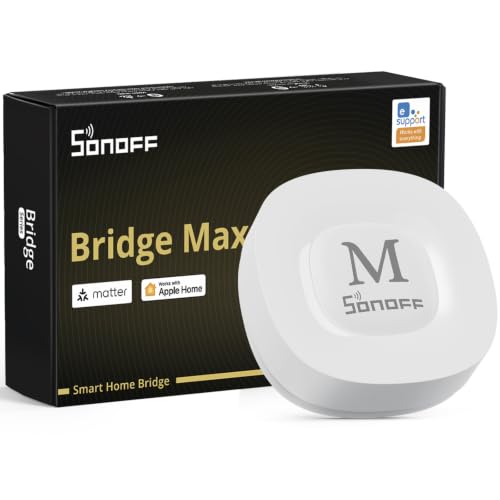
- Local web console without required cloud access
- Bridges Zigbee, BTHome, and eWeLink to Matter
- Works with Home Assistant, Alexa, Google Home, and Apple Home
Best For: Matter-based homes wanting local device management and broad Zigbee compatibility
Best Advanced Local Automation Hub

- Edge Hub prioritizes local automation
- Supports Zigbee, Thread, Matter, and Home Assistant
- Includes encrypted storage and a learning IR blaster
Best For: Aqara-centered homes seeking advanced local automation and Matter support
Best Tuya Multi-Protocol Gateway

- Combines Zigbee 3.0 and Bluetooth Mesh
- Supports up to 128 Tuya devices
- Works with Smart Life, Tuya, Alexa, and Google Home
Best For: Tuya or Smart Life users combining Zigbee and Bluetooth Mesh devices
Best Local Zigbee/Thread Adapter

- Zigbee 3.0 and Thread support
- Local Home Assistant communication
- High-gain antenna for wider coverage
Best For: Home Assistant users prioritizing local automation
Best Multi-Protocol Privacy-Focused Hub

- Supports five major connection types
- Works with thousands of compatible devices
- Privacy-by-design data policy
Best For: Mixed-brand homes needing broad compatibility
Best SmartThings Local Automation Hub

- Matter and Zigbee gateway support
- Local automations can continue offline
- Wi-Fi and Ethernet connectivity
Best For: SmartThings users adding Matter and Zigbee devices
Best Privacy-First Pick – Home Assistant Green
Home Assistant Green | Smart Home hub with Advanced Automation | Official Home Assistant Hardware
Check Price On AmazonFor shoppers comparing smart home hubs without cloud access, Home Assistant Green is an appealing starting point. Home Assistant OS comes preinstalled, and the hub is designed to keep your home data on the device while coordinating compatible devices and automations locally.
Best For: Beginners who want a simple, privacy-focused Home Assistant setup.
Pros:
- Home Assistant is already installed for straightforward setup.
- Local data storage lets you view, share, and export your information.
- Compact, silent, fanless design with 4GB RAM and 32GB storage.
- USB ports support expansion with Z-Wave, Zigbee, and Thread adapters.
Cons:
- Ethernet is the listed network connection, so it is not a wireless-first hub.
- Z-Wave, Zigbee, and Thread connectivity require separate USB devices.
Home Assistant Green is a strong foundation for a local-first smart home, especially if you value control over your data and want room to expand protocols later.
Best IR Appliance Hub – Tapo H110
The Tapo H110 is aimed at households that need one hub for legacy infrared appliances and newer IoT devices. It supports Matter and can control TVs, air conditioners, fans, and other equipment through the Tapo app, though its remote access and voice features are designed around connected services.
Best For: Homes consolidating infrared remotes, Tapo devices, and Matter-compatible products.
Pros:
- Supports more than 8,000 infrared brands and 18 appliance types.
- Matter certification helps it integrate across major smart home platforms.
- Built-in 93 dB alarm can provide audible alerts from connected sensors.
- Schedules, GPS-based actions, app control, and voice control are supported.
Cons:
- The supplied information emphasizes app-based remote access and cloud-connected features rather than fully local operation.
- It requires 2.4 GHz Wi-Fi and does not replace the need for compatible Tapo sensors or devices for some functions.
The H110 is versatile for mixed old-and-new equipment, but shoppers specifically seeking smart home hubs without cloud access should verify local-control behavior before choosing it.
Best Local API Value – YoLink Local Hub
The YoLink Local Hub is a practical option for smart home hubs without cloud access when you want local automations and third-party integration. After internet-based provisioning and synchronization, stored rules can run on the hub, while its Local API can connect YoLink devices to systems such as Home Assistant.
Best For: Power users who want YoLink devices to keep automating during internet outages.
Pros:
- Preconfigured schedules, timers, and automations execute locally.
- Local API supports direct integration with third-party local control centers.
- LoRa connectivity reaches up to one quarter mile under suitable conditions.
- Ethernet or Wi-Fi connection options and a battery-backup version are available.
Cons:
- Internet is required for initial provisioning and for creating or modifying local rules.
- Remote app access and local API operation during an outage require powered network equipment.
- The local approach is centered on YoLink devices and integrations.
This hub offers a useful middle ground: cloud access is needed for setup and changes, but synced automations and Local API control can continue locally when the internet is unavailable.
Best Advanced Local Automation – Hubitat Elevation C-8 Pro
Hubitat Elevation C-8 Pro is one of the strongest choices for shoppers seeking smart home hubs without cloud access. It processes automations directly on the hub, supports a broad mix of protocols, and is designed to keep device data at home while routines continue operating during internet outages.
Best For: Experienced users managing a diverse, automation-heavy smart home.
Pros:
- Local processing keeps automations responsive without remote-server processing.
- Supports Matter, Z-Wave 800 Series, Zigbee 3.0, and Bluetooth.
- Works with Alexa, Google Home, and Apple HomeKit.
- No recurring subscription is required for the full platform functionality.
Cons:
- Its advanced Rule Machine and broad feature set may involve a steeper learning curve.
- Voice assistants and some integrations may still depend on their respective ecosystems.
- The hub’s radio support is broad, but compatible devices and integrations still need to be selected carefully.
The C-8 Pro is a compelling local-first control center for larger or more complex installations, particularly when protocol flexibility and detailed automation matter more than plug-and-play simplicity.
Best Local Matter Bridge – SONOFF Bridge Max
For shoppers seeking smart home hubs without cloud access, the SONOFF Bridge Max stands out with a local web console that works directly over your LAN. It bridges Zigbee, BTHome, and eWeLink devices to Matter platforms while offering Ethernet or Wi-Fi connectivity.
Best For: Matter-based homes that need local device management, Zigbee compatibility, and Home Assistant support.
Pros:
- Local web interface enables configuration without relying on cloud services.
- Bridges Zigbee, BTHome, and eWeLink devices to Alexa, Google Home, Apple Home, and other Matter platforms.
- Supports Home Assistant through MQTT or Matter bridging.
- Includes a built-in 90 dB alarm when paired with suitable Zigbee sensors.
Cons:
- Some setup and advanced integrations may require familiarity with MQTT, Matter, or Zigbee.
- The alarm and notifications depend on compatible sensors and configuration.
The Bridge Max is a flexible choice for building a locally managed, cross-platform smart home. Its local console and broad bridge functionality make it especially appealing to privacy-conscious users, though it may be more capable than necessary for simple Tuya-only setups.
Best Advanced Local Automation Hub – Aqara Smart Home Hub M3
The Aqara Hub M3 is designed for shoppers comparing smart home hubs without cloud access and wanting more advanced automation features. Its Edge Hub prioritizes local control, supports Zigbee and Thread devices, and includes encrypted local storage, while some notifications still require internet access.
Best For: Aqara-focused homes that want local automations, Matter integration, Thread support, and built-in IR control.
Pros:
- Edge Hub operation shifts supported automations toward local execution.
- Supports Aqara Zigbee devices, Thread devices, Matter bridging, and Home Assistant integration.
- Offers 8GB of end-to-end encrypted local storage for configuration and automation data.
- Includes a 360-degree IR blaster with feedback and learning capabilities.
Cons:
- Some cloud-based notifications still require an internet connection.
- Zigbee support is intended for Aqara devices rather than third-party Zigbee devices.
- A USB-C power adapter is not included, and stable placement near the router is recommended.
The M3 is a strong fit when local automation matters but you still want a polished Aqara ecosystem and Matter connectivity. Its device limits, Aqara-specific Zigbee compatibility, and remaining cloud-dependent features are important considerations before buying.
Best Tuya Multi-Protocol Gateway – Smart Multi-Mode Gateway
This compact gateway combines Zigbee 3.0 and Bluetooth Mesh in one device, making it a practical option for users seeking smart home hubs without cloud access as long as they are comfortable with the Tuya Smart or Smart Life ecosystem. Remote control, voice commands, and automation are managed through the app and supported platforms.
Best For: Tuya or Smart Life users who need one gateway for compatible Zigbee and Bluetooth Mesh devices.
Pros:
- Combines Zigbee 3.0 and Bluetooth Mesh communication in one gateway.
- Supports up to 128 compatible Tuya smart home devices.
- Works with Smart Life or Tuya for device management, grouping, and remote control.
- Supports Alexa and Google Home voice control.
Cons:
- Supports Tuya or Smart Life devices only.
- The supplied notes emphasize app-based remote control rather than fully local, cloud-free operation.
- Requires a 2.4 GHz network.
This gateway is a straightforward choice for a Tuya-based installation that mixes Zigbee and Bluetooth Mesh devices. It should not be the first pick for shoppers specifically requiring verified standalone local operation, since the listed features center on app remote control and third-party voice platforms.
Best Local Zigbee/Thread Adapter – ZBT-2 Gateway
For shoppers seeking smart home hubs without cloud access, the ZBT-2 focuses on local Zigbee and Thread communication through Home Assistant. Its dual-protocol support, plug-and-play setup, and high-gain antenna make it a practical choice for responsive automations that stay within your home network.
Best For: Home Assistant users building local Zigbee and Thread networks.
Pros:
- Supports Zigbee 3.0 and Thread in one device.
- Local communication keeps control within the home network.
- Plug-and-play Home Assistant detection and configuration.
- High-gain antenna helps extend coverage across rooms.
Cons:
- Designed around Home Assistant rather than a standalone consumer ecosystem.
- Its listed protocol support does not include Z-Wave.
The ZBT-2 is especially compelling when privacy, low latency, and local control matter more than broad cloud-platform integration. Matter readiness also gives a compatible Home Assistant setup room to expand.
Best Multi-Protocol Privacy-Focused Hub – Homey Bridge
The Homey Bridge is a flexible option for shoppers comparing smart home hubs without cloud access, although its feature set includes app-based and optional voice integrations. It combines Z-Wave Plus, Zigbee, Wi-Fi, Bluetooth Low Energy, and infrared support with broad brand compatibility and privacy-focused data practices.
Best For: Households combining devices from multiple brands and protocols.
Pros:
- Supports Z-Wave Plus, Zigbee, Wi-Fi, BLE, and infrared.
- Works with many brands, including Philips Hue, IKEA, Aqara, Yale, and Sonos.
- Flows in the Homey app enable customized automations.
- Privacy-by-design policy says data is not used for profiling or shared without consent.
Cons:
- Homey Premium is required for more than five connected devices and Homey Insights.
- Voice control requires linking services such as Alexa, Siri Shortcuts, or Google Assistant.
Homey Bridge stands out for protocol and brand coverage, making it useful for mixed-device homes. Buyers wanting fully independent offline operation should verify the behavior of their specific automations and integrations before choosing it.
Best SmartThings Local Automation Hub – Aeotec Smart Home Hub2
The Aeotec Smart Home Hub2 is a strong consideration for shoppers seeking smart home hubs without cloud access because many local automations can continue when the internet is temporarily unavailable. It supports SmartThings, Matter, and Zigbee, with Wi-Fi or Ethernet setup and compatibility with Alexa and Google Assistant.
Best For: SmartThings households wanting Matter, Zigbee, and local automation support.
Pros:
- Supports Matter and Zigbee devices across lighting, security, climate, and energy applications.
- Local automation execution can improve responsiveness during internet outages.
- Connects through Wi-Fi or wired Ethernet.
- Works with SmartThings, Alexa, Google Assistant, and compatible Matter devices.
Cons:
- Z-Wave is not supported.
- Some ecosystem features and integrations depend on SmartThings and compatible services.
The Hub2 is a practical fit for users already invested in SmartThings who want local routines and newer Matter support. Its lack of Z-Wave is the key limitation, so check device compatibility before building around it.
How We Picked the Best Smart Home Hubs Without Cloud Access
We focused on hubs that offer meaningful local control rather than relying entirely on remote servers. Our comparison considered whether automations can run on the hub, the availability of local APIs or dashboards, supported wireless standards, device compatibility, software maturity, and ease of expansion.
Because “local” can mean different things, we also checked for cloud-dependent features. Some hubs support local device control but still use the cloud for remote access, voice assistants, account setup, firmware updates, or advanced integrations. Buyers should verify those limitations before choosing a platform.
Quick Comparison
- Best for maximum flexibility: Home Assistant Green supports extensive integrations and advanced automation, but it may require more configuration.
- Best for dedicated local automation: Hubitat Elevation is designed around hub-based processing and broad Zigbee, Z-Wave, and Matter support.
- Best for straightforward ecosystems: Aqara, Tapo, SONOFF, and YoLink hubs are appealing when most of your devices come from one compatible brand family.
- Best for broad protocol coverage: Homey Bridge and compatible multi-protocol hubs can reduce the need for separate bridges.
- Best for SmartThings users: Aeotec Smart Home Hub provides a familiar SmartThings-based route, but confirm its specific radio support and cloud requirements.
Key Buying Factors for Smart Home Hubs Without Cloud Access
Local Processing and Outage Behavior
Look for clear documentation stating which automations, scenes, schedules, and device controls continue working without internet access. A hub may advertise local control while requiring cloud connectivity for some integrations.
Wireless Protocols
Zigbee and Z-Wave are useful for low-power sensors, switches, and locks. Matter can improve cross-platform compatibility, while Thread requires a compatible Thread border router. Infrared is valuable for controlling televisions and other traditional appliances. Choose a hub that matches your existing devices and planned additions.
Compatibility and Expansion
Check supported brands, device models, regional radio frequencies, and integration limits. Open platforms generally provide more options, while brand-specific hubs may be simpler but narrower. Also consider whether the hub exposes a local API or supports community integrations.
Setup, Maintenance, and Privacy
Consider technical comfort, backup tools, firmware support, and the availability of local dashboards. Review account requirements, remote-access methods, data collection, and whether voice control sends commands through a cloud service.
Who Should Buy Which Smart Home Hubs Without Cloud Access?
Choose Home Assistant Green if you want deep customization, extensive integrations, and control over your automation environment. Choose Hubitat Elevation if local processing and a dedicated home-automation platform are priorities without building a full server setup.
Brand-focused buyers may prefer Aqara, Tapo, SONOFF, or YoLink when their existing devices fit one ecosystem. Homey Bridge is a practical option for users who want broad protocol coverage and a polished interface, while the generic multi-mode and Matter-ready gateways may suit simpler, budget-conscious installations.
Finally, choose Aeotec Smart Home Hub if you already use SmartThings-compatible devices and accept its platform requirements. Before purchasing, confirm that every critical automation works locally and that the hub supports the exact devices you plan to install.