The right Thunderbolt cable can determine whether your dock, SSD, monitor, and laptop deliver their advertised performance. Speed ratings, certification, power delivery, and cable length all matter.
We’ve gathered 10 strong options for Thunderbolt 4 and Thunderbolt 5 setups, from compact certified cables to longer, high-bandwidth USB-C models. Use the guide below to match the cable to your devices and workload.
Best 10 Thunderbolt Cables for Data Transfer Picks for 2026
Next-Gen Performance Pick

- 80Gbps data transfer with 120Gbps video bandwidth
- Supports up to 16K and multiple high-refresh displays
- 240W PD3.1 charging with Thunderbolt 5 compatibility
Best For: High-performance multi-monitor and eGPU setups
Certified Reliability Pick
Cable Matters Thunderbolt 4 Cable

- Intel-certified Thunderbolt 4 performance at 40Gbps
- Supports one 8K or two 4K displays
- 240W charging with Thunderbolt 3 and USB4 compatibility
Best For: Certified everyday Thunderbolt 4 connections
Long-Reach High-Bandwidth Pick

- 80Gbps data transfer with a practical 5-foot length
- Supports dual 8K, triple 4K 144Hz, and 4K 480Hz
- 240W PD3.1 charging across Thunderbolt and USB4 devices
Best For: Extended high-performance workstation connections
Certified Value Pick
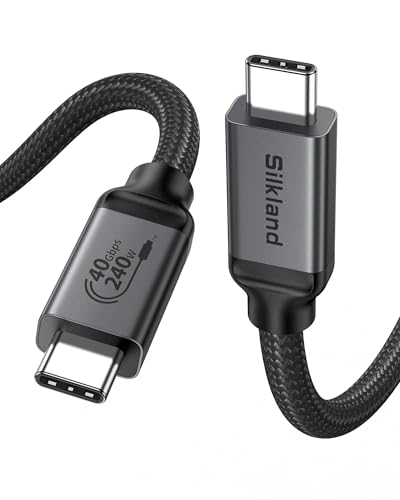
- USB-IF certified 40Gbps USB4 performance
- Supports 8K or dual 4K displays
- 240W PD3.1 charging with Thunderbolt 4/3 compatibility
Best For: Compact certified desk and monitor connections
Best All-Around USB4 Value

- 40Gbps USB4 data transfer
- 8K video and 240W charging
- 6.6-foot length with broad compatibility
Best For: Mixed USB-C, USB4, and Thunderbolt 4 setups
Fastest Next-Generation Option

- Up to 80Gbps Thunderbolt 5 transfers
- Dual 8K display support
- 240W USB-C charging
Best For: High-speed files and advanced multi-display workstations
Best Two-Pack for Flexible Setups

- Two 40Gbps USB4 cables
- 8K or dual 4K display support
- Braided construction with 240W charging
Best For: Home-office setups needing a spare or travel cable
Top-Speed Powerhouse
UGREEN 240W Thunderbolt 5 Cable

- Up to 80Gbps USB4 Gen4 data transfer
- 240W PD 3.1 charging support
- Up to 16K video output
Best For: Large-file transfers and demanding multi-display workstations
Reliable Everyday Pick
Anker 240W Thunderbolt 4 Cable

- Up to 40Gbps USB4 data transfer
- Supports up to 8K at 60Hz
- 240W charging capability
Best For: Laptop, monitor, and general high-speed USB-C setups
Future-Ready Display Cable
Zelcaum Thunderbolt 5 USB-C Cable

- Up to 80Gbps data and 120Gbps video bandwidth
- Supports dual 8K or triple 4K displays
- 240W charging with PD 3.1 hardware
Best For: Creators and professionals building high-resolution display workstations
Next-Gen Performance Pick – ZIKNYDO USB4 80Gbps Cable
For shoppers seeking thunderbolt cables for data transfer, the ZIKNYDO USB4 cable stands out with 80Gbps bidirectional performance, USB4 and Thunderbolt 5 compatibility, and a compact 1.6-foot length. It is designed for fast file movement, high-resolution displays, eGPUs, and high-power charging.
Best For: High-performance desktops, laptops, docks, eGPUs, and multi-monitor workstations.
Pros:
- Supports up to 80Gbps data transfer and 120Gbps video bandwidth.
- Handles up to 16K displays, dual 8K displays, or three 4K 144Hz monitors.
- Offers up to 240W PD3.1 charging and broad Thunderbolt and USB compatibility.
- Braided construction, aluminum housing, and gold-plated plugs support durability.
Cons:
- The 1.6-foot length may be limiting for floor-standing devices or widely spaced equipment.
- Its highest speeds and display capabilities depend on compatible host devices and peripherals.
The ZIKNYDO is a strong choice when maximum bandwidth matters, particularly for demanding storage, graphics, and display setups. Its short length is best suited to close-range connections.
Certified Reliability Pick – Cable Matters Thunderbolt 4 Cable
The Cable Matters 3.3-foot cable is a practical option for buyers comparing thunderbolt cables for data transfer and wanting Intel certification. It provides 40Gbps Thunderbolt 4 performance, USB4 support, 8K display capability, and up to 240W Power Delivery.
Best For: Certified Thunderbolt 4 laptop, dock, monitor, and storage connections.
Pros:
- Intel-certified Thunderbolt 4 cable with reliable 40Gbps data transfer.
- Supports one 8K display or two 4K displays.
- Backward compatible with Thunderbolt 3 and USB4, USB-C 3.2, 3.1, and 2.0.
- Supports USB PD 3.1 charging up to 240W.
Cons:
- It provides 40Gbps rather than the newer 80Gbps bandwidth offered by some USB4 Version 2.0 cables.
- The 3.3-foot length may not suit setups requiring long cable runs.
For users who prioritize certification and broad compatibility over next-generation bandwidth, Cable Matters offers a dependable all-purpose Thunderbolt 4 connection for modern workstations.
Long-Reach High-Bandwidth Pick – Fitee USB4 80Gbps Cable
The Fitee 5-foot cable gives shoppers evaluating thunderbolt cables for data transfer extra reach without giving up USB4 Version 2.0 bandwidth. It supports 80Gbps data transfer, 120Gbps video bandwidth, 240W charging, and advanced multi-display configurations.
Best For: Larger desks, multi-monitor workstations, gaming systems, and charging setups that need additional cable length.
Pros:
- Delivers up to 80Gbps bidirectional data transfer.
- Supports dual 8K or 6K displays, triple 4K 144Hz displays, and up to 4K 480Hz.
- Provides up to 240W PD3.1 charging at 48V/5A.
- Compatible with Thunderbolt 5, Thunderbolt 4/3, USB4, and USB 3.2 devices.
Cons:
- Peak speeds, refresh rates, and charging require compatible devices and accessories.
- Its 5-foot length may be more cable than needed for side-by-side connections.
Fitee is a compelling option when you need both high bandwidth and a longer reach. It fits flexible workstation layouts especially well, while retaining support for demanding displays and fast storage.
Certified Value Pick – Silkland USB4 40Gbps Cable
Silkland is a sensible choice for shoppers seeking thunderbolt cables for data transfer with USB-IF certification and broad everyday compatibility. This 3.3-foot USB4 cable supports 40Gbps transfers, 8K video, dual 4K displays, and up to 240W charging.
Best For: Certified laptop-to-monitor, dock, SSD, and charger connections in compact setups.
Pros:
- USB-IF certified and rated for 40Gbps data transfer.
- Supports one 8K display or two 4K displays.
- Offers up to 240W PD3.1 charging with an E-Marker chip.
- Compatible with Thunderbolt 4/3, USB4, and earlier USB standards.
Cons:
- 40Gbps bandwidth is lower than USB4 Version 2.0 cables rated at 80Gbps.
- The 3.3-foot length is intended mainly for nearby devices.
- Actual transfer performance depends on the connected host and device.
Silkland balances certification, charging capacity, and display support in a compact cable. It is especially practical for side-by-side desk connections where 3.3 feet is sufficient.
Best All-Around USB4 Value – 40Gbps USB4 Cable
If you need thunderbolt cables for data transfer without limiting yourself to Thunderbolt-only hardware, this 6.6-foot Cable Matters USB4 cable offers a versatile option. It supports up to 40Gbps data bandwidth, USB4 and Thunderbolt 4 compatibility, 8K video, and USB PD 3.1 charging up to 240W.
Best For: Users connecting USB-C laptops, monitors, docks, and compatible Thunderbolt 4 devices who want one longer cable for data, video, and charging.
Pros:
- Up to 40Gbps data transfer for USB4 devices
- Supports 8K and 4K video through DisplayPort Alt Mode
- Up to 240W USB PD 3.1 charging
- Backward compatible with USB 2.0, USB 3.x, USB4, and Thunderbolt 4
Cons:
- It is a single cable rather than a multi-pack
- Maximum performance depends on the connected devices and ports
Its broad backward compatibility and 6.6-foot length make it a practical choice for mixed USB-C setups. Choose it when flexibility and reach matter as much as high-speed transfer performance.
Fastest Next-Generation Option – Prime Thunderbolt 5 Cable
For demanding workflows, the Anker Prime Thunderbolt 5 cable is built for high-performance thunderbolt cables for data transfer. Its stated Thunderbolt 5 capability reaches 80Gbps, with support for up to 120Gbps bandwidth for compatible display use and 240W USB-C charging.
Best For: Thunderbolt 5 users transferring large files, powering high-end laptops, or building multi-display workstations.
Pros:
- Up to 80Gbps data transfer for Thunderbolt 5 setups
- Supports dual 8K displays at 60Hz with up to 120Gbps bandwidth
- 240W USB-C charging for compatible devices
- Includes an 18-month warranty
Cons:
- At 3.3 feet, it offers less reach than longer cables
- Thunderbolt 5 benefits require compatible devices and ports
This is the performance-focused pick in the group, especially for large file transfers and advanced display configurations. It makes the most sense if your computer and peripherals can take advantage of Thunderbolt 5 speeds.
Best Two-Pack for Flexible Setups – Maxonar USB4 Cable Pair
The Maxonar two-pack is a convenient way to stock up on thunderbolt cables for data transfer. Each 3.3-foot USB4 cable supports up to 40Gbps, 240W power delivery, and 8K video, while the included braided nylon jacket is designed for regular plugging and unplugging.
Best For: Home and office users who want two short cables for laptops, docks, external SSDs, eGPUs, or high-resolution monitors.
Pros:
- Two cables provide practical home-and-travel or desk-and-office coverage
- 40Gbps USB4 and Thunderbolt 4-compatible data performance
- Supports single 8K or dual 4K displays
- Braided nylon construction and reinforced connectors
Cons:
- 3.3-foot length may be limiting for distant docks or monitors
- Maximum results depend on compatible USB4 or Thunderbolt ports
Its two-pack format adds value for users who regularly move between workspaces or need a spare cable. Select a longer listed length if your computer sits farther from the dock or display.
Top-Speed Powerhouse – UGREEN 240W Thunderbolt 5 Cable
For shoppers seeking thunderbolt cables for data transfer, the UGREEN 240W USB-C cable stands out with USB4 Gen4 bandwidth up to 80Gbps. Its 3.3-foot length also combines high-speed data, charging, and advanced display support in one cable.
Best For: Photographers, developers, gamers, and workstation users moving large files or driving high-resolution displays.
Pros:
- Supports up to 80Gbps data transfer for large files.
- Delivers up to 240W PD 3.1 charging with compatible equipment.
- Supports up to 16K at 60Hz, dual 8K, or triple 4K displays.
- Nylon braiding and reinforced construction are rated for up to 10,000 bends.
Cons:
- Maximum performance requires compatible USB4 Gen4, Thunderbolt, display, and charging hardware.
- The 3.3-foot length may be limiting for some desk setups.
Choose this cable when maximum listed data bandwidth and broad USB-C compatibility matter most. It is particularly appealing for demanding file-transfer and multi-display workflows, provided your devices support its higher specifications.
Reliable Everyday Pick – Anker 240W Thunderbolt 4 Cable
This Anker cable is a practical option among thunderbolt cables for data transfer, offering up to 40Gbps over a 3.3-foot USB-C connection. It also supports 240W charging and high-resolution external displays for a versatile laptop or desktop setup.
Best For: Laptop users, monitor setups, and anyone who wants dependable USB4 or Thunderbolt 3/4 connectivity.
Pros:
- Transfers files at speeds up to 40Gbps.
- Supports displays up to 8K at 60Hz or 4K at 144Hz.
- Handles up to 240W charging with compatible chargers and devices.
- Tested to withstand up to 5,000 bends and includes an 18-month warranty.
Cons:
- Its 40Gbps data rate is lower than newer 80Gbps options.
- The short length may not suit larger workspaces.
Anker’s cable makes sense for users who need strong data performance without specifically requiring the newest Thunderbolt 5 bandwidth. Its charging and display capabilities make it a well-rounded choice for everyday high-speed connectivity.
Future-Ready Display Cable – Zelcaum Thunderbolt 5 USB-C Cable
The Zelcaum Thunderbolt 5 cable is built for users comparing thunderbolt cables for data transfer alongside demanding video and charging needs. Its 3-foot design supports up to 80Gbps data transfer, up to 120Gbps video bandwidth, and 240W power delivery when paired with compatible equipment.
Best For: Content creators, multimedia professionals, and mobile workstations using high-resolution displays and large project files.
Pros:
- Supports up to 80Gbps data and up to 120Gbps video bandwidth.
- Can support dual 6K, dual 8K, or triple 4K at 144Hz displays.
- Provides up to 240W charging with PD 3.1-compatible hardware.
- Backward compatible with Thunderbolt 4/3, USB4, and USB 3.2 Gen 2.
Cons:
- Highest speeds and display configurations depend on compatible devices.
- Its 3-foot length may be short for some setups.
This is a strong choice for a future-oriented desk or mobile editing kit, especially when one cable must handle data, power, and advanced displays. Its broad backward compatibility also helps it fit into mixed USB-C and Thunderbolt environments.
How We Picked the Best Thunderbolt Cables for Data Transfer
We focused on cables with clearly stated data rates, supported charging output, display capabilities, connector standards, and practical lengths. Models covering Thunderbolt 4, Thunderbolt 5, and USB4 are included, with attention to certification where it is specified. Because a cable cannot increase a device’s maximum capability, we also considered backward compatibility and whether the advertised performance is useful for common setups such as docks, external SSDs, monitors, and laptops.
Before buying, verify the product listing and your devices’ specifications. Marketing terms such as “120Gbps” may describe maximum display bandwidth rather than a sustained data-transfer rate.
Quick Comparison
- Best for Thunderbolt 4 reliability: Choose an Intel-certified or USB-IF-certified 40Gbps cable.
- Best for Thunderbolt 5 systems: Look for an 80Gbps cable with stated 120Gbps display bandwidth and 240W power support.
- Best for charging: Select a cable explicitly rated for USB Power Delivery up to 240W, while confirming that both devices support that output.
- Best for a multi-device setup: A two-pack can be useful when you connect a dock, monitor, and external storage at the same time.
- Best for reach: Longer cables improve desk flexibility, but check whether the full data and display rating applies at that length.
Key Buying Factors for Thunderbolt Cables for Data Transfer
Data Speed and Protocol
Thunderbolt 4 and USB4 cables commonly support up to 40Gbps, while Thunderbolt 5 and newer USB4 implementations can reach 80Gbps in supported hardware. Both the source and destination must support the same performance level; otherwise, the connection falls back to the slower standard.
Certification and Compatibility
Certification can provide extra confidence that a cable meets a published specification. Check for the Thunderbolt logo, Intel certification, or USB-IF certification where relevant. A USB-C plug alone does not guarantee Thunderbolt support.
Display and Storage Requirements
For external NVMe drives, docks, and high-speed file transfers, prioritize the stated data rate. For 4K, 8K, or multiple displays, check the cable’s display bandwidth as well as your computer’s graphics and port capabilities.
Power Delivery and Length
A 240W rating is useful for compatible high-power laptops, but it does not make a charger or device deliver 240W automatically. Shorter cables are often easier to use for maximum performance, while longer models are better for cable management and distant peripherals.
Who Should Buy Which Thunderbolt Cables for Data Transfer?
Most Thunderbolt 4 laptop users should choose a certified 40Gbps cable for a dock, SSD, or single-monitor connection. Thunderbolt 5 workstation owners should select an 80Gbps model with clear 240W and high-resolution display specifications. Creative professionals moving large video or photo libraries should prioritize verified bandwidth and a suitable length over charging claims. Home-office users can save money with a dependable 40Gbps cable unless their computer and peripherals specifically require Thunderbolt 5. If you regularly connect several accessories, a two-pack offers useful backup and flexibility.