The best computer cases for workstations give demanding components enough room to breathe, expand, and stay accessible. This roundup compares 10 options for professional desktops, storage servers, creative systems, and high-performance builds.
We focus on practical differences that matter during a workstation build: motherboard compatibility, GPU clearance, drive capacity, cooling support, noise control, and long-term serviceability.
Best 10 Computer Cases for Workstations Picks for 2026
Top-Tier Airflow Pick

- Two 200 mm intake fans and 140 mm exhaust
- Supports 420 mm radiators and 440 mm GPUs
- E-ATX full-tower design with dust indicator
Best For: High-performance workstations needing powerful cooling
Maximum Storage Pick

- Holds up to 10 HDDs and 3 SSDs
- Includes four 120 mm fans
- Supports vertical GPUs and a 360 mm radiator
Best For: Storage-intensive workstation builds
Professional Expansion Pick
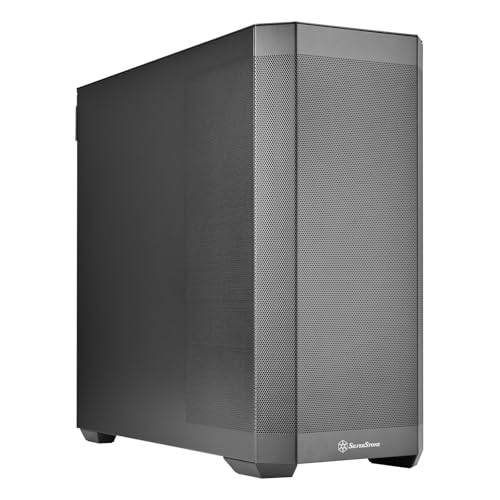
- Supports SSI-EEB through Mini-ITX boards
- Holds up to 15 storage drives
- Offers eight expansion slots for multi-GPU builds
Best For: Large professional and multi-GPU workstations
High-Airflow Mid-Tower Pick

- Two 220 mm intakes plus a 180 mm exhaust
- Supports 430 mm GPUs and 360 mm AIOs
- GPU holder supports one or two graphics cards
Best For: Compact high-airflow workstation builds
Best for Easy Setup

- Up to 11 HDDs or 13 SSDs
- E-ATX and 400mm card support
- USB-C and hot-swap features
Best For: AI servers, NAS systems, and storage-heavy workstations
Flexible Cooling Pick

- Up to 13 fan positions
- 427mm GPU and 360mm AIO support
- Back-connect ATX design with USB-C
Best For: Performance workstations with strong airflow and GPU needs
Quiet Expansion Pick

- Supports up to 18 HDDs and 5 SSDs
- 530mm GPU and 480mm radiator support
- Modular full-tower interior
Best For: Large storage workstations and custom water-cooled builds
Quiet Customizable Workstation

- Two quiet pre-installed fans
- Repositionable storage and removable ODD cage
- Supports up to 360mm radiators
Best For: Quiet ATX workstation builds with flexible storage
Airflow-Focused ATX Case

- Mesh front panel and magnetic dust filters
- Supports up to eight 120mm fans
- Fits GPUs up to 340mm and includes Type-C readiness
Best For: Airflow-conscious ATX builds with large graphics cards
Expandable Dual-Chamber Platform

- Supports E-ATX and up to 10 fans
- Accommodates thick 360mm radiators in three positions
- Dual-chamber layout with VGA holder
Best For: Large, cooling-intensive E-ATX workstation builds
Top-Tier Airflow Pick – ASUS ProArt PA602
For demanding computer cases for workstations, the ASUS ProArt PA602 emphasizes airflow, thermal management, and expansive component support. Its full-tower layout accommodates E-ATX boards, large graphics cards, and substantial liquid-cooling hardware.
Best For: High-performance workstations that need strong out-of-the-box cooling and room for oversized components.
Pros:
- Includes two 200 mm front fans and a 140 mm rear exhaust fan.
- Supports a 420 mm radiator and graphics cards up to 440 mm.
- Features airflow deflectors, a built-in fan hub, and a front-panel IR dust indicator.
- Offers USB Type-C 20Gbps connectivity and two-section PWM control.
Cons:
- Its 35.5-pound full-tower design is substantial.
- The black, non-ARGB configuration prioritizes function over lighting customization.
The PA602 is a strong choice when cooling capacity and installation space matter more than a compact footprint. Its included fans and dust-monitoring feature also reduce the amount of setup and maintenance required.
Maximum Storage Pick – DARKROCK Classico Max
The DARKROCK Classico Max stands out among computer cases for workstations by prioritizing drive capacity. Its full-tower design supports up to 10 3.5-inch hard drives and three 2.5-inch SSDs, while mesh panels support airflow around high-power hardware.
Best For: Storage-heavy workstations, media libraries, and systems that need numerous HDDs and SSDs.
Pros:
- Supports up to 13 drives: 10 3.5-inch HDDs and three 2.5-inch SSDs.
- Includes four pre-installed 120 mm non-RGB fans.
- Supports E-ATX, ATX, Micro-ATX, and Mini-ITX motherboards.
- Provides vertical GPU mounting and support for a top-mounted 360 mm radiator.
Cons:
- Installing an E-ATX motherboard requires removing the hard-drive cages.
- The one-year warranty is shorter than some competing options.
This case is particularly practical when storage expansion is the main requirement. The removable drive cages provide flexibility, but E-ATX users should plan the internal layout before installation.
Professional Expansion Pick – SilverStone SETA H2
Silverstone Technology SETA H2 Full-Size Workstation Tower Chassis, SST-SEH2-B
Check Price On AmazonThe SilverStone SETA H2 is a full-size chassis for computer cases for workstations that require broad motherboard compatibility, storage capacity, and multi-GPU support. Its fully perforated front panel is designed for unobstructed airflow, though fans are not included.
Best For: Professional workstations using SSI-EEB or other large motherboards, multiple graphics cards, and many storage drives.
Pros:
- Supports SSI-EEB, SSI-CEB, E-ATX, ATX, Micro-ATX, and Mini-ITX boards.
- Accommodates up to 15 2.5-inch SSDs or 3.5-inch HDDs.
- Provides eight expansion slots for multi-GPU configurations.
- Uses a fully perforated front mesh panel and robust alloy-steel construction.
Cons:
- Fans are not included, increasing the setup requirements.
- The one-year limited warranty is relatively brief.
The SETA H2 is a flexible foundation for specialized workstation builds, especially those using server-class motherboards or several expansion cards. Budget for a suitable fan configuration to take full advantage of its open front mesh.
High-Airflow Mid-Tower Pick – Cooler Master HAF II 500
The Cooler Master HAF II 500 delivers workstation-oriented airflow in a more compact mid-tower format. It includes two 220 mm front fans and a 180 mm rear fan, while supporting ATX and E-ATX-compatible configurations, large graphics cards, and a 360 mm AIO.
Best For: Air-cooled or liquid-cooled workstation builds that need strong ventilation without moving to a full tower.
Pros:
- Includes two 220 mm front intake fans and one 180 mm rear exhaust fan.
- Supports graphics cards up to 430 mm and a 360 mm AIO.
- Dual-Mode GPU Holder supports one GPU or two GPUs up to 3.6 slots each.
- Provides split-level cable management and flexible storage-cage positioning.
Cons:
- Its mid-tower format offers less overall room than the full-tower options.
- The listed motherboard support is limited to ATX and E-ATX-compatible configurations.
For buyers comparing computer cases for workstations, the HAF II 500 is a compelling middle ground: its oversized fans and dedicated GPU airflow support demanding hardware, while the mid-tower footprint keeps the build more manageable.
Best for Easy Setup – Rosewill Thor NAS
For buyers comparing computer cases for workstations, the Rosewill Thor NAS is built around storage density and expansion. This full-tower chassis supports E-ATX motherboards, up to 11 3.5-inch HDDs or 13 2.5-inch SSDs, and expansion cards up to 400mm, making it suited to demanding data-focused builds.
Best For: AI servers, DIY NAS systems, media servers, and workstation builds requiring extensive drive capacity.
Pros:
- Supports up to 11 3.5-inch HDDs or 13 2.5-inch SSDs.
- Compatible with E-ATX motherboards and cards up to 400mm.
- Includes USB 3.2 Type-C, a 140mm PWM fan, dust filtering, and hot-swap support.
Cons:
- Its full-tower size is substantial at 20.1 inches deep and 20.9 inches high.
- Only one fan is supplied, so additional cooling may be needed for demanding configurations.
- Its storage-first design is more specialized than a typical desktop case.
The Thor NAS is a strong choice when drive capacity and expansion matter more than a compact footprint. Plan the cooling setup carefully if installing high-power workstation components.
Flexible Cooling Pick – JONSBO X400 Gray
The JONSBO X400 is a mid-tower option for computer cases for workstations that need modern component support and extensive cooling flexibility. It accommodates ATX and Micro-ATX back-connect motherboards, GPUs up to 427mm, and up to 13 fan positions.
Best For: Workstation or performance desktop builders who want flexible airflow, large graphics-card clearance, and a clean back-connect layout.
Pros:
- Supports up to 13 fan positions and 240/280/360mm AIO cooling.
- Fits GPUs up to 427mm and air coolers up to 176mm tall.
- Offers tool-free panels, tempered glass, USB-C, and vertical GPU support.
Cons:
- Vertical GPU installation requires a separately purchased bracket and PCIe extension cable.
- Supports only one 2.5-inch SSD and two 3.5-inch HDDs.
- ATX power supplies are limited to 180mm in length.
The X400 balances spacious GPU support with a broad cooling layout in a mid-tower form. It is a practical fit for performance-focused builds, provided its limited drive capacity meets your needs.
Quiet Expansion Pick – Fractal Design Define 7 XL
The Fractal Design Define 7 XL is a full-tower choice among computer cases for workstations, offering a spacious, modular interior for large components and storage arrays. It supports E-ATX and SSI-EEB boards, up to 18 HDDs and five SSDs, and GPUs up to 530mm.
Best For: Large workstation builds, extensive storage configurations, and custom water-cooling systems.
Pros:
- Accommodates up to 18 HDDs and five SSDs in the default storage layout.
- Supports GPUs up to 530mm and radiators up to 480mm.
- Offers a modular interior, reversible front door, and multi-brackets for storage or pump mounting.
Cons:
- The 18.73kg full-tower chassis is heavy and takes up considerable space.
- Advanced water-cooling and storage layouts may require more planning during installation.
- Its understated solid-panel design may not suit buyers seeking a showcase-style case.
The Define 7 XL stands out for scale and configuration flexibility. Choose it when your workstation needs substantial storage or water-cooling room and you have space for a large, heavy chassis.
Quiet Customizable Workstation – Pure Base 600
The be quiet! Pure Base 600 is a practical choice among computer cases for workstations when quiet operation and flexible storage placement matter. Its repositionable drive bays, removable optical-drive cage, and support for air or water cooling make it adaptable for office, creative, and mixed-use builds.
Best For: Quiet ATX workstations that need flexible storage and cooling options.
Pros:
- Includes two pre-installed be quiet! Pure Wings 2 fans for quiet airflow.
- Repositionable HDD slots and a removable ODD cage support customized layouts.
- Supports radiators up to 360mm, with an adjustable top cover vent.
- Includes a three-year manufacturer’s warranty.
Cons:
- Has only two USB ports listed in the supplied specifications.
- Does not include a tempered-glass showcase side panel in the listed features.
Choose the Pure Base 600 if a restrained, configurable case is more important than showcase styling or extensive front-panel connectivity. Its included fans and broad cooling support reduce the need for immediate upgrades.
Airflow-Focused ATX Case – DARKROCK EC2
The DARKROCK EC2 is one of the more airflow-oriented computer cases for workstations, pairing a mesh front panel with support for up to eight 120mm fans. It also provides Type-C readiness, magnetic dust filters, tempered-glass side panels, and room for large graphics cards.
Best For: ATX workstation builds that prioritize airflow, modern connectivity, and graphics-card clearance.
Pros:
- Mesh front panel is designed for efficient airflow.
- Supports up to eight 120mm fans and a 360mm front radiator.
- Accommodates GPUs up to 340mm and power supplies up to 200mm.
- Includes Type-C readiness, magnetic dust filters, and tempered-glass side panels.
Cons:
- Only one fan is pre-installed.
- The listed warranty is one year.
- Its gaming-focused tempered-glass design may be less understated for a traditional office.
The EC2 is a strong fit for a workstation that may use a high-performance graphics card and benefits from additional cooling capacity. Budget for extra fans if you want to approach its maximum airflow potential.
Expandable Dual-Chamber Platform – Antec C8
The Antec C8 is a spacious full-tower option among computer cases for workstations, supporting E-ATX motherboards, multiple storage drives, up to 10 fans, and thick 360mm radiators. Its dual-chamber layout and full-view tempered-glass panels suit powerful builds where component space and cooling flexibility are priorities.
Best For: Large E-ATX workstations with extensive cooling, storage, and expansion needs.
Pros:
- Supports E-ATX, ATX, Micro-ATX, and ITX motherboards.
- Dual-chamber design provides room for complex builds and cable management.
- Supports thick 360mm radiators on the top, bottom, and side simultaneously.
- Includes an aluminum VGA holder and tool-free design features.
Cons:
- Fans are not included.
- Full-tower dimensions may be excessive for compact desks or smaller workspaces.
- The supplied details list two USB ports.
The C8 is best suited to builders who are comfortable selecting and installing their own fans. Its unusually broad radiator support and E-ATX compatibility make it a capable foundation for demanding workstation hardware.
How We Picked These Computer Cases for Workstations
We selected cases across several workstation priorities rather than treating size or gaming features as the only measures of quality. The lineup includes E-ATX full towers for complex builds, storage-oriented chassis for NAS and server use, airflow-focused designs for high-wattage processors and graphics cards, and quieter cases for office or studio environments.
Our comparison emphasizes documented compatibility, internal layout, cooling provisions, expansion room, drive support, front-panel connectivity, and ease of maintenance. Because component fit and cooling needs vary widely, no single case is ideal for every workstation.
Quick Comparison
- Best for professional creator builds: ASUS ProArt PA602
- Best for maximum storage flexibility: DARKROCK Classico Max Storage Master or Rosewill Thor NAS
- Best for quiet modular builds: Fractal Design Define 7 XL
- Best for high airflow: Cooler Master HAF II 500
- Best for a large dual-chamber layout: Antec C8
- Best for a simpler mid-tower workstation: be quiet! Pure Base 600
Key Buying Factors for Computer Cases for Workstations
Motherboard and Component Clearance
Confirm support for your motherboard format, especially if you are using E-ATX, SSI-EEB, oversized power supplies, or multiple expansion cards. Check maximum GPU length, CPU cooler height, and radiator clearance before ordering.
Cooling and Airflow
Workstation CPUs and GPUs can sustain heavy loads for hours. Look for a sensible intake-and-exhaust path, removable filters, and room for the fans or radiators you actually plan to install. A case with more fan mounts is not automatically better if its front panel restricts intake.
Storage and Expansion
Video, engineering, AI, and server workloads may require several 3.5-inch hard drives, 2.5-inch SSDs, or add-in cards. Check the number and placement of drive bays, whether drive cages affect GPU or radiator space, and how easily storage can be serviced.
Noise, Access, and Connectivity
For an office or recording environment, insulated panels and controlled fan placement may matter more than maximum airflow. Also check for front USB-C, dust filtration, tool-less access, cable-routing space, and whether fans are included. A case sold without fans can be excellent, but its complete build cost will be higher.
Who Should Buy Which Computer Cases for Workstations?
Choose a full tower such as the ASUS ProArt, SilverStone SETA H2, Define 7 XL, or a storage-focused Rosewill or DARKROCK model if you need many drives, multiple cards, large cooling hardware, or extensive upgrade room. These are the safest choices for complex professional systems.
Choose the Cooler Master HAF II 500 or Antec C8 when airflow and modern component layouts are priorities. The be quiet! Pure Base 600 and DARKROCK EC2 are better suited to more conventional ATX workstations where compact dimensions and straightforward assembly matter. The JONSBO X400 is worth considering when a back-connect layout and unusual cooling or cable-management approach fit your parts.
Before buying, list every installed component and every planned upgrade. The best case is the one that supports the complete build without blocked airflow, cramped cabling, or unnecessary unused volume.