Building or repairing Ethernet cables is easier when your crimper seats contacts evenly, trims conductors cleanly, and fits the connectors you actually use. The best network crimping tools can also simplify stripping, cutting, and testing, reducing failed terminations and rework.
Our selection includes compact all-in-one crimpers, pass-through models, and complete kits for home networking, installations, maintenance, and larger cable projects. Use the guide below to match the tool’s connector support and included accessories to your workflow.
Best 10 Network Crimping Tools Picks for 2026
Best Precision Pick
Klein Tools VDV226-110 Crimper

- Combines crimping, stripping, and cutting
- Supports RJ11, RJ12, and RJ45 connectors
- Flush-trims Pass-Thru conductors
Best For: Focused voice and data cable installation
Best Complete Starter Kit

- Includes crimper, tester, stripper, connectors, and boots
- Supports CAT5 through CAT7 cable
- Tests cables up to 300 meters
Best For: DIY projects and multi-cable installations
Best Plug-and-Install Bundle

- Includes crimper and 50 CAT6 Pass-Thru plugs
- Built-in wiring guide helps minimize errors
- Handles cutting, stripping, and crimping
Best For: Repeated CAT6 Pass-Thru terminations
Best Shielded Cable Option
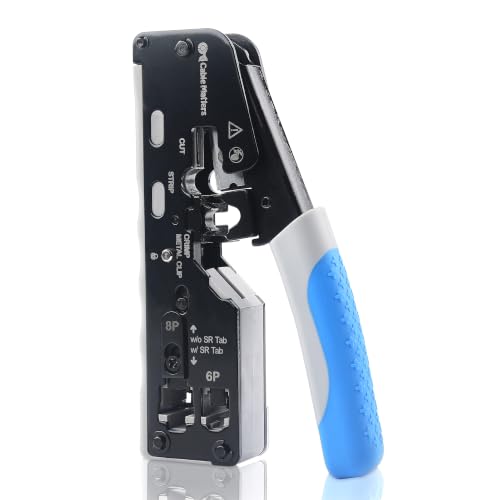
- Supports shielded Cat5 through Cat8 connectors
- Works with pass-through and standard RJ45 plugs
- Adjustable crimp type and metal frame
Best For: Custom shielded Ethernet cable creation
Best Value Kit
Gaobige Pass-Through RJ45 Crimper
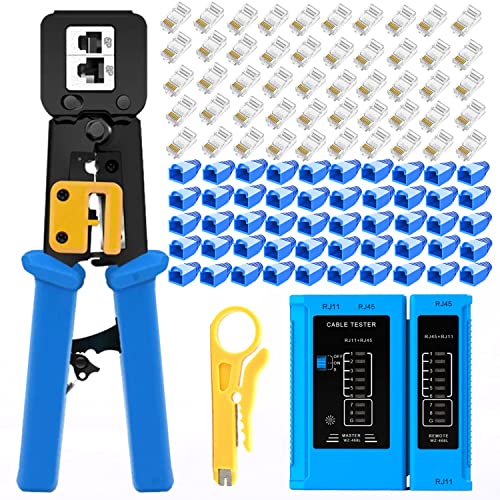
- Cuts, strips, and crimps RJ45, RJ11, and RJ12 connectors
- Includes 50 connectors, 50 covers, a stripper, and tester
- Tester checks common network and telephone cable faults
Best For: DIY users who want a complete starter crimping kit
Simple Handheld Pick

- Supports pass-through and standard RJ45, RJ12, and RJ11 connectors
- Carbon-steel construction with black-oxide finish
- Includes a mini stripper for added flexibility
Best For: Routine cable termination when you already own accessories
Most Complete Set
ZOERAX 14-in-1 Network Tool Kit
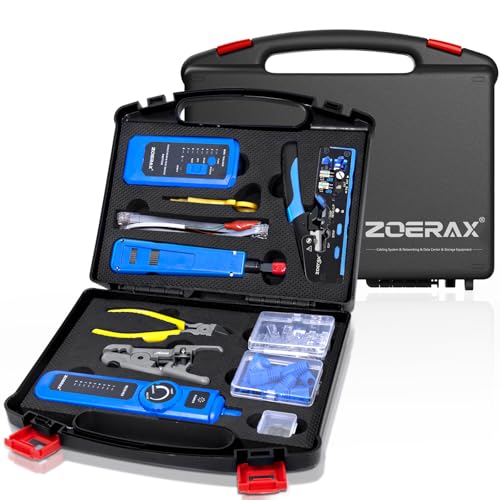
- Includes crimper, punch-down tool, tester, tracker, stripper, and cutter
- Tool-free adjustable crimper supports multiple connector types
- Comes with connectors, boots, and a protective carrying case
Best For: Installers and technicians managing full network projects
Best All-in-One Kit

- Crimper, stripper, cutter, and tester included
- Supports Cat5e, Cat6, and Cat6a 8P8C plugs
- Includes 20 connectors and covers
Best For: Home users and basic Ethernet installation work
Best Accessory Bundle

- Includes 50 connectors and 50 strain-relief boots
- Supports RJ11, RJ12, and RJ45 connectors
- Includes tester, cutters, strippers, and spare blades
Best For: Multiple Ethernet installation and repair jobs
Best Compact Option

- Compact all-in-one pass-through crimper
- Works with RJ45 and RJ11/RJ12 connectors
- Includes 50 connectors, covers, tester, and blades
Best For: Compact Ethernet and telephone wiring tasks
Best Precision Pick – Klein Tools VDV226-110 Crimper
For installers who want dependable network crimping tools without carrying separate cutters and strippers, the Klein Tools VDV226-110 combines all three functions in one ratcheting tool. It supports RJ11, RJ12, and RJ45 connectors, including Klein Tools Pass-Thru plugs, and flush-trims conductors at the connector end.
Best For: Voice and data cable installation, maintenance, and users who prioritize a purpose-built Klein Tools solution.
Pros:
- Combines stripping, cutting, and crimping in one tool.
- Supports 4-, 6-, and 8-position modular connectors.
- Flush trimming helps prevent unintended conductor contact.
- Ergonomic comfort-grip handle and ratcheting operation.
Cons:
- Pass-Thru crimping is specifically listed for Klein Tools connectors.
- Does not include connectors, boots, or a cable tester.
This is a focused, compact option for routine RJ11/RJ12 and RJ45 termination work. Choose it when precise trimming and familiar Klein Tools ergonomics matter more than included accessories.
Best Complete Starter Kit – Solsop RJ45 Crimper Kit
The Solsop kit is a practical choice among network crimping tools when you need accessories for a project rather than a bare crimper. It combines cable preparation, crimping, and testing, with support for CAT5 through CAT7 cables, RJ11/RJ12 connectors, and shielded or unshielded modular plugs.
Best For: DIY network projects and installers who want connectors, boots, a tester, and a stripper included.
Pros:
- Includes a crimper, mini stripper, tester, connectors, and boots.
- Works with CAT5, CAT5e, CAT6, CAT6A, and CAT7 cable.
- Supports shielded and unshielded modular plugs.
- Tester range is listed up to 300 meters.
Cons:
- The network tester requires a 9V battery, which is not included.
- The kit is less compact than a standalone crimping tool.
With 50 pass-through connectors and 50 boots, this kit is ready for repeated terminations. It is a sensible package for building or troubleshooting several cables, especially when you do not already own supporting tools.
Best Plug-and-Install Bundle – Klein Tools 80024 Kit
For buyers who want network crimping tools paired with compatible consumables, the Klein Tools 80024 includes the VDV226-110 ratcheting crimper and a 50-pack of Pass-Thru CAT6 modular plugs. The integrated stripper, cutter, and crimper help streamline voice and data connector installation.
Best For: CAT6 termination work where a trusted crimper and a supply of compatible Pass-Thru plugs are both needed.
Pros:
- Pairs a ratcheting crimper with 50 Pass-Thru CAT6 plugs.
- On-tool wiring guide can help reduce wiring errors.
- One tool handles stripping, cutting, and crimping.
- Specified for CAT3, CAT5e, CAT6/6A, RJ11, RJ12, and RJ45 work.
Cons:
- Includes plugs but not a network cable tester.
- More specialized than a kit with broad accessory coverage.
This bundle offers a straightforward way to start terminating CAT6 cables with matching Pass-Thru components. It is particularly appealing when guided wiring and repeatable connector installation are more important than having a full testing kit.
Best Shielded Cable Option – Cable Matters Cat 8 Crimper
The Cable Matters all-in-one tool stands out among network crimping tools for broad shielded-cable compatibility. It combines cutting, stripping, and crimping, supports Cat5 through Cat8 shielded Ethernet connectors, and includes an adjustable switch for different crimp types.
Best For: IT professionals, network installers, and DIYers making custom-length shielded Ethernet cables.
Pros:
- Supports shielded Cat5, Cat6, Cat6A, Cat7, and Cat8 connectors.
- Works with both pass-through and standard RJ45 connectors.
- Includes RJ11 and RJ12 compatibility.
- Metal frame, adjustable crimp switch, and shielded dovetail-clip support.
Cons:
- Does not include connectors, boots, or a cable tester.
- Its broad feature set may be unnecessary for basic unshielded cable work.
This is the most versatile option here for shielded Ethernet projects and higher-category cable types. Select it when connector flexibility and support for Cat8 shielded pass-through work outweigh the value of an accessory bundle.
Best Value Kit – Gaobige Pass-Through RJ45 Crimper
For shoppers comparing network crimping tools, the Gaobige kit combines a pass-through RJ45 crimper with connectors, protective covers, a stripper, and a cable tester. It is designed for common RJ45, RJ11, and RJ12 work while also supporting basic cable testing.
Best For: Home users and DIY network projects that need a ready-to-use crimping and testing kit.
Pros:
- Handles cutting, stripping, and crimping for pass-through and regular connectors.
- Includes 50 Cat5e pass-through connectors and 50 protective covers.
- Cable tester checks for opens, shorts, crosses, and other wiring issues.
- Ergonomic handle and sharp, wear-resistant blade support comfortable use.
Cons:
- The tester requires a 9V battery, which is not included.
- The kit weighs about 0.93 kg, making it less compact than a basic crimper.
This is a practical bundle for occasional installation work, especially when you want connectors and testing capability included rather than purchased separately.
Simple Handheld Pick – Yellow RJ45 Ethernet Crimper
This yellow RJ45 crimper is a straightforward option among network crimping tools, with support for pass-through and standard RJ45, RJ12, and RJ11 connectors. Its carbon-steel construction suits routine cable-making tasks, while the included mini stripper adds flexibility.
Best For: Users who need a compact, single-tool solution for common Cat5, Cat5e, and Cat6 connector work.
Pros:
- Strips, cuts, and crimps pass-through and regular connectors.
- Works with RJ45, RJ12, and RJ11 formats.
- High-carbon steel and black-oxide construction are designed for durability.
- Ergonomic handle helps reduce hand fatigue during longer projects.
Cons:
- The blade height must be set carefully to avoid damaging the cable core.
- It is not designed for RJ45 connectors with 1.2 mm hole diameters.
- The package includes one crimper rather than a larger testing or connector kit.
Choose this model when you already have connectors and testing equipment and want a focused crimper for standard residential or small-office cable work.
Most Complete Set – ZOERAX 14-in-1 Network Tool Kit
The ZOERAX 14-in-1 kit is the broadest choice among these network crimping tools. Along with an adjustable RJ45 crimper, it includes a punch-down tool, wire tracker, cable tester, stripper, cutter, connectors, boots, and a carrying case for organized transport.
Best For: Installers, technicians, and serious DIYers handling complete home, office, server-room, or network installation projects.
Pros:
- Combines crimping, stripping, cutting, punch-down, wire tracking, and cable testing.
- Crimper supports pass-through and non-pass-through RJ45, RJ11, and RJ12 connectors.
- Tool-free rotating adjustment enables quick crimper changes.
- Includes reversible 110/88 punch-down blades and a sturdy storage case.
Cons:
- At about 1.2 kg, the full kit is heavier than a standalone crimper.
- Only 10 Cat6 pass-through connectors and RJ45 boots are listed in the kit.
- The broad tool selection may be more than casual users need.
Its combination of termination, testing, and cable-management tools makes this the strongest fit for repeat installations where portability and an organized kit matter.
Best All-in-One Kit – RJ45 Pass-Through Crimper Kit
For network crimping tools that cover the essentials without adding too many separate pieces, this kit combines a pass-through RJ45 crimper, wire stripper, and cable tester. It supports Cat5e, Cat6, and Cat6a 8P8C connectors, including shielded types, and includes 20 pass-through connectors with covers.
Best For: Home users and installers who want a compact Ethernet termination kit with basic cable-testing capability.
Pros:
- Combines stripping, cutting, and crimping in one tool.
- Includes 20 Cat6 pass-through connectors and connector covers.
- Heavy-duty steel construction with a black oxide finish.
- Tester can help identify working network, phone, or buried cables.
Cons:
- The 9V battery for the tester is not included.
- Connector compatibility is focused on 8-position modular plugs and is not for AMP connectors.
This is a practical choice when you want the core tools for Ethernet work in one purchase. The included tester adds useful troubleshooting value, while the steel crimper is suited to repeated cable-termination tasks.
Best Accessory Bundle – 8-in-1 Ethernet Crimping Kit
This network crimping tools kit is built for users who want a broad set of accessories for Ethernet installation and repair. It includes a pass-through crimper, cable tester, multiple stripping tools, cutters, spare blades, and 50 Cat6 connectors with 50 strain-relief boots.
Best For: Installers who need extra connectors, boots, and cable-preparation tools for multiple jobs.
Pros:
- Includes 50 pass-through connectors and 50 strain-relief boots.
- Crimps 4-, 6-, and 8-position modular connectors, including RJ11, RJ12, and RJ45 pass-through types.
- Offers both round- and flat-cable stripping tools with adjustable blade depth.
- Tester includes a stated 60V PoE stand-voltage test feature.
Cons:
- The tester requires a 9V battery, which is not included.
- The larger accessory set weighs about 850 g.
With its generous connector and boot supply, this kit is oriented toward repeated installations rather than occasional single-cable repairs. The mix of stripping tools and spare blades also helps support different cable-preparation tasks.
Best Compact Option – Mini RJ45/RJ11 Crimper Kit
For network crimping tools in a smaller format, this mini pass-through crimper handles both Ethernet and telephone connectors. Its all-in-one design combines stripping, cutting, and crimping, while the included tester, spare blades, 50 connectors, and 50 covers make it ready for common wiring tasks.
Best For: Users who prioritize a compact ergonomic tool for RJ45 Ethernet and RJ11/RJ12 telephone work.
Pros:
- Compact design is about two-thirds the size of traditional crimpers.
- Supports 8P RJ45 Cat5 through Cat6a pass-through and non-pass-through connectors.
- Also handles 6P RJ11/RJ12 telephone connectors.
- Includes 50 pass-through connectors, 50 covers, a tester, and spare blades.
Cons:
- The tester battery is not included.
- Included connectors are specified for cable with a maximum 1.1 mm insulated-wire outside diameter and 24 AWG cable.
This kit stands out when storage space and hand comfort matter. Its pass-through design trims excess conductors during crimping, while support for telephone connectors broadens its usefulness beyond standard Ethernet jobs.
How We Picked These Network Crimping Tools
We focused on the features that have the greatest effect on termination quality and day-to-day usability: connector compatibility, crimp consistency, handle comfort, stripping and cutting functions, tool durability, and included accessories. Pass-through designs received attention because they make conductor alignment easier and allow excess wire to be trimmed during crimping. We also included basic standalone crimpers and broader kits so buyers can choose between a focused tool and a complete setup.
Because product bundles can vary, confirm the included connectors, tester, batteries, and cable categories before ordering. A kit’s advertised Cat 6 or Cat 8 compatibility does not automatically mean every included connector supports that category.
Quick Comparison
| Best For | What to Look For | Typical Configuration |
|---|---|---|
| Occasional home repairs | Simple all-in-one design and low storage requirements | Crimper, stripper, and cutter |
| Frequent RJ45 termination | Ratcheting action, comfortable grip, and sturdy frame | Dedicated modular crimper |
| Faster pass-through work | Pass-through connector support and integrated trimming | RJ45 crimper with cutter |
| Complete network projects | Tester, spare connectors, boots, and stripping tools | Multi-piece installation kit |
Key Buying Factors for Network Crimping Tools
Connector and Cable Compatibility
Check whether the tool supports the modular plugs you plan to install, such as 8P8C RJ45 connectors for Ethernet and, where applicable, 6P RJ11 or RJ12 telephone plugs. Cat5e, Cat6, Cat6a, and Cat8 labels describe cable or connector performance; the crimper must physically match the plug design. Pass-through tools require compatible pass-through plugs and should not be assumed to work with every standard connector.
Crimping Mechanism and Build Quality
A ratcheting mechanism helps apply consistent pressure and prevents the jaws from opening before the cycle is complete. Look for aligned dies, a firm frame, spring-assisted handles, and grips that remain comfortable during repeated terminations. For occasional use, a lighter tool may be preferable; installers who make many cables should prioritize durability and reduced hand fatigue.
Stripping, Cutting, and Testing
Integrated blades and stripping functions reduce the number of tools needed, but they are valuable only if they work cleanly with your cable diameter. A cable tester is useful for checking continuity and wiring order after crimping, although it will not certify bandwidth or validate a complete high-performance installation. Kits with spare plugs and boots can be economical when starting from scratch.
Who Should Buy Which Network Crimping Tools?
For Home Users and Occasional Repairs
Choose a compact all-in-one tool if you only make a few patch cables or replace damaged plugs. A basic crimper with stripping and cutting functions keeps the cost and storage space down.
For DIY Network Builds
A pass-through crimper kit is often the most convenient choice. It can make conductor alignment easier, while included connectors, boots, and a tester help you complete and verify several cables without buying accessories separately.
For Installers and Frequent Maintenance
Prioritize a durable ratcheting tool with precise dies and comfortable handles. If you regularly troubleshoot cables, add a dependable tester and keep category-matched connectors in stock rather than relying solely on a bundled assortment.
For Mixed Telephone and Ethernet Work
Look for a tool explicitly designed for both RJ45 and RJ11/RJ12 formats. Confirm the jaw markings and connector support before purchase, since many Ethernet-focused crimpers are not suitable for smaller telephone plugs.