Smart displays can turn scattered devices into one simple home control center. From lighting and climate to cameras and routines, the right panel makes everyday automation faster and easier.
Below, we compare the best options for different rooms, budgets, and platform preferences so you can choose a display that fits your setup today and can grow with it tomorrow.
Best 10 Smart Displays for Home Automation Picks for 2026
Best Alexa Wall Hub
Amazon Echo Hub 8" Smart Home Control Panel

- 8-inch wall-mounted dashboard for home control
- Works with thousands of Alexa-compatible devices
- Customizable layout for routines, cameras, and security
Best For: Alexa households wanting a dedicated wall control center
Large Android Control Panel
15.6" Android Smart Home Dashboard Panel

- 15.6-inch Full HD wall-mounted touchscreen
- Android 14 with Google Play app support
- POE, sensors, and multiple integration ports
Best For: Advanced home automation setups needing a large wired dashboard
Compact All-in-One Panel
SONOFF NSPanel Pro 120 Smart Control Panel

- 4.7-inch control panel for home devices and cameras
- Energy tracking plus security modes with alerts
- Supports live camera viewing and web shortcuts
Best For: SONOFF-focused homes that want a compact wall panel
POE Wall Dashboard
10.1" Android Smart Home Tablet with POE

- 10.1-inch wall-mounted Android 14 dashboard
- POE, Wi-Fi 6, Ethernet, and BLE 5.3 support
- Proximity wake plus sensors and serial interfaces
Best For: Home Assistant users wanting a compact wired wall dashboard
Home Security Hub Pick
eufy Smart Display E10 8" Control Panel

- Auto-wakes for door and camera events
- Shows four live feeds at once
- Local event playback with 8-inch touchscreen
Best For: Security-first homes that want instant, hands-free monitoring
Wall-Mounted Dashboard Upgrade
Slim Edge 15.6" Android POE Tablet
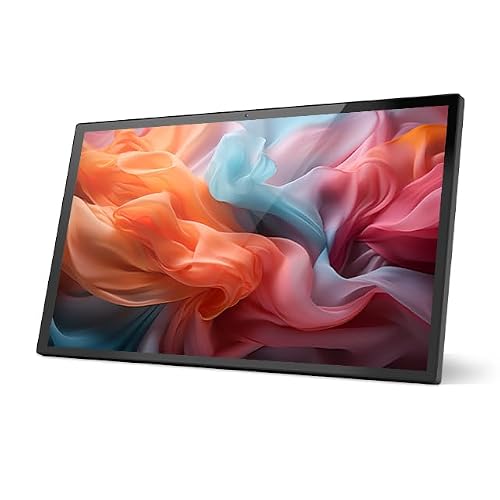
- Large 15.6-inch 1080p touch display
- PoE+ Ethernet plus Wi‑Fi 6 and Bluetooth
- Android 14 with 8GB RAM and 64GB storage
Best For: Wall-mounted smart home dashboards with wired networking
Best for Comfort

- 4.7-inch touchscreen for home control
- Tracks energy, cameras, thermostat, and lighting
- Security modes with alarm and phone alerts
Best For: Small spaces that need a compact all-in-one control panel
Pro POE Wall Hub
10.1-inch Android 14 Smart Home Control Panel

- PoE and wired networking make installation cleaner.
- Android 14 with 4GB RAM and 64GB storage.
- Includes sensor, LED bars, and serial support.
Best For: Permanent wall-mounted smart home dashboards and automation hubs.
Alexa Hub Touch Panel
MOES Smart Home Control Panel with Alexa and Zigbee

- Built-in Alexa voice control for hands-free use.
- Integrated Zigbee gateway replaces a separate hub.
- 5-inch touchscreen supports Smart Life devices.
Best For: Compact all-in-one control for Alexa and Zigbee smart homes.
Wall Box Command Center
Shelly Wall Display XL 10.1-inch Smart Control Panel
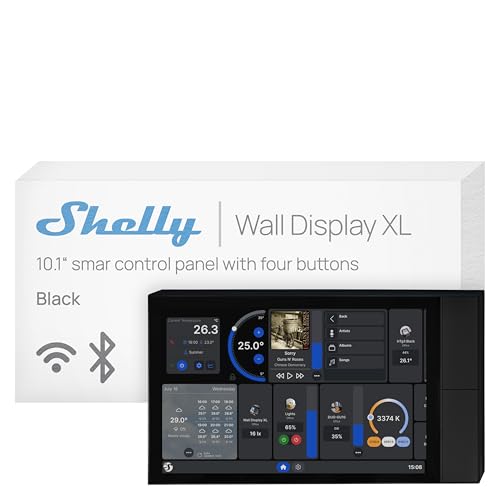
- Large 10.1-inch display with built-in relay.
- Four customizable buttons for quick control.
- Integrates with Shelly app and Home Assistant.
Best For: Wall-installed Shelly control with touchscreen and physical buttons.
Best Alexa Wall Hub – Amazon Echo Hub 8" Smart Home Control Panel
If you want smart displays for home automation that feel built into the house, the Amazon Echo Hub is a straightforward control panel for everyday use. Its 8-inch dashboard lets you arrange devices, launch routines, check cameras, and manage compatible security gear without digging through menus.
Best For: Families who want a dedicated, wall-mounted Alexa control center for lights, cameras, routines, and security.
Pros:
- Customizable dashboard with resizable device sections
- Works with thousands of Alexa-compatible devices, including Matter, Zigbee, Thread, and Sidewalk
- Supports camera views, routines, modes, and media controls from one panel
- Wall-mount friendly and can hide cables with optional accessories
Cons:
- Some features, like Ring event summaries, require separate subscriptions
- Tabletop stand and cable-hiding accessories are sold separately
For buyers who want a polished, always-ready interface, Echo Hub is one of the most practical smart displays for home automation in the Alexa ecosystem. It balances broad device support with a clean control-panel design, making it especially useful in shared spaces.
Large Android Control Panel – 15.6" Android Smart Home Dashboard Panel
This 15.6-inch panel is built for users who want a large-format option among smart displays for home automation. With Android 14, Google Play access, and broad app compatibility, it works like an embedded wall tablet for dashboards, cameras, and integrated control systems.
Best For: Buyers who want a large, feature-heavy wall-mounted smart home dashboard with Android app flexibility.
Pros:
- 15.6-inch Full HD touchscreen with portrait or landscape mounting
- Google Play support for apps like Home Assistant, Tuya, Smart Life, and SmartThings
- POE support simplifies installation with power and network over one cable
- Multiple ports and sensors, including RS-232, RS-485, IR, temperature, and humidity
Cons:
- Bulkier and more complex than a simple consumer smart display
- No built-in battery, so it is intended for fixed wall installation
If your setup depends on dashboards, sensors, and wired integration, this panel offers more flexibility than typical smart display options. It is best suited to tinkerers and advanced home automation setups that need more than voice control alone.
Compact All-in-One Panel – SONOFF NSPanel Pro 120 Smart Control Panel
The SONOFF NSPanel Pro 120 is a compact pick for smart displays for home automation when you want core control features without a large wall tablet. Its 4.7-inch screen brings lighting, thermostat, camera viewing, energy tracking, and web shortcuts into one tap-friendly interface.
Best For: Smaller spaces and SONOFF users who want a compact all-in-one wall panel for control and security.
Pros:
- All-in-one panel for lights, thermostat, cameras, energy use, and web pages
- Supports three security modes with sensor-triggered alarms and phone notifications
- Can display live camera feeds from four camera types
- Compact 4.7-inch design fits tighter wall spaces
Cons:
- Smaller display than larger dashboard-style smart panels
- Best suited to users already in the SONOFF ecosystem
For buyers who want a simple control point rather than a full tablet-style interface, this panel keeps the essentials close at hand. It is a strong fit for pared-down automation setups where quick access matters more than screen size.
POE Wall Dashboard – 10.1" Android Smart Home Tablet with POE
This 10.1-inch Android tablet is a practical option for smart displays for home automation when you want a fixed dashboard with sensor support and wired connectivity. It combines POE, Home Assistant compatibility, and a proximity sensor that wakes the screen automatically as you approach.
Best For: Home automation users who want a compact POE-powered wall dashboard with Home Assistant support.
Pros:
- Android 14 with a 10.1-inch touchscreen and 4GB RAM
- Supports Wi-Fi 6, Ethernet, BLE 5.3, and POE power delivery
- Home Assistant-friendly with I/O, IR, RS232, and RS485 interfaces
- Includes temperature/humidity sensors, LED light bars, and proximity wake
Cons:
- No camera, so it is less versatile for video-based use cases
- Smaller display and lower resolution than larger wall panels
This model is a solid choice if you want a tidy, always-on control surface with useful automation hardware built in. It is especially appealing for users who prefer wired reliability and Home Assistant-style integration over a mainstream consumer interface.
Home Security Hub Pick – eufy Smart Display E10 8" Control Panel
If you want smart displays for home automation that double as a security monitor, the eufy Smart Display E10 is built around fast, hands-free visibility. It automatically lights up for doorbell rings, door unlocks, and camera detections, and it can show four live feeds at once for quick property checks.
Best For: households that want an always-ready security-focused control panel with local playback and simple touchscreen access.
Pros:
- Automatically wakes for doorbell, door, or camera events with live video and voice alerts.
- Shows four simultaneous live feeds for broader home monitoring.
- Stores historical events locally for instant replay without buffering.
- 8-inch touchscreen is designed to be easy for kids and seniors to use.
Cons:
- Focused more on security monitoring than broader smart home dashboard features.
- Requires compatible eufy/HomeBase 3 features to get the full event-summary experience.
The E10 makes sense if your priority is immediate awareness at the door and around the property, rather than a general-purpose tablet-style panel.
Wall-Mounted Dashboard Upgrade – Slim Edge 15.6" Android POE Tablet
For smart displays for home automation that need a larger dashboard-style interface, this 15.6-inch Android panel offers a big full-view screen, PoE networking, and Android 14. It is aimed at wall-mounted control use, with Ethernet, Wi‑Fi 6, Bluetooth, and support for camera monitoring, media playback, and web browsing.
Best For: users who want a large wall-mounted Android control panel with wired networking and flexible dashboard use.
Pros:
- 15.6-inch 1920×1080 display gives plenty of room for controls and dashboards.
- PoE+ Ethernet support can simplify wall installation with power and data over one cable.
- Runs Android 14 with 8GB RAM and 64GB storage for app-based control.
- Includes HDMI input, USB 3.0 ports, microphone, speakers, and RGB LED strip.
Cons:
- No camera is included by default.
- Bulkier and more specialized than smaller home control panels.
This is the most dashboard-like option here, especially if you want a wired, high-resolution panel that can handle more than just basic home controls.
Best for Comfort – SONOFF NSPanel Pro 120
If you want smart displays for home automation in a smaller, more focused form factor, the SONOFF NSPanel Pro 120 packs control, security, and monitoring into a 4.7-inch touchscreen. It can handle energy tracking, camera viewing, thermostat control, lighting, and even quick web access from one panel.
Best For: compact smart-home setups that need an all-in-one wall control panel with security and energy visibility.
Pros:
- Combines home control, energy monitoring, camera viewing, and thermostat access.
- Supports security modes that trigger alarms and phone notifications when sensors are activated.
- Can display live feeds from supported camera types.
- Includes webpage shortcuts for quick access to saved sites.
Cons:
- 4.7-inch display is much smaller than tablet-style control panels.
- Best suited to SONOFF-style ecosystem use rather than a large generic dashboard experience.
This panel is a strong choice when you want a practical wall controller that emphasizes everyday automation without taking up much space.
Pro POE Wall Hub – 10.1-inch Android 14 Smart Home Control Panel
If you want a more permanent option among smart displays for home automation, this 10.1-inch Android 14 panel is built like a true wall-mounted control hub. It combines PoE power, Wi‑Fi 6, Ethernet, BLE 5.3, and broad device integration support, so it fits well in setups that need reliable, always-on control.
Best For: Wall-mounted smart home dashboards, Home Assistant-style control, and installations that benefit from PoE and serial integration.
Pros:
- PoE support simplifies installation by reducing cable clutter.
- Android 14 with 4GB RAM and 64GB storage gives you room for smart home apps and multitasking.
- Supports Wi‑Fi 6, Ethernet, Bluetooth, IR, RS232, and RS485 for flexible integration.
- Built-in temperature/humidity sensor plus LED light bars add extra automation potential.
Cons:
- No built-in battery, so it is meant for permanent mounting.
- 10.1-inch wall-focused format may be larger than needed for compact spaces.
- Version choice matters if you want the camera model versus the proximity-sensor model.
Overall, this is a strong fit if you want a feature-rich control panel that behaves more like dedicated smart home infrastructure than a casual tablet. The proximity sensing and broad protocol support make it especially practical for always-available household control.
Alexa Hub Touch Panel – MOES Smart Home Control Panel with Alexa and Zigbee
This MOES panel is a practical pick in smart displays for home automation if you want a smaller touchscreen with voice control built in. The 5-inch display, integrated Alexa assistant, and Zigbee gateway make it useful as a compact all-in-one controller for common smart home devices.
Best For: Users who want a compact touchscreen with Alexa voice control and built-in Zigbee hub functionality.
Pros:
- Built-in Alexa enables hands-free control of devices, scenes, and voice skills.
- Integrated Zigbee gateway removes the need for a separate hub.
- Compatible with many Smart Life devices, including switches, bulbs, sockets, cameras, and locks.
- Supports both wired and wireless network connections for flexible setup.
Cons:
- 5-inch screen is smaller than larger wall-panel alternatives.
- Limited product details on storage, processor, and advanced interface options.
- Best suited to ecosystems that already use Smart Life and Alexa.
For buyers who want a straightforward wall controller without extra complexity, this panel covers the essentials well. Its main advantage is combining display control, Alexa, and Zigbee into one compact unit.
Wall Box Command Center – Shelly Wall Display XL 10.1-inch Smart Control Panel
Among smart displays for home automation, this Shelly Wall Display XL stands out for users who want a large touchscreen plus physical controls in a standard wall-box format. It combines a 10.1-inch display, built-in relay switching, and four customizable buttons, making it useful for direct control of lights, fans, appliances, and routines.
Best For: Shelly users, Home Assistant setups, and wall installations that need both touchscreen and hardware controls.
Pros:
- 10.1-inch touchscreen offers a roomy interface for day-to-day control.
- Built-in 5A relay and four customizable buttons add direct appliance control.
- Works with Shelly Smart Control App and Home Assistant for unified management.
- Supports Bluetooth or Sonos speaker control for audio playback.
Cons:
- Neutral wire required, which may limit installation flexibility.
- Primarily centered on Shelly ecosystems and compatible platforms.
- Wired wall-box installation is less portable than tablet-style options.
This is a solid choice if you want one installed panel to handle both automation and quick manual actions. The mix of touchscreen, relay control, and physical buttons makes it especially practical in busy households or shared spaces.
How We Picked These Smart Displays for Home Automation
We focused on the features that matter most in real homes: reliable app and ecosystem support, responsive touch controls, installation flexibility, and compatibility with common platforms and devices. We also looked for models that can work as a central dashboard rather than just a basic screen.
For Smart Displays for Home Automation, the best picks balance convenience with broad device compatibility, clear visibility, and enough processing power to handle frequent use without lag.
Quick Comparison
Wall-mounted tablets and larger 10-inch to 15.6-inch panels are best when you want a permanent command center in a kitchen, entryway, or living room. Smaller panels and compact hubs are better for tight spaces, local control, or adding an extra station in a bedroom or utility area.
If your home relies heavily on voice assistants, choose a display with built-in Alexa or strong assistant support. If you prefer local automation or mixed-device ecosystems, prioritize Zigbee, POE, MQTT, and strong dashboard customization.
Key Buying Factors for Smart Displays for Home Automation
Size and Placement
Larger screens are easier to read from across a room and work well as shared household dashboards. Smaller panels can be less intrusive and may suit hallway or bedside control points.
Power and Connectivity
POE is a big advantage for clean wall-mounted installations because it can reduce cable clutter. Wi-Fi-only models are simpler to place, while models with Zigbee or hub functionality may reduce the need for extra bridges.
Software and Ecosystem Support
Check whether the interface works smoothly with your existing smart home platform. Some users will want Alexa-first convenience, while others need Android flexibility, MQTT compatibility, or direct integration with security and lighting systems.
Responsiveness and Everyday Use
A good control panel should wake quickly, respond accurately to touch, and make frequent tasks easy to reach. Proximity sensing, energy monitoring, and camera support can be helpful, but only if they serve your daily routine.
Who Should Buy Which Smart Displays for Home Automation?
Choose a premium wall dashboard if you want a polished always-on control center for the household. Pick a compact smart hub if you mainly need quick access to scenes, sensors, and security status. Go with an Android-based tablet panel if you want flexibility, custom dashboards, and broader automation tinkering.
If you are building a whole-home system around voice control and mainstream device support, a display with Alexa or strong assistant integration is usually the easiest choice. If your priority is local control and expanding automation over time, look for models with Zigbee, POE, and open protocol support.