Smart displays can do far more than show the weather. The best models now handle video calls, media streaming, calendar management, and voice-controlled home routines in one easy-to-use screen.
Below, we’ve grouped the top picks by size, features, and ecosystem so you can quickly find the right fit for your kitchen, desk, or bedside table.
Best 10 Smart Displays Picks for 2026
Premium Smart Display
Amazon Echo Show 8 (Newest Model)

- 8.7-inch HD touchscreen with 15% more viewing area
- Spatial audio with stronger bass and clearer vocals
- Built-in smart home hub plus Alexa+ features
Best For: Households wanting a premium all-in-one smart display
Smart Photo Frame Calendar
ApoloSign 14" Neon Picture Frame

- 14.1-inch FHD touchscreen with vivid detail
- AI neon lighting adjusts to each photo’s tone
- Auto-synced calendar plus Frameo photo sharing
Best For: Gift buyers and families who want a photo-focused smart display
Smart Home Hub Display

- 8.7-inch HD display with more viewing area
- Spatial audio and stronger bass for media
- Smart home hub with Alexa+ and video calling
Best For: Alexa users wanting a compact all-purpose smart display
Kitchen Hub Smart Display
Echo Show 15, Full HD 15.6" with Fire TV

- 15.6-inch Full HD screen with customizable widgets
- Built-in Fire TV for streaming and music
- Smart home dashboard and centered video calling camera
Best For: Busy families who want a central home organization and entertainment hub
In-Wall Control Panel Smart Display
Shelly Wall Display XL Black, 10.1" touchscreen
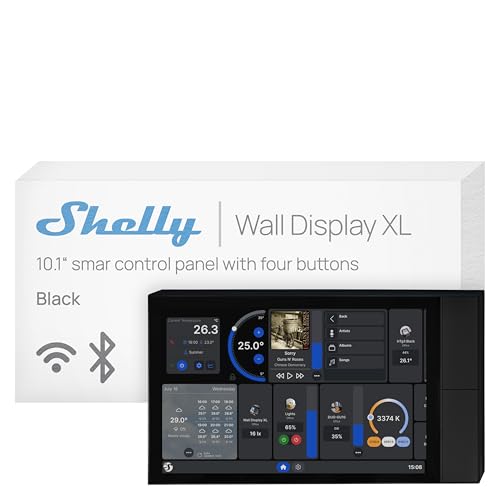
- 10.1-inch wall-mounted touchscreen with built-in relay
- Four customizable buttons for appliance and scene control
- Works with Shelly app and Home Assistant
Best For: Wall-mounted smart home control in homes, rentals, hotels, and businesses
Premium Assistant Smart Display
Echo Show 11, Full-HD 11" with Spatial Audio

- 11-inch Full HD screen with 60% more viewing area
- Spatial audio with clearer vocals and stronger bass
- Built-in smart home hub and centered video calling camera
Best For: People who want a balanced mid-size Alexa display for media and home control
Compact Google Assistant Hub

- 7-inch touchscreen for weather, photos, and videos
- Google Assistant for hands-free smart home control
- Works with 200+ devices from 50+ brands
Best For: compact Google Assistant control and everyday home info
Large Alexa Entertainment Display

- 11-inch Full-HD screen with more viewing area
- Spatial audio with up to 2x bass
- Built-in smart home hub and centered camera
Best For: larger Alexa-powered viewing, calling, and smart home control
Compact Alexa Smart Display

- 5.5-inch display for quick glances and media
- Built-in camera for calls and home check-ins
- Controls lights and thermostats with Alexa
Best For: small spaces and basic Alexa-powered daily use
Premium Smart Display – Amazon Echo Show 8 (Newest Model)
If you want one of the most capable smart displays for everyday use, the newest Echo Show 8 is built to do a lot in a compact footprint. The 8.7-inch HD screen, spatial audio, smart home hub, and Alexa+ features make it a strong pick for media, home control, and quick reference tasks.
Best For: Busy households that want a versatile smart display for entertainment, smart home control, video calls, and at-a-glance help.
Pros:
- 8.7-inch HD touchscreen with 15% more viewing area than the 2023 Echo Show 8
- Room-filling spatial audio with crisper vocals and up to 2x bass versus the prior model
- Built-in smart home hub for controlling lights, thermostats, cameras, and other Alexa devices
- Centered auto-framing camera with 3.3x zoom for clearer video calls
Cons:
- Best value depends on whether you’ll use the Alexa+ and smart home features regularly
- Works best inside the Alexa ecosystem, so it is less flexible for non-Alexa homes
Overall, this is a well-rounded smart display for people who want a screen that handles entertainment, communication, and home control without feeling basic. The privacy controls and photo slideshow features add everyday convenience, while the upgraded hardware makes it feel more premium than a simple tabletop display.
Smart Photo Frame Calendar – ApoloSign 14" Neon Picture Frame
This ApoloSign model stands out among smart displays if you want something focused on photos, schedules, and desk-friendly convenience. Its 14.1-inch FHD touchscreen, auto-synced calendar mode, and AI neon lighting make it more of a decorative productivity display than a voice assistant.
Best For: Families and gift buyers who want a stylish smart display for photos, calendars, and everyday desktop use.
Pros:
- 14.1-inch FHD IPS touchscreen with 1920×1200 resolution for detailed photo viewing
- AI-powered neon ambient lighting that adjusts to the tone of each image
- Smart calendar support that syncs automatically through the Frameo app and calendar providers
- Easy global photo and video sharing through the free Frameo app
Cons:
- Designed mainly for photo display and scheduling rather than broader smart home control
- Best for tabletop or nightstand use, not a wall-mounted assistant-style setup
For shoppers who want smart displays that feel personal and decorative, this frame-calendar hybrid is a strong fit. It combines useful daily information with a warm visual presentation, making it especially appealing as a gift or a shared family display.
Smart Home Hub Display – Amazon Echo Show 8 (Graphite)
The Graphite Echo Show 8 brings the same core appeal as the newest Echo Show 8, making it a strong choice for shoppers comparing smart displays with a focus on home control and everyday convenience. You get the 8.7-inch HD screen, spatial audio, smart home hub, and Alexa+ support in a clean, understated finish.
Best For: Alexa households that want a compact smart display for entertainment, video calls, and simple home control.
Pros:
- Vibrant 8.7-inch HD touchscreen with 15% more viewing area than the 2023 model
- Spatial audio with wider sound stage, clearer vocals, and stronger bass
- Built-in smart home hub for managing Alexa-compatible devices without a separate hub
- Auto-framing camera, 3.3x zoom, and noise reduction for natural video calls
Cons:
- Most useful if you already use Alexa-compatible smart home gear
- The feature set overlaps heavily with the Glacier White version of the same model
In practice, this is a polished, do-everything smart display that fits well on a kitchen counter, desk, or nightstand. If you like Alexa’s ecosystem and want a screen that can handle music, calls, routines, and quick info at a glance, it’s an easy contender.
Desktop Widget Display – Divoom Times Frame 10.1"
If you want smart displays for a desk setup rather than the kitchen or living room, the Divoom Times Frame is aimed squarely at that use case. Its 10.1-inch IPS screen, RGB lighting, live widgets, and app-based customization make it ideal for showing useful info in a more stylized way.
Best For: Desk setups, gamers, and creators who want a personalized smart display with live widgets and ambient lighting.
Pros:
- 10.1-inch IPS display with a modern transparent-style look
- Customizable widgets for clock, weather, calendar, stocks, and social stats
- RGB backlighting and adjustable brightness for mood and workspace matching
- App control for photos, GIFs, short videos, and pixel art
Cons:
- No built-in battery, so it needs continuous plugged-in power
- More of a desktop display than a full-featured voice assistant
This is a smart display for people who care as much about aesthetics as function. It gives you useful at-a-glance information while doubling as a customizable desk accessory, which makes it especially appealing in gaming, office, and creative spaces.
Kitchen Hub Smart Display – Echo Show 15, Full HD 15.6" with Fire TV
If you want smart displays that do more than show the time, the Echo Show 15 is built to be a kitchen command center. Its 15.6-inch Full HD screen gives you plenty of room for widgets, streaming, video calls, and quick smart home checks in one central place.
Best For: Families who want a large wall or counter smart display for organization, entertainment, and home control.
Pros:
- Large 15.6-inch Full HD display with customizable widgets for calendars, to-do lists, weather, and more
- Built-in Fire TV supports streaming from apps like Prime Video, Netflix, YouTube, and Apple TV
- Smart home dashboard lets you control devices, view camera feeds, and manage lights by voice or touch
- Centered camera with 3.3x zoom, wide field of view, and noise reduction for video calls
Cons:
- Fire TV remote is included, but some streaming apps may still require subscriptions
- Designed mainly as a home hub, so it may be larger than needed for smaller spaces
- Best value depends on whether you will use both the display and entertainment features regularly
The Echo Show 15 stands out if you want a smart display that functions as both an organizer and an entertainment screen. It is especially practical in busy homes where calendars, reminders, and smart home controls need to stay visible.
In-Wall Control Panel Smart Display – Shelly Wall Display XL Black, 10.1" touchscreen
Among smart displays, the Shelly Wall Display XL is aimed at users who want a hardwired wall control panel instead of a tabletop screen. Its 10.1-inch touchscreen, built-in relay, and four customizable buttons make it a practical fit for managing connected devices directly from the wall.
Best For: Homeowners, apartments, hotels, and commercial spaces that need a wall-mounted smart control panel for Shelly devices.
Pros:
- 10.1-inch touchscreen mounts in a standard electrical wall box
- Built-in 5A relay plus four customizable buttons for appliance control
- Works with Shelly Smart Control App and Home Assistant for unified automation
- Bluetooth or Sonos speaker control adds convenient media management
Cons:
- Neutral wire is required for installation
- Most compelling if you already use Shelly devices or compatible platforms
- Less focused on entertainment and calling than consumer smart displays
This is a strong choice if your priority is wall-mounted control rather than voice-first convenience. It is best suited to users who want a dedicated interface for automations, appliances, and room-level device management.
Premium Assistant Smart Display – Echo Show 11, Full-HD 11" with Spatial Audio
If you want smart displays with a more premium everyday layout, the Echo Show 11 balances a larger viewing area with a compact footprint. The 11-inch Full HD screen, spatial audio, and built-in smart home hub make it a versatile pick for recipes, media, calls, and home control.
Best For: Users who want a mid-size Alexa smart display with strong media performance and broad smart home support.
Pros:
- 11-inch Full HD display offers 60% more viewing area than Echo Show 8 (2025 release)
- Room-filling spatial audio with clearer vocals and up to 2x bass versus Echo Show 8 (2023 release)
- Built-in smart home hub supports thousands of Alexa-compatible devices without a separate hub
- Useful everyday features for recipes, calendars, shopping lists, photos, and video calls
Cons:
- More expensive than smaller smart display options in the line
- Some advanced features depend on Alexa+ support
- Still best for users already comfortable with the Alexa ecosystem
The Echo Show 11 is a well-rounded smart display for people who want more screen space without jumping to a very large kitchen hub. It makes the most sense if you want a strong balance of entertainment, communication, and smart home control in one device.
Compact Google Assistant Hub – Google Nest Hub (1st Gen)
If you want smart displays that feel simple and useful, the Google Nest Hub (1st Gen) is a compact pick for everyday tasks. Its 7-inch touchscreen makes it easy to check weather, calendars, photos, and videos, while Google Assistant handles voice commands for smart home control and quick answers.
Best For: Hands-free Google Assistant control in a compact display for kitchens, bedrooms, or desks.
Pros:
- 7-inch 1024×600 touchscreen shows weather, calendar items, YouTube videos, and Google Photos.
- Built-in Google Assistant supports voice control for reminders and smart home devices.
- Compatible with over 200 devices from 50+ brands, including lights, cameras, and thermostats.
- Streams music and video from YouTube, Spotify, Pandora, and more.
Cons:
- Smaller screen than larger smart display models.
- Designed around Google services, so it fits best in a Google-centered setup.
Overall, this is a practical smart display for users who want a smaller footprint and straightforward voice control. It works well as an always-available hub for routines, media, and home management.
Large Alexa Entertainment Display – Echo Show 11
The Amazon Echo Show 11 is a large smart display built for people who want more viewing area and a stronger media experience. Its Full-HD 11-inch screen, spatial audio, and built-in smart home hub make it a versatile pick for video, recipes, calendars, and camera viewing.
Best For: A larger Alexa-powered smart display for entertainment, smart home control, and video calls.
Pros:
- 11-inch Full-HD touchscreen offers 60% more viewing area than Echo Show 8 (2025 release).
- Spatial audio delivers room-filling sound with clearer vocals and up to 2x bass versus Echo Show 8 (2023 release).
- Built-in smart home hub lets you control thousands of Alexa-compatible devices without a separate hub.
- Centered auto-framing camera with 3.3x zoom supports video calls and live view.
Cons:
- Larger footprint may be more than some rooms need.
- Best value if you plan to use Alexa+ and Amazon services heavily.
This is one of the more feature-rich smart displays in the lineup, especially if you want a bigger screen for shared viewing and home management. It stands out for mixing display size, audio quality, and privacy controls in one device.
Compact Alexa Smart Display – Echo Show 5
The Amazon Echo Show 5 is a small smart display that covers the essentials without taking up much space. Its 5.5-inch screen is useful for quick glances at news, weather, video calls, cameras, music, and photo slideshows, making it a practical fit for desks, nightstands, or counters.
Best For: A compact Alexa smart display for small spaces and everyday home checks.
Pros:
- 5.5-inch display is easy to place in tight spaces.
- Lets you view weather, news, shows, songs, and compatible camera feeds at a glance.
- Supports smart home control for lights and thermostats, even when you’re away.
- Includes a built-in camera for video calls and home check-ins.
Cons:
- Smaller screen limits viewing comfort compared with larger smart displays.
- 2 MP camera is basic for video calling and monitoring.
If you mainly want a compact display for Alexa tasks, this model keeps things simple and space-saving. It is a strong choice when you want helpful smart display features without committing to a larger device.
How We Picked These Smart Displays
We focused on screen size, display quality, audio performance, smart home compatibility, voice assistant support, and everyday usefulness. We also looked for models that make sense in common placement zones like kitchens, desks, and nightstands.
Quick Comparison
If you want a compact model, the smaller Echo Show options are better for bedrooms and side tables. For larger viewing areas and more practical multitasking, the 11-inch and 15-inch Amazon models offer a more capable experience. If your priority is photo display or desk scheduling, the digital frame-style picks lean more decorative and calendar-friendly than assistant-first Smart Displays.
Key Buying Factors for Smart Displays
Screen Size and Resolution
A larger screen is easier for recipes, video calls, and dashboards, but it also takes more space. Higher resolution helps text, photos, and streaming look sharper, especially on 10-inch-and-up models.
Voice Assistant and Ecosystem
Choose Alexa or Google support based on the devices and services you already use. The best Smart Displays work best when they match your existing smart home setup, music apps, and routines.
Audio and Placement
If you plan to use the display for music, podcasts, or calls, sound quality matters as much as the panel itself. For kitchens and open rooms, prioritize louder speakers and stronger clarity. For desks or bedrooms, compact models are often enough.
Smart Home and Media Features
Some screens are built around home control, while others emphasize streaming, photo sharing, or scheduling. Think about whether you want a true command center or a more specialized display that also happens to be connected.
Who Should Buy Which Smart Displays?
Buy a compact smart display if you want an affordable everyday assistant for alarms, timers, and quick questions. Choose a mid-size model if you want a better balance of visibility and footprint. Go for the larger kitchen-hub style displays if you want the most useful all-purpose screen for family schedules, entertainment, and smart home control. If your main goal is visual content or shared calendars, a digital picture frame-style option may be the smarter choice.