The right USB extension cable can give you more flexibility without sacrificing charging performance or data speed. This roundup compares 10 USB 3.0 Type-A male-to-female options in useful lengths, pack sizes, and construction styles.
Because cable length, connector quality, and device requirements all affect real-world results, use the buying guide below to narrow the list to the best fit for your desk, gaming setup, accessories, or home office.
Best 10 USB Extension Cables for Fast Charging Picks for 2026
Best Multi-Pack Value
6-Foot Braided USB 3.0 Extensions

- Four 6-foot USB-A extension cables
- Up to 5 Gbps data transfer
- Braided, gold-plated design
Best For: Multiple devices and hard-to-reach USB-A ports
Best for Charging Reach

- Charging support up to 2A
- Up to 5 Gbps data transfer
- Braided cable with reinforced strain relief
Best For: Extending chargers and USB peripherals across a room
Best Compact Setup
UGREEN 3-Foot Braided USB Extensions
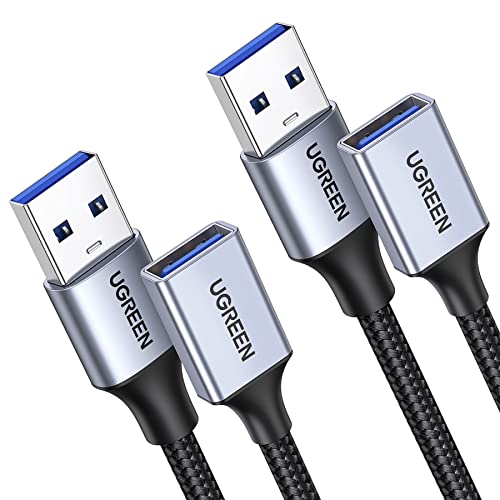
- Two 3-foot USB 3.0 cables
- Up to 2A charging and 5 Gbps transfer
- Nylon braid and aluminum-alloy connectors
Best For: Compact desks and nearby USB peripherals
Best Heavy-Duty Design
AINOPE 6.6-Foot USB Extensions
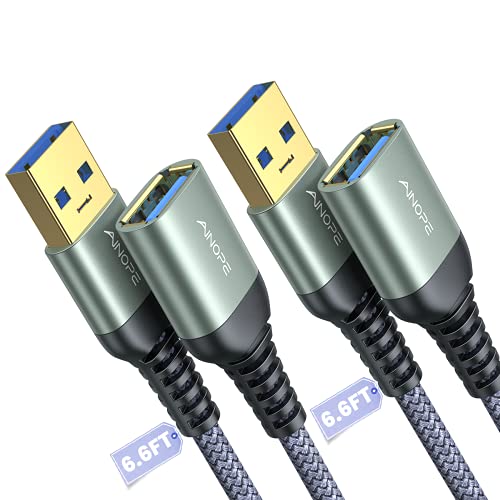
- Two 6.6-foot USB 3.0 cables
- Up to 2A charging and 5 Gbps transfer
- 400,000+ bend-tested reinforced joints
Best For: Frequent-use setups needing durability and organization
Best Long-Reach Pick
10-Foot Braided USB 3.0 Extension

- 10-foot male-to-female USB-A extension
- Up to 5Gbps data transfer
- Braided build with reinforced joints
Best For: Long-distance desk, TV, and peripheral setups
Best Fast-Charging Option

- Supports up to 3A charging
- 5Gbps data transfer with USB 3.0
- 40,000+ bend-rated nylon braid
Best For: Long-reach charging and data connections
Best Compact Pick
3.3-Foot Braided USB 3.0 Extension

- Compact 3.3-foot USB-A extension
- Up to 2A charging and 5Gbps transfer
- Gold-plated connectors with nylon braid
Best For: Nearby peripherals and tidy workspaces
Long-Reach Charging Pick
AINOPE 10FT USB 3.0 Extension Cable

- 10-foot reach for flexible setups
- Up to 2A charging and 5Gbps data
- Braided cable with reinforced joints
Best For: Long-distance USB-A extensions for home, gaming, and surveillance setups
Heavy-Duty Speed Pick
Upgrade 6.6FT USB 3.0 Extension Cable

- 5Gbps data transfer with up to 2A charging
- Military-grade nylon rated for 400,000+ bends
- Reinforced connectors and 6.6-foot reach
Best For: Durable indoor workstation and gaming setups
Two-Cable Value Pick
JSAUX 2-Pack 10FT USB 3.0 Extensions

- Two 10-foot cables in one pack
- Up to 5Gbps data transfer
- Braided build with gold-plated connectors
Best For: Multi-device setups needing long USB-A extensions
Best Multi-Pack Value – 6-Foot Braided USB 3.0 Extensions
If you need several usb extension cables for fast charging and high-speed peripherals, this four-pack offers useful reach and broad USB compatibility. Each male-to-female cable is 6 feet long and supports USB 3.0 data transfer up to 5 Gbps, while remaining backward compatible with USB 2.0 devices.
Best For: Home offices, entertainment setups, and households that need multiple long USB-A extensions.
Pros:
- Four 6-foot cables provide strong multi-device value.
- Braided construction, gold-plated connectors, and tinned copper are designed for durability and signal quality.
- Supports USB 3.0 transfer speeds up to 5 Gbps and works with USB 2.0 peripherals.
Cons:
- USB-A male-to-female design is not intended for USB-C-only devices.
- The supplied specifications list a maximum voltage of 5V, so charging performance depends on the connected charger and device.
This is a practical choice when quantity and length matter most. Its four-cable package is especially useful for extending hard-to-reach ports, though shoppers should verify that their devices use USB-A connections.
Best for Charging Reach – 6-Foot USB 3.0 Extension Pair
This two-pack is a useful option for shoppers comparing usb extension cables for fast charging around a desk, sofa, or entertainment center. The 6-foot USB-A male-to-female cables support charging up to 2A and USB 3.0 data transfer up to 5 Gbps.
Best For: Extending wall chargers or computer ports to phones, controllers, webcams, storage drives, and other USB-A peripherals.
Pros:
- Supports charging up to 2A along with data syncing.
- USB 3.0 transfer speeds reach up to 5 Gbps and are backward compatible with USB 2.0 and 1.1.
- Braided shielding, an aluminum-alloy connector, and reinforced strain relief are designed for frequent use.
Cons:
- Only two cables are included.
- Maximum current is listed as 2A, which may not match higher-power charging requirements.
Choose this pair when convenient placement is as important as charging and syncing. The long length and reinforced construction make it well suited to everyday setups, provided your equipment uses USB-A.
Best Compact Setup – UGREEN 3-Foot Braided USB Extensions
For shorter desk setups, the UGREEN pair provides a tidy way to use usb extension cables for fast charging without adding excessive cable length. Each USB 3.0 male-to-female cable supports up to 2A charging and 5 Gbps data transfer, with compatibility across many common USB peripherals.
Best For: Desks, webcams, keyboards, hubs, phones, and other devices located a short distance from the host port.
Pros:
- Two 3-foot cables provide convenient reach for compact workspaces.
- Supports charging up to 2A and data transfer up to 5 Gbps.
- Nylon braiding, aluminum-alloy connectors, and layered shielding support durability and signal clarity.
Cons:
- Three feet may be too short for behind-TV or across-room applications.
- The listed charging limit is 2A.
This pair is a sensible fit when you want modest extra reach rather than a long cable run. Its compact length can help keep a workstation organized while preserving USB 3.0 syncing and charging capability.
Best Heavy-Duty Design – AINOPE 6.6-Foot USB Extensions
The AINOPE two-pack is built for shoppers seeking usb extension cables for fast charging with added protection against bending and wear. These USB 3.0 male-to-female cables are 6.6 feet long, support up to 2A charging, and are backward compatible with USB 2.0 and 1.1 devices.
Best For: Frequently used desk, gaming, storage, and peripheral connections that benefit from extra cable organization and reinforced joints.
Pros:
- 6.6-foot length offers flexible placement around desks and entertainment setups.
- Reinforced strain relief is tested for more than 400,000 bends, according to the supplied notes.
- Nylon braiding, all-metal shells, aluminum-alloy connectors, and shielding support durability.
Cons:
- The two-pack offers fewer cables than the four-pack option.
- Charging is listed at up to 2A, so it may not suit higher-current requirements.
With its longer reach, included sticky buckles, and heavily reinforced construction, this is the strongest fit for demanding everyday use. It is a good choice when cable longevity and organization matter more than having the largest quantity.
Best Long-Reach Pick – 10-Foot Braided USB 3.0 Extension
If you need USB extension cables for fast charging that also add substantial reach, this 10-foot USB-A male-to-female cable is a practical choice. It supports USB 3.0 transfer speeds up to 5Gbps and works with a broad range of peripherals, including consoles, printers, cameras, storage drives, keyboards, and mice.
Best For: Extending USB peripherals behind desks, TVs, or across a room while retaining USB 3.0 data performance.
Pros:
- Extra-long 10-foot reach helps avoid awkward positioning.
- Supports up to 5Gbps data transfer and backward compatibility with USB 2.0, 1.1, and 1.0 devices.
- Nylon-braided construction, reinforced joints, and aluminum-alloy housings add durability.
- Rated for more than 10,000 bends.
Cons:
- Its USB-A design is not intended for direct USB-C connections.
- The 10-foot length may be more cable than needed for compact setups.
This cable stands out when reach is the priority. Its 5Gbps USB 3.0 capability and reinforced braided build make it useful for both everyday charging and data-connected accessories, though users should verify that their devices use USB-A ports.
Best Fast-Charging Option – 10-Foot 3A USB 3.0 Extender
For shoppers comparing USB extension cables for fast charging, this 10-foot USB 3.0 extender emphasizes both charging and connectivity. It supports up to 3A charging and 5Gbps data synchronization, with a pure copper core and multilayer shielding designed for signal clarity.
Best For: Users who want a long USB-A extension for charging, file transfers, webcams, hubs, controllers, and other peripherals.
Pros:
- Supports up to 3A charging and 5Gbps data transfer.
- 10-foot length provides flexibility behind desks and entertainment centers.
- Compatible with USB 3.0 and backward-compatible USB 2.0 and USB 1.1 ports.
- Nylon braid and reinforced strain relief are rated for more than 40,000 bends.
Cons:
- It uses USB-A male-to-female connectors, limiting compatibility with USB-C-only devices without an adapter.
- Long cable runs may be unnecessary for close-range connections.
Among these options, this model offers the clearest charging specification, with a stated 3A maximum current. Its long, durable construction and included 12-month warranty make it a strong fit for demanding everyday extension use.
Best Compact Pick – 3.3-Foot Braided USB 3.0 Extension
If you need USB extension cables for fast charging but only want a modest increase in reach, this 3.3-foot USB-A extension keeps the setup compact. It supports up to 2A charging and 5Gbps data transfer, making it suitable for nearby peripherals, gaming accessories, cameras, and storage devices.
Best For: Short-range extensions where a tidy, durable cable is more useful than a 10-foot reach.
Pros:
- Compact 3.3-foot length adds useful reach without excessive slack.
- Supports up to 5Gbps data transfer and up to 2A charging.
- Gold-plated connectors, metal housing, and multilayer shielding help support reliable connections.
- Nylon braid is rated for more than 20,000 bends.
Cons:
- Lower stated charging capacity than the 3A 10-foot option.
- Shorter length is less suitable for reaching behind distant furniture or TVs.
This is the most space-conscious choice in the group. It delivers USB 3.0 performance and a durable build for nearby devices, while its 2A charging specification makes it better suited to everyday charging than higher-demand fast-charging setups.
Long-Reach Charging Pick – AINOPE 10FT USB 3.0 Extension Cable
For shoppers comparing usb extension cables for fast charging, the AINOPE USB 3.0 model stands out with a 10-foot reach, support for charging up to 2A, and data transfer speeds up to 5Gbps. Its braided exterior, reinforced joints, and included sticky buckles make it practical for flexible home setups.
Best For: Extending USB-A connections to devices such as webcams, printers, storage drives, game consoles, or surveillance cameras.
Pros:
- 10-foot length provides convenient reach for sofas, desks, and camera installations.
- Supports up to 2A charging and USB 3.0 data transfer speeds up to 5Gbps.
- Nylon braiding, reinforced joints, and an all-metal aluminum-alloy connector improve durability.
- Includes sticky buckles for managing excess cable length.
Cons:
- USB-A male-to-female design is not a direct USB-C cable.
- Charging is rated up to 2A, so it is better suited to standard USB charging than high-wattage systems.
The AINOPE is a strong choice when reach and everyday durability matter as much as charging and syncing. Its 10-foot length is especially useful for setups where a short cable would leave a device inconveniently placed.
Heavy-Duty Speed Pick – Upgrade 6.6FT USB 3.0 Extension Cable
The Upgrade USB 3.0 extension cable is a practical option among usb extension cables for fast charging when you want a shorter reach, high-speed data transfer, and a rugged build. It supports up to 2A charging, 5Gbps transfers, and broad compatibility with USB 3.0, USB 2.0, and USB 1.1 devices.
Best For: Workstations, gaming setups, external drives, printers, webcams, and other indoor USB-A peripherals that need added reach.
Pros:
- 6.6-foot length balances added reach with easier cable management.
- Supports up to 5Gbps data transfer and up to 2A charging.
- Military-grade nylon braiding is rated for more than 400,000 bends.
- Includes reinforced connectors, gold-plated contacts, a two-year warranty, and lifetime service coverage according to the supplied notes.
Cons:
- Indoor usage is the specified use case.
- USB-A male-to-female connections may not suit devices requiring USB-C.
Choose this model if you want a durable, mid-length extension for demanding everyday use. Its combination of 5Gbps performance, 2A charging support, and heavily reinforced construction makes it a versatile workstation or gaming accessory.
Two-Cable Value Pick – JSAUX 2-Pack 10FT USB 3.0 Extensions
For buyers who need more than one long extension, the JSAUX two-pack offers two 10-foot USB 3.0 cables with support for up to 5Gbps data transfer. They are useful for positioning peripherals more conveniently while reducing repeated plugging and unplugging at the original device port.
Best For: Multi-device home offices, entertainment centers, gaming areas, and setups using webcams, printers, hubs, storage drives, or consoles.
Pros:
- Includes two 10-foot USB 3.0 extension cables for broader coverage.
- Supports data transfers up to 5Gbps and works with USB 2.0 and USB 1.1 devices.
- Nylon braiding, gold-plated connectors, shielding, and molded joints support reliable everyday use.
- 18-month warranty and compatibility with many peripherals add practical value.
Cons:
- The supplied notes emphasize data transfer performance rather than a specific maximum charging current.
- Two 10-foot cables may be more length than needed for compact desks.
- USB-A male-to-female design is not intended for USB-C-only ports.
The JSAUX pack is best when you need two long extensions rather than a single cable. It prioritizes flexible placement, broad USB-A peripheral compatibility, and convenient port protection, making it a useful value-oriented choice.
How We Picked the Best USB Extension Cables for Fast Charging
We focused on USB 3.0 Type-A male-to-female extension cables that support both charging and data transfer. The selected models were compared by advertised transfer speed, available lengths, pack value, connector design, cable construction, and compatibility with common accessories such as keyboards, mice, webcams, game controllers, storage drives, phones, and hubs.
For fast charging, specifications matter, but the connected device and charger remain equally important. A USB extension cable cannot create a higher charging speed than the source, device, or original cable supports.
Quick Comparison
| Best For | What to Look For |
|---|---|
| Everyday desk use | 3- to 6-foot cable, braided jacket, USB 3.0 support |
| Hard-to-reach devices | 10-foot length, sturdy connectors, careful cable routing |
| Multiple accessories | Two- or four-pack value |
| Gaming and webcams | Reliable shielding, secure fit, and sufficient data bandwidth |
| Storage drives | USB 3.0 or faster compatibility and the shortest practical length |
Key Buying Factors for USB Extension Cables for Fast Charging
Charging and Data Specifications
Look for USB 3.0 labeling and a clearly stated 5Gbps data rate when you need fast transfers. Charging output may be less clearly defined, so check whether the cable is intended for charging, syncing, or both. USB-A extensions are most useful when your charger or host device has a USB-A port.
Length and Signal Reliability
Shorter cables generally introduce fewer practical limitations, making 3- to 6-foot options suitable for desks and nearby peripherals. Ten-foot cables are useful across furniture or behind a monitor, but avoid unnecessary slack and sharp bends. High-power or sensitive devices may perform best with a shorter, well-built cable.
Construction and Connector Fit
Braided jackets can improve resistance to everyday abrasion, while reinforced strain relief helps protect the ends from repeated bending. Gold-plated contacts may resist corrosion, but fit, wiring quality, and compatibility are more important than appearance. A snug male and female connector is essential for stable operation.
Who Should Buy Which USB Extension Cables for Fast Charging?
Choose a compact 3- to 6-foot model for keyboards, mice, controllers, and other nearby accessories. A two-pack is practical when you need to extend several devices, while a four-pack offers better value for a multi-device workstation. Pick a 10-foot cable when reach is the main problem, especially for a webcam, camera, television accessory, or console setup.
For external hard drives, flash drives, and other high-bandwidth devices, prioritize USB 3.0 support and use the shortest length that reaches comfortably. If you are extending a phone or high-draw accessory, confirm the charger, device, and original cable support the desired charging standard before buying.