Open frame computer cases make PC building, troubleshooting, and hardware testing faster by keeping components accessible and airflow unrestricted. They range from compact ITX test benches to spacious ATX and EATX platforms.
This roundup compares 10 options across motherboard support, construction, portability, expansion room, cooling potential, and everyday practicality so you can choose the right open-air setup for your build.
Best 10 Open Frame Computer Cases Picks for 2026
Flexible Test-Bench Value

- ATX, Micro ATX, and Mini-ITX support
- Unrestricted graphics-card area
- 0.8mm SPCC construction
Best For: DIY builds and hardware testing
Showcase Pick

- Open frame with tempered glass
- Supports up to a 420mm radiator
- Includes GPU holder and eight slots
Best For: Showcase gaming PCs and custom cooling
Maximum Platform Flexibility
DALAIBUKESI DIY Open Frame Chassis

- Supports ITX through EATX
- Accepts ATX, SFX, and 1U PSUs
- Works with air or water cooling
Best For: Specialized EATX and server-style builds
Reinforced Test Bench
ALAMENGDA AL01 Open Frame Case

- Reinforced 0.8mm SPCC frame
- Supports standard ATX power supplies
- Designed for testing and overclocking
Best For: Hardware testing and DIY gaming setups
Compact Mesh Pick
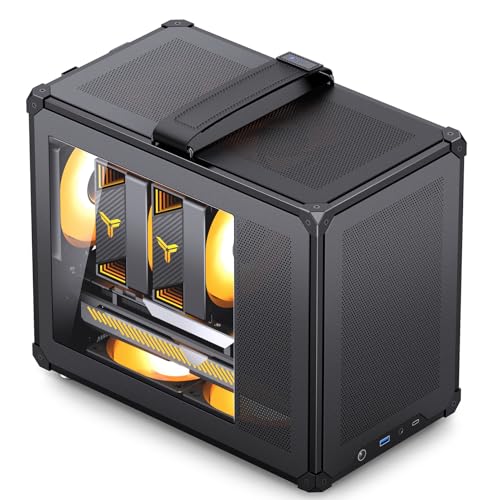
- Mesh panels support airflow
- Tool-free panel access
- Up to 335mm GPU support
Best For: Compact Micro ATX or Mini ITX builds
DIY Test-Bench Pick

- Transparent acrylic design
- Easy access for testing and maintenance
- Supports longer graphics cards
Best For: ITX testing, overclocking, and DIY builds
Workstation Test-Bench Pick

- Supports EATX through ITX
- Stackable up to 10 units
- Supports extensive air or liquid cooling
Best For: Workstations, server racks, and multi-system setups
Durable Steel Test Bench
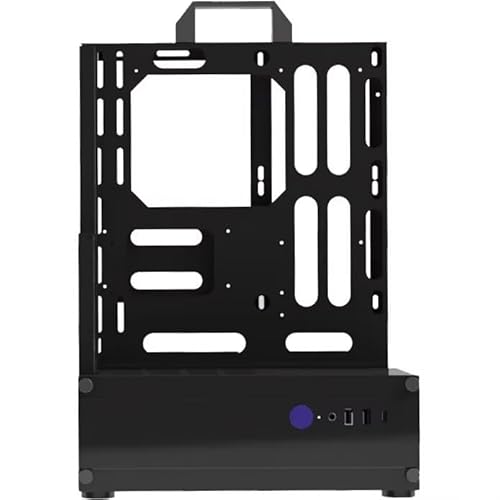
- Zinc-coated steel construction
- Supports ATX, ITX, and mATX boards
- Open structure for direct hardware access
Best For: Simple component testing with a sturdy steel chassis
Stackable Server Test Bench

- Rigid SPCC steel construction
- Supports EATX through ITX motherboards
- Stackable design with extensive cooling support
Best For: Workstation, server, and multi-system test environments
Flexible Test-Bench Value – JOYJOM ATX Open Air Case
If you want a straightforward option among open frame computer cases, the JOYJOM model supports ATX, Micro ATX, and Mini-ITX motherboards in an accessible open-air layout. Its unrestricted graphics-card area and standard ATX power-supply support make it practical for DIY builds, testing, and maintenance.
Best For: DIY builders, hardware testing, and compact ATX-compatible setups.
Pros:
- Supports ATX, Micro ATX, and Mini-ITX motherboards.
- No stated graphics-card length or width restriction.
- Uses 0.8mm SPCC with a black sandblasted finish.
Cons:
- Provides only one HDD/SSD bay.
- Open-air construction offers less enclosure than a conventional case.
This is a sensible pick when accessibility and broad motherboard compatibility matter more than enclosed-case features. The single storage bay and open design are worth considering before purchase.
Showcase Pick – Thermaltake Core P3 TG Pro
Thermaltake Core P3 TG Pro Open Frame ATX Compatible PC Case CA-1G4-00M1WN-09 CS8593
Check Price On AmazonThe Thermaltake Core P3 TG Pro stands out among open frame computer cases with its open-frame construction and tempered-glass panel. It is designed to display components while supporting ATX builds, large graphics cards, standard ATX power supplies, and substantial cooling hardware.
Best For: Showcase gaming PCs and builders who want visible components with flexible cooling support.
Pros:
- Tempered-glass panel provides a clear view of the interior.
- Supports ATX, Micro ATX, and Mini-ITX motherboards.
- Included bracket supports a 140mm fan and up to a 420mm radiator.
- Includes a GPU holder and eight expansion slots.
Cons:
- At 7 kg, it is heavier than the smaller test-bench designs listed here.
- Its large 19.69-by-10.55-by-21.06-inch footprint requires suitable desk or display space.
Choose this model when presentation and liquid-cooling flexibility are priorities. Its tempered-glass showcase design makes it less of a minimalist bench and more of a centerpiece PC chassis.
Maximum Platform Flexibility – DALAIBUKESI DIY Open Frame Chassis
For builders working with unusual or demanding hardware, this aluminum open frame computer case supports ITX, MATX, ATX, and EATX motherboards. It also accepts ATX, SFX, and 1U power supplies, with room for either air or water cooling and graphics cards of any length.
Best For: High-performance custom systems, dual-CPU server builds, and enthusiasts who need broad component compatibility.
Pros:
- Supports motherboard formats from ITX through EATX.
- Compatible with ATX, SFX, and 1U power supplies.
- Accommodates air and water cooling solutions.
- Offers four internal bays and four USB 3.0 ports.
Cons:
- The listed configuration has only two expansion slots.
- Its highly customizable DIY format may require more planning during assembly.
- The supplied listing identifies the chassis color as red, which may not suit every build.
This is the most versatile choice for specialized builds, especially where EATX support and multiple power-supply formats are useful. Verify your expansion-slot and storage requirements before committing.
Reinforced Test Bench – ALAMENGDA AL01 Open Frame Case
The ALAMENGDA AL01 is a practical option among open frame computer cases for testing, overclocking, and maintenance. Its reinforced 0.8mm SPCC construction supports ATX, Micro ATX, and ITX motherboards, while the open layout leaves graphics-card length and width unrestricted by the chassis.
Best For: Hardware testers, overclocking setups, and DIY gaming systems that need easy component access.
Pros:
- Supports ATX, Micro ATX, and ITX motherboards.
- Reinforced SPCC construction includes folded edges and triangular supports.
- Supports standard ATX power supplies and reserved cable-routing holes.
- Designed for open-air cooling and multi-GPU testing.
Cons:
- The supplied details list Micro ATX as the supported motherboard type, despite the compatibility description also naming ATX and ITX; verify fit before ordering.
- Open construction provides less physical enclosure than a traditional case.
- Its 18-inch depth may require more workspace than a small bench chassis.
This model is a strong fit for hands-on hardware work, combining a reinforced steel frame with broad stated compatibility. Confirm the motherboard dimensions and layout for your specific build, particularly if using ATX or ITX.
Compact Mesh Pick – JONSBO C6 MAX
The JONSBO C6 MAX is a compact Micro ATX option for shoppers comparing open frame computer cases with more structure and protection. Its mesh panels promote airflow, while tool-free access makes installation and maintenance straightforward.
Best For: Compact Micro ATX or Mini ITX builds that need flexible access, mesh cooling, and a carry handle.
Pros:
- Mesh construction with fan positions on the front, upper, lower, and rear areas
- Tool-free front, upper, and side panel access
- Supports graphics cards up to 335mm, depending on installation and power-supply configuration
- Includes an adjustable Magic Hook Handle
Cons:
- Limited to Micro ATX and Mini ITX motherboards
- ATX power-supply and graphics-card clearance varies by slot configuration
- Only one internal 3.5-inch HDD or 2.5-inch SSD bay is listed
This is a practical choice when compact dimensions, easy access, and airflow matter more than full-size motherboard support. Check the GPU and PSU measurements carefully before building.
DIY Test-Bench Pick – Yoidesu ITX Open Frame
The Yoidesu open frame test bench takes a minimalist approach to open frame computer cases, using transparent acrylic for visibility and easy component access. Its open design is intended for testing, overclocking, gaming, and maintenance.
Best For: ITX builders, hardware testing, overclocking experiments, and DIY setups that prioritize visibility.
Pros:
- Transparent acrylic construction provides a visible, distinctive presentation
- Open layout supports cooling, maintenance, and easy mounting
- Designed for ITX motherboards
- Provides space for longer graphics cards
Cons:
- ITX-focused compatibility limits motherboard selection
- Open construction provides less enclosure than a conventional case
- Cooling is described as air-based, without a detailed fan layout
This test bench makes sense for users who frequently swap components or want a straightforward platform for experimentation. Confirm your ITX board and graphics-card dimensions before ordering.
Workstation Test-Bench Pick – JOYJOM PS091
The JOYJOM PS091 is a heavy-duty open frame computer case for workstation, server-rack, and test-bench applications. Its SPCC construction, broad motherboard support, stackable format, and extensive cooling capacity make it suited to larger and more configurable systems.
Best For: Workstations, server-rack layouts, multi-system setups, and builders needing EATX-to-ITX compatibility.
Pros:
- Supports EATX, ATX, Micro ATX, and ITX motherboards
- Accommodates up to eight 120mm fans or several radiator configurations
- Stackable horizontally up to 10 units and supports horizontal or vertical placement
- Offers two HDD bays, three SSD bays, and up to 335mm GPU clearance with external fan mounting
Cons:
- Open test-bench construction is more exposed than a conventional enclosed case
- GPU clearance drops to 310mm when internal fans are used
- Standard ATX power-supply clearance is limited to 300mm
The PS091 is the most flexible choice here for larger platforms and high-airflow layouts. Its stackable design is particularly useful when organizing multiple test systems, but component clearances should be verified for each configuration.
Flexible Aluminum Test Bench – Modular Open Air ATX Case
This compact open frame computer case uses an aluminum construction and modular layout for hands-on building, testing, and upgrades. It supports ATX, Micro ATX, and Mini ITX motherboards, multiple power-supply formats, and flexible horizontal or vertical GPU placement.
Best For: DIY builders who prioritize airflow, hardware access, and extensive component customization.
Pros:
- Open structure promotes airflow and convenient hardware installation.
- Supports ATX, SFX, and SFX-L power supplies plus ATX, mATX, and ITX boards.
- Flexible cooling layout supports air cooling and several radiator sizes.
- Accommodates horizontal or vertical GPU installation and 2.5-inch or 3.5-inch drives.
Cons:
- Vertical GPU installation requires a riser cable, which is not included.
- Open construction provides less enclosure than a conventional closed case.
With adjustable cooling placement and no stated graphics-card size limit, this is a particularly adaptable choice for experimental builds and visible RGB-focused systems. Verify your preferred mounting arrangement and included accessories before ordering.
Durable Steel Test Bench – Portable Open Frame ATX Case
This open frame computer case is a straightforward test-bench chassis made from zinc-coated steel. Its open structure provides direct access to components while supporting ATX, Micro ATX, and ITX motherboards in a black baked-paint finish.
Best For: Builders who want a sturdy, simple open chassis for testing compatible desktop hardware.
Pros:
- Zinc-coated steel construction is designed for durability.
- Supports ATX, ITX, and mATX motherboards.
- Open structure offers convenient access during installation and testing.
- Black baked-paint finish matches a range of components.
Cons:
- The supplied notes list air cooling but do not specify radiator support.
- Details identify compatibility with ATX motherboards, so broader component fit should be checked carefully.
- Only one USB 3.0 port is listed.
This model favors basic durability and accessibility over detailed cooling or storage expansion. It is worth considering for a practical test setup, provided your motherboard and power-supply arrangement match the listed specifications.
Stackable Server Test Bench – High-Capacity Open Frame Case
This open frame computer case is built for demanding workstation, server, and test-bench setups. Its SPCC steel panels support EATX, ATX, Micro ATX, and ITX motherboards, with substantial fan, radiator, storage, and stacking capacity.
Best For: Workstation or server builders who need broad motherboard support, multiple cooling options, and stackable test-bench hardware.
Pros:
- 1.5 mm SPCC panels and a 0.8 mm base plate provide a rigid steel structure.
- Supports EATX, ATX, mATX, and ITX motherboards up to 330 × 330 mm.
- Cooling support includes up to eight 120 mm fans or multiple radiator configurations.
- Can stack up to 10 units horizontally and supports two HDDs plus three SSDs.
Cons:
- GPU length is limited to 310 mm with internal fan installation or 335 mm with external mounting.
- Supports ATX power supplies up to 300 mm in length.
- Its larger footprint may be less suitable for compact desktop spaces.
Among these open frame computer cases, this is the most oriented toward high-capacity and repeatable test environments. Its broad board support and stackable design are useful for server-style deployments, but component dimensions should be checked before assembly.
How We Picked the Best Open Frame Computer Cases
We evaluated these Open Frame Computer Cases by looking at the factors that matter most in an exposed PC build: motherboard compatibility, graphics-card clearance, power-supply placement, storage support, structural rigidity, cooling access, and ease of assembly. We also considered whether each design suits a specific use case, such as overclocking, component testing, a compact desktop, or a server-style workstation.
Because open-frame products vary widely in construction and naming, verify the seller’s measurements and compatibility details before ordering. Some are complete cases, while others are minimalist test benches or brackets that may require additional mounting hardware.
Quick Comparison
| Best For | Look For | Typical Strength |
|---|---|---|
| Frequent upgrades | Tool-friendly layout and open access | Fast component swaps |
| Overclocking | Large radiator and fan clearance | Strong airflow |
| Compact builds | ITX or Micro ATX support | Smaller footprint |
| Workstations and servers | EATX support and sturdy construction | Expansion capacity |
| Portable testing | Rigid frame, handles, or compact design | Easier transport |
Key Buying Factors for Open Frame Computer Cases
Motherboard and Component Compatibility
Start with the motherboard standard: ITX, Micro ATX, ATX, or EATX. Check mounting-hole placement, CPU cooler height, GPU length, and the number of expansion slots. A frame that supports a motherboard size may still lack clearance for a large graphics card or tower cooler.
Cooling and Airflow
Open construction improves access to ambient air, but it does not automatically provide directed cooling. Confirm whether the frame includes fan mounts, radiator support, or enough space for your intended cooling hardware. Dust protection is also limited, so exposed systems require more frequent cleaning.
Power Supply, Storage, and Cable Management
Look for the supported PSU format and mounting position, especially if you plan to use a full-size ATX power supply. Drive brackets and cable-routing features vary considerably. Minimal test benches may need separate solutions for SSDs, hard drives, and loose cables.
Materials, Safety, and Stability
Aluminum and coated steel can provide a strong, durable platform, while acrylic may prioritize visibility and lightweight customization. Rounded edges, secure hardware mounting, and a stable base are important because exposed components are easier to bump or short accidentally.
Who Should Buy Which Open Frame Computer Cases?
Choose a broad ATX or EATX frame if you build, repair, or benchmark multiple systems and want maximum access. A compact ITX or Micro ATX option is better for a smaller test station or desktop where space matters. Pick a design with radiator and fan support for high-performance or overclocked hardware, and prioritize handles or a rigid chassis if you regularly move components between work areas.
Open Frame Computer Cases are best for experienced builders who value accessibility over silence, dust resistance, and child or pet protection. For a conventional everyday PC, a closed case may provide better acoustic control and safer long-term operation.